
Ọja Pariview
The XuanPad K10 Projector is a versatile home theater device designed for an immersive viewing experience. It features official Netflix licensing, automatic focus and keystone correction, and a highly adaptable 210° rotatable stand. With Full HD 1080P native resolution and 4K support, coupled with 700 ANSI brightness, it delivers clear and vibrant images. Advanced connectivity options include WiFi 6 and Bi-directional Bluetooth 5.2, ensuring seamless streaming and audio integration. The projector also incorporates a dust removal and efficient heat dissipation design for enhanced durability and performance.

Image: The XuanPad K10 Projector showcasing its compact design and integration with streaming services.
Eto Itọsọna
Follow these steps for initial setup of your XuanPad K10 Projector:
- Unboxing: Carefully remove all components from the packaging. Ensure you have the projector, power cord, remote, HDMI cable, and AV cable.
- Asopọ agbara: Connect the power cord to the projector's power input port and then to a power outlet. The power indicator light will illuminate.
- Ibi: Place the projector on a stable, flat surface. The 210° rotatable stand allows for flexible positioning, including ceiling, tabletop, or floor mounting.
- Agbara Ibẹrẹ Tan: Tẹ bọtini agbara lori pirojekito tabi isakoṣo latọna jijin lati tan ẹrọ naa.
- Eto Nẹtiwọọki: Navigate to the 'Network' settings to connect to your Wi-Fi network. The projector supports fast WiFi 6 for stable wireless connections.
- Àtúnṣe Àfojúsùn Àdáni àti Ìṣàtúnṣe Kọ́kọ́ọ̀dì: The projector features state-of-the-art AI focus and displacement gyroscope technology that automatically focuses and corrects trapezoidal distortion within 3 seconds. Manual adjustments can also be made via the remote if needed.
- Wiwọle App: The smart system provides seamless access to certified apps like Netflix. Ensure you are logged into your accounts to access content.
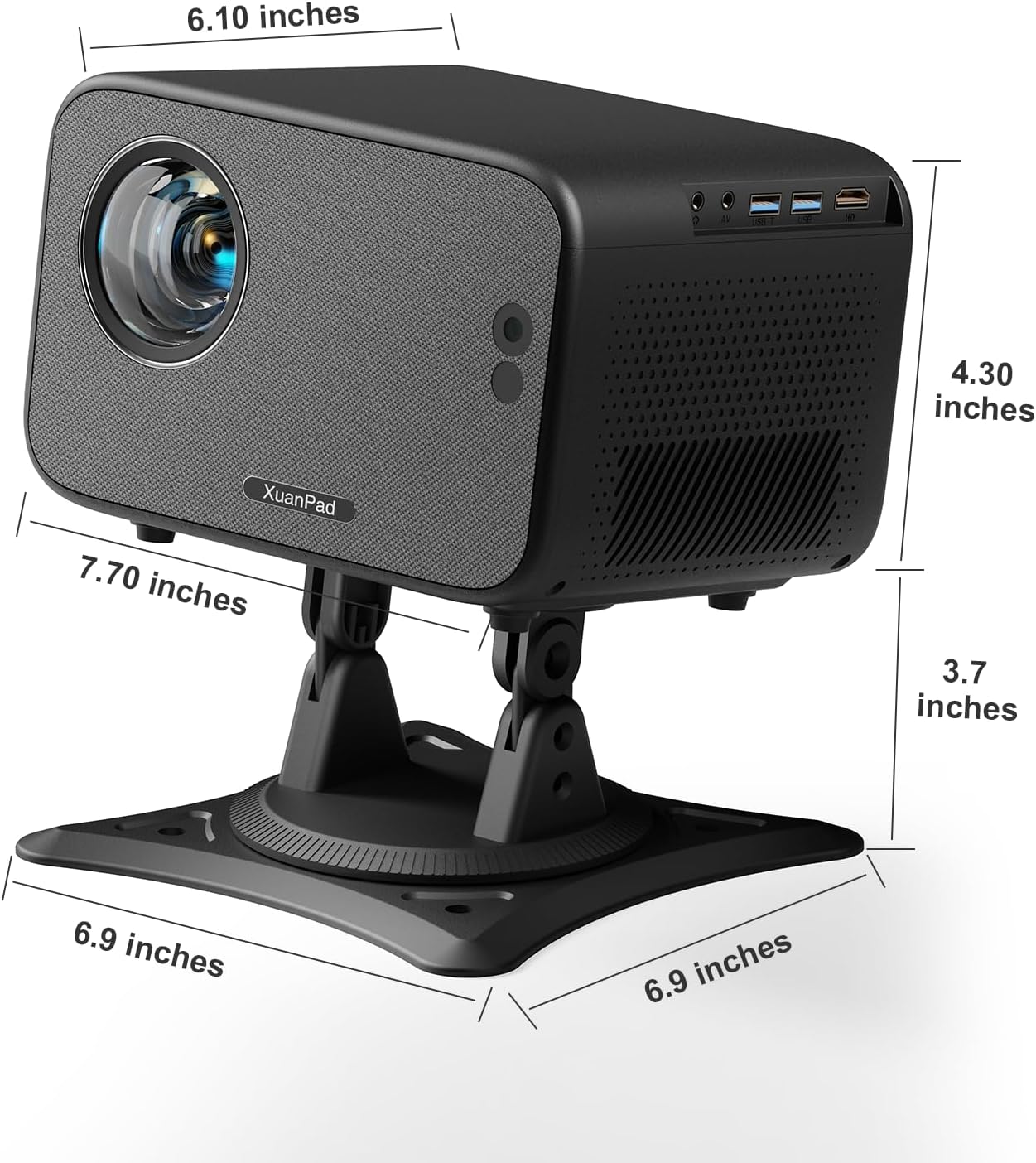
Aworan: Ẹyin view of the projector highlighting the power input, USB, and HDMI ports for connectivity.
Awọn ilana Iṣiṣẹ
Adjusting Image Quality
- Auto Focus & Keystone: The projector automatically adjusts focus and corrects trapezoidal distortion. For manual adjustment, use the remote control's focus and keystone buttons.
- Iṣẹ Sún: Adjust the image size from 50% to 100% using the zoom setting in the menu.
- Brightness & Color: The projector offers 700 ANSI brightness and covers 99% of the NTSC color gamut. Adjust picture mode settings (e.g., standard, vivid, user) via the menu for optimal viewing.

Image: Visual representation of the projector's auto focus and auto keystone correction features.
Asopọmọra
- Wi-Fi 6: Connect to your home network for high-speed, stable streaming and wireless projection.
- Bi-directional Bluetooth 5.2: Connect external speakers or headphones for enhanced audio, or use the projector as a standalone Bluetooth speaker.
- HDMI & USB: Use the HDMI port to connect external devices like laptops, gaming consoles, or streaming sticks. The USB port allows for media playback from USB drives.

Image: Depiction of the projector's ultra-fast WiFi 6 capabilities for smooth streaming.
Itoju
Regular maintenance ensures optimal performance and longevity of your projector:
- Yiyọ eruku kuro: The projector is designed with features to minimize dust accumulation. Periodically clean the exterior with a soft, dry cloth. Avoid using abrasive cleaners or solvents.
- Pipade Ooru: Ensure proper ventilation around the projector to allow for effective heat dissipation. Do not block the vents.
- Fifọ lẹnsi: Use a specialized lens cleaning cloth and solution to gently clean the projector lens. Avoid touching the lens directly with your fingers.
- Ibi ipamọ: Nigbati o ko ba wa ni lilo fun awọn akoko ti o gbooro sii, tọju ẹrọ pirojekito ni itura, aye gbigbẹ, kuro lati orun taara ati awọn iwọn otutu to gaju.
Laasigbotitusita
If you encounter issues with your XuanPad K10 Projector, refer to the following common solutions:
- Kò sí Àwòrán/Àwòrán Dídíẹ̀:
- Rii daju pe okun agbara wa ni asopọ ni aabo.
- Check the focus and keystone settings. The auto-focus feature should correct most blurriness.
- Verify the input source (HDMI, Home) is correctly selected.
- Adjust the projector's position to be perpendicular to the screen/wall.
- Ko si Ohun:
- Ṣayẹwo ipele iwọn didun pirojekito ati rii daju pe ko dakẹ.
- Verify audio connection cables (if using external speakers) are properly connected.
- Adjust audio output settings on the connected device.
- If using Bluetooth, ensure the external speaker is paired and connected.
- Awọn oran Asopọmọra (Wi-Fi/Bluetooth):
- Ensure the Wi-Fi network is stable and within range.
- Restart the projector and your Wi-Fi router.
- For Bluetooth, ensure the external device is in pairing mode and within range.
- Iṣakoso Latọna jijin Ko Dahun:
- Ṣayẹwo ki o rọpo awọn batiri ni isakoṣo latọna jijin.
- Rii daju pe ko si awọn idena laarin isakoṣo latọna jijin ati olugba IR pirojekito.

Image: Detailed user guide providing tips for optimizing picture and audio quality.
Awọn pato
| Ẹya ara ẹrọ | Ẹ̀kúnrẹ́rẹ́ |
|---|---|
| Brand | XuanPad |
| Nọmba awoṣe | K10 |
| Iwọn Nkan | 5.35 iwon |
| Ọja Mefa | 7.7 x 4.3 x 6.1 inches |
| Àwọ̀ | Dudu |
| Ipinnu Ifihan | 1920 x 1080 (Abínibí 1080P, 4K Support) |
| Imọlẹ | 700 ANSI |
| Asopọmọra Technology | Bluetooth, HDMI, USB, Wi-Fi |
| Pataki Awọn ẹya ara ẹrọ | Auto Focus; Built-in Apps (Netflix licensed); 360° Rotatable Stand; 70° Vertical Adjustment; Auto Keystone Correction; Bi-directional Bluetooth 5.2; 50%-100% Zoom; 3D Stereo Sound; Portable Size |
| Asogun-ọna iboju ti o han | 300" / 762 cm |
Atilẹyin ọja & Atilẹyin
Your XuanPad K10 Projector is designed for reliability and performance. For any inquiries or assistance, please refer to the following:
- Awọn Eto Idaabobo: Àwọn ètò ààbò tó gùn wà fún ríra, pẹ̀lú àwọn àṣàyàn Ọdún 2 àti Ọdún 3.
- Iṣẹ onibara: XuanPad offers 24/7 professional customer service.
- Oluranlowo lati tun nkan se: Lifetime technical support is provided for your product.
- Òótọ́: This product is Verified by Transparency, ensuring its authenticity with a unique code verified before shipping.
For further assistance, please contact XuanPad customer support through their official channels.

Image: Information regarding XuanPad's 24/7 professional service and lifetime technical support.