
1. Ifihan
This manual provides essential information for the proper use and care of your SUAAT S3 10-inch Android 14 Tablet. Please read this manual thoroughly before operating the device to ensure optimal performance and longevity. Keep this manual for future reference.
2. Package Awọn akoonu
Daju pe gbogbo awọn ohun ti a ṣe akojọ rẹ si isalẹ wa ninu package rẹ. Ti awọn ohun kan ba nsọnu tabi bajẹ, jọwọ kan si atilẹyin alabara.
- SUAAT S3 tabulẹti
- Tablet Case
- Fiimu Olugbeja iboju
- Keyboard
- Asin
- Type-C to USB Adapter (OTG)
- Okun Iru-C
- European Standard Charger
- SIM Ejector Pin
- Itọsọna olumulo

Aworan 2.1: All items included in the SUAAT S3 Tablet package.
3. Ọja Ipariview
The SUAAT S3 tablet features a sleek design with a 10-inch display and a robust set of accessories to enhance your user experience.

Aworan 3.1: SUAAT S3 Tablet and its accessories.
Awọn ẹya pataki:
- Eto isesise: Android 14
- Olupilẹṣẹ: Octa-core 1.8 GHz (A523)
- Ramu: 20GB (6GB physical + 14GB expansion)
- ROM: 128GB
- Ifihan: 10.1-inch IPS, 1280 x 800 pixels
- Asopọmọra: Dual-band WiFi (2.4G/5G), Bluetooth 5.0
- Batiri: 6000 mAh
- Ijẹrisi: GMS Certified, Widevine L1
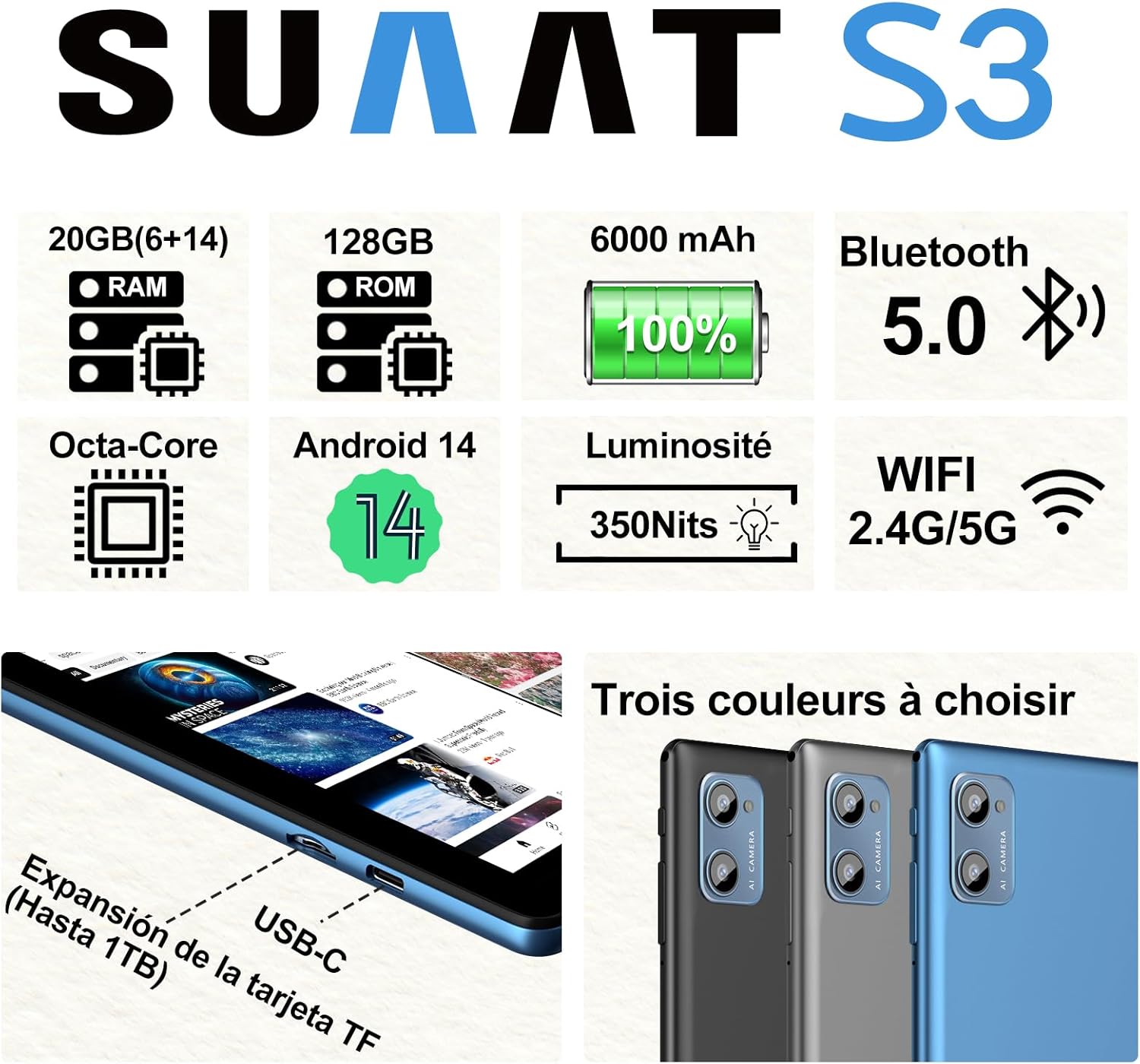
Aworan 3.2: SUAAT S3 Tablet key specifications.
4. Ni ibẹrẹ Oṣo
4.1 Gbigba agbara si tabulẹti
Before first use, fully charge the tablet using the provided Type-C cable and European standard charger. The charging port is located on the side of the tablet.

Aworan 4.1: Tablet charging via USB-C.
4.2 Titan / Pa a
- Lati Fi agbara: Tẹ bọtini Power mọlẹ titi iboju yoo fi tan.
- Lati Paarẹ: Tẹ bọtini agbara ki o si dimu, lẹhinna yan 'Pa agbara kuro' lati awọn aṣayan ti o wa lori iboju.
- Lati Tun bẹrẹ: Tẹ bọtini agbara ki o si dimu, lẹhinna yan 'Tun bẹrẹ' lati awọn aṣayan.
4.3 Iṣeto ni ibẹrẹ
Upon first power-on, follow the on-screen prompts to set up your tablet. This includes selecting your language, connecting to a Wi-Fi network, setting up your Google account, and configuring security options.
5. Awọn ilana Iṣiṣẹ
5.1 Àwọn Ẹ̀yà Android 14
Your SUAAT S3 tablet runs on Android 14, offering enhanced privacy, customization, and productivity features:
- Awọn iṣakoso obi: Manage screen time, app access, and content filters for children.
- Multi-Account Mode: Ṣẹda lọtọ olumulo profiles for different users, each with their own apps, settings, and data.
- Pipin Ipo iboju: Use two applications simultaneously by dividing the screen.
- Custom Themes: Personalize your tablet's appearance with various themes and wallpapers.
- Awọn ẹrọ ailorukọ: Add calendar, weather, and other widgets to your home screen for quick information access.

Aworan 5.1: Tablet in split-screen mode.
5.2 Ipilẹ Lilọ kiri
- Iboju ile: Ra osi tabi sọtun lati lilö kiri laarin awọn iboju ile.
- Drawer App: Ra soke lati isalẹ iboju lati wọle si gbogbo awọn ohun elo ti a fi sii.
- Awọn iwifunni & Eto Yara: Ra isalẹ lati oke iboju si view awọn iwifunni ati wọle si awọn eto iyara toggles.
- Awọn ohun elo aipẹ: Tap the square navigation button (or swipe up and hold from the bottom if using gesture navigation) to see recently opened applications.
6. Asopọmọra
6.1 Wi-Fi Asopọ
The tablet supports dual-band Wi-Fi (2.4G and 5G) for faster and more stable internet connectivity.
- Lọ si Eto > Nẹtiwọọki & Intanẹẹti > Wi-Fi.
- Yipada Wi-Fi On.
- Yan nẹtiwọki ti o fẹ lati atokọ ki o tẹ ọrọ igbaniwọle sii ti o ba nilo.
6.2 Àwọn ẹ̀rọ Bluetooth
Connect Bluetooth accessories like the included keyboard and mouse, or headphones, using Bluetooth 5.0.
- Lọ si Eto > Awọn ẹrọ ti a ti sopọ > Bluetooth.
- Yi Bluetooth pada On.
- Rii daju pe ẹrọ Bluetooth rẹ wa ni ipo sisopọ.
- Select the device from the 'Available devices' list to pair.
6.3 Jack agbekọri
A 3.5mm headphone jack is provided for wired audio connections.
7. Ìfihàn àti Multimedia
7.1 10.1-inch IPS Display
The tablet features a 10.1-inch IPS display with a resolution of 1280 x 800 pixels, offering clear and vibrant visuals with wide viewing awọn igun.

Aworan 7.1: 10.1-inch IPS Display.
7.2 Àtìlẹ́yìn Widevine L1
With Widevine L1 support, the tablet can stream high-definition content from popular streaming services, providing a clear and immersive viewiriri iriri.
7.3 GMS Certification
The tablet is GMS (Google Mobile Services) certified, ensuring full access to the Google Play Store and all Google applications, along with robust security and privacy features.
8. Ibi ipamọ ati Performance
8.1 RAM and ROM
The SUAAT S3 comes with 20GB of RAM (6GB physical + 14GB virtual expansion) and 128GB of internal storage (ROM). This ample memory allows for smooth multitasking and storage of numerous applications, videos, images, and files.

Aworan 8.1: Tablet showcasing large memory for apps and media.
8.2 Octa-Core Processor
Equipped with an Octa-core 1.8 GHz A523 processor, the tablet delivers stable and responsive performance for everyday tasks, gaming, and multimedia consumption.
8.3 Expandable Storage
The tablet supports expandable storage via a TF (microSD) card, allowing you to increase storage capacity up to 1TB for even more files ati media.
9. Iṣakoso batiri
9.1 Agbara Batiri
The SUAAT S3 is powered by a 6000 mAh battery, providing extended usage time. Actual battery life may vary based on usage patterns and settings.
9.2 Awọn Itọsọna gbigba agbara
- Lo ṣaja atilẹba nikan ati okun ti a pese pẹlu tabulẹti.
- Avoid exposing the tablet to extreme temperatures during charging.
- Do not leave the tablet charging for excessively long periods after it has reached 100% to prolong battery health.
10. Itọju
10.1 Ninu tabulẹti
- Lo asọ ti ko ni lint lati nu iboju ati ara tabulẹti naa.
- Fun agidi smudges, die-die dampen awọn asọ pẹlu omi tabi a iboju regede. Yẹra fun awọn kẹmika lile.
- Ensure the tablet is powered off and unplugged before cleaning.
10.2 Ibi ipamọ
When not in use for extended periods, store the tablet in a cool, dry place. Avoid direct sunlight and extreme temperatures.
10.3 Software imudojuiwọn
Ṣayẹwo nigbagbogbo fun ati fi awọn imudojuiwọn sọfitiwia sori ẹrọ lati rii daju pe tabulẹti rẹ ni awọn ẹya tuntun, awọn abulẹ aabo, ati awọn ilọsiwaju iṣẹ. Lọ si Eto > Eto > Imudojuiwọn eto.
11. Laasigbotitusita
If you encounter issues with your SUAAT S3 tablet, refer to the following common solutions:
| Isoro | Owun to le Solusan |
|---|---|
| Tabulẹti ko ni agbara lori | Rii daju pe batiri ti gba agbara. So ṣaja pọ ki o duro fun iṣẹju diẹ ṣaaju igbiyanju lati tan-an lẹẹkansi. |
| Iboju ko dahun | Restart the tablet. If the issue persists, perform a factory reset (data will be lost). |
| Ko le sopọ si Wi-Fi | Check if Wi-Fi is enabled in settings. Restart your router. Ensure you are entering the correct password. |
| Ẹrọ Bluetooth ko so pọ | Ensure Bluetooth is enabled on both devices and the accessory is in pairing mode. Try restarting both devices. |
| Awọn ohun elo n ṣubu tabi o lọra | Close background apps. Clear app cache (Settings > Apps > [App Name] > Storage > Clear cache). Ensure sufficient storage space. |
| Batiri n ṣan ni kiakia | Reduce screen brightness. Disable unused features like Wi-Fi or Bluetooth. Close background apps. Check for power-intensive apps. |
If these solutions do not resolve the issue, please contact SUAAT customer support.
12. Awọn pato
| Ẹya ara ẹrọ | Ẹ̀kúnrẹ́rẹ́ |
|---|---|
| Brand | SUAAT |
| Nọmba awoṣe | S3 |
| Eto isesise | Android 14 |
| isise | A523 Octa-core 1.8 GHz |
| Àgbo | 20 GB (6GB installed) |
| Ibi ipamọ (ROM) | 128 GB |
| Expandable Ibi ipamọ | Títí dé 1 TB nípasẹ̀ káàdì TF |
| Iwon iboju | 10.1 inches |
| Ipinnu iboju | 1280 x 800 awọn piksẹli |
| Alailowaya Asopọmọra | Wi-Fi (802.11n, 2.4G/5G Dual-band) |
| Bluetooth | Bluetooth 5.0 |
| Asopọmọra Iru | USB-C |
| Jack agbekọri | 3.5mm |
| Agbara Batiri | 6000 mAh |
| Awọn iwọn (L x W x H) | 17 x 12 x 0.8 cm |
| Iwọn | 1.28 kilo |
| To wa Awọn ẹya ẹrọ | Keyboard, Mouse, Protective Case, Screen Protector |
13. Atilẹyin ọja ati Support
SUAAT provides professional technical support and customer service for your S3 tablet. If you require assistance, have questions, or encounter any issues not covered in this manual, please contact our customer support team. Refer to your purchase documentation for specific warranty terms and contact information.