
1. Ọja Ipariview
The llano CS2 18W PD USB-C Fast Charger is designed for efficient and safe charging of Nikon EN-EL14 and EN-EL14a camera batteries. This compact charger features a digital display for real-time battery status, multiple safety protections, and versatile charging options, making it an ideal accessory for photographers.

2. Key Awọn ẹya ara ẹrọ
- 18W PD Gbigba agbara Yara: Provides up to 50% faster charging for Nikon EN-EL14/EN-EL14a batteries compared to standard USB chargers.
- Dual Battery Slots: Charges two batteries simultaneously.
- Ifihan Oni-nọmba To ti ni ilọsiwaju: Real-time monitoring of battery charge levels and charging status.
- Aabo ti o ni kikun: Incorporates 10-layer protection against over-voltage, overheating, short-circuiting, and more, ensuring battery longevity and safety.
- Apẹrẹ Alagbara-Eto: Compact and lightweight, ideal for travel and on-the-go use.
- Versatile Power Input: Supports charging via wall adapters, car chargers, and portable power banks using a USB-C connection.
- Integrated SD Card Storage: Includes a dedicated slot for storing one SD card.
- Magnetic Flip-Open Lid: Ensures secure closure and protects batteries from dust and damage.

3. Ibamu
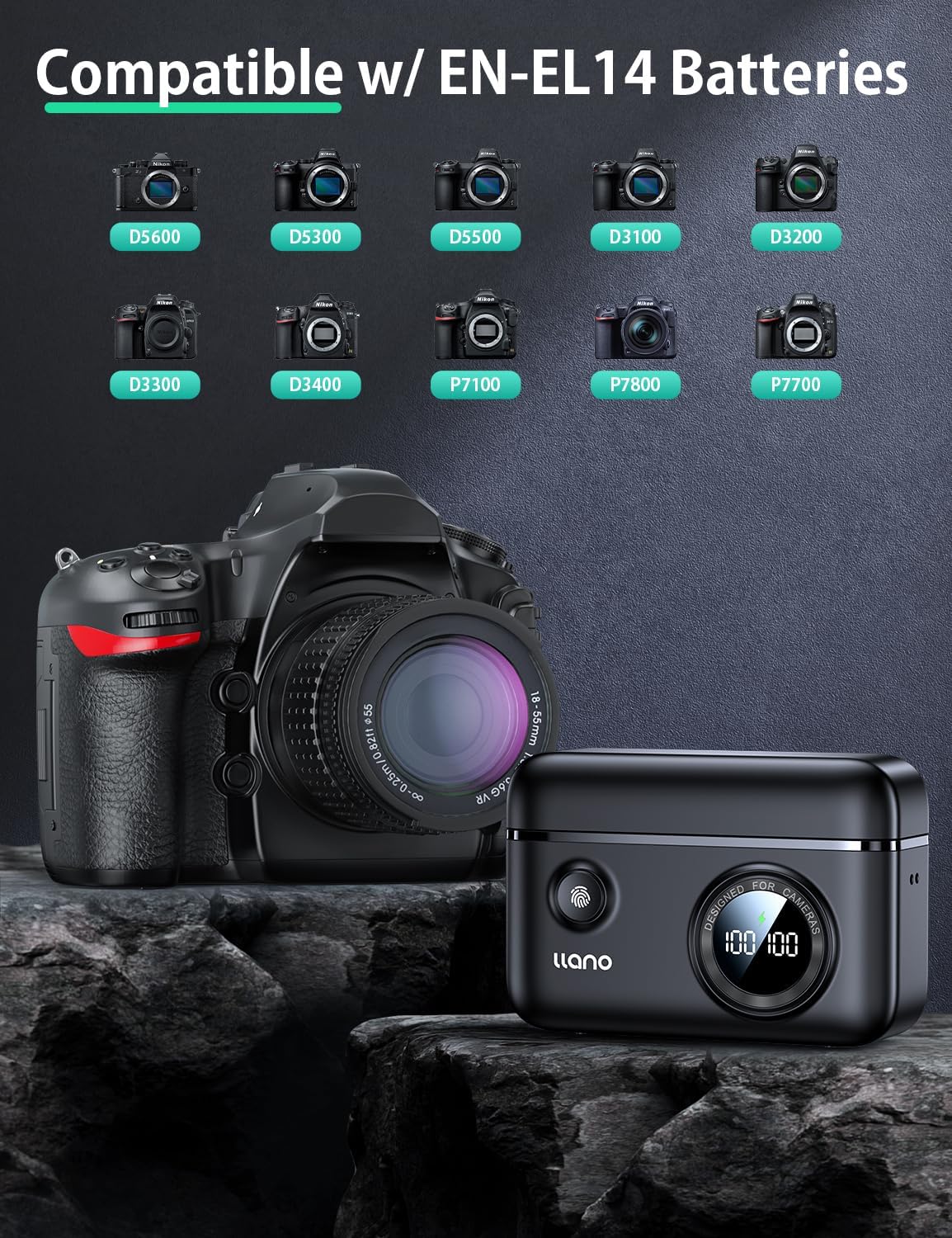
The llano CS2 charger is compatible with Nikon EN-EL14 and EN-EL14a batteries, used in various Nikon camera models, including:
- Nikon D3200, D3300, D3400, D3500
- Nikon D5100, D5200, D5300, D5500, D5600
- Nikon Coolpix P7000, P7100, P7700, P7800
4. Ohun ti o wa ninu Apoti
- llano CS2 18W PD USB-C Fast Charger
- Lanyard
- USB-C si okun USB-C
- Drawstring Bag
5. Awọn ilana iṣeto
- So agbara: Connect the provided USB-C cable to the charger's input port and to a compatible 18W PD (Power Delivery) USB-C power source (e.g., wall adapter, car charger, power bank). The digital display will illuminate.
- Fi awọn batiri sii: Open the magnetic lid. Insert one or two Nikon EN-EL14/EN-EL14a batteries into the designated charging slots (CH1 and CH2), ensuring correct orientation. The digital display will show the current charge percentage for each inserted battery.
- Optional SD Card Storage: If desired, place an SD card into the dedicated storage slot on the side of the charger. This slot is for storage only and does not function as a card reader.

6. Awọn ilana Iṣiṣẹ
- Iye owo ibẹrẹ: Once batteries are inserted and the charger is connected to a power source, charging will begin automatically. The digital display will show the charging icon and the increasing ogoruntage fun kọọkan batiri.
- Monitoring Charge Status: Ifihan oni-nọmba n pese ogorun batiri akoko giditage. A lightning bolt icon indicates active charging. When a battery reaches 100%, the charging process for that slot will stop automatically.
- Checking Battery Level (Unplugged): Press the button on the front of the charger to view the current charge level of inserted batteries without being connected to a power source.
- Awọn batiri yiyọ kuro: Once charging is complete, or if you need to remove a battery, gently pull it out from its slot.

7. Itọju
- Ninu: Use a soft, dry cloth to clean the charger's exterior. Avoid using liquid cleaners or solvents. Ensure no debris enters the charging slots or USB-C port.
- Ibi ipamọ: Store the charger in a cool, dry place away from direct sunlight and extreme temperatures. Utilize the magnetic lid to protect the battery slots and the included drawstring bag for scratch resistance during transport.
- Mimu: Avoid dropping the charger or subjecting it to strong impacts. Ensure batteries are inserted and removed gently to prevent damage to the contacts.

8. Laasigbotitusita
| Isoro | Owun to le Fa | Ojutu |
|---|---|---|
| Charger display is off / No power | Ko si asopọ agbara tabi okun waya/adapta ti ko ni abawọn. | Ensure the USB-C cable is securely connected to both the charger and a working power source. Try a different USB-C cable or power adapter. |
| Batiri ko ngba agbara | Battery not properly inserted; battery is damaged or incompatible; charger contacts are dirty. | Re-insert the battery, ensuring it clicks into place. Verify the battery is an EN-EL14/EN-EL14a type. Clean charger and battery contacts with a dry cloth. |
| Iyara gbigba agbara lọra | Power source does not support 18W PD; cable is not PD compatible. | Use an 18W (or higher) Power Delivery (PD) compatible USB-C power adapter and a PD-compatible USB-C cable for optimal charging speed. |
| Digital display shows incorrect percentage | Temporary display glitch; battery calibration needed. | Remove and re-insert the battery. Allow the battery to fully charge and discharge a few times to recalibrate. |
9. Awọn pato
| Sipesifikesonu | Ẹ̀kúnrẹ́rẹ́ |
|---|---|
| Nọmba awoṣe | LJN-CS004 |
| Brand | llano |
| Ọja Mefa | 4.4"D x 1.7"W x 3.3"H (11.18 cm x 4.32 cm x 8.38 cm) |
| Iwọn Nkan | 0.4 Poun (isunmọ. 181 giramu) |
| Iṣagbewọle Voltage | 8.4 Volts |
| O wujade Voltage | 7.4 Volts |
| Igba agbara Batiri | Approx. 1.45 Hours (with 18W PD charger) |
| Asopọmọra Iru | USB-C |
| Nọmba ti Ports | 1 (USB-C input) |
| Àwọ̀ | Dudu |
| Awọn iwe-ẹri | FCC |
10. Atilẹyin ọja ati Support
This llano CS2 Fast Charger comes with an 18-osù atilẹyin ọja from the date of purchase. For warranty claims, technical support, or any inquiries regarding your product, please contact llano customer service through the retailer where the product was purchased or visit the official llano webojula fun support alaye olubasọrọ.
Jọwọ ṣe idaduro ẹri rira rẹ fun ijẹrisi atilẹyin ọja.