
1. Ifihan
This manual provides comprehensive instructions for the installation, operation, and maintenance of your Antec CX700 ATX Mid Tower Gaming Case. Designed for PC enthusiasts, this case features a sleek, modern design with a tempered glass side panel and pre-installed ARGB fans to enhance visual appeal and ensure optimal airflow. Please read this manual thoroughly before beginning assembly to ensure proper setup and safe operation.
2. Awọn pato
| Ẹya ara ẹrọ | Ẹ̀kúnrẹ́rẹ́ |
|---|---|
| Brand | Antec |
| Nọmba awoṣe | CX700 |
| Iru Irú | Ile-iṣọ Mid |
| Modaboudu Ibamu | ATX |
| Àwọ̀ | Dudu |
| Ohun elo | Alloy Irin, Ṣiṣu |
| Iwọn Nkan | kilo 5.5 (12.1 poun) |
| Ọna Itutu | Afẹfẹ |
| Pre-installed ARGB Fans | 3 (Front-mounted) |
| Àtìlẹ́yìn àwọn afẹ́fẹ́ (Púpọ̀ jùlọ) | Front: 3x120mm, Top: 3x120mm, Rear: 1x120mm, Bottom: 3x120mm |
| Awọn ibudo USB 3.0 | 2 |
| Awọn ibudo USB Iru-C | 1 |
| Awọn ibudo ohun | Headphone, Microphone |
| GPU Clearance (Max) | 410mm (16.14 inches) |
| Àtìlẹ́yìn HDD | 3.5 inches |
| SSD Support | 2.5 inches |
| Gígùn PSU (Púpọ̀ jùlọ) | 225mm |
3. Package Awọn akoonu
- Antec CX700 ATX Mid Tower Gaming Case
- Pre-installed ARGB Fans (3 fans, typically front-mounted as per product title)
- Accessory Box (Screws, cable ties, user manual)
- Tempered Gilasi Side Panel
4. Awọn ilana iṣeto
4.1 Unpacking ati ayewo
Carefully remove the case from its packaging. Inspect for any signs of damage during transit. The tempered glass panel is fragile; handle with care.
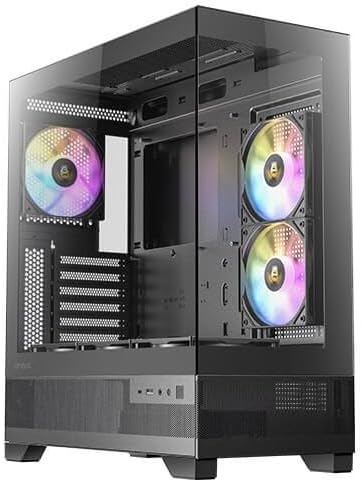
Nọmba 1: Iwaju ati ẹgbẹ view of the Antec CX700 case, showcasing the tempered glass panel and pre-installed fans.
4.2 Removing Side Panels
To access the interior for component installation, remove the tempered glass side panel and the solid rear side panel.
- Locate the thumbscrews on the rear of the case securing the tempered glass panel.
- Carefully unscrew these thumbscrews.
- Gently pull the tempered glass panel away from the chassis. Lay it flat on a soft, clean surface to prevent scratches or damage.
- Repeat the process for the solid rear side panel if necessary for cable management access.

olusin 2: Ẹyìn view of the Antec CX700 case, showing the rear fan and expansion slots. The side panel is removed for internal access.
4.3 Fifi sori modaboudu
Install your ATX motherboard into the designated area. Ensure all standoffs are correctly aligned and secured.
4.4 Fi sori ẹrọ paati
Install your CPU, RAM, GPU (up to 410mm length), storage drives (3.5" HDD, 2.5" SSD), and power supply unit (PSU, up to 225mm length) according to their respective manuals and the case's layout.

olusin 3: Top view of the Antec CX700 case, highlighting the pre-installed fans and internal layout for component placement.
4.5 USB Management
Lo àwọn ibi tí a ti gé àwọn okùn ìdarí àti àwọn ibi tí a ti so mọ́ ẹ̀yìn àtẹ motherboard láti ṣàkóso àwọn okùn náà dáadáa. Èyí mú kí afẹ́fẹ́ àti ẹwà rẹ̀ sunwọ̀n síi.
4.6 Front Panel I/O Connections
Connect the front panel I/O cables (USB 3.0, USB Type-C, HD Audio, Power, Reset, LED) to the corresponding headers on your motherboard.
- Bọtini agbara: Initiates system power.
- Bọtini atunto: Tun eto naa bẹrẹ.
- Awọn ibudo USB 3.0 (x2): Fun ga-iyara data gbigbe.
- Ibudo USB Iru-C (x1): For modern device connectivity.
- Jack agbekari: Ijade ohun.
- Gbohungbohun Jack: Iṣawọle ohun.
5. Awọn ilana Iṣiṣẹ
Once all components are installed and connected, replace the side panels. Connect your peripherals, monitor, and power cable. Press the power button on the top panel to start your system. The pre-installed ARGB fans will illuminate, providing customizable lighting effects.
6. Itọju
Regular maintenance ensures optimal performance and longevity of your PC case and components.
- Awọn Ajọ Eruku: The case includes magnetic dust filters (e.g., on the top panel) that can be easily removed and cleaned with water or a soft brush. Clean these regularly to maintain airflow and prevent dust buildup inside the case.
- Ninu inu: Periodically open the side panels and use compressed air to remove dust from internal components and fans. Ensure the system is powered off and unplugged before cleaning.
- Gilasi ibinu: Clean the tempered glass panel with a microfiber cloth and a non-abrasive glass cleaner. Avoid harsh chemicals.
7. Laasigbotitusita
Ti o ba pade awọn ọran, tọka si awọn igbesẹ laasigbotitusita ti o wọpọ wọnyi:
- Eto Ko Titan:
- Ensure the power supply is properly connected to the wall outlet and the PSU switch is in the 'ON' position.
- Rí i dájú pé gbogbo àwọn okùn agbára (ATX-pin 24, CPU-pin 8, PCIe fún GPU) ni a so pọ̀ mọ́ modaboudu àti àwọn ẹ̀yà ara rẹ̀ láìléwu.
- Ṣàyẹ̀wò pé okùn bọ́tìnì agbára iwájú wà ní ìsopọ̀ dáadáa pẹ̀lú àkọlé iwájú pánẹ́lì modaboudu.
- Fans Not Spinning / ARGB Not Lighting Up:
- Confirm that the fan power cables and ARGB cables are correctly connected to the motherboard or a dedicated ARGB controller.
- Refer to your motherboard manual for proper ARGB header connections and software control.
- Ko si Abajade Ifihan:
- Ensure your monitor cable is connected to the graphics card (GPU) output, not the motherboard's integrated graphics ports (unless using integrated graphics).
- Tun awọn eya kaadi ninu awọn oniwe-PCIe Iho.
8. Atilẹyin ọja ati Support
The Antec CX700 ATX Mid Tower Gaming Case comes with a standard manufacturer's warranty. For specific warranty terms, duration, and to register your product, please visit the official Antec webojú òpó wẹ́ẹ̀bù tàbí kí o kàn sí àwọn oníbàárà wọn. Pa ẹ̀rí ìrajà rẹ mọ́ fún àwọn ẹ̀tọ́ ìdánilójú.
For further technical assistance or support, please refer to the Antec support resources available online.