
1. Ifihan
This manual provides detailed instructions for the installation, operation, and maintenance of the Aigo B760L D4 Motherboard. Please read this manual thoroughly before installing or using the product to ensure proper functionality and to prevent damage.
2. Alaye Aabo
Nigbagbogbo ṣe akiyesi awọn iṣọra aabo wọnyi:
- Ge asopọ agbara ṣaaju fifi sori ẹrọ tabi yọkuro eyikeyi awọn paati.
- Mu modaboudu nipasẹ awọn egbegbe rẹ lati yago fun fifọwọkan awọn paati ifura.
- Use an anti-static wrist strap to prevent electrostatic discharge (ESD) damage.
- Rii daju pe fentilesonu to dara laarin ọran kọnputa lati ṣe idiwọ igbona.
- Ma ṣe fi modaboudu han si ọrinrin tabi awọn iwọn otutu to gaju.
3. Package Awọn akoonu
Jẹrisi pe gbogbo awọn ohun kan wa ninu package:
- Aigo B760L D4 Motherboard
- Afowoyi Olumulo (iwe-ipamọ yii)
- Awọn okun SATA (iye le yatọ)
- I / O Shield
- CD/USB awakọ̀ (tí ó bá wà pẹ̀lú rẹ̀)
4. Ọja Ipariview
The Aigo B760L D4 is an M-ATX motherboard designed for Intel LGA 1700 processors, featuring the Intel B760 chipset. It supports DDR4 memory and offers a range of connectivity options.
4.1 Ifilelẹ modaboudu
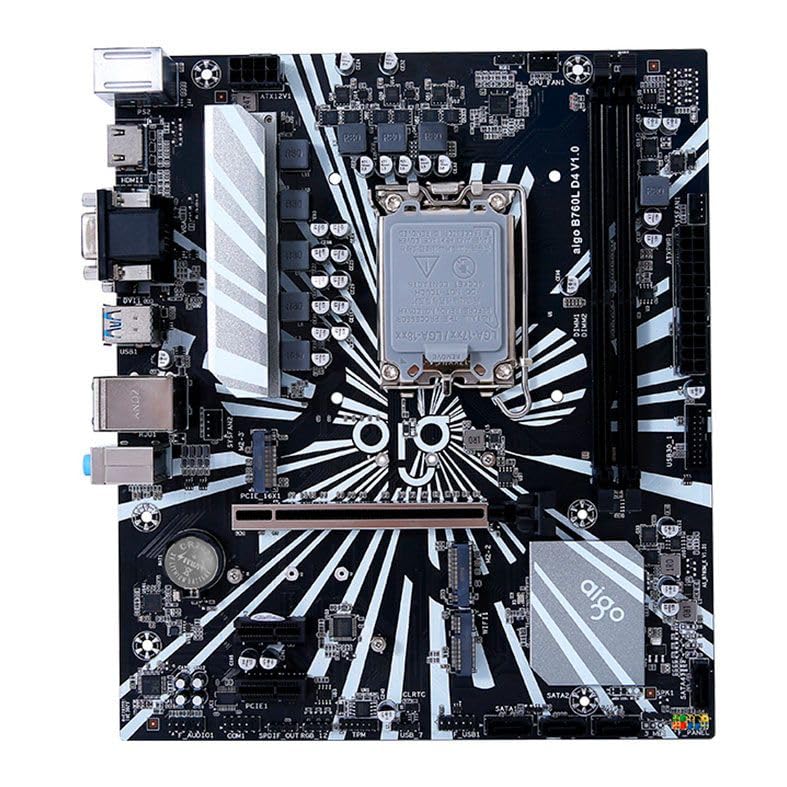
Olusin 1: Pariview of the Aigo B760L D4 Motherboard alongside its retail packaging.

olusin 2: Top-isalẹ view of the Aigo B760L D4 Motherboard, highlighting component placement.

olusin 3: Angled view of the Aigo B760L D4 Motherboard, showing the CPU socket and memory slots.
4.2 Ru I/O Panel

Figure 4: Rear I/O panel of the Aigo B760L D4 Motherboard, displaying various connectivity ports.
Panel I/O ẹhin pẹlu:
- 1 x PS/2 Keyboard and Mouse port
- 2 x USB 2.0 awọn ibudo
- 4 x USB 3.0 awọn ibudo
- 1 x HDMI ibudo
- 2 x DVI ports
- 1 x VGA ibudo
- 1 x RJ45 LAN port
- Audio jacks (Line In, Line Out, Mic In)
5. Eto
5.1 Fifi Sipiyu sii
- Wa iho LGA 1700 Sipiyu lori modaboudu.
- Ṣii lefa iho Sipiyu ki o gbe awo fifuye naa.
- Farabalẹ ṣe deede Sipiyu pẹlu iho, aridaju ami onigun mẹta lori Sipiyu baamu ami lori iho naa.
- Fi rọra gbe Sipiyu sinu iho lai fi agbara mu.
- Pa awo fifuye naa ki o ni aabo pẹlu lefa.
5.2 Fifi DDR4 Memory
The motherboard supports up to 64GB of DDR4 memory across two slots, with speeds from 2133 MHz to 3200 MHz in dual-channel configuration.
- Ṣii awọn agekuru ni awọn mejeji opin ti DIMM Iho.
- Parapọ iranti module pẹlu iho, aridaju ogbontarigi lori module ibaamu awọn bọtini ni Iho.
- Tẹ mọlẹ ṣinṣin lori awọn opin mejeeji ti module iranti titi awọn agekuru yoo fi rọ si aaye.
5.3 Fifi awọn ẹrọ Ibi ipamọ
The motherboard features 4 x SATA 3.0 ports and 2 x M.2 NVME Dual-Protocol slots.
5.3.1 SATA Drives
- So opin kan SATA data USB to a SATA ibudo lori modaboudu.
- So opin miiran ti okun data SATA si dirafu lile SATA tabi SSD rẹ.
- So okun agbara SATA kan lati ipese agbara rẹ si kọnputa.
5.3.2 M.2 NVME Drives
- Locate an M.2 slot on the motherboard.
- Yọ M.2 standoff dabaru.
- Insert the M.2 NVME drive into the slot at a 30-degree angle.
- Gently push the drive down and secure it with the standoff screw.
5.4 Nsopọ Agbara
So asopọ agbara ATX pin 24 ati asopọ agbara ATX pin 8 lati ipese agbara rẹ si awọn ibudo ti o baamu lori modaboudu.
5.5 Fifi Awọn Kaadi Imugboroosi sii
The motherboard includes 1 x PCIe x16 slot and 1 x PCIe x1 slot.
- Align your expansion card (e.g., graphics card) with the appropriate PCIe slot.
- Press down firmly until the card is seated correctly in the slot.
- Fi skru so kaadi naa mọ apoti kọmputa naa.
6. Ṣiṣẹ
6.1 First Boot ati BIOS Oṣo
Lẹ́yìn tí o bá ti kó ètò rẹ jọ tán, so mọ́tò, kííbọọ̀dù, àti máìsì pọ̀. Tan ètò náà. Nígbà tí o bá ń bẹ̀rẹ̀ iṣẹ́, tẹ bọ́tìnì tí a yàn (nígbà gbogbo) DEL or F2) to enter the BIOS/UEFI setup utility. Here you can configure boot order, system time, and other advanced settings.
6.2 Fifi sori ẹrọ eto
The Aigo B760L D4 Motherboard supports Windows 10 and Windows 11 operating systems. Insert your OS installation media (USB drive or DVD) and follow the on-screen instructions to install the operating system.
6.3 Driver fifi sori
After OS installation, install the necessary drivers for the chipset, audio, LAN, and other integrated components. These drivers are typically provided on a CD/USB with the motherboard or can be downloaded from the manufacturer's webojula.
7. Itọju
- Jeki o mọ: Regularly clean dust from inside your computer case using compressed air. Dust accumulation can lead to overheating.
- Awọn imudojuiwọn BIOS: Lorekore ṣayẹwo olupese ká website for BIOS/UEFI updates. Updates can improve stability, compatibility, and performance. Follow update instructions carefully.
- Awọn imudojuiwọn Awakọ: Jeki awọn awakọ rẹ ni imudojuiwọn lati rii daju iṣẹ ṣiṣe to dara julọ ati ibaramu pẹlu sọfitiwia tuntun ati hardware.
- Iṣakoso Ayika: Operate the system in a cool, dry, and well-ventilated environment.
8. Laasigbotitusita
8.1 Ko si Agbara
- Ensure the power supply is connected correctly to the motherboard (24-pin and 8-pin ATX 12V).
- Check if the power supply switch is in the "ON" position.
- Verify that the power button on the case is correctly connected to the motherboard's front panel header.
8.2 Ko si Ifihan
- Ensure the monitor is connected to the correct video output (either integrated graphics or a dedicated graphics card).
- Tun awọn eya kaadi ati iranti modulu.
- Try booting with only one memory module installed.
8.3 System aisedeede / ipadanu
- Ṣàyẹ̀wò iwọn otutu CPU àti GPU láti rí i dájú pé wọn kò gbóná jù.
- Verify that all power connectors are securely attached.
- Ṣiṣe awọn irinṣẹ idanimọ iranti lati ṣayẹwo fun Ramu ti ko tọ.
- Ensure BIOS is updated to the latest stable version.
9. Awọn pato
| Ẹya ara ẹrọ | Sipesifikesonu |
|---|---|
| Brand | Aigo |
| Awoṣe | AIGO-B760L-D4 |
| Chipset | Intel B760 |
| Sipiyu Socket | LGA 1700 |
| Iho iranti | 2 x DDR4 DIMM iho |
| Maks Memory Agbara | 64GB |
| Iranti Iyara Support | 2133 ~ 3200 MHz (Dual Channel) |
| Olohun Interface | 1 x HDMI, 2 x DVI, 1 x VGA |
| Awọn iho SATA | 4 x SATA 3.0 |
| M.2 Iho | 2 x M.2 NVME Dual-Protocol |
| Awọn ibudo USB (Ẹyin) | 2x USB 2.0, 4x USB 3.0 |
| Imugboroosi Iho | 1 x PCIe x1, 1 x PCIe x16 |
| Awọn ọna System Support | Windows 10/11 |
| PS/2 Port | 1 x PS/2 Keyboard and Mouse |
| Ipele Agbara | 8-alakoso |
| Awọn asopọ agbara | 1 x 24-pin ATX, 1 x 8-pin ATX 12V |
| WiFi Interface | 1 x WiFi interface (PCIe compatible) |
| Lan Port | 1 x RJ45 |
| Awọn iwọn | 24.4 x 21 cm (M-ATX) |
10. Atilẹyin ọja ati Support
For warranty information and technical support, please refer to the documentation provided with your purchase or visit the official Aigo webojula. Jeki ẹri rira rẹ fun awọn iṣeduro atilẹyin ọja.