
DOOGEE FIRE6
Ìwé Ìtọ́sọ́nà Olùlò Fóònù Alágbára DOOGEE Fire 6
Model: FIRE6
Ọrọ Iṣaaju
The DOOGEE Fire 6 is a robust and versatile rugged smartphone designed for demanding environments and users who require advanced features like thermal imaging. It combines military-grade durability with high-performance specifications, including a powerful processor, ample memory, and a long-lasting battery. This manual provides essential information on setting up, operating, and maintaining your device to ensure optimal performance and longevity.
Ọja Pariview
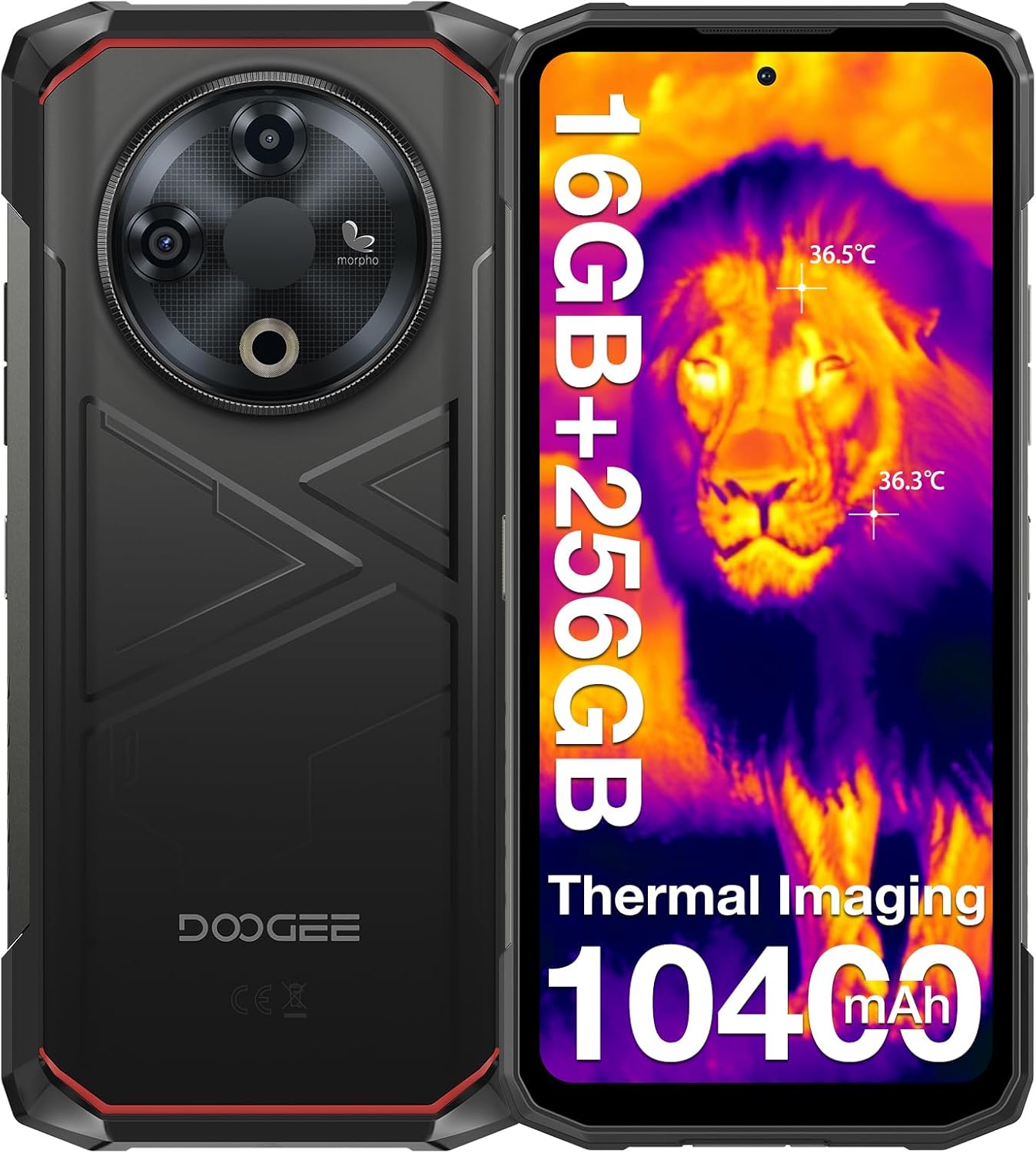
Apẹrẹ Lapapọ: The DOOGEE Fire 6 features a rugged design with a mechanical texture, built to withstand harsh conditions. The image shows both the front display with thermal imaging overlay and the back panel highlighting the camera module and durable casing.

Advanced Thermal Imaging: Equipped with an 8MP thermal camera, the Fire 6 detects heat sources with precision. It features a dual-light fusion algorithm for enhanced clarity, 160x120 resolution, 12µm pixel spacing, and a thermometric range from -15°C to 550°C with 2% accuracy. This allows for detailed thermal analysis in various applications.

Batiri 10400mAh nla: The Fire 6 boasts a large 10400mAh battery, providing extended usage times. It supports 18W fast charging and OTG reverse charging, allowing the phone to act as a portable power bank for other devices.

Iṣe Alagbara: Powered by a Spreadtrum T606 octa-core processor, the Fire 6 offers smooth multitasking. It comes with 16GB RAM (6GB fixed + 10GB expandable) and 256GB ROM, expandable up to 2TB via TF card for extensive storage needs.

Ìfihàn alárinrin: The device features a 6.56-inch HD+ IPS display with a 90Hz refresh rate, providing clear and fluid visuals. The screen is protected by Corning Gorilla Glass for enhanced durability.

Eto Kamẹra To ti ni ilọsiwaju: The Fire 6 includes a 50MP AI main camera, an 8MP front camera, and an 8MP fusion lens. It supports dual-light fusion technology for improved low-light performance and features like HDR, portrait, and panorama modes.
Eto Itọsọna
- Fi SIM/TF Kaadi sii: Locate the SIM card tray on the side of the phone. Use the provided SIM ejector tool to open the tray. Insert your Nano-SIM cards and/or a TF (microSD) card into the designated slots. Ensure the cards are correctly oriented before reinserting the tray.
- Agbara Tan: Tẹ bọtini agbara ki o si dimu mọ (nigbagbogbo ni apa ọtun) titi aami DOOGEE yoo fi han.
- Iṣeto akọkọ: Follow the on-screen prompts to complete the initial setup. This includes selecting your language, connecting to Wi-Fi, setting up your Google account, and configuring security features like face unlock or fingerprint recognition.
- Batiri Gba agbara: For optimal performance, fully charge the device before first use. Connect the provided Type-C USB cable to the phone and the charger, then plug the charger into a power outlet.

Triple Card Slot: The Fire 6 supports dual SIM cards and a TF card simultaneously, allowing for flexible connectivity and expanded storage up to 2TB.
Awọn ilana Iṣiṣẹ
Using the Thermal Imaging Camera
The DOOGEE Fire 6's integrated thermal camera is a powerful tool for various applications, from home inspections to outdoor exploration. To use it:
- Launch ThermalEye App: Locate and open the "ThermalEye" application on your phone's home screen or app drawer.
- View Thermal Feed: The app will display a real-time thermal image. You can adjust settings like color palettes, temperature range, and measurement points within the app interface.
- Ya aworan/Fidio: Use the on-screen buttons to capture thermal images or record videos. The dual-light fusion technology enhances clarity by overlaying visual details onto the thermal image.

Outdoor Thermal Imaging: This image demonstrates the thermal camera's capability in an outdoor setting, highlighting heat signatures of animals against the cooler environment. This feature is useful for wildlife observation or navigating in low-light conditions.
DOOGEE Fire 6 Rugged Smartphone Overview: This video provides a comprehensive look at the DOOGEE Fire 6, showcasing its design, thermal imaging capabilities, powerful processor, camera features, and rugged build. It highlights the phone's suitability for various demanding tasks and environments.
General Smartphone Usage
- Lilọ kiri: The Fire 6 runs on Android 14, offering an intuitive user interface. Swipe gestures and on-screen buttons allow for easy navigation between apps and menus.
- Aabo: Utilize the face unlock or side-mounted fingerprint sensor for quick and secure access to your device.
- Asopọmọra: Connect to Wi-Fi networks, pair Bluetooth devices, and manage your dual SIM settings through the 'Settings' menu.
- Kamẹra: Open the standard camera app to capture photos and videos using the 50MP main camera or 8MP front camera. Explore modes like HDR, portrait, and panorama for diverse photography options.

Eto Android 14: The Fire 6 operates on the latest Android 14 system, providing an enhanced and secure user experience with features like smart motion sensing, screen awareness, glove mode, real-time subtitles, and dual system mode.
Agbara ati Idaabobo
The DOOGEE Fire 6 is engineered for extreme durability, meeting stringent industry standards:
- IP68 & IP69K Certified: This certification ensures the phone is highly resistant to dust and water. It can withstand immersion in water up to 1.5 meters for 30 minutes.
- Ó bá MIL-STD-810H mu: The device has passed military-grade tests for shock, vibration, extreme temperatures (-30°C to 55°C), humidity, and more, making it suitable for harsh environments.
- Ikole ti o lagbara: Built with aerospace-grade high-strength titanium alloy, Bayer TPU anti-drop/anti-abrasion materials, and PC/PMMA composite materials, the Fire 6 offers superior protection against drops and impacts.

Certified Durability: The image illustrates the DOOGEE Fire 6's compliance with IP68, IP69K, and MIL-STD-810H standards, showcasing its waterproof, dustproof, and drop-proof capabilities. This ensures reliability in challenging conditions.
Asopọmọra ati Lilọ kiri
- Atilẹyin SIM meji: The Fire 6 supports two Nano-SIM cards, allowing you to manage personal and work numbers or use different carriers simultaneously.
- Ibi ipamọ ti o gbooro: In addition to its internal 256GB ROM, storage can be expanded up to 2TB using a TF (microSD) card.
- Global Navigation Systems: Equipped with GPS, GLONASS, Galileo, and Beidou, the phone provides accurate and reliable positioning for navigation in diverse environments.
- Awọn Imọ-ẹrọ Alailowaya: Features Wi-Fi 5 for fast internet access and Bluetooth 5.0 for seamless connection to wireless accessories.

Asopọmọra pipe: This image highlights the Fire 6's accurate navigation system (GPS, Glonass, Galileo, Beidou) and its triple card slot, which supports dual SIM cards and expandable storage, ensuring you stay connected and on track.
Itọju ati Itọju
- Ninu: Nu foonu naa pẹlu asọ, damp cloth. For stubborn dirt, use a mild soap solution. Ensure all ports are closed before cleaning with liquids.
- Idaabobo ibudo: Always ensure the rubber seals covering the charging port and SIM tray are properly closed to maintain water and dust resistance.
- Iwọn otutu: Avoid exposing the phone to extreme temperatures outside its operating range (-30°C to 55°C) for prolonged periods.
- Idaabobo iboju: While the screen is made of Corning Gorilla Glass, using the pre-applied screen protector and an additional anti-explosion film (included) can further prevent scratches and damage.
- Awọn imudojuiwọn sọfitiwia: Ṣayẹwo nigbagbogbo fun ati fi awọn imudojuiwọn eto sori ẹrọ lati rii daju iṣẹ ṣiṣe to dara julọ, aabo, ati iraye si awọn ẹya tuntun.
Laasigbotitusita
| Isoro | Owun to le Solusan |
|---|---|
| Foonu ko ṣiṣẹ. | Ensure the battery is charged. Connect the charger and wait a few minutes before attempting to power on again. If unresponsive, try a forced restart (refer to device-specific instructions for button combinations). |
| Kamẹra ooru ko ṣiṣẹ. | Check if the "ThermalEye" app is updated. Ensure there are no physical obstructions on the thermal camera lens. Restart the app or the phone. |
| Poor network signal (4G/5G). | Verify SIM card insertion. Check network settings (Settings > Network & internet > Mobile network). Ensure you are in an area with network coverage. Note: This model is primarily a 4G device, 5G compatibility may vary by region/carrier. |
| O lọra išẹ. | Close unused apps. Clear cache (Settings > Storage > Cached data). Restart the phone. Consider uninstalling rarely used applications. |
| Batiri n ṣan ni kiakia. | Reduce screen brightness. Disable unnecessary features like Wi-Fi, Bluetooth, GPS when not in use. Limit background app activity. Check battery usage in settings to identify power-hungry apps. |
Awọn pato
| Ẹya ara ẹrọ | Ẹ̀kúnrẹ́rẹ́ |
|---|---|
| Orukọ awoṣe | FIRE6 |
| Awọn iwọn | 2.36 x 7.87 x 11.02 inches |
| Eto isesise | Android 14 |
| Ifihan | 6.56-inch HD+ IPS (1280x720 pixels), 90Hz Refresh Rate, Corning Gorilla Glass |
| isise | Octa-core (Spreadtrum T606) |
| Àgbo | 16GB (6GB fixed + 10GB expandable) |
| Ibi ipamọ inu (ROM) | 256GB |
| Expandable Ibi ipamọ | Titi di 2TB nipasẹ kaadi TF |
| Kamẹra akọkọ | 50MP AI Camera with Dual-Light Fusion |
| Kamẹra iwaju | 8MP |
| Kamẹra Gbona | 8MP, -15°C to 550°C range, 160x120 resolution, 2% accuracy |
| Agbara Batiri | 10400mAh |
| Gbigba agbara | Gbigba agbara yara 18W, gbigba agbara iyipada OTG |
| Àwọn ìdíyelé tó lè pẹ́ tó | IP68, IP69K, MIL-STD-810H |
| Asopọmọra | Wi-Fi 5, Bluetooth 5.0, Dual SIM |
| Lilọ kiri | GPS, GLONASS, Galileo, Beidou |
| Jack ohun | 3.5 mm |
| Aabo | Face Unlock, Side Fingerprint Sensor |
Ohun ti o wa ninu Apoti
- 1 x DOOGEE Fire 6 Rugged Smartphone
- 1 x Ṣaja
- 1 x Iru-C okun USB
- 1 x Screen-printed Protective Film (Pre-applied)
- 1 x Anti-explosion film
- 1 x Apoti Iṣakojọpọ
- 1 x Itọsọna olumulo
- 1 x Kaadi atilẹyin ọja

Awọn akoonu idii: This image displays all items included in the DOOGEE Fire 6 retail package, ensuring users know what to expect upon unboxing their new rugged smartphone.
Atilẹyin ọja ati Support
DOOGEE provides a limited warranty for the Fire 6 Rugged Smartphone. Please refer to the included Warranty Card for specific terms and conditions, including warranty period and coverage details.
For technical support, troubleshooting assistance, or warranty claims, please contact DOOGEE customer service through their official website or the contact information provided in your warranty documentation. Keep your purchase receipt as proof of purchase for warranty services.
Ask a question about this manual
Ask about setup, troubleshooting, compatibility, parts, safety, or missing instructions. Manuals+ will review the question and use this page’s manual context to help answer it.