
1. Ifihan
Thank you for choosing the MGI Ai 500 GPS Electric Golf Cart. This manual provides essential information for the safe and efficient operation, maintenance, and troubleshooting of your new golf cart. The MGI Ai 500 is designed with an integrated GPS system built into a super responsive, high-resolution 4-inch full-color all-weather touchscreen display, connecting you to over 40,000 courses worldwide. Please read this manual thoroughly before using the product.

Figure 1: MGI Ai 500 GPS Electric Golf Cart, front-side view.
2. Alaye Aabo
Nigbagbogbo ṣe akiyesi awọn iṣọra ailewu atẹle lati yago fun ipalara tabi ibajẹ ọja naa:
- Read all instructions before operating the golf cart.
- Do not operate the cart in adverse weather conditions or on excessively steep terrain.
- Keep hands and feet clear of moving parts, especially wheels and folding mechanisms.
- Ensure the battery is securely installed and charged according to instructions.
- Do not attempt to modify the cart or its components. Use only MGI-approved parts and accessories.
- Store the cart in a dry, secure location away from extreme temperatures.
3. Package Awọn akoonu
Jẹrisi pe gbogbo awọn ohun kan wa ninu package:
- MGI Ai 500 GPS Electric Golf Cart
- Lithium Battery (36 Hole)
- Ṣaja batiri
- Drink Holder (DH)
- Umbrella Holder (UH)
- Wheels (Pre-installed or requiring attachment)
- Afowoyi Olumulo (iwe-ipamọ yii)
- Quick Bẹrẹ Itọsọna
- Wipe (for cleaning)
4. Ọja Ipariview
The MGI Ai 500 features a robust design with integrated GPS and a user-friendly interface. Familiarize yourself with the main components:
- Mu: Ergonomically apẹrẹ fun itunu dimu ati iṣakoso.
- 4" Full Color Touchscreen Display: Integrated GPS, scorecard, and settings.
- Abala Batiri: Houses the Click & Go Lithium Battery System.
- Ọna kika: Single Action Zip Fold Technology for compact storage.
- Awọn kẹkẹ: Durable rear and front wheels for various terrains.
- Àwọn ohun èlò ìfipamọ́: For Drink Holder and Umbrella Holder.
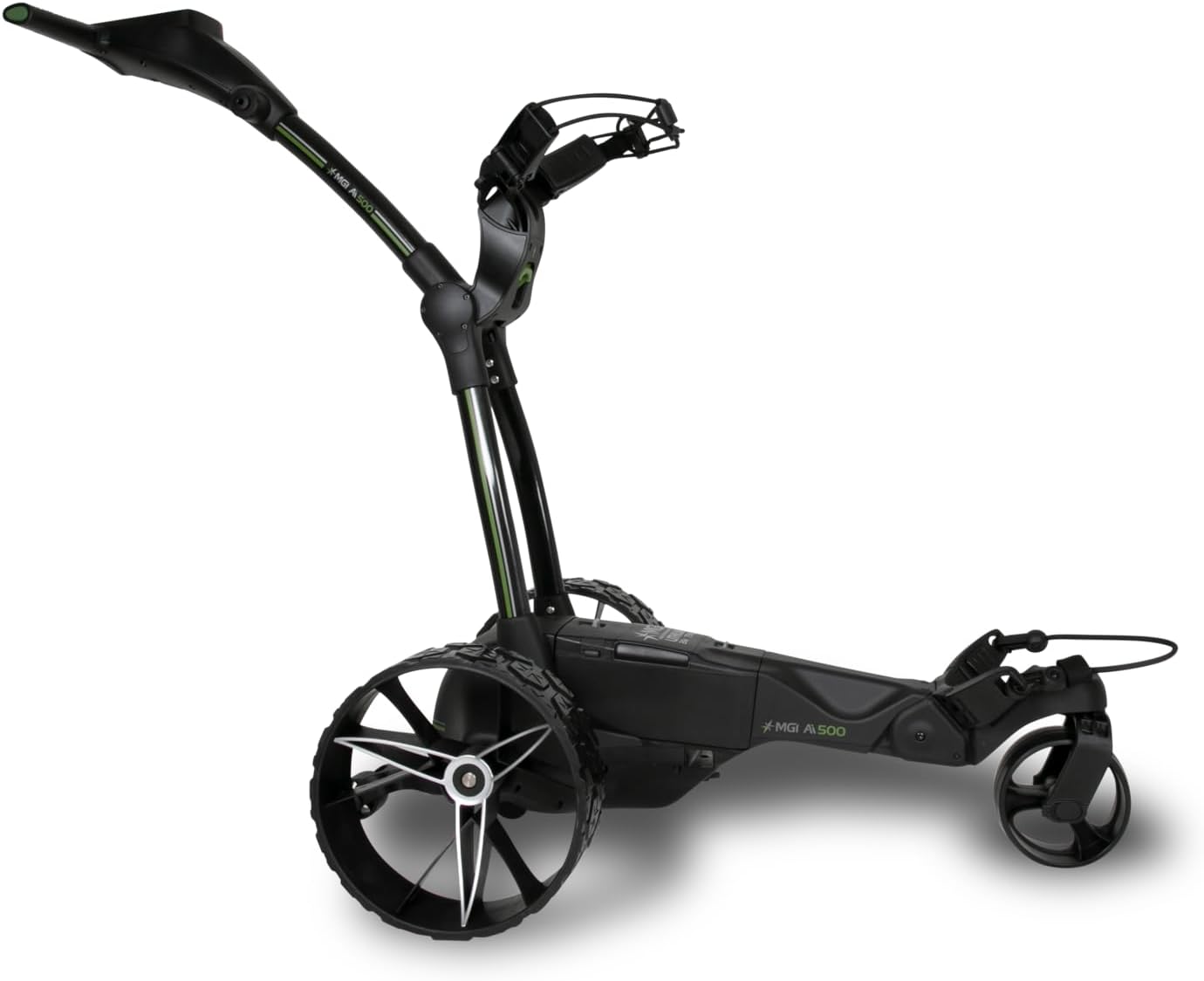
olusin 2: Apa view of the MGI Ai 500 GPS Electric Golf Cart, highlighting its structure.

olusin 3: Ẹyìn view of the MGI Ai 500 GPS Electric Golf Cart, showing the wheel design.
5. Eto
5.1 Unfolding Cart
- Gbe awọn ti ṣe pọ kẹkẹ lori kan alapin, dada idurosinsin.
- Locate the main folding release mechanism (refer to quick start guide for exact location).
- Engage the release and gently extend the frame until it locks into the open position.
- Ensure all locking mechanisms are securely engaged before proceeding.

Figure 4: MGI Ai 500 GPS Electric Golf Cart in its compact, folded state.
5.2 Batiri sori ati gbigba agbara
- Idiyele Ibẹrẹ: Before first use, fully charge the lithium battery. Connect the color-coded charger (Red-Charging, Green-Full Charge) to the battery and a power outlet.
- Fifi sori: Once charged, slide the battery horizontally into the center battery compartment of the cart until it clicks securely into place. This ensures an improved center of gravity and stability.
- Asopọmọra: Connect the battery cable to the cart's power port, ensuring the color-coded ports (Red & Black) match.
Akiyesi: The MGI Ai 500 uses a Zip High Performance Lithium 36 Hole Battery, designed to be light, compact, and powerful.
6. Awọn ilana Iṣiṣẹ
6.1 Titan / Pa a
- Agbara Tan: Press and hold the power button located on the handle until the display illuminates.
- Agbara Pa: Press and hold the power button until the display shuts down.
6.2 GPS System Operation
The integrated 4-inch full-color touchscreen display provides comprehensive GPS functionality:
- Course Recognition: The cart automatically recognizes golf courses within a 5KM/5M radius.
- Iho View: Displays total distance from the selected tee, stroke index, and hole shaping.
- Interactive Distances: Touch the screen to get exact numbers to bunkers and hazards (front edge & back edge).
- Alawọ ewe View: Shows total distance to the front, middle, and back of the green. Interactive pin allows for precise distance measurement.
- Automatic Hole Advancement: The system automatically advances to the next hole once the cart reaches it.
- Digital Scorecard: Track Gross, Net, and Stableford scores directly on the display.
- Round Summary & Stat Tracking: Monitor Greens Hit %, Average # of Putts, Fairways Hit %, and % Missed Left or Right.
- Ipo Idije: Toggle on/off as required.
- Asopọmọra: Features Wi-Fi and Bluetooth for updates and connectivity.

Figure 5: The MGI Ai 500's integrated display, showing GPS and interface capabilities.
6.3 Driving the Cart
- Use the controls on the handle to adjust speed and direction.
- Always maintain a safe distance from other golfers and obstacles.
- Engage the brake when stopping on inclines or uneven ground.
Ìtẹ̀síwájú 6.4 fún Ìrìn/Ìtọ́jú
To fold the cart for transport or storage:
- Ensure the cart is powered off and the battery is removed.
- Engage the folding mechanism (reverse of unfolding).
- Compress the cart until it locks into its folded position.
- The rear wheels can be inverted on the axle to further reduce the footprint.
Folded Dimensions (Inverted Rear Wheels): 25 x 17.3 x 13.3 Inches.
6.5 MGI Sureshot App
The MGI Ai 500 is compatible with the complimentary MGI Sureshot App. Refer to the app's documentation for specific features and connectivity instructions.
7. Itọju
7.1 Ninu
- Regularly wipe down the cart with a damp asọ ati ìwọnba detergent.
- Yẹra fún lílo àwọn ohun ìfọṣọ tàbí àwọn ohun èlò ìfọ́mọ́ra tí ó lè ba ìparí tàbí àwọn ohun èlò ẹ̀rọ itanna jẹ́.
- Ensure the display screen is cleaned with a soft, lint-free cloth.
7.2 batiri Itọju
- Always fully charge the battery after each use, even if only for a short period.
- Tọju batiri naa ni itura, aye gbigbẹ nigbati ko si ni lilo.
- Ma ṣe fi batiri han si awọn iwọn otutu to gaju.
- If storing for an extended period, charge the battery every 1-2 months to maintain its health.
7.3 Gbogbogbo ayewo
- Periodically check all fasteners and connections to ensure they are secure.
- Inspect wheels for wear and tear.
- Rii daju pe ẹrọ kika n ṣiṣẹ laisiyonu.
8. Laasigbotitusita
This section addresses common issues you might encounter with your MGI Ai 500 GPS Electric Golf Cart.
| Isoro | Owun to le Fa | Ojutu |
|---|---|---|
| Fun rira ko ni agbara lori. | Battery not charged or not connected properly. | Ensure battery is fully charged and securely connected to the cart. Check battery cable connection. |
| GPS not acquiring signal or course. | Poor satellite reception; Wi-Fi/Bluetooth off; out of range. | Move to an open area for better signal. Ensure Wi-Fi/Bluetooth is enabled in settings. Check if course is within the 5KM/5M auto-recognition radius. |
| Cart moves slowly or inconsistently. | Low battery charge; obstruction in wheels. | Recharge the battery. Inspect wheels and axles for debris or obstructions. |
| Folding mechanism is stiff. | Aini ti lubrication; idoti ni siseto. | Clean the mechanism and apply a small amount of silicone-based lubricant if necessary. |
If you encounter issues not listed here, please refer to the MGI website for additional support or contact customer service.
9. Awọn pato
| Ẹya ara ẹrọ | Ẹ̀kúnrẹ́rẹ́ |
|---|---|
| Orukọ awoṣe | MGI Ai 500 GPS Electric Golf Cart - 36 Hole Battery (Drink & Umbrella Holder) |
| Nọmba apakan | AI500-B |
| Brand | MGI |
| Àwọ̀ | Dudu |
| Ohun elo | Ṣiṣu |
| Awọn iwọn Nkan (LxWxH) | 31.5 x 23.2 x 40.9 inches |
| Ìwúwo Ohun kan (pẹ̀lú bátírì) | 31.3 iwon |
| Àwọn Ìwọ̀n Tí A Pọ̀ (Àwọn Kẹ̀kẹ́ Ẹ̀yìn Tí A Yí Padà) | 25 x 17.3 x 13.3 inches |
| Package iwuwo | 19.14 kilo |
| GPS Awọn ẹya ara ẹrọ | 4" Full Color Touchscreen, 40,000+ pre-loaded courses, Hole View, Alawọ ewe View, Interactive Pin, Digital Scorecard, Stat Tracking, Auto Course/Hole Recognition |
| Batiri Iru | Lithium (36 Hole) |
| Asopọmọra | Wi-Fi, Bluetooth |
| Ọjọ Akọkọ Wa | Oṣu Kẹsan Ọjọ 4, Ọdun 2024 |
10. Atilẹyin ọja ati Support
Ilana Atilẹyin ọja: MGI offers a 3-year manufacturer warranty on manufacturing defects for all parts, including the lithium battery and charger. This warranty is valid if the product is registered within 30 days of purchase. Please refer to the official MGI website or the online user manual for complete terms and conditions.
Atilẹyin: MGI is committed to customer satisfaction. They offer warranty spare parts delivered at no charge and comprehensive DIY videos for common issues. In certain circumstances, authorization may be given to send the cart to a preferred service center for repair, freight-free. The cart is expected to be sent in its original carton for such services.
For further assistance, please visit the official MGI webaaye tabi kan si atilẹyin alabara wọn.