
Ọrọ Iṣaaju
This manual provides detailed instructions for the NEMTMCUA Digital Wall Clock, an 8.5-inch large display LED clock. It features a multifunctional display showing time, date, day of the week, and temperature. The clock includes two independent alarms and three adjustable brightness levels. It is designed for versatile placement, suitable for wall mounting or desktop use in various indoor environments such as living rooms, bedrooms, and offices.

Aworan: Pariview of the NEMTMCUA Digital Wall Clock's features, including multiple displays, 3 AAA battery option, 2 alarm sets, USB charging, 3 brightness levels, and 2 placement methods.
Package Awọn akoonu
Jọwọ rii daju pe gbogbo awọn nkan wa ninu package:
- Digital Wall Clock x 1
- Okun USB x 1
- Ilana itọnisọna x 1
Ṣeto
Ibi ti ina elekitiriki ti nwa
The NEMTMCUA Digital Wall Clock supports two power supply modes: USB plug-in power or 3 AAA batteries (not included).
- Agbara agbara USB: Connect the provided USB cable to the clock's power input and a compatible USB power adapter (not included). This is the primary power source for continuous display.
- Battery Power (3 x AAA, not included): When powered solely by batteries, the screen will automatically turn off after 10 seconds to conserve energy. To activate the display, make a sound such as tapping on the clock or the surface it rests on.
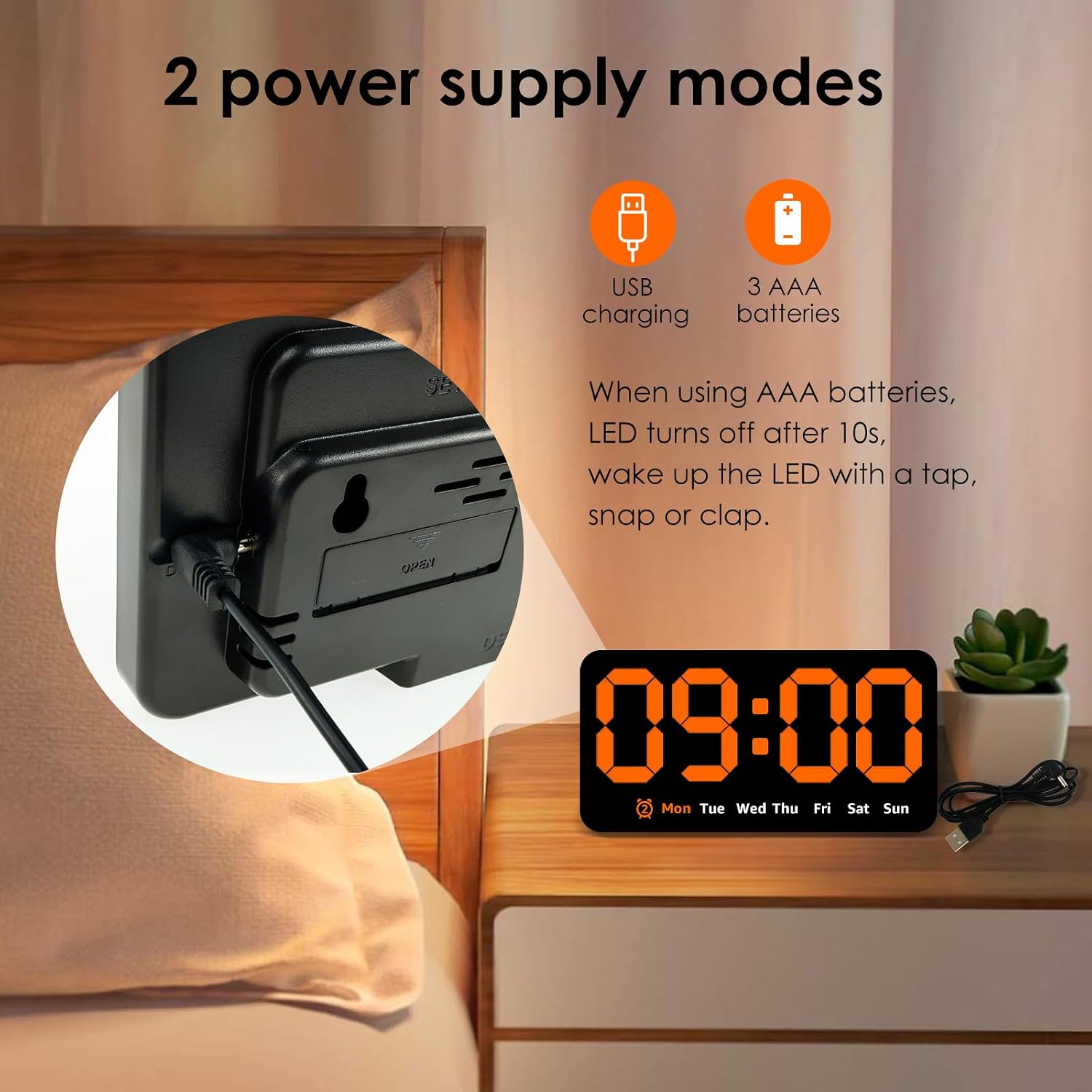
Aworan: Ẹyin view of the clock highlighting the USB charging port and the battery compartment, illustrating the two power supply options.
Ipo
Aago naa nfunni ni awọn aṣayan ipo gbigbe to rọ:
- Iṣagbede ogiri: Utilize the two hanging holes located on the back of the clock to securely mount it on a wall.
- Ibi tabili: The clock can also stand independently on any flat surface, such as a desk, nightstand, or shelf.
Video: An unboxing and initial setup guide for the Digital Wall Clock, demonstrating how to power on the device and its basic display functions.
Awọn ilana Iṣiṣẹ
Awọn iṣẹ bọtini
The clock features several buttons on its top for setting and adjusting functions:
- Ṣeto: Used to enter setting modes for time, date, and alarms.
- +: Used to increase values during setting or switch display modes.
- -: Used to decrease values during setting.
- ALARM (Bell Icon): Used to activate/deactivate alarms or enter alarm setting mode.
Eto Aago ati Ọjọ
- Tẹ awọn SET bọtini lẹẹkan lati tẹ ipo eto akoko sii. Awọn nọmba wakati yoo filasi.
- Lo awọn + or - awọn bọtini lati ṣatunṣe awọn wakati.
- Tẹ SET lẹ́ẹ̀kan sí i láti gbéra sí ìṣètò ìṣẹ́jú. Lo + or - lati ṣatunṣe awọn iṣẹju.
- Tesiwaju titẹ SET láti yípo àwọn ètò ọdún, oṣù, àti ọjọ́, láti ṣàtúnṣe ọ̀kọ̀ọ̀kan pẹ̀lú + or -.
- Tẹ SET igba to kẹhin lati jade kuro ni ipo eto.
Eto Awọn itaniji
Aago naa n ṣe atilẹyin fun awọn itaniji ominira meji.
- Tẹ awọn Itaniji Bọtini lati yipo nipasẹ Itaniji 1, Itaniji 2, ati Itaniji Pipa.
- To set an alarm, press and hold the Itaniji button when the desired alarm (e.g., AL1) is displayed. The hour digits will flash.
- Lo awọn + or - awọn bọtini lati ṣatunṣe aago itaniji.
- Tẹ Itaniji lẹ́ẹ̀kan sí i láti gbéra sí ìṣètò ìṣẹ́jú. Lo + or - láti ṣàtúnṣe ìṣẹ́jú ìkìlọ̀.
- Tẹ Itaniji one last time to confirm and exit alarm setting mode.
- When an alarm sounds, press any button to enter snooze mode.

Image: Detail of the clock's top-mounted control buttons, including SET, +, -, and the alarm button, with an alarm icon visible on the display.
Siṣàtúnṣe Imọlẹ
The clock offers three levels of brightness. To adjust the brightness:
- Ni ipo ifihan akoko deede, tẹ bọtini naa + button to cycle through the three brightness levels.
- Dimming the light at night can improve sleep comfort.

Image: A visual comparison of the clock's display at three distinct brightness settings, from brightest to dimmest.
Awọn ipo ifihan
Aago naa ṣe atilẹyin fun awọn ipo ifihan akọkọ meji:
- DP1: Displays only the time and day of the week.
- DP2: Cycles between time + day of the week, and temperature + date.
To switch between display modes, long press the + bọtini.

Image: A composite image showing the clock's various display options, including time-only (DP1) and cycling displays of time, date, and temperature (DP2).
Itoju
To ensure the longevity and proper functioning of your NEMTMCUA Digital Wall Clock, follow these maintenance guidelines:
- Ninu: Gently wipe the clock's surface with a soft, dry cloth. Avoid using abrasive cleaners, solvents, or harsh chemicals, as these can damage the display or casing.
- Rirọpo Batiri: If using battery power, replace all three AAA batteries simultaneously when the display becomes dim or unresponsive. Ensure correct polarity when inserting new batteries.
- Ayika: Keep the clock away from extreme temperatures, direct sunlight, and high humidity.
Laasigbotitusita
If you encounter issues with your NEMTMCUA Digital Wall Clock, refer to the following common problems and solutions:
| Isoro | Owun to le Fa | Ojutu |
|---|---|---|
| Display turns off after 10 seconds (on battery power) | This is a power-saving feature when running on batteries. | Make a sound (e.g., tap the clock or table) to reactivate the display. For continuous display, use USB power. |
| Clock loses time or is inaccurate | Unstable power supply or internal malfunction. | Ensure the USB power connection is stable. If using batteries, replace them with fresh ones. If the issue persists, try resetting the clock by disconnecting all power sources for a few minutes. |
| Alarm sounds even when set to OFF | Alarm setting not properly deactivated. | Press the ALARM button repeatedly until no alarm icon is displayed, indicating all alarms are off. |
| Display is too bright or too dim | Ipele imọlẹ nilo atunṣe. | In normal time display mode, press the '+' button to cycle through the three available brightness levels until the desired setting is reached. |
| Clock resets to 0:00 when touched or moved | Loose power connection or internal issue. | Ensure the USB cable is firmly connected. If using batteries, check they are securely seated. Avoid excessive force when handling the clock. |
Awọn pato

Image: Diagram illustrating the product dimensions of the NEMTMCUA Digital Wall Clock, measuring 21.4cm (8.43in) in width and 11cm (4.33in) in height, with a thickness of 2.8cm (1.1in).
| Ẹya ara ẹrọ | Ẹ̀kúnrẹ́rẹ́ |
|---|---|
| Brand | NEMTMCUA |
| Nọmba awoṣe | 450220240009071633 |
| Ifihan Iru | LED oni-nọmba |
| Àwọ̀ | ọsan |
| Awọn iwọn Ọja (W x H) | 8.27"W x 4.33"H (approx. 21.4cm x 11cm) |
| Ohun elo Iru | Acrylonitrile Butadiene Styrene (ABS) |
| Orisun agbara | USB (cable included) or 3 x AAA Batteries (not included) |
| Pataki Awọn ẹya ara ẹrọ | Adjustable Brightness (3 levels), Double Alarm, Date, Week, Temperature Display, Wall Mountable / Desktop |
| Yara Iru | Living Room, Bedroom, Office, Classroom |
| Iwọn Nkan | 0.28 kilo |
Atilẹyin ọja ati Support
For warranty information, please refer to the documentation provided at the time of purchase or contact your retailer. For technical support or further assistance, please reach out to the manufacturer or the seller through your purchase platform.