
1. Ifihan
This manual provides essential instructions for the safe and effective use of your ALONEFIRE SV116 365nm UV Flashlight. This powerful blacklight is designed for detecting fluorescent substances not visible to the naked eye, including pet urine, scorpions, currency authentication, and curing resins. Please read this manual thoroughly before operation and retain it for future reference.

Figure 1: ALONEFIRE SV116 365nm UV Flashlight and accessories.
2. Alaye Aabo
IKILO: Ultraviolet (UV) light can be harmful to eyes and skin. Always follow these safety precautions:
- DO NOT LOOK DIRECTLY AT THE UV LIGHT SOURCE. Direct exposure can cause eye damage.
- Always wear the included UV protective glasses when operating the flashlight.
- Avoid prolonged skin exposure to UV light.
- Jeki kuro ni arọwọto awọn ọmọde.
- Ẹrọ yii jẹ Ko Omi Resistant. Yago fun ifihan si omi tabi ọriniinitutu giga.
- Do not disassemble or modify the flashlight. This may cause damage and void the warranty.
3. Package Awọn akoonu
Jẹrisi pe gbogbo awọn ohun kan wa ninu package:
- ALONEFIRE SV116 365nm UV Flashlight
- Rechargeable Lithium Ion Battery (pre-installed)
- USB-C Ngba agbara Cable
- UV Protective Glasses
- Ọwọ Lanyard

olusin 2: Package awọn akoonu ti.
4. Ọja Ipariview
The ALONEFIRE SV116 features a durable anodized aluminum body, a black UV filter lens, and high-powered 365nm UV LEDs for pure and effective ultraviolet illumination.
Awọn ẹya pataki:
- 365nm UV LED: Utilizes 6 pieces of 4-core 365nm UV LEDs for powerful and precise detection.
- Black UV Filter Lens: Filters out visible light, enhancing the purity and intensity of the UV output.
- Aluminiomu Alloy Shell: Provides excellent heat dissipation, extending LED lifespan and ensuring reliability.
- USB-C Gbigba agbara: Convenient and easy charging with a reversible USB-C port.
- Yiyipada gbigba agbara: Functions as a power bank via a USB-A output port to charge other devices.

Figure 3: Flashlight head with 6PCS 4-Cores 365nm UV LEDs.
5. Eto
5.1 Gbigba agbara akọkọ
- The flashlight comes with a pre-installed rechargeable Lithium Ion battery. For optimal performance, fully charge the battery before first use.
- Connect the provided USB-C charging cable to the flashlight's USB-C port.
- Plug the other end of the cable into a compatible USB power source (e.g., wall adapter, power bank, laptop, car charger).
- Ina Atọka gbigba agbara yoo han Pupa nigba gbigba agbara.
- Nígbà tí a bá ti gba agbára tán pátápátá, ìmọ́lẹ̀ ìtọ́ka náà yóò yípadà Alawọ ewe. Disconnect the charging cable.
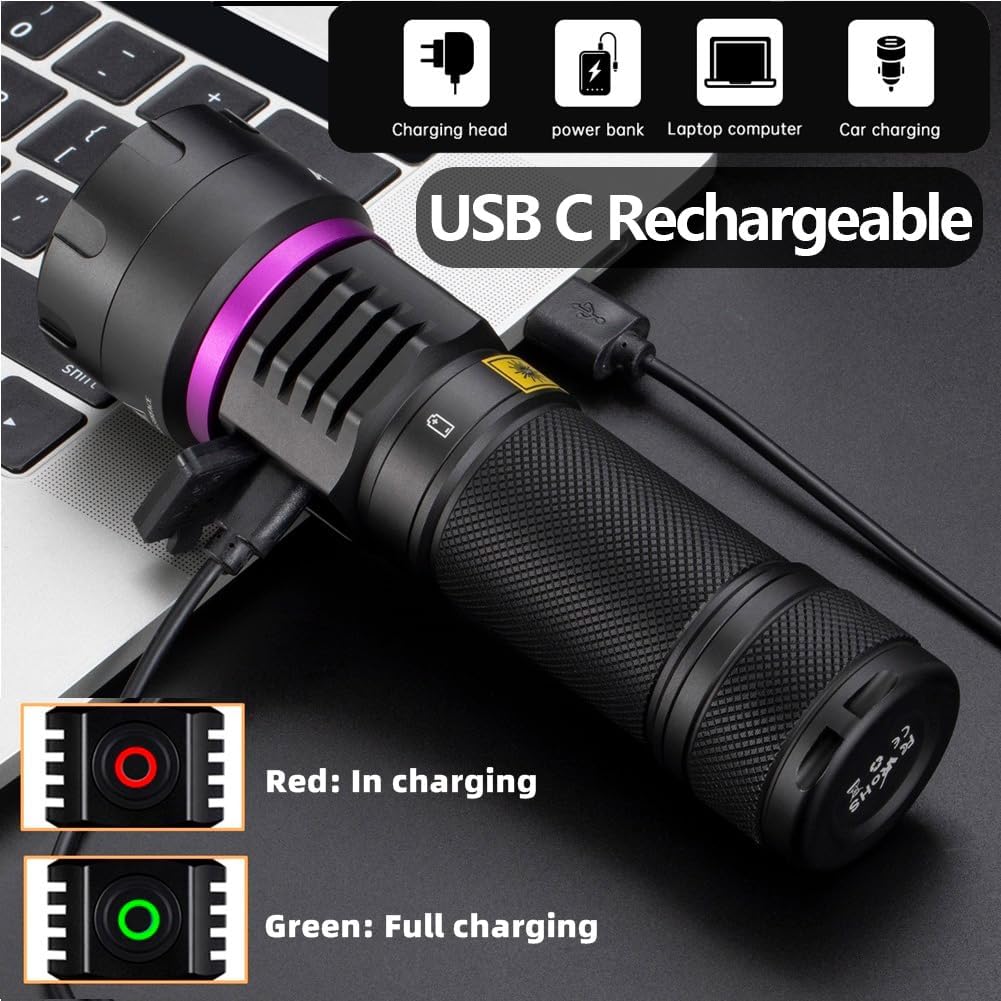
Figure 4: USB-C charging with indicator lights.
5.2 Síso Lanyard pọ̀
Thread the wrist lanyard through the designated loop at the tail cap of the flashlight for secure handling.

Figure 5: Flashlight with wrist lanyard.
6. Awọn ilana Iṣiṣẹ
6.1 Agbara Tan / Pa ati Aṣayan Ipo
- Before turning on the flashlight, ensure you are wearing the UV protective glasses.
- Press the power button to turn the flashlight ON.
- Press the power button again to cycle through available brightness modes (e.g., Low, High).
- Press and hold the power button to turn the flashlight OFF.
6.2 Reverse Charging Function (Power Bank)
The SV116 can be used as an emergency power bank to charge other devices:
- Locate the USB-A output port on the flashlight.
- Connect your device's charging cable (USB-A to your device's port) to the flashlight's USB-A output port.
- The flashlight will begin charging your device.

Figure 6: Reverse charging a mobile device.
6.3 Awọn ohun elo
The 365nm UV light is effective for various detection and curing tasks:
- Pet Urine and Stains: Detect hidden pet urine, vomit, and other organic stains on carpets, furniture, and floors.
- Ṣiṣawari Scorpion: Scorpions fluoresce under 365nm UV light, making them easier to spot in dark environments.
- Currency and Document Authentication: Verify security features on banknotes, passports, and other official documents.
- Mineral and Gemstone Inspection: Observe fluorescence in certain minerals and gemstones.
- Resin and Glue Curing: Accelerate the curing process of UV-sensitive resins and glues.
- Bed Bug Detection: Identify bed bugs and their eggs by their fluorescent properties.

Olusin 7: Exampawọn ohun elo ina UV.

Figure 8: 365nm UV light provides purer fluorescence compared to 395nm for certain materials.
7. Itọju
7.1 Ninu
- Nu ara filaṣi nu pẹlu asọ, damp asọ. Ma ṣe lo abrasive ose tabi epo.
- Gently clean the lens with a lens cleaning cloth to maintain optimal light output.
7.2 Itọju Batiri ati Ibi ipamọ
- Recharge the battery regularly, even if not in use, to prolong its lifespan.
- Tọju ina filaṣi naa ni itura, aye gbigbẹ kuro lati orun taara ati awọn iwọn otutu to gaju.
- Tí o bá ń tọ́jú rẹ̀ fún ìgbà pípẹ́, gba agbára bátìrì náà sí ìwọ̀n agbára tó tó 50%.
8. Laasigbotitusita
| Isoro | Owun to le Fa | Ojutu |
|---|---|---|
| Ina filaṣi ko tan. | Batiri ti dinku tabi ko fi sori ẹrọ daradara. | Gba agbara batiri naa patapata. Rii daju pe batiri naa wa pẹlu polarity ti o tọ. |
| Ina flickers tabi dims lairotẹlẹ. | Batiri kekere tabi asopọ alaimuṣinṣin. | Recharge the battery. Ensure the battery cap is tightened securely. |
| Ina filaṣi ko gba agbara. | Okùn tí ó ní àbùkù, orísun agbára, tàbí ibudo gbigba agbara. | Try a different USB-C cable and power source. Ensure the cable is fully inserted. |
| Reverse charging is not working. | Ẹ̀rọ náà kò báramu tàbí ìṣòro okùn. | Ensure your device supports charging via USB-A. Try a different USB-A cable. |
9. Awọn pato
| Ẹya ara ẹrọ | Ẹ̀kúnrẹ́rẹ́ |
|---|---|
| Awoṣe | SV116 |
| UV LED Type | 6pcs 4-cores 365nm UV LED |
| Agbara agbara | 60W |
| Agbara Imọlẹ | 8000mW |
| Ohun elo | Aluminiomu anodized |
| Batiri Iru | 1x Lithium Ion (Rechargeable, Included) |
| Gbigba agbara Port | USB-C Input |
| Reverse Charging Port | Ṣiṣejade USB-A |
| Omi Resistance Ipele | Ko Omi Resistant |
| Iwọn Nkan | 1.6 iwon |
10. Atilẹyin ọja ati Support
10.1 atilẹyin ọja Alaye
No specific warranty information is provided in the product details. Please refer to your purchase documentation or contact the seller for warranty terms.
10.2 Onibara Support
For further assistance or inquiries, please contact ALONEFIRE customer support. You can visit the official ALONEFIRE store on Amazon for more information: ALONEFIRE Store.