1. Ifihan
This manual provides comprehensive instructions for the setup, operation, maintenance, and troubleshooting of your new Universal TV Remote Control. Designed for ease of use, this remote is compatible with a wide range of major TV brands, offering a convenient replacement for your original remote.
Jọ̀wọ́ ka ìwé ìtọ́ni yìí dáadáa kí o tó lo ọ̀nà àbáwọlé láti rí i dájú pé iṣẹ́ rẹ dára jù àti pé o lè pẹ́ tó.

Figure 1: Universal TV Remote Control

Figure 2: Compatible with Major TV Brands
2. Awọn ilana iṣeto
Before first use, insert two AAA batteries into the remote control. Ensure correct polarity (+/-) as indicated inside the battery compartment.
2.1. Brand Setting (Recommended Method)
This method is recommended for major TV brands that have a dedicated button on the remote control (e.g., Samsung, LG, Sony, TCL, Vizio, Hisense, Sanyo, Insignia, Philips, Panasonic, Sharp, Toshiba, Hitachi, JVC, Vestel, Seiki, RCA, Magnavox, Westinghouse, Haier).
- Identify the button on the remote control corresponding to your TV brand.
- Press and hold the corresponding brand button for approximately 3 seconds.
- The LED indicator on the remote will flash three times, indicating that the setting is complete.

Figure 3: Brand Setting Method
Imọran to wulo: Under the Initial Setting Mode, this remote can directly control many TV brands, including LG, SAMSUNG, PHILIPS, SONY, PANASONIC, SHARP and other TV brands listed on the remote control.
2.2. Code Setting Method
Use this method for TV brands that do not have a dedicated brand button on the remote, or if the Brand Setting method does not work.
- Tẹ mọlẹ Pa ẹnu mọ́ bọtini ati awọn Agbara bọtini ni nigbakannaa fun kan diẹ aaya.
- Release both buttons when the LED indicator light illuminates.
- Refer to the provided code list in the physical manual (not included here) and enter the 3 or 4-digit code for your TV brand using the number buttons.
- If the code is correct, the LED will turn off, indicating successful setup. If the code is incorrect, the LED will remain lit, and you will need to re-enter the code.

Figure 4: Code Setting Method
Akiyesi: The new chip provides stronger power-off memory. Once set up, the TV brand memory will be maintained permanently, even after power off.
3. Awọn ilana Iṣiṣẹ
Once set up, your universal remote control functions similarly to your original TV remote. Below are some common button functions:

Figure 5: Other Button Functions
- Bọtini agbara: Tan TV si tan tabi paa.
- Bọtini titẹ sii: Cycles through video input sources (HDMI, AV, etc.).
- CC (Closed Caption) Button: Yipada awọn akọle pipade tan tabi pa.
- Bọtini Smart: Accesses the Smart TV hub or home screen.
- NETFLIX Button: Wiwọle taara si ohun elo Netflix.
- Bọtini 3D: Activates or deactivates 3D mode (if supported by TV).
- Paadi lilọ kiri (Soke, Isalẹ, Osi, Ọtun, O DARA): Ti a lo fun lilọ kiri akojọ aṣayan ati yiyan.
- Bọtini Akojọ: Ṣii akojọ aṣayan akọkọ ti TV.
- Bọ́tìnì Àwọn Ohun Èlò: Accesses the TV's application list.
- Vol +/- Buttons: Ṣe atunṣe ipele iwọn didun.
- Ch +/- Buttons: Iyipada ikanni.
- Bọtini Mute: Pa ohun TV kuro tabi mu ohun foonu kuro.
- Awọn bọtini nọmba (0-9): Titẹwọle ikanni taara.
- Bọtini Jade: Jade akojọ aṣayan lọwọlọwọ tabi ohun elo.
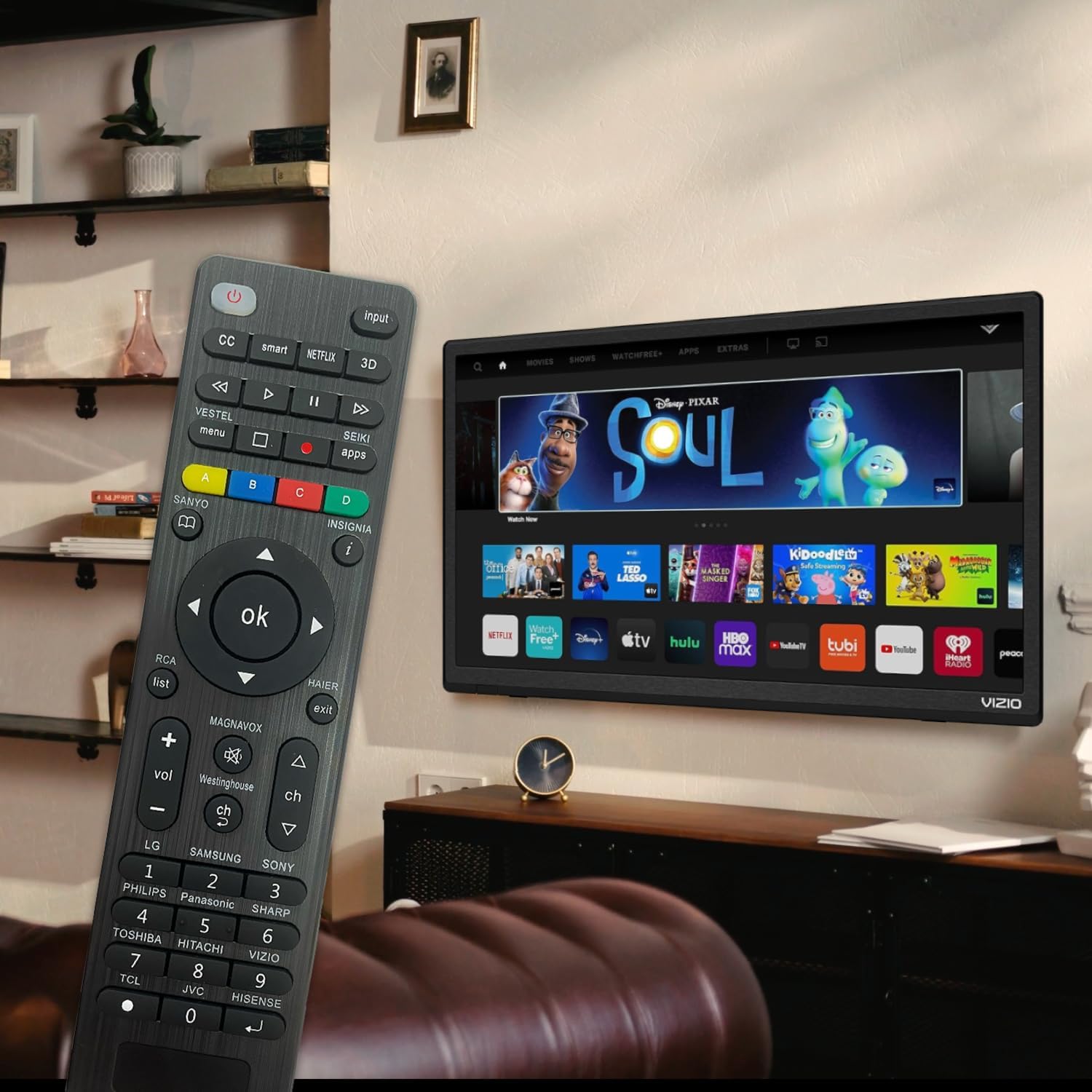
Figure 6: Remote in use with a Smart TV
4. Itọju
- Ninu: Lo asọ asọ ti o gbẹ lati nu isakoṣo latọna jijin. Maṣe lo awọn olutọpa olomi tabi awọn ohun elo abrasive, nitori wọn le ba oju tabi awọn paati inu jẹ.
- Rirọpo Batiri: Replace batteries when the remote's response becomes sluggish or the LED indicator does not light up. Always replace both batteries at the same time with new AAA batteries. Do not mix old and new batteries or different types of batteries.
- Ibi ipamọ: Ti a ko ba lo latọna jijin naa fun akoko ti o gbooro sii, yọ awọn batiri kuro lati yago fun jijo ati ibajẹ ti o pọju. Tọju isakoṣo latọna jijin ni itura, aye gbigbẹ kuro lati orun taara ati awọn iwọn otutu to gaju.
- Iduroṣinṣin: The remote features upgraded material with a metal dome added to the control buttons for enhanced flexibility and extended life. Avoid dropping the remote or exposing it to excessive force.
5. Laasigbotitusita
| Isoro | Owun to le Fa | Ojutu |
|---|---|---|
| Latọna jijin ko ṣiṣẹ. | Batteries are dead or inserted incorrectly. Remote is not paired with the TV. Obstruction between remote and TV. | Check and replace batteries, ensuring correct polarity. Re-attempt Brand Setting or Code Setting. Ensure clear line of sight to TV's IR receiver. |
| Diẹ ninu awọn bọtini ko ṣiṣẹ. | Incorrect code or partial pairing. TV does not support certain functions. | Try a different code from the manual's code list. Verify if your TV model supports the specific function. |
| Remote is slow to respond. | Low battery power. Interference. | Rọpo awọn batiri. Rii daju pe ko si awọn orisun ina to lagbara tabi awọn ẹrọ IR miiran ti o n daamu. |
| LED indicator keeps lighting up during code setting. | Koodu ti ko tọ ti tẹ sii. | Re-enter the correct 3 or 4-digit code from the manual's code list. |
| Cannot find my TV brand button. | Brand not listed on dedicated buttons. | Use the Code Setting Method (Section 2.2) with the provided code list. |
If issues persist, please refer to the original product packaging for customer support contact information or visit the manufacturer's webojula.
6. Awọn pato
- Nọmba awoṣe: BVTVRemote-01
- Awọn iwọn ọja: 1.38 x 0.6 x 6.5 inches
- Ìwọ̀n Nkan: 2.39 iwon
- Awọn batiri ti a beere: 2 x AAA (ko si)
- Àwọ̀: Dudu
- Ẹya Pataki: Programmable, Power-off Memory
- Nọmba ti o pọju ti Awọn ẹrọ Atilẹyin: 3 (typically for TV, DVD/Blu-ray Player, though primarily designed for TV)
- Awọn ẹrọ ibaramu: Television, DVD/Blu-ray Player (Universal compatibility with major TV brands)
- Olupese: BoostVision
- Ilu isenbale: China
7. Atilẹyin ọja ati Support
For warranty information, please refer to the documentation included with your purchase or contact the seller directly. This product is typically covered by a standard manufacturer's warranty against defects in materials and workmanship.
For technical support or further assistance, please contact BoostVision customer service through their official webaaye tabi awọn alaye olubasọrọ ti a pese lori apoti ọja.
Olutaja: BoostVision TV Remote
Oju-iwe ọja Amazon: https://www.amazon.com/dp/B0DHCZB2DT


