1. Awọn Ilana Aabo pataki
- Ka gbogbo awọn ilana ṣaaju ṣiṣe ẹrọ naa.
- Jeki awọn ọwọ ati awọn aṣọ alaimuṣinṣin kuro lati awọn ẹya gbigbe lakoko iṣẹ.
- Do not exceed the specified punching and binding capacities to prevent damage to the machine.
- Rí i dájú pé a gbé ẹ̀rọ náà sí orí ilẹ̀ tí ó dúró ṣinṣin, tí ó tẹ́jú.
- Jeki kuro ni arọwọto awọn ọmọde.
2. Ọja Ipariview
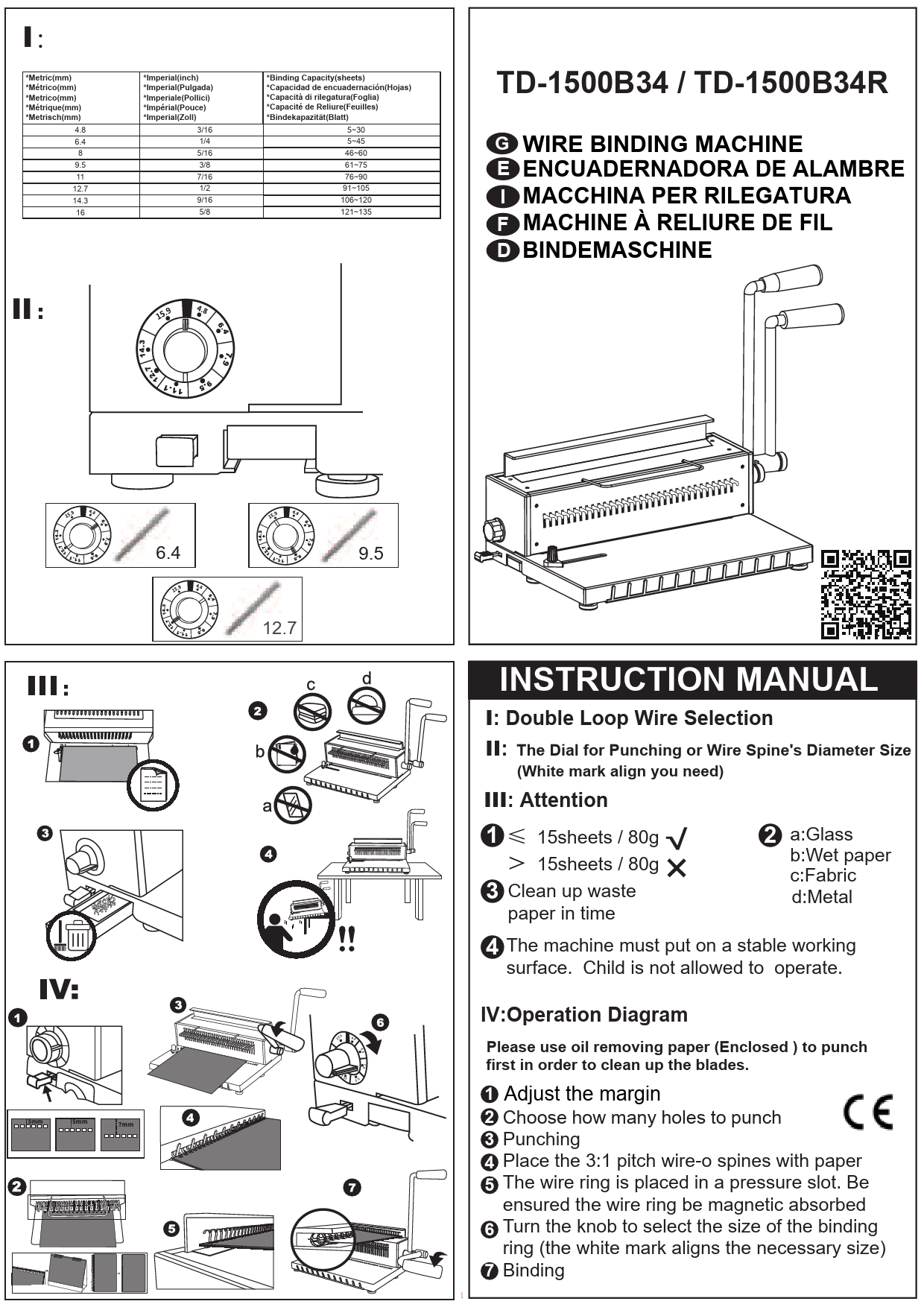
The Rayson TD-130 is a manual wire binding machine designed for creating professional-looking documents with square holes. It features durable metal construction and is suitable for office and home use.

Ipariview of the Rayson TD-130 Wire Binding Machine, showcasing its compact design and the types of wire binding coils it uses.
Awọn ẹya pataki:
- Manual Punching and Binding Operation
- Punching Capacity: 12 sheets (80gsm/20lb)
- Binding Capacity: 120 sheets (80gsm/20lb)
- Punching Holes Quantity: 34 square holes
- Square Hole Size: 0.15" x 0.15" (4x4mm)
- Adjustable Margin: 2.5mm, 3.5mm, 4.5mm
- Maximum Sheet Size: A4 (8.26"x11.7")
- Ti o tọ Irin Ikole
3. Eto
- Ṣii silẹ: Carefully remove the binding machine from its packaging. Inspect for any damage.
- Ibi: Place the machine on a sturdy, level surface.
- Initial Cleaning Punch: The cutting blades are pre-oiled to prevent rusting during storage and transit. Before binding important documents, use the enclosed oiled removing paper (or a few scrap sheets) to perform several test punches. This will clean any excess oil from the blades and prevent staining on your documents.
4. Awọn ilana Iṣiṣẹ
4.1 Punching Documents
- Adjust Margin Depth: Use the margin adjustment knob to select the desired distance from the paper edge to the punched holes (2.5mm, 3.5mm, or 4.5mm). A deeper margin (4.5mm) is recommended for thicker documents or larger binding coils.
- Set Punching Mode: Ensure the punching dial is turned clockwise to the "PUNCHING" position. The white mark on the dial should align with the punching mark. Failure to do so may result in incomplete hole cuts.
- Fi Iwe sii: Align the edges of your paper or covers against the paper guide. Insert a maximum of 12 sheets of 80gsm paper (or equivalent thickness for covers) into the punching slot. Do not force more sheets than the capacity.
- Punch: Firmly press down the punching handle until the holes are completely cut. Release the handle and remove the punched sheets.
- Tun: Continue punching all pages and covers for your document.

This image illustrates the adjustable margin feature, allowing users to select a punch depth of 2.5mm, 3.5mm, or 4.5mm from the paper edge, ensuring optimal binding results for different document sizes.

A alaye view of the punching dial, emphasizing the correct clockwise rotation required to engage the punching mechanism fully, preventing incomplete hole cuts.

This image demonstrates the machine's capability to punch various materials, including standard A4 paper, a leathergrain cover, and a plastic cover, highlighting its versatility.
4.2 Binding Documents
- Select Coil: Choose a 3:1 wire-o binding ring or coil binding spiral appropriate for the thickness of your document (up to 120 sheets).
- Ṣiṣi Coil: Place the open wire binding coil onto the binding comb fingers of the machine.
- Load Pages: Carefully load the punched pages onto the open coil, starting with the back cover, then the main content, and finally the front cover.
- Close Coil: Once all pages are loaded, remove the document from the comb fingers. Place the open coil into the wire closer slot. Gently push the closing handle to crimp the wire coil shut, securing the document. Adjust the closing pressure if necessary to achieve a perfect bind.

An teleample of documents successfully bound with a black wire coil, demonstrating the professional finish achievable with the Rayson TD-130 binding machine.
5. Itọju
- Isọfọ abẹfẹlẹ: Regularly perform test punches with scrap paper to clean any accumulated paper dust or residual oil from the cutting blades.
- Waste Tray: Empty the waste paper tray frequently to prevent jams and ensure smooth operation. The tray is typically located at the bottom or back of the machine.
- Isọsọ gbogboogbo: Mu ese ita ti ẹrọ naa pẹlu asọ ti o gbẹ. Ma ṣe lo abrasive ose tabi epo.
- Lubrication: The cutting blades are pre-lubricated. Additional lubrication is generally not required under normal use. If punching becomes difficult, consult professional service.
6. Laasigbotitusita
- Problem: Holes are not cut completely or are ragged.
- Ojutu 1: Ensure the punching dial is fully turned clockwise to the "PUNCHING" position. Refer to Section 4.1, Step 2.
- Ojutu 2: Reduce the number of sheets being punched at once. Exceeding the 12-sheet capacity can lead to incomplete cuts.
- Ojutu 3: Perform several test punches with scrap paper to clear any debris from the cutting blades.
- Problem: Paper jams in the punching slot.
- Ojutu 1: Do not force the punching handle if resistance is met. Remove the paper carefully.
- Ojutu 2: Ensure the waste tray is not full.
- Ojutu 3: Check for any foreign objects in the punching slot.
- Problem: Binding coil does not close properly.
- Ojutu 1: Ensure you are using the correct size binding coil for your document thickness.
- Ojutu 2: Adjust the wire closer mechanism if available (refer to machine specific adjustments if present, not detailed in current data).
- Ojutu 3: Apply even pressure when closing the coil.
7. Awọn pato
| Ẹya ara ẹrọ | Sipesifikesonu |
|---|---|
| Nọmba awoṣe | TD-130 |
| Brand | RAYSON |
| Ipo Isẹ | Afowoyi |
| Punching Agbara | 12 sheets (80gsm/20lb) |
| Agbara abuda | 120 sheets (80gsm/20lb) |
| Iho kika | 34 iho |
| Iho Iru | Onigun mẹrin |
| Square Hole Size | 0.15" x 0.15" (4x4mm) |
| Adjustable Margin | 2.5mm, 3.5mm, 4.5mm |
| Max. Sheet Size | A4 (8.26"x11.7") |
| Ohun elo | Irin |
| Àwọ̀ | Buluu |
| Ọja Mefa | 18.43"L |
| Iwọn Nkan | 11.53 iwon (5.24 kilo) |
| Olupese | RAYSON ELECTRICAL MFG. LTD. |