
1. Ifihan
O ṣeun fun riraasing the HOCO HA1 Portable Party Speaker. This manual provides essential information for the safe and efficient operation of your device. Please read it thoroughly before use and retain it for future reference.
Alaye Aabo
- Ma ṣe fi agbọrọsọ si omi tabi ọrinrin ti o pọ ju.
- Yago fun gbigbe agbọrọsọ nitosi awọn orisun ooru tabi ni imọlẹ orun taara.
- Ma ṣe gbiyanju lati tu tabi tun ẹya ara rẹ ṣe. Kan si oṣiṣẹ iṣẹ ti o peye.
- Jeki kuro ni arọwọto awọn ọmọde.
- Lo awọn ẹya ẹrọ gbigba agbara pàtó kan.
2. Package Awọn akoonu
Jọwọ ṣayẹwo pe gbogbo awọn nkan wa ninu package:
- HOCO HA1 Portable Party Speaker
- Gbohungbo onina
- Charging Cable (USB-A to DC barrel jack, inferred)
- Ilana Afowoyi (iwe yii)

Image: The HOCO HA1 speaker packaging, illustrating the speaker and its accessories, including a wired microphone.
3. Ọja Ipariview: Awọn Iṣakoso ati Awọn Ibudo
Familiarize yourself with the various controls and connection ports on your HOCO HA1 speaker.

Aworan: Oke view of the HOCO HA1 speaker, highlighting the control panel with buttons, rotary knob, and integrated carrying handle.
Pánẹ́lì Ìṣàkóso (Òkè)
- Bọtini agbara: Tẹ mọlẹ lati tan/Pa agbohunsoke.
- Bọtini Ipo: Short press to switch between Bluetooth, USB, AUX, and FM radio modes.
- Bọtini Iwọn didun: Yiyi lati ṣatunṣe iwọn didun titunto si.
- Bọ́tìnnì Ṣíṣe/Sánu duro: Tẹ lati mu ṣiṣẹ tabi da ohun duro duro.
- Ti tẹlẹ/Awọn bọtini orin atẹle: Press to skip tracks in Bluetooth/USB mode, or change FM stations.
- Bọtini Ipo Imọlẹ: Press to cycle through different LED light effects or turn them off.

Aworan: Ẹyin view of the HOCO HA1 speaker, displaying the various input ports for USB, AUX, and microphone connections.
Awọn ibudo ẹhin
- Ibudo USB: Fun ohun orin lati inu kọnputa filasi USB kan.
- Iṣawọle AUX (3.5mm): For connecting external audio devices via an audio cable.
- Ìbáwọlé Gbohungbohun (6.35mm): Fún sísopọ̀ gbohungbohun onírin.
- Ibudo Ngba agbara DC 5V: Fun sisopọ okun gbigba agbara.
4. Eto
4.1 Gbigba agbara si Agbọrọsọ
- Connect the charging cable to the DC 5V charging port on the rear of the speaker.
- Connect the other end of the charging cable to a compatible USB power adapter (not included) or a USB port.
- Ina Atọka gbigba agbara yoo tan imọlẹ. Gba awọn wakati 3-4 laaye fun idiyele ni kikun.
- Ge asopọ okun gbigba agbara ni kete ti o ti gba agbara ni kikun.
4.2 Nsopọ Gbohungbohun
- Locate the Microphone Input (6.35mm) port on the rear of the speaker.
- Insert the microphone cable securely into this port.
- The microphone is now ready for use in Karaoke mode.
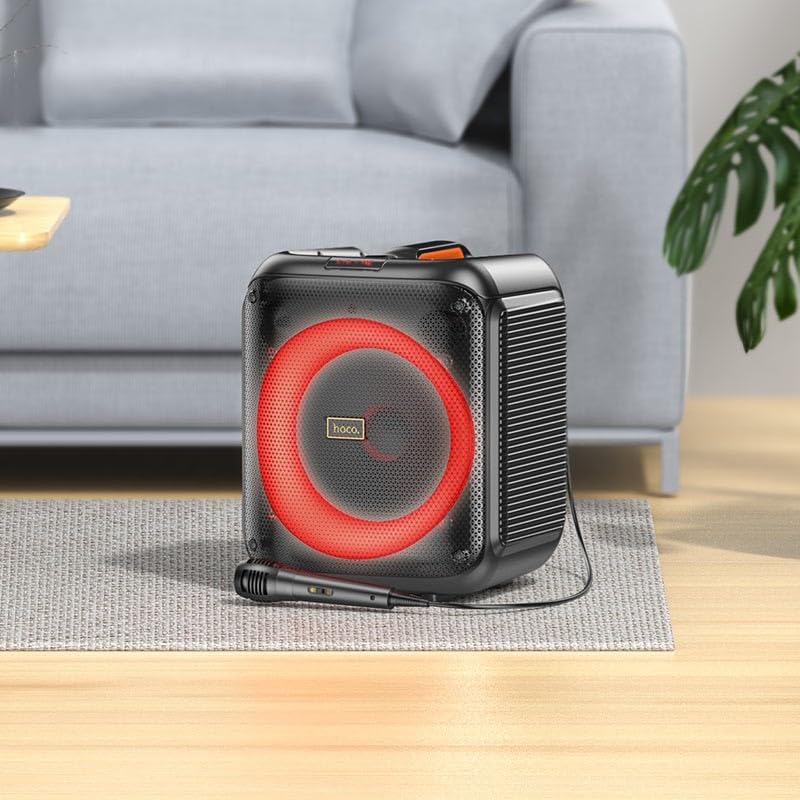
Image: The HOCO HA1 speaker set up with its wired microphone, demonstrating its readiness for karaoke or vocal use.
5. Awọn ilana Iṣiṣẹ
5.1 Agbara Tan / Pa
Tẹ mọlẹ Bọtini agbara on the control panel for approximately 3 seconds to turn the speaker On or Off.
5.2 Sisopọ Bluetooth
- Tan agbohunsoke. Yoo tẹ ipo sisopọ pọ si Bluetooth laifọwọyi, tọka nipasẹ LED didan.
- Lori ẹrọ alagbeka rẹ, mu Bluetooth ṣiṣẹ ki o wa awọn ẹrọ to wa.
- Select "HOCO HA1" from the list of devices.
- Nígbà tí a bá so wọ́n pọ̀, agbọ́hùnsọ̀ náà yóò mú ohùn ìjẹ́rìí jáde, LED náà yóò sì dáwọ́ dúró.
- O le mu ohun ṣiṣẹ bayi lati ẹrọ rẹ nipasẹ agbọrọsọ.
5.3 USB Sisisẹsẹhin
- Fi kọnputa USB ti o ni ohun MP3 sii files into the USB port on the rear of the speaker.
- Tẹ awọn Bọtini Ipo until "USB" mode is selected.
- The speaker will automatically begin playing audio from the USB drive.
- Lo awọn Ṣiṣẹ / Sinmi ati Ti tẹlẹ/Orin atẹle awọn bọtini lati ṣakoso ṣiṣiṣẹsẹhin.
5.4 Iṣawọle AUX
- Connect an external audio device (e.g., smartphone, MP3 player) to the AUX Input port using a 3.5mm audio cable (not included).
- Tẹ awọn Bọtini Ipo until "AUX" mode is selected.
- Play audio from your connected device. The speaker will output the sound.
5.5 Redio FM
- Tẹ awọn Bọtini Ipo until "FM" mode is selected.
- Lati ṣe ayẹwo-laifọwọyi ati fi awọn ibudo to wa pamọ, tẹ mọlẹ Bọtini Muu ṣiṣẹ/DaduroAgbọ́hùnsọ̀ náà yóò ṣe àyẹ̀wò, yóò sì kó àwọn ibùdó ìpamọ́ pamọ́.
- Lo awọn Previous/Next Track Buttons láti lọ kiri láàrin àwọn ibùdó FM tí a ti fipamọ́.
5.6 Karaoke Function (Microphone Use)
Once the microphone is connected (as described in Section 4.2), simply speak or sing into it. The microphone audio will be mixed with any music playing through the speaker (Bluetooth, USB, AUX). Adjust the master volume using the Iwọn didun Iwọn.
5.7 Awọn ipa ina LED
Tẹ awọn Bọtini Ipo Imọlẹ on the control panel to cycle through various LED light effects. Pressing it repeatedly will change the pattern or turn the lights off.

Image: The HOCO HA1 speaker showcasing its dynamic, multi-colored LED lighting feature, enhancing the party atmosphere.
6. Itọju
6.1 Ninu
- Rii daju pe agbọrọsọ ti wa ni pipa ati yọọ kuro ṣaaju ṣiṣe mimọ.
- Lo asọ ti o tutu, ti o gbẹ lati nu awọn ita ita.
- Ma ṣe lo awọn afọmọ abrasive, waxes, tabi awọn nkanmimu.
6.2 Ibi ipamọ
- Tọju agbohunsoke ni itura, aye gbigbẹ kuro lati orun taara ati awọn iwọn otutu to gaju.
- If storing for an extended period, charge the battery periodically (e.g., every 3 months) to maintain battery health.
7. Laasigbotitusita
| Isoro | Owun to le Fa | Ojutu |
|---|---|---|
| Agbọrọsọ ko ni tan. | Batiri ti dinku. | Gba agbara fun agbọrọsọ naa fun o kere ju iṣẹju 30. |
| Ko si ohun lati agbọrọsọ. | Iwọn didun ti lọ silẹ pupọ; ti yan ipo ti ko tọ; ẹrọ ko so pọ (Bluetooth). | Increase volume; press Mode button to select correct input; re-pair Bluetooth device. |
| Ẹrọ Bluetooth ko le so pọ. | Agbọrọsọ kii ṣe ni ipo sisopọ; ẹrọ jina ju; kikọlu. | Ensure speaker is in Bluetooth mode and flashing; move device closer; turn off other Bluetooth devices. |
| Gbohungbohun ko ṣiṣẹ. | Microphone not properly connected; microphone switch off (if applicable). | Ensure microphone is fully plugged into the correct port; check if microphone has an On/Off switch. |
| Gbigba redio FM ko dara. | Ifihan agbara; kikọlu ayika. | Relocate the speaker; try auto-scanning again. |
8. Awọn pato
| Nọmba awoṣe | HA1 (20000463) |
| Brand | HOCO |
| Agbọrọsọ o wu Power | 45 Wattis (O pọju) |
| Asopọmọra | Bluetooth, USB, AUX (3.5mm), FM Radio |
| Gbigbe gbohungbohun | Bẹẹni (6.35mm) |
| Batiri Iru | Lithium ion (1 pẹlu) |
| Iwọn Nkan | 3.6 kilo |
| Iṣagbesori Iru | Tabili Duro |
9. Atilẹyin ọja ati Support
The HOCO HA1 Portable Party Speaker comes with a standard manufacturer's warranty. For detailed warranty terms and conditions, please refer to the warranty card included with your purchase or visit the official HOCO webojula.
For technical support, troubleshooting assistance beyond this manual, or service inquiries, please contact HOCO customer support through their official channels. Contact information can typically be found on the product packaging or the HOCO official webojula.