
1. Ifihan
This manual provides detailed instructions for the HOU Keyboard Case designed for the iPad Pro 13-inch M5/M4 models. Please read this manual carefully before use to ensure proper operation and to maximize the product's lifespan.
1.1 Ibamu
A ṣe àgbékalẹ̀ keyboard yìí ní pàtó fún iPad Pro 13-inch M5/M4 (2025 models). Compatible iPad models include: A2925, A2926, A3007.
Important: This case is NOT compatible with iPad Air 13 (M2) 2024 (models A2898, A2899, A2900) or iPad Pro 12.9-inch (2017-2022) (6th/5th/4th/3rd/2nd/1st generation).
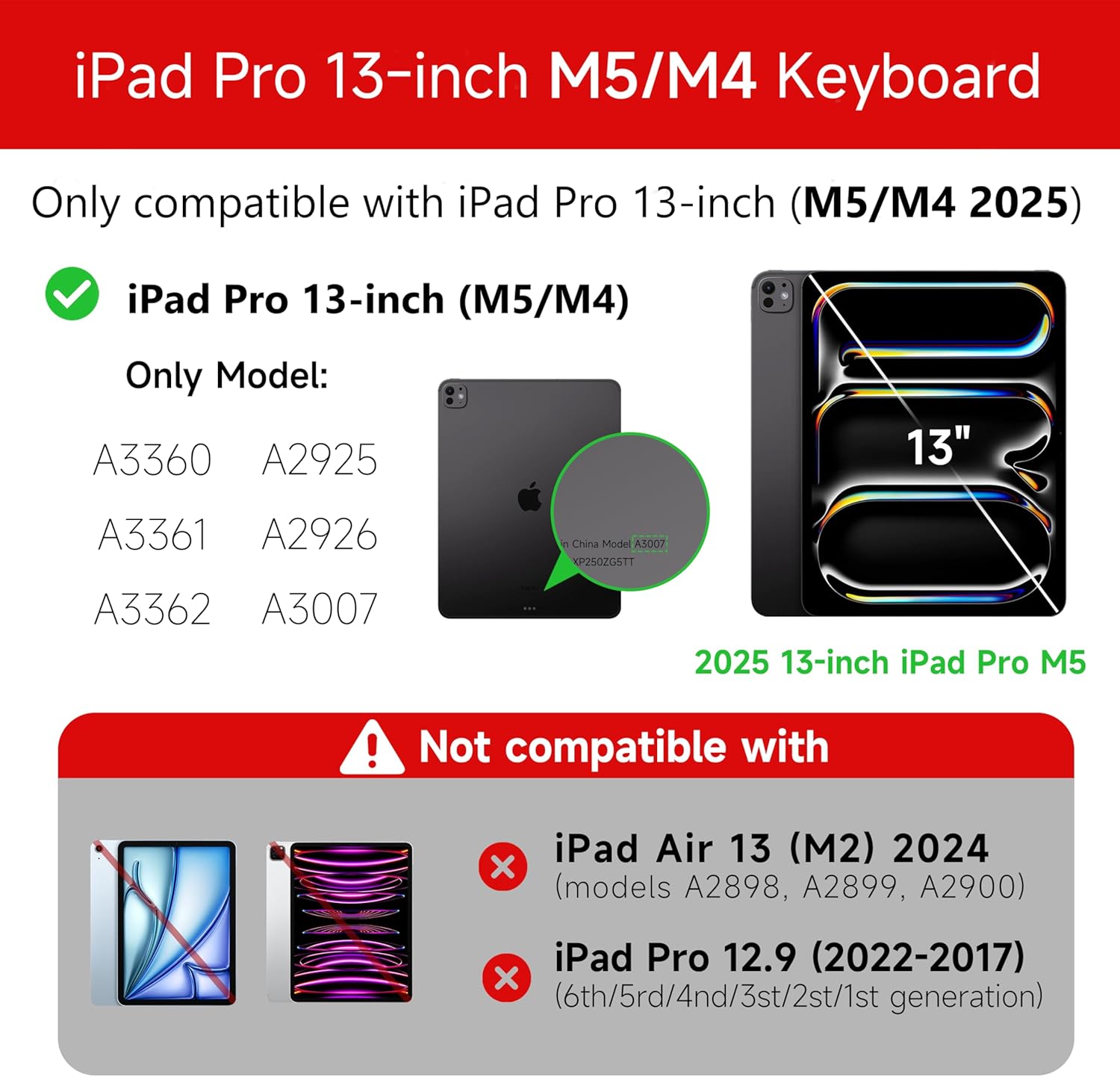
Figure 1: Compatibility details for the HOU iPad Pro 13-inch Keyboard Case.
2. Eto
2.1 Ngba agbara si Keyboard
Before initial use, fully charge the keyboard. Connect the provided USB-C cable to the charging port on the keyboard and to a power source. The charging indicator light will show the charging status.
- Ibudo gbigba agbara: Iru-C
- Akoko gbigba agbara: Approximately <2 hours
- Agbara Batiri: 500mAh
2.2 So iPad Pro rẹ pọ̀ mọ́ra
The keyboard case features a magnetic design for secure attachment. Align your iPad Pro 13-inch with the magnetic back panel of the case. The strong magnets will securely hold your iPad in place, providing stability.

Figure 2: Magnetic attachment for secure iPad placement.
2.3 Bluetooth Asopọ
To connect the keyboard to your iPad Pro via Bluetooth:
- Rii daju pe o ti gba agbara ati ki o ṣiṣẹ lori keyboard.
- Lori iPad rẹ, lọ si Eto > Bluetooth ki o si tan Bluetooth.
- Lórí keyboard, tẹ kí o sì dimu Fn + Control + R for 3 seconds until the indicator light flashes, indicating pairing mode.
- On your iPad, select the keyboard from the list of available devices (e.g., "HOU Keyboard").
- Once connected, the indicator light on the keyboard will stop flashing.
After the initial connection, the keyboard should automatically reconnect to your iPad when both devices are powered on and Bluetooth is enabled.
3. Awọn ilana Iṣiṣẹ
3.1 Adijositabulu Viewing Awọn igun
The keyboard case features a floating design that allows for angle adjustment up to 135 degrees. The keyboard base opens at a 45-degree angle, providing enhanced stability for various viewing and typing positions.
olusin 3: Adijositabulu viewing angle up to 135 degrees.
3.2 Backlight Išė
The keyboard features an adaptive backlight with 7 different colors and 3 adjustable brightness levels. This allows for comfortable typing in various lighting conditions, including low-light environments.

Figure 4: Keyboard backlight in use for typing at night.
3.3 Multi-Touch Trackpad
The integrated multi-touch trackpad supports full-area press and various swipe gestures, transforming your iPad into a laptop-like experience. It provides responsive controls for scrolling, dragging, input, and media control.
Adjusting Trackpad Sensitivity: You can adjust the trackpad sensitivity directly from your iPad's settings to match your personal preference.
- Lọ si Eto lori iPad rẹ.
- Lilö kiri si Wiwọle.
- Find and adjust Ipasẹ ifamọ.

Figure 5: Multi-touch trackpad functionality and sensitivity adjustment.
3.4 Awọn bọtini ọna abuja
The keyboard includes a series of shortcut keys to boost productivity. Refer to the keyboard layout for specific functions.
4. Itọju
The exterior of the keyboard case is made from a semi-silicone material, which is wear-resistant and designed to resist fingerprints and stains, making it easy to clean.
- Lati nu, rọra nu dada pẹlu asọ, damp asọ.
- Avoid using harsh chemicals or abrasive materials, as these may damage the finish.
- Ensure the charging port and keys are free from dust and debris.
5. Laasigbotitusita
5.1 Keyboard Ko Sopọ nipasẹ Bluetooth
- Rí i dájú pé keyboard ti gba agbára tán pátápátá.
- Rí i dájú pé Bluetooth ti ṣiṣẹ́ lórí iPad rẹ.
- Re-enter pairing mode on the keyboard by pressing and holding Fn + Control + R fun 3 aaya.
- Gbagbe ẹrọ naa ninu eto Bluetooth ti iPad rẹ ki o gbiyanju lati so pọ mọ lẹẹkansi.
- Tun bẹrẹ mejeeji iPad ati keyboard.
5.2 Trackpad Lag or Unresponsiveness
- This can sometimes occur due to Bluetooth connectivity. Try turning the keyboard off and then back on.
- Ensure there are no obstructions between the keyboard and the iPad that might interfere with the Bluetooth signal.
- Check for any available iPadOS updates, as software improvements can sometimes resolve connectivity issues.
5.3 Ìmọ́lẹ̀ ẹ̀yìn kò ṣiṣẹ́
- Rii daju pe keyboard ni idiyele batiri ti o to.
- Check the keyboard's function keys for backlight control (usually a dedicated key or Fn combination).
6. Awọn pato
| Ẹya ara ẹrọ | Ẹ̀kúnrẹ́rẹ́ |
|---|---|
| Brand | HOU |
| Awọn ẹrọ ibaramu | 2025 (M4/M5) iPad Pro 13-inch (A2925/A2926/A3007) |
| Asopọmọra Technology | Bluetooth 5.2 |
| Apejuwe Keyboard | Multi-functional with Trackpad |
| Iṣeduro Lilo | Ti ara ẹni |
| Pataki Awọn ẹya ara ẹrọ | Trackpad, Backlit, Hot Keys & Media Keys, Rechargeable, Lightweight |
| Àwọ̀ | Funfun |
| Backlight awọn awọ | 7 RGB awọn awọ |
| Awọn iwọn Ọja (L x W x H) | 32 x 24.2 x 2.7 cm |
| Ohun elo | Aluminum, Metal, ABS, Polyurethane (PU), Semi-silicone |
| Iwọn Nkan | 1.1 kilo |
| Orisun agbara | Agbara Batiri |
| Agbara Batiri | ~ 500mAh |
| Ṣiṣẹ lọwọlọwọ | <10mA |
| Akoko Iduro | ≥ 30 ọjọ |
| Ijinna iṣẹ | ≤10m |
7. Atilẹyin
For any questions or further assistance, please contact the seller directly through your Amazon account:
- Wọle si akọọlẹ Amazon rẹ.
- Go to "Order History".
- Locate your order for the HOU iPad Pro 13-inch Keyboard Case.
- Click on "Contact Seller".