
1. Ifihan
Thank you for choosing the Tesvor S8Pro Robot Vacuum Cleaner. This manual provides essential information for setting up, operating, and maintaining your robot vacuum to ensure optimal performance and longevity. Please read this manual thoroughly before using the product and keep it for future reference.
2. Awọn ilana aabo
To reduce the risk of injury or damage, read these safety instructions carefully. This appliance is for indoor household use only.
- Do not use the robot in wet environments or on surfaces with standing water.
- Keep the robot away from open flames or fragile objects.
- Ensure the charging dock is placed against a wall on a level surface, with no obstacles within 1 meter (3 feet) in front and 0.5 meters (1.5 feet) on either side.
- Má ṣe jẹ́ kí àwọn ọmọdé máa lo robot náà. Máa ṣe àbójútó àwọn ọmọdé àti ẹranko nígbà tí robot náà bá ń ṣiṣẹ́.
- Before cleaning, remove power cords, small objects, and any items that could entangle the brushes.
- Má ṣe lo robot láti kó àwọn pàǹtí ńlá, omi, tàbí àwọn nǹkan tí ń jóná.
- Only use the original power adapter and charging dock provided by Tesvor.
- Ti okun agbara ba bajẹ, o gbọdọ rọpo nipasẹ olupese tabi aṣoju iṣẹ ti o pe lati yago fun awọn ewu.
3. Package Awọn akoonu
Jẹrisi pe gbogbo awọn paati wa ninu package:
- Robot Vacuum Isenkanjade
- Adapter agbara
- Mop paadi
- Gbigba agbara gbigba agbara
- 2-in-1 Water Tank and Dustbin
- Awọn Brushes ẹgbẹ (meji meji)
- Ajọ HEPA (ti fi sii tẹlẹ)
- Itọsọna olumulo
- Ninu Awọn Irinṣẹ
- Isakoṣo latọna jijin
- Bọ́ṣì Roller (tí a ti fi sori ẹrọ tẹlẹ)

Aworan 3.1: Awọn akoonu Package. The package includes the robot vacuum, power adapter, mop pad, charging station, 2-in-1 water tank and dustbin, side brushes, HEPA filter, user manual, cleaning tools, remote control, and roller brush.
4. Ọja Ipariview
The Tesvor S8Pro is a 2-in-1 robot vacuum cleaner featuring powerful suction and intelligent navigation for efficient home cleaning.
Awọn ẹya pataki:
- Ifamọ ti o lagbara: Up to 6000 Pa (adjustable up to 8000 Pa) for deep cleaning.
- 2-in-1 Vacuum & Mop: Simultaneous vacuuming and mopping with a 350 ml electronic water tank and 250 ml dustbin.
- LiDAR LiDAR Lida: Precise mapping and optimal route planning for comprehensive coverage.
- Igbesi aye batiri gigun: 5200 mAh lithium-ion battery, providing up to 180 minutes of runtime at low suction.
- Automatic Charging & Resume: Returns to the charging dock when battery is low and resumes cleaning.
- Sensor-Controlled Obstacle Avoidance: Detects and avoids obstacles to prevent collisions.
- Igbega capeti: Automatically increases suction power on carpets.
- Iṣakoso Smart: Control via smartphone app, compatible with Amazon Alexa and Google Home.

Image 4.1: 2-in-1 Water Tank and Dustbin. The Tesvor S8Pro features a versatile 2-in-1 design, allowing it to vacuum and mop simultaneously. It includes a 350 ml water tank and a 250 ml dustbin.

Image 4.2: Powerful Suction. The Tesvor S8Pro offers powerful suction, adjustable up to 8000Pa, to effectively clean various types of debris from hard floors and carpets. The image shows different suction levels from quiet to max.
5. Eto
5.1 Gbigba agbara ibi iduro
Place the charging dock against a wall on a hard, level surface. Ensure there are no obstacles within 1 meter (3 feet) in front and 0.5 meters (1.5 feet) on either side of the dock to allow the robot to return and charge successfully.
5.2 Gbigba agbara akọkọ
Connect the power adapter to the charging dock and plug it into a wall outlet. Place the robot on the charging dock. The robot will automatically begin charging. For first-time use, fully charge the robot (approximately 5-6 hours).

Image 5.1: Automatic Charging. The robot vacuum automatically returns to its charging dock when the battery is low (below 20%) and resumes cleaning from where it left off once charged (above 80%).
5.3 Fifi awọn gbọnnu ẹ̀gbẹ́ sori ẹrọ
Snap the side brushes onto the corresponding posts on the bottom of the robot until they click into place.
5.4 Installing 2-in-1 Water Tank/Dustbin
Fill the water tank with clean water (for mopping) and ensure the dustbin is empty. Slide the 2-in-1 module into the back of the robot until it locks securely.
5.5 Nsopọ si App
Download the Tesvor app from your smartphone's app store. Follow the in-app instructions to connect your robot vacuum to your home Wi-Fi network. This enables advanced features like scheduling, cleaning mode selection, and real-time mapping.
6. Ṣiṣẹ
6.1 Bíbẹ̀rẹ̀/Dídúró nínú ìmọ́mọ́
- Bẹrẹ: Press the power button on the robot or the 'Clean' button in the app/remote control to start automatic cleaning.
- Duro: Press the power button or 'Clean' button again to pause cleaning.
6.2 ninu awọn ipo
Select cleaning modes via the Tesvor app or remote control:
- Isọmọ Aifọwọyi: The robot intelligently plans an S-shaped path for comprehensive coverage.
- Isọdọmọ Aami: Cleans a specific area intensively.
- Isọfọ eti: Fọ pẹlú Odi ati aga egbegbe.
- Ipo fifọ aṣọ: For wet cleaning, ensure the water tank is filled and the mop pad is attached.

Image 6.1: Smart Cleaning Features. This intelligent robot vacuum supports various cleaning modes including S-shaped path, specific area cleaning, and scheduled cleaning. It generates real-time room maps and can be controlled via Amazon Alexa or Google Home.
6.3 Carpet Boost
The robot automatically detects carpets and increases its suction power for a more thorough clean. It can also navigate over obstacles up to 20mm high.

Image 6.2: Carpet Boost. The robot vacuum automatically detects carpets and increases suction power for a deeper clean. It can climb obstacles up to 20mm.
6.4 Iṣakoso ohun
The Tesvor S8Pro is compatible with Amazon Alexa and Google Home. Follow the instructions in the Tesvor app to link your robot with your voice assistant for convenient control.

Image 6.3: LDS LiDAR Navigation. The robot vacuum uses advanced LDS LiDAR navigation to efficiently map its surroundings, ensuring comprehensive coverage and optimized cleaning paths.
7. Itọju
Regular maintenance ensures your Tesvor S8Pro operates efficiently. Always turn off the robot before performing any maintenance.
7.1 Emptying Dustbin & Cleaning Water Tank
- Press the release button to remove the 2-in-1 module.
- Ṣí ibi ìdọ̀tí náà kí o sì kó àwọn ìdọ̀tí náà dànù.
- Fi omi ṣan eruku ati ojò omi pẹlu omi mimọ. Gba wọn laaye lati gbẹ patapata ṣaaju fifi sii.
- Remove and clean the mop pad after each use.
7.2 Cleaning Main Brush
Open the main brush cover on the bottom of the robot. Remove the main brush and use the cleaning tool to cut and remove any hair or debris tangled around it. Reinstall the brush.
7.3 Cleaning Side gbọnnu
Periodically check the side brushes for tangled hair or debris. Pull them off their posts, clean them, and reattach. Replace worn brushes as needed.
7.4 Cleaning Ajọ
Remove the HEPA filter from the dustbin. Tap it gently to remove dust. Do not wash the HEPA filter with water. Replace the HEPA filter every 3-6 months, depending on usage.
7.5 Awọn sensọ mimọ ati Awọn olubasọrọ gbigba agbara
Wipe the cliff sensors, wall sensors, and charging contacts on both the robot and the charging dock with a clean, dry cloth to ensure proper function.
8. Laasigbotitusita
Ti o ba pade awọn ọran pẹlu igbale robot rẹ, tọka si awọn iṣoro ti o wọpọ ati awọn ojutu wọnyi:
| Isoro | Owun to le Fa | Ojutu |
|---|---|---|
| Robot ko ni tan | Low battery; Power button not pressed | Gba agbara si robot naa; Tẹ bọtini agbara ki o si di mu fun awọn aaya mẹta |
| Robot ko le gba agbara | Àwọn olùbáṣepọ̀ gbígbà agbára dọ̀tí; Ibùdó gbígbà agbára kúrò | Nu awọn olubasọrọ gbigba agbara mọ; Rii daju pe ibudo gbigba agbara ti sopọ mọ |
| Robot di nigbagbogbo | Ju ọpọlọpọ awọn idiwo; Cliff sensosi idọti | Clear the cleaning area; Clean cliff sensors |
| Iṣẹ ṣiṣe mimọ ti ko dara | Dustbin kun; Awọn gbọnnu tangled; Àlẹmọ dí | Dá àpótí ìdọ̀tí sílẹ̀; Nu àwọn búrọ́ọ̀ṣì pàtàkì/ẹ̀gbẹ́; Fọ/rọ́pò àlẹ̀mọ́ |
| Iṣẹ mopping ko ṣiṣẹ | Water tank empty; Mop pad not attached | Fill water tank; Attach mop pad correctly |
For further assistance, please contact Tesvor customer support.
9. Awọn pato
| Ẹya ara ẹrọ | Ẹ̀kúnrẹ́rẹ́ |
|---|---|
| Brand | Tesvor |
| Orukọ awoṣe | YC-S8 Pro |
| Nọmba awoṣe | M2-NLT |
| Agbara afamora | 6000 Pa (adjustable up to 8000 Pa) |
| Lilọ kiri Iru | LiDAR Lilọ kiri |
| Batiri Iru | Litiumu-dẹlẹ |
| Agbara Batiri | 5200 mAh |
| Max asiko isise | 180 minutes (at lowest suction) |
| Omi ojò Agbara | 350 milimita |
| Dustbin Agbara | 250 milimita |
| Àlẹmọ Iru | HEPA |
| Ọna Iṣakoso | Ohun elo, Iṣakoso latọna jijin |
| Awọn ẹrọ ibaramu | Amazon Echo, Google Home, Smartphone, Tablet |
| Awọn iwọn Ọja (Robot) | 33L x 33W x 10H cm |
| Awọn Iwọn Ibudo Gbigba agbara | 17.5L x 9W x 11.5H cm |
| Àwọ̀ | Funfun |
| Niyanju Lilo | Home cleaning, floors, carpets, pet hair removal |
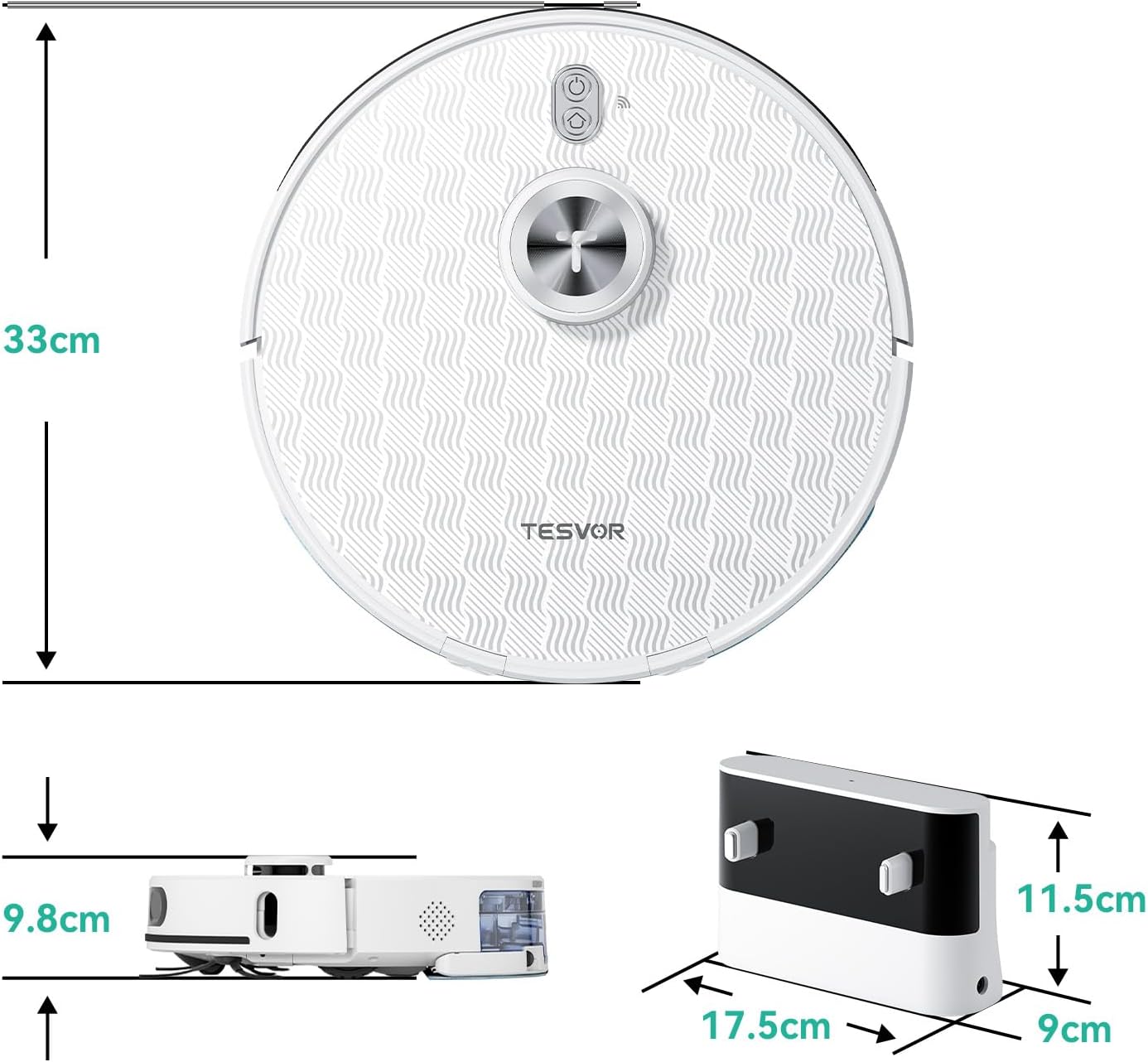
Aworan 9.1: Awọn iwọn ọja. The robot vacuum measures 33cm in diameter and 9.8cm in height. The charging dock measures 17.5cm in width, 9cm in depth, and 11.5cm in height.
10. Atilẹyin ọja ati Support
The Tesvor S8Pro Robot Vacuum Cleaner comes with a 2-odun atilẹyin ọja. For warranty claims, technical support, or any questions regarding your product, please contact Tesvor customer service through the official website or your purchase platform. Please have your model number (M2-NLT) and proof of purchase ready.