
1. Ifihan
The Groov-e Lisbon Portable DAB & FM Digital Radio offers a versatile listening experience with its dual-band radio capabilities and Bluetooth connectivity. Designed for portability, it features an intuitive LCD display, a built-in alarm clock, and a headphone jack for private listening. This manual provides detailed instructions for setup, operation, and maintenance of your Lisbon radio.

Aworan: Pariview of the Groov-e Lisbon radio highlighting its key features like DAB/FM, Bluetooth, LCD display, alarm clock, and headphone socket.
2. Awọn ẹya Ọja
- DAB/FM Digital Stations & Bluetooth Streaming: This portable digital radio comes with DAB & FM technology, so tune into preset stations with auto-scan and manual tuning. Plus use Bluetooth to turn your radio into a speaker and stream your music on the go.
- Ifihan LCD Aláwọ̀ Búlúù: The LCD screen features a blue background light that notifies you of the radio station that you're tuned into and can be dimmed or turned off, while the easy front-on buttons are simple to use for easy tuning and navigation.
- Built-In Alarm Clock: The handy built-in alarm clock allows you to set your alarm clock as to when you want it to go off so you can stay organised and also features a snooze and timer function.
- 3.5mm Headphone Input: Thanks to the 3.5mm jack input you can easily plug in your own earphones so you can listen quietly and in peace while the expanding telescopic antenna allows for crystal clear signal.
- Designed to Travel: Portable, sleek, and sized to fit on a shelf or table, this radio can be powered using a USB cable or batteries (not included); a convenient travel companion that can be easily carried or tucked into your backpack or luggage.
3. Package Awọn akoonu
Jọwọ ṣayẹwo pe gbogbo awọn nkan wa:
- Groov-e Lisbon Portable DAB & FM Digital Radio
- Okun Agbara USB
- Afowoyi Olumulo (iwe-ipamọ yii)
4. Awọn iṣakoso ati Ifihan
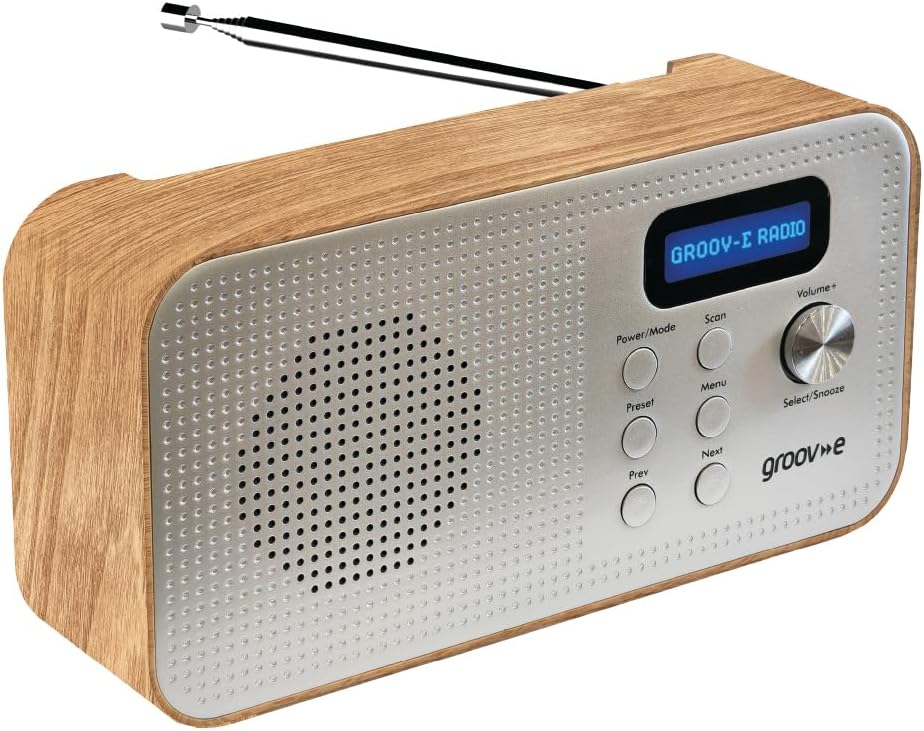
Image: Front panel of the Groov-e Lisbon radio, detailing the layout of buttons, the volume knob, and the LCD screen.
Awọn iṣakoso Igbimọ iwaju:
- Bọtini Agbara / Ipo: Press to turn the radio on or off. Press repeatedly to cycle through DAB, FM, and Bluetooth modes.
- Bọtini Ṣiṣayẹwo: Initiates an auto-scan for available radio stations in DAB or FM mode.
- Bọtini Akojọ: Accesses the menu options for the current mode.
- Bọtini tito tẹlẹ: Used to save and recall your favorite radio stations.
- Prev Button: Navigates to the previous station, menu option, or track.
- Bọtini atẹle: Navigates to the next station, menu option, or track.
- Volume+ / Select/Snooze Knob: Rotate to adjust volume. Press to select a menu option or to activate the snooze function when an alarm sounds.
Ifihan LCD:
The blue backlit LCD display shows current station information, time, alarm status, and menu options. It can be dimmed or turned off to conserve power or for nighttime use.

Image: A graphic icon symbolizing an LCD display, indicating the presence of a digital screen on the radio.
5. Eto
Powering Your Radio:
The Groov-e Lisbon radio can be powered in two ways:
- Agbara agbara USB: Connect the supplied USB cable to the radio's USB port and plug the other end into a compatible USB power adapter (not included) or a powered USB port.
- Agbara Batiri: For portable use, insert 4 x AA batteries (not included) into the battery compartment located on the back of the unit. Ensure correct polarity.
Eriali:
Extend the telescopic antenna fully for optimal DAB and FM radio reception.

Image: A woman enjoying the Groov-e Lisbon radio outdoors, illustrating its portable design and ease of use for travel.
6. Awọn ilana Iṣiṣẹ
6.1 Agbara Tan / Pa ati Aṣayan Ipo
- To turn on the radio, press the Agbara / Ipo bọtini.
- Lati paa redio, tẹ mọlẹ Agbara / Ipo bọtini.
- To switch between DAB, FM, and Bluetooth modes, press the Agbara / Ipo bọtini leralera.
6.2 Iṣẹ́ Rédíò DAB
- Ṣiṣayẹwo Aifọwọyi: Ni ipo DAB, tẹ bọtini naa Ṣayẹwo button to automatically search for and store all available DAB stations.
- Itọsọna Afowoyi: Lo awọn Iṣaaju or Itele buttons to browse through available stations.
- Fifipamọ awọn tito tẹlẹ: Tune si ibudo ti o fẹ. Tẹ mọlẹ Tito tẹlẹ button until "Preset Store" appears. Use Tẹlẹ/Itele to select a preset number (1-20), then press Select/Snooze bọtini lati jẹrisi.
- ÌRallNT Pres Awọn tito tẹlẹ: Ni soki tẹ awọn Tito tẹlẹ bọtini. Lo Tẹlẹ/Itele to select the desired preset number, then press Select/Snooze bọtini lati jẹrisi.
6.3 FM Radio isẹ
- Ṣiṣayẹwo Aifọwọyi: Ni ipo FM, tẹ bọtini naa Ṣayẹwo bọtini lati wa ati tọju awọn ibudo FM ti o wa laifọwọyi.
- Itọsọna Afowoyi: Lo awọn Iṣaaju or Itele awọn bọtini lati itanran-tune awọn igbohunsafẹfẹ.
- Fifipamọ awọn tito tẹlẹ: Tune si ibudo ti o fẹ. Tẹ mọlẹ Tito tẹlẹ button until "Preset Store" appears. Use Tẹlẹ/Itele to select a preset number (1-20), then press Select/Snooze bọtini lati jẹrisi.
- ÌRallNT Pres Awọn tito tẹlẹ: Ni soki tẹ awọn Tito tẹlẹ bọtini. Lo Tẹlẹ/Itele to select the desired preset number, then press Select/Snooze bọtini lati jẹrisi.

Image: The Groov-e Lisbon radio displayed with text emphasizing its DAB/FM digital station capabilities and Bluetooth streaming functionality.
6.4 Bluetooth Asopọmọra
- Yi redio pada si Bluetooth ipo nipa lilo Agbara / Ipo button. The display will show "Bluetooth Pairing".
- On your Bluetooth-enabled device (smartphone, tablet, etc.), search for "Groov-e Lisbon" in the Bluetooth settings.
- Select "Groov-e Lisbon" to pair. Once connected, the radio will indicate successful pairing.
- You can now stream audio from your device to the radio. Use the Tẹlẹ/Itele buttons on the radio to skip tracks, and the Iwọn didun + koko lati ṣatunṣe iwọn didun.
6.5 Itaniji Aago Išė
- Ṣiṣeto Itaniji: Tẹ awọn Akojọ aṣyn bọtini, lẹhinna lo Tẹlẹ/Itele to navigate to "Alarm Setup". Press Select/Snooze to enter. Follow the on-screen prompts to set the alarm time, source (DAB/FM/Buzzer), and volume.
- Sun Nigbati itaniji ba dun, tẹ bọtini naa Select/Snooze knob to activate snooze. The alarm will temporarily stop and sound again after a set interval.
- Idaduro Itaniji naa: Press any other button (except Snooze) to turn off the alarm for the day.
- Akoko oorun: Tẹ awọn Akojọ aṣyn button, then navigate to "Sleep Timer". Use Tẹlẹ/Itele to set the desired sleep duration (e.g., 15, 30, 60 minutes). The radio will automatically turn off after the set time.

Image: A graphic icon symbolizing an alarm clock, indicating the radio's built-in alarm functionality.
6.6 Agbekọri Lilo
- Plug any standard 3.5mm headphones into the headphone jack located on the side or back of the radio.
- The radio's internal speaker will automatically mute when headphones are connected.
- Satunṣe iwọn didun nipa lilo awọn Iwọn didun + koko.

Image: A graphic icon symbolizing headphones, indicating the radio's headphone jack for private listening.
7. Itọju
- Ninu: Lo aṣọ rírọrùn tí ó gbẹ láti nu ojú rédíò náà. Má ṣe lo àwọn ohun ìfọṣọ tàbí àwọn ohun èlò ìfọṣọ.
- Itọju Batiri: If using batteries, remove them if the radio will not be used for an extended period to prevent leakage.
- Ibi ipamọ: Tọju redio ni itura, aye gbigbẹ kuro lati orun taara ati awọn iwọn otutu to gaju.
- Eriali: Handle the telescopic antenna with care to avoid bending or breaking.
8. Laasigbotitusita
| Isoro | Owun to le Fa | Ojutu |
|---|---|---|
| Redio ko tan. | No power, flat batteries, or USB cable not connected properly. | Ensure USB cable is securely connected or replace batteries. |
| Gbigba redio ti ko dara (DAB/FM). | Antenna not extended, weak signal area, or interference. | Fully extend the telescopic antenna. Try repositioning the radio. Avoid placing near other electronic devices. |
| Ko si ohun. | Volume too low, headphones connected, or incorrect mode. | Increase volume. Disconnect headphones if not needed. Ensure correct mode (DAB/FM/Bluetooth). |
| Asopọ Bluetooth kuna. | Radio not in pairing mode, device too far, or already paired. | Ensure radio is in Bluetooth mode and "Pairing" is displayed. Move device closer. Unpair from other devices if necessary. |
| Itaniji ko dun. | A kò ṣètò itaniji, iwọn didun itaniji kere ju, tabi itaniji ti wa ni pipa. | Verify alarm settings (time, source, volume) in the menu. Ensure alarm is enabled. |
9. Awọn pato
- Awoṣe: Lisbon (5060108299435)
- Awọn iwọn ọja: 18.1L x 7W x 10H sẹntimita
- Ìwúwo: 360 g
- Imọ-ẹrọ Asopọmọra: Bluetooth
- Imọ-ẹrọ Tuner: DAB, FM
- Orisun Agbara: Battery Powered (4 x AA, not included), AC Adapter (via USB cable)
- Ṣe atilẹyin Awọn ẹgbẹ Redio: DAB, FM
- Awọn ẹya pataki: Portable, Headphone Socket, Alarm Clock, Bluetooth Connectivity, LCD Display
- Àwọ̀: Brown
- Olupese: Rashmian Ltd.
10. Atilẹyin ọja ati Support
For warranty information and technical support, please refer to the documentation provided at the time of purchase or visit the official Groov-e webojula. O tun le kan si alagbata rẹ fun iranlọwọ.
Groov-e Official Webojula: www.groov-e.co.uk