
1. Ifihan
This instruction manual provides essential information for the safe and effective use of your GT POWER AC Adapter, model 602. This power supply is designed to be compatible with the Verizon WNC-CR200A Gateway Router. Please read this manual thoroughly before use and retain it for future reference.
2. Alaye Aabo
ÌKÌLỌ̀: Láti dín ewu ìkọlù iná mànàmáná, iná, tàbí ìpalára kù, kíyèsí àwọn ìlànà ààbò wọ̀nyí:
- Ensure the power adapter is used with devices that match its voltage ati lọwọlọwọ ni pato.
- Do not expose the adapter to water, rain, or excessive moisture.
- Ma ṣe tuka tabi yi ohun ti nmu badọgba pada. Tọkasi gbogbo iṣẹ si oṣiṣẹ oṣiṣẹ.
- Avoid placing the adapter in areas with poor ventilation or near heat sources.
- Inspect the adapter and cable for damage before each use. Do not use if damaged.
- Jeki kuro ni arọwọto awọn ọmọde.
- Yọọ ohun ti nmu badọgba lati inu iṣan agbara nigbati ko si ni lilo fun awọn akoko ti o gbooro sii.
This adapter features Over VoltagIdaabobo e (OVP), Idaabobo Lori Lọwọlọwọ (OCP), ati Idaabobo Kukuru Circuit (SCP) lati rii daju pe o ṣiṣẹ lailewu.
3. Package Awọn akoonu
- 1 x GT POWER AC Adapter (Model 602)
4. Ọja Ipariview
The GT POWER AC Adapter is a compact and reliable power supply designed for specific networking equipment. It converts standard AC wall power to the DC power required by your device.

Nọmba 4.1: Iwaju view of the GT POWER AC Adapter, showing the power prongs and the output cable.

Nọmba 4.2: Apa view of the GT POWER AC Adapter, highlighting the barrel connector at the end of the output cable.
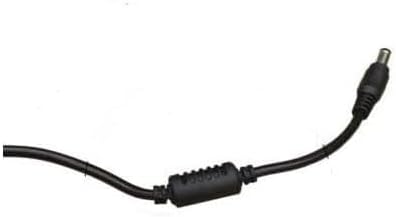
Nọmba 4.3: Sun mo tipetipe view of the barrel connector, which plugs into the compatible device.
5. Eto
Follow these steps to properly connect your GT POWER AC Adapter to your Verizon WNC-CR200A Gateway Router.
- Jẹrisi Ibamu Ẹrọ: Before connecting, ensure your device is a Verizon WNC-CR200A Gateway Router. The adapter is specifically designed for this model. You can often find the model number on a label at the bottom or back of your router.

Nọmba 5.1: Example of a Verizon WNC-CR200A Gateway Router's bottom label, indicating the model number for compatibility verification.
- Sopọ si Ẹrọ: Insert the barrel connector of the GT POWER AC Adapter firmly into the power input port of your Verizon WNC-CR200A Gateway Router.
- Sopọ si Ile-iṣẹ Agbara: Plug the AC prongs of the adapter into a standard 100-240V AC wall outlet.
- Agbara Tan: Once connected, your Verizon WNC-CR200A Gateway Router should power on automatically or can be turned on using its power button, if available.
6. Ṣiṣẹ
The GT POWER AC Adapter operates automatically once connected. It provides a stable power supply to your compatible device. No user interaction is required for its operation beyond initial connection.
- Ensure the adapter is always connected to a functioning power outlet.
- Avoid disconnecting the adapter during critical operations of your router to prevent data loss or system instability.
7. Itọju
Itọju to dara ṣe idaniloju gigun ati iṣẹ ailewu ti ohun ti nmu badọgba AC rẹ.
- Ninu: Ge asopọ ohun ti nmu badọgba lati iṣan agbara ati ẹrọ ṣaaju ṣiṣe mimọ. Lo asọ asọ ti o gbẹ lati nu ita. Ma ṣe lo awọn olutọpa olomi tabi awọn olomi.
- Ibi ipamọ: Nigbati o ko ba si ni lilo, tọju ohun ti nmu badọgba ni itura, aye gbigbẹ, kuro lati orun taara ati awọn iwọn otutu to gaju. Yago fun yiyi okun ni wiwọ lati yago fun ibajẹ.
- Itọju USB: Do not bend, twist, or pull the cable excessively. Avoid placing heavy objects on the cable.
8. Laasigbotitusita
If you encounter issues with your GT POWER AC Adapter, refer to the following common problems and solutions:
| Isoro | Owun to le Fa | Ojutu |
|---|---|---|
| Ẹrọ ti ko ni agbara lori. |
|
|
| Adapter kan lara pọnran gbona. |
|
|
9. Awọn pato
| Ẹya ara ẹrọ | Ẹ̀kúnrẹ́rẹ́ |
|---|---|
| Nọmba awoṣe | 602 |
| Brand | AGBARA GT |
| Iṣagbewọle Voltage | AC 100-240V (50/60Hz) |
| O wujade Voltage | DC 12V |
| Ijade lọwọlọwọ | 3A |
| Wattage | 36 Wattis |
| Asopọmọra Iru | Agba |
| USB Ipari | 59 inches (approx. 1.5 meters) |
| Idaabobo Awọn ẹya ara ẹrọ | OVP (Lori VoltagIdaabobo e), OCP (Aabo Lori Lọwọlọwọ), SCP (Aabo Kukuru Circuit) |
| Awọn ẹrọ ibaramu | Verizon WNC-CR200A Gateway Router CR200A WiFi6 NKR-LV65C-T3 |
10. Atilẹyin ọja ati Support
This GT POWER AC Adapter comes with a Atilẹyin ọja Ọdun kan lati ọjọ ti o ra. Ni afikun, a 30-Day Owo Back Garanti ni a funni.
For technical support, warranty claims, or further assistance, please contact your retailer or the manufacturer directly. Please have your purchase information and product model number (602) available when contacting support.
For more information, you may refer to the seller's contact details provided at the point of purchase.