
1. Ifihan
The Denon DJ PRIME GO+ is an ultra-portable, battery-powered standalone DJ controller and mixer designed for high-end performance and exceptional music streaming. This device integrates advanced features for professional DJs on the move, offering comprehensive control and connectivity in a compact form factor.

Figure 1: Denon DJ PRIME GO+ Portable DJ Controller and Mixer.
2. Awọn ẹya ara ẹrọ Ọja Loriview
The PRIME GO+ offers a robust set of features for versatile DJing:
- Isẹ ti o ni imurasilẹ: Powered by Engine DJ OS for laptop-free performances.
- Wi-Fi Music Streaming: Access to over 100 million tracks from various streaming services including Apple Music and Amazon Music Unlimited via built-in Wi-Fi and a DRM chip.
- Stem Separation: Pre-render tracks with Engine DJ Desktop to isolate or remove vocals, melody, bass, and drums during live performance.
- Portable FX Powerhouse: Features 26 Main FX, 2 knob-controlled Sweep FX, Fader Echo FX, and 10 interactive Touch FX options.
- Advanced Media Options: SD card slot and USB input for accessing saved music libraries and playlists.
- Batiri Ajọpọ: Rechargeable battery for portable use, allowing preparation, practice, and performance anywhere.
- Engine Lighting Enhancements: Onboard beat-synced control for Philips Hue, Nanoleaf, and DMX lights.

Figure 2: Key features of the PRIME GO+ including standalone capability, Wi-Fi, Bluetooth, performance pads, battery life, streaming, internal FX, and lighting control.
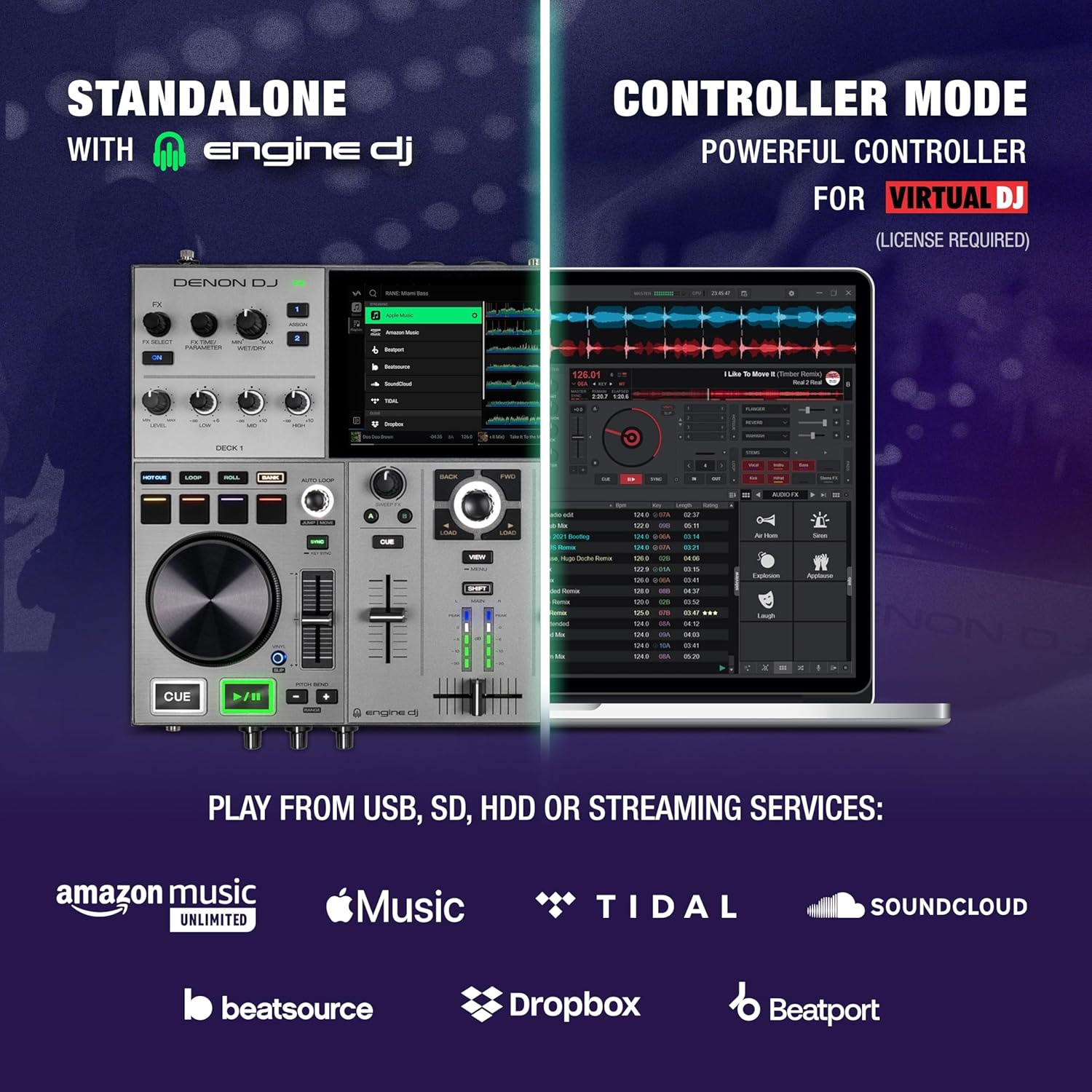
Figure 3: Illustration of standalone mode with Engine DJ and controller mode for Virtual DJ (license required).

Figure 4: Displaying continuous feature updates via Engine DJ, including Day Mode, Bluetooth I/O, Touch FX, Drop Sampler, Match, and Fader Echo.
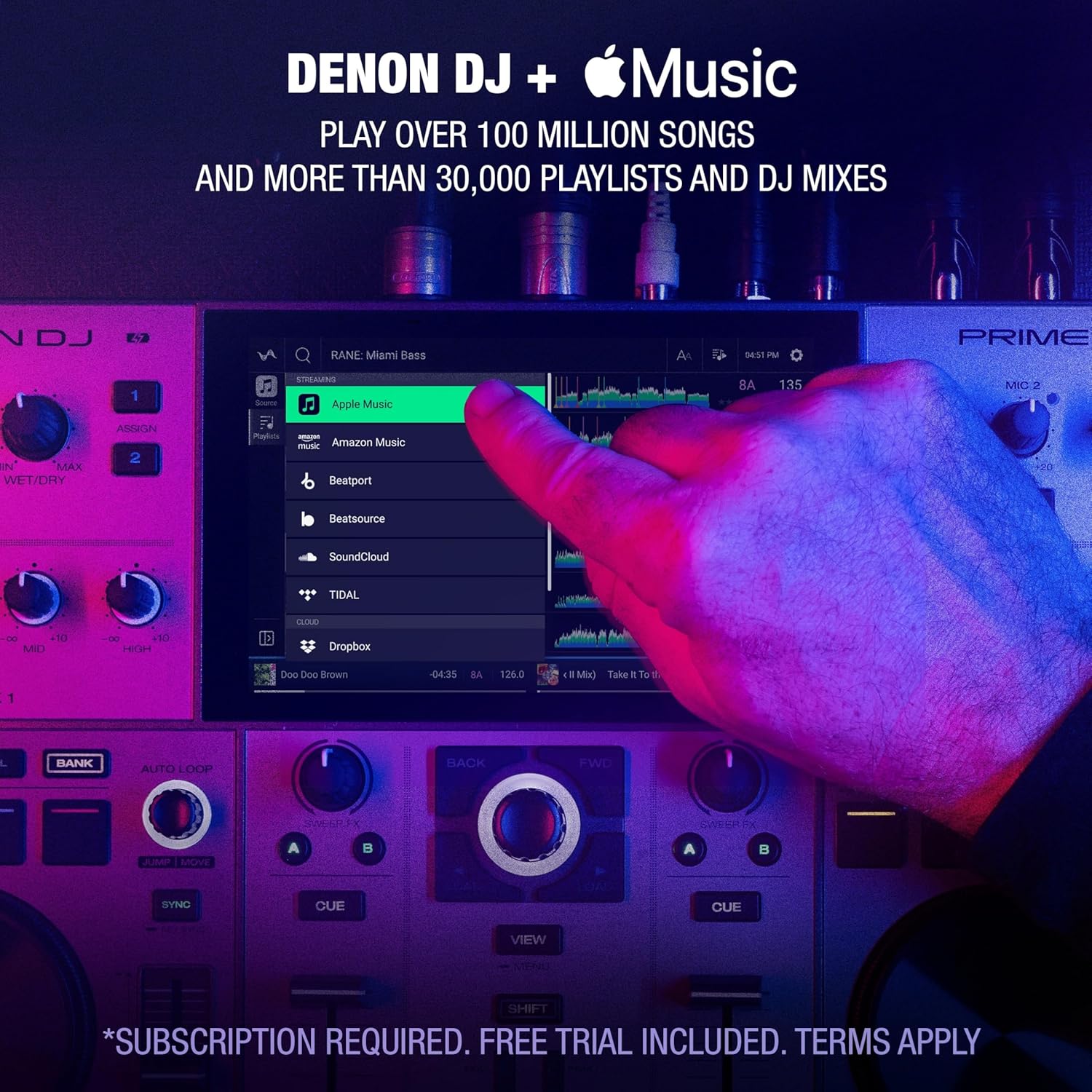
Figure 5: The PRIME GO+ supports streaming over 100 million songs and 30,000+ playlists from Apple Music (subscription required).

Figure 6: The PRIME GO+ supports 4-part standalone stems for vocal, melody, bass, and drum separation, with lightning-fast rendering on Engine DJ Desktop.

Figure 7: Embedded Engine Lighting with on-screen control for Philips Hue, Nanoleaf, and DMX lighting systems.
3. Eto ati awọn isopọ
To set up your Denon DJ PRIME GO+:
- Asopọ agbara: Connect the included power cord to the PRIME GO+ and a power outlet. The device can also operate on its internal rechargeable battery.
- Awọn abajade Audio: Connect your main speakers to the balanced XLR outputs or RCA output pair. For booth monitoring, use the 1/4" booth outputs.
- Agbekọri: Plug your headphones into either the 1/4" or 1/8" stereo headphone jacks on the front panel.
- Awọn gbohungbohun: Connect up to two microphones using the 2 mic combo jack inputs on the rear panel.
- Iṣawọle Iranlọwọ: Use the RCA AUX input pair for connecting external audio sources.
- Ibi ipamọ Media: Insert an SD card into the SD card slot or connect a USB drive to the USB port for accessing your music library.
- Asopọ Kọmputa: For controller mode or library management, connect the PRIME GO+ to your computer via the USB B port.
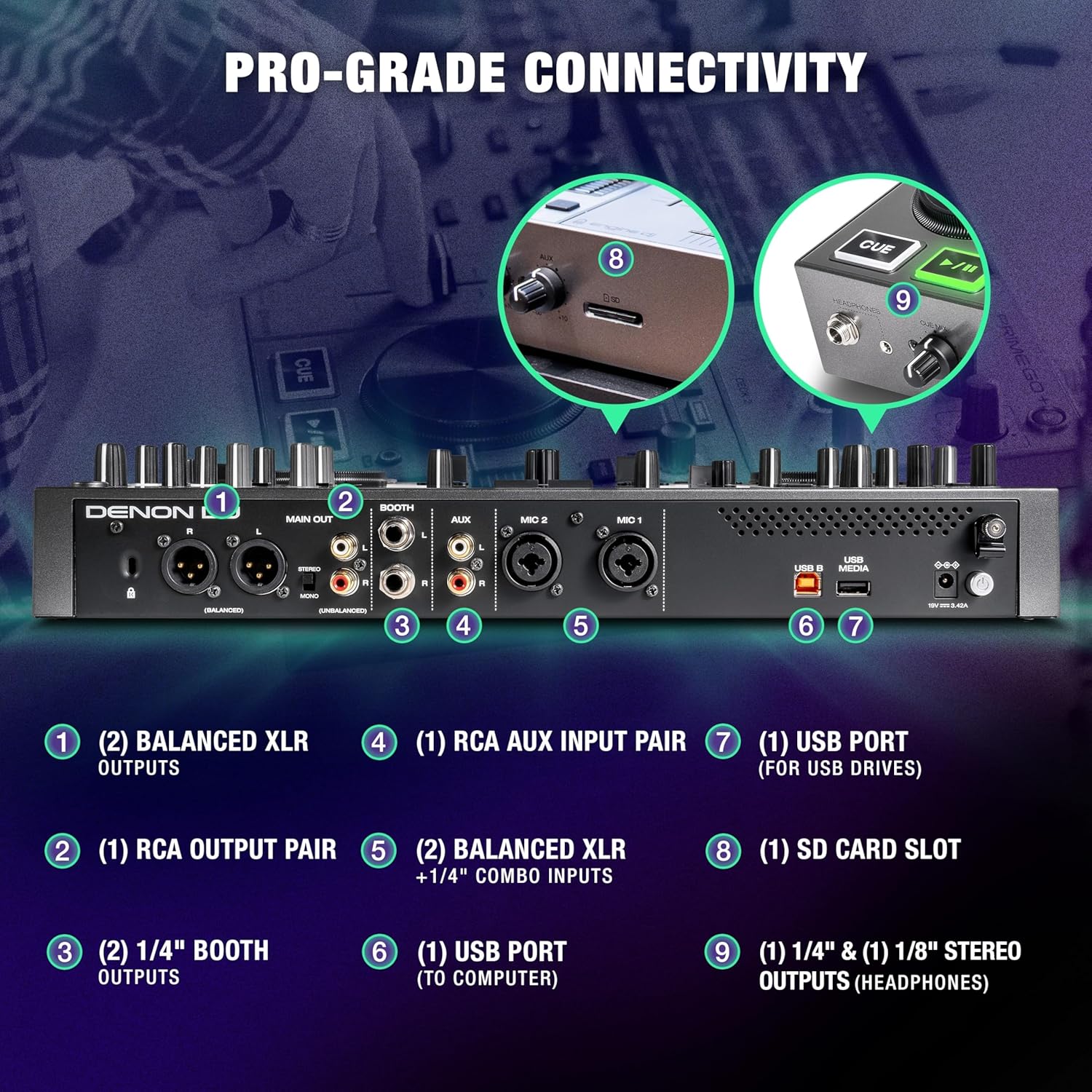
Figure 8: Diagram illustrating the pro-grade connectivity options on the rear and front panels, including balanced XLR outputs, RCA outputs, booth outputs, RCA AUX input, mic inputs, USB ports, and SD card slot.

Figure 9: Actual view of the rear panel connections, showing main outputs, booth outputs, AUX inputs, mic inputs, USB ports, and power input.

Figure 10: Actual view of the front panel connections, including headphone jacks, cue mix, level, AUX controls, and SD card slot.
4. Awọn ilana Iṣiṣẹ
4.1. Awọn iṣakoso ipilẹ
The PRIME GO+ features a 7-inch multi-touch display for intuitive control over your music library and performance parameters. Use the jog wheels for scratching, nudging, and track navigation. The device includes dedicated controls for EQ, gain, and channel faders for each of its two decks.

olusin 11: Top-isalẹ view of the PRIME GO+ showing the layout of the jog wheels, mixer section, and touchscreen display.
4.2. Browsing and Loading Tracks
Navigate your music library using the touchscreen or the dedicated browse knob. Select tracks from connected USB drives, SD cards, or streaming services. Load tracks to Deck 1 or Deck 2 using the respective load buttons.

Figure 12: Close-up of a jog wheel and the central browse knob, used for track selection and navigation.
4.3. Awọn ẹya ara ẹrọ iṣẹ
Utilize the performance pads for hot cues, loops, rolls, and samples. The FX section allows for real-time manipulation of audio with various effects like Echo, Flanger, Reverb, and Phaser. Adjust FX parameters using the dedicated knobs.

Figure 13: Close-up of a jog wheel with play/pause and cue buttons, essential for track control.

Figure 14: Close-up of the FX section, showing FX select buttons, parameter knobs, and wet/dry control.
5. Media Integration
The PRIME GO+ supports various media sources for your DJ sets:
- Awọn awakọ USB: Connect USB flash drives or external hard drives to the USB ports for direct playback of your music library.
- Kaadi SD: Utilize the SD card slot for convenient access to your prepared playlists and tracks.
- Wi-Fi ṣiṣanwọle: Connect to a Wi-Fi network to stream music directly from supported services like Amazon Music Unlimited, TIDAL, Beatport, Beatsource, and Soundcloud GO+.
- Bluetooth: The device features Bluetooth input/output for wireless audio connectivity.
6. Awọn ẹya ara ẹrọ ti ilọsiwaju
6.1. Stem Separation
Leverage the innovative Stem Separation feature by pre-rendering tracks using Engine DJ Desktop. This allows you to isolate or remove vocal, melodic, bass, and drum elements from tracks in real-time during your performance, offering unprecedented creative control.
6.2. Engine Lighting
Control compatible smart home and DMX lighting systems directly from your PRIME GO+. The Engine Lighting feature provides beat-synced control, allowing you to synchronize your light show with your music for an immersive experience. This includes increased autoloop count to 128, visual feedback for active autoloops, and new repeat preferences.
7. Itọju
To ensure the longevity and optimal performance of your PRIME GO+:
- Ninu: Regularly wipe the unit with a soft, dry, lint-free cloth. Avoid using harsh chemicals or abrasive cleaners.
- Ibi ipamọ: Tọju ẹyọ naa ni itura, aye gbigbẹ kuro lati orun taara ati awọn iwọn otutu to gaju.
- Itọju Batiri: For optimal battery life, avoid fully discharging the battery frequently. Charge the unit regularly, even when not in use for extended periods.
- Awọn imudojuiwọn famuwia: Periodically check the Denon DJ webaaye fun awọn imudojuiwọn famuwia lati rii daju pe o ni awọn ẹya tuntun ati awọn atunṣe kokoro.
8. Laasigbotitusita
If you encounter issues with your PRIME GO+, consider the following common solutions:
- Ko si Agbara: Ensure the power adapter is securely connected to both the unit and a working power outlet. Check the battery charge level if operating wirelessly.
- Ko si Ijade Olohun: Verify all audio cables are correctly connected. Check volume levels on the PRIME GO+, connected speakers, and headphones. Ensure the correct output is selected.
- Music Not Loading: Confirm that your USB drive or SD card is properly inserted and formatted correctly (FAT32/exFAT). Ensure the music files are in a supported format.
- Awọn ọran Asopọmọra Wi-Fi: Check your Wi-Fi network connection. Ensure the PRIME GO+ is within range of the router. Restart the unit and your router if necessary.
- Awọn abawọn sọfitiwia: Restart the PRIME GO+. If issues persist, check for and install any available firmware updates.
For more detailed troubleshooting, refer to the official Denon DJ support resources online.
9. Awọn pato
| Ẹya ara ẹrọ | Ẹ̀kúnrẹ́rẹ́ |
|---|---|
| Iwọn Nkan | 8.11 iwon |
| Ọja Mefa | 10.8 x 16.2 x 2.1 inches |
| Nọmba Awoṣe Nkan | PRIMEGO+ |
| Awọn batiri | Awọn batiri Lithium Ion 4 nilo (pẹlu) |
| Batiri Iru | Litiumu Iwon |
| Orisun agbara | Agbara Batiri |
| Voltage | 19 Volts (DC) |
| Nọmba ti awọn ikanni | 2 |
| Asopọmọra Technology | 1/4" Headphone Jack, 1/4" TRS Outputs (Booth L/R), 1/8" Headphone Jack, Bluetooth, RCA Output Pair (Unbalanced L/R), SD card slot, USB port (for USB drives), USB port (to computer), Wi-Fi, XLR Outputs (Balanced L/R) |

Figure 15: Visual representation of the PRIME GO+ dimensions and weight.
10. Official ọja Video
Video 1: Official launch promotion for the Denon DJ PRIME GO+, showcasing awọn ẹya ara ẹrọ rẹ ati gbigbe.
11. Atilẹyin ọja ati Support
For warranty information, please refer to the documentation included with your Denon DJ PRIME GO+ or visit the official Denon DJ website. Technical support and additional resources can also be found on the manufacturer's webojula.