
1. Ifihan
Thank you for choosing the Donner DDP-95 Digital Piano. This instrument is designed to provide an authentic piano playing experience with modern digital features, suitable for beginners and experienced players alike. This manual provides essential information for the safe and effective use of your digital piano.
1.1 Abo Alaye
- Ibi ti ina elekitiriki ti nwa: Lo oluyipada agbara pàtó kan. Rii daju pe voltage ibaamu ti agbegbe rẹ ipese agbara.
- Ibi: Place the piano on a stable, level surface. Avoid direct sunlight, heat sources, and excessive humidity.
- Ninu: Lo aṣọ rírọrùn tí ó gbẹ fún ìwẹ̀nùmọ́. Má ṣe lo àwọn ohun ìfọṣọ omi tàbí àwọn ohun èlò ìfọṣọ.
- Omi ati Ọrinrin: Keep the instrument away from water or any liquids. Do not operate with wet hands.
- Afẹfẹ: Ensure proper ventilation around the instrument to prevent overheating.
- Ṣiṣẹ: Do not attempt to repair the instrument yourself. Refer all servicing to qualified personnel.
2. Ọja Ipariview
The Donner DDP-95 features an 88-key weighted keyboard, a 4.3-inch LCD display, and a wide array of tones, rhythms, and teaching modes to enhance your musical journey.
2.1 Main irinše
- Digital Piano Unit (Keyboard and Stand)
- 3-Pedal System (Soft, Sostenuto, Sustain)
- Isinmi Orin
- Adapter agbara
- Itọsọna olumulo

Figure 2.1: The Donner DDP-95 Digital Piano, showcasing its full size, integrated stand, and three-pedal unit.

olusin 2.2: Top-isalẹ view of the DDP-95 control panel, highlighting the LCD display and various function buttons for wireless connection, split, dual tones, MP3, transpose, chord, drum kit, and metronome.
3. Eto
3.1 Apejọ
The DDP-95 typically comes with the keyboard and stand as separate components. Follow the included assembly guide for detailed instructions on attaching the keyboard to the stand and securing the pedal unit. Ensure all screws are tightened securely before use.
3.2 Nsopọ Agbara
- Connect the DC power adapter to the DC 15V input jack on the rear of the piano.
- So ohun ti nmu badọgba naa sinu ibudo ina deede kan.
3.3 Connecting Pedals
Connect the pedal unit cable to the 'PEDAL' jack on the rear of the piano. The DDP-95 features a 3-pedal system for Soft, Sostenuto, and Sustain functions.

Figure 3.1: The three-pedal system, including Soft, Sostenuto, and Sustain pedals, designed for an authentic playing experience.
3.4 Awọn isopọ Ohun
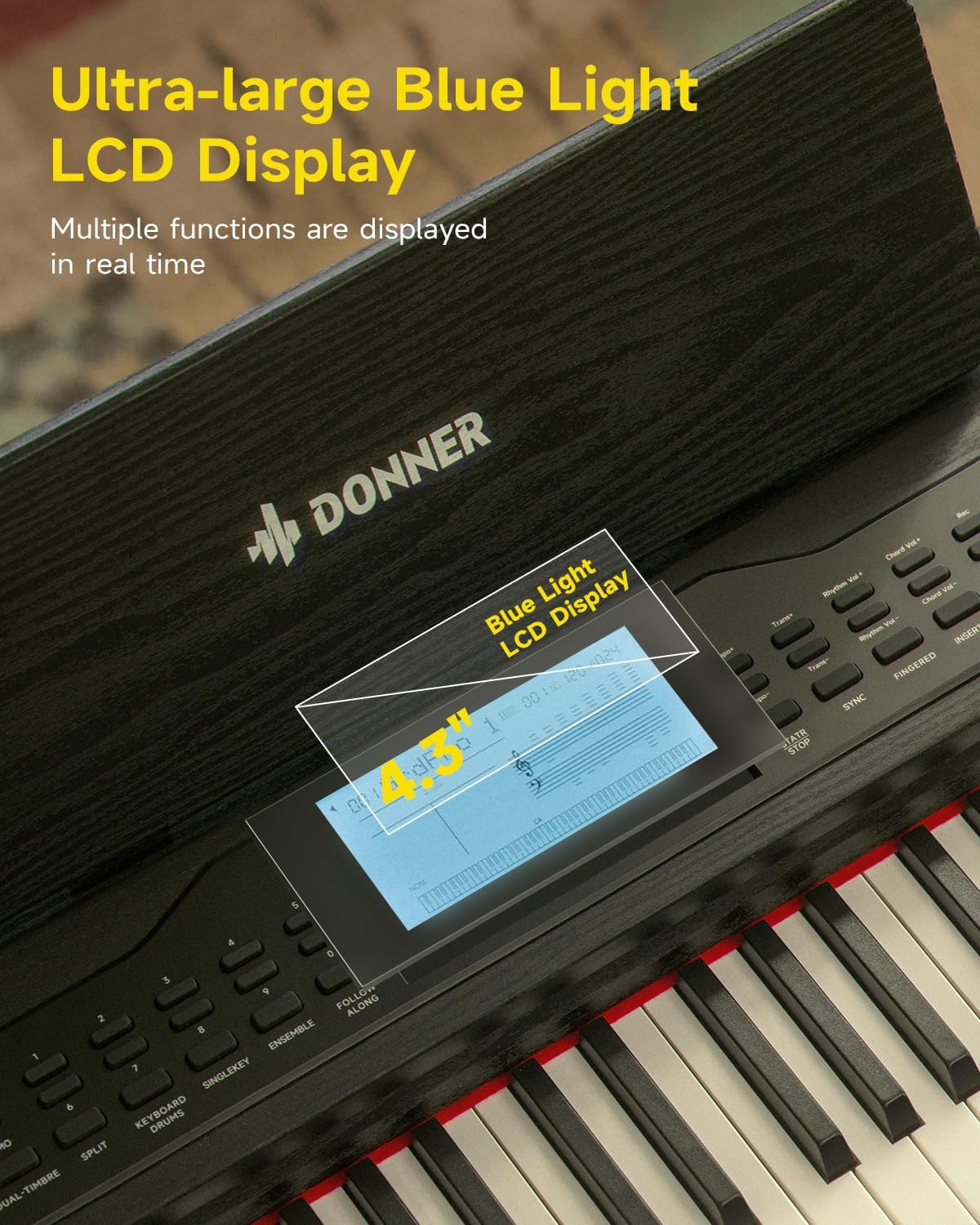
Figure 3.2: Rear panel connections, including (1) DC power jack, (2) Sustain Pedal Jack, (3) Headphone jack, (4) Audio input/output jacks, and (5) USB-MIDI port for connecting to computers, smartphones, and tablets.
- Agbekọri: Connect standard 6.35mm stereo headphones to the 'HEADPHONE' jack for private practice.
- Ohun Wọle/Jade: Use the 'AUDIO IN' and 'AUDIO OUT' 6.35mm jacks to connect to external audio devices like amplifiers, mixers, or other instruments.
3.5 USB-MIDI and Bluetooth Connectivity
- USB-MIDI: Connect the piano to a computer, smartphone, or tablet using a USB-MIDI cable for MIDI data transfer with compatible software.
- Bluetooth: The DDP-95 supports wireless Bluetooth connection for MIDI-compatible applications. Refer to your device's Bluetooth settings and the application's instructions for pairing.
4. Awọn ilana Iṣiṣẹ
4.1 Ipilẹ isẹ
- Titan/Apapa: Press the 'POWER' button to turn the piano on or off.
- Iṣakoso iwọn didun: Use the 'VOLUME' knob or buttons to adjust the overall sound level.
- Aṣayan ohun orin: The DDP-95 offers 610 tones. Use the 'TONE' buttons and the LCD display to browse and select different instrument sounds.
- Aṣayan Rhythm: Choose from 600 rhythms (including 128 accompaniment styles) using the 'RHYTHM' buttons.
- Awọn orin Ririnkiri: Play through 100 built-in demo songs for inspiration or practice.
- Metronome: Activate the metronome function to assist with timing and rhythm practice.

Olusin 4.1: Pariview of the DDP-95's extensive sound library, including 610 tones, 600 rhythms, 110 demo songs, and 128-note polyphony.
Ifihan LCD 4.2
The 4.3-inch blue light LCD display provides visual feedback on various settings and functions. It can show notes in staff notation, indicate key positions, and offer intuitive prompts.

Figure 4.2: The 4.3-inch blue light LCD display, showing real-time information and musical notation.

Figure 4.3: Detailed breakdown of the LCD display elements: (1) Tone/Demo/Rhythm Name, (2) Number of Bars, (3) Tempo, (4) Rhythmic Volume, (5) Indication of Active Keys, (6) Currently Used Function Icon, (7) Piano Score.
4.3 Keyboard Awọn ẹya ara ẹrọ
- 88-Key Fully Weighted Keyboard: Provides an authentic piano feel with hammer action.
- 16-Level Touch Sensitivity: Adjusts the volume and timbre based on how hard or soft you play the keys, allowing for expressive dynamics.

Figure 4.4: Visual representation of the 16-level touch sensitivity, demonstrating how key weight influences sound effects from light to heavy.
4.4 Àwọn Ọ̀nà Ìkọ́ni
The DDP-95 includes three teaching modes to assist learners:
- Bọtini Nikan: Practice individual notes.
- Follow Along: The piano waits for you to play the correct note before proceeding.
- Papọ: Practice with an accompaniment, playing your part along with the built-in music.

Figure 4.5: Illustration of the three teaching modes: Single Key, Follow Along, and Ensemble, designed to guide learners progressively.
4.5 Gbigbasilẹ ati Sisisẹsẹhin
The piano allows you to record your performances, with a capacity of up to 5000 bytes. This feature is useful for reviewing your playing, identifying areas for improvement, and capturing musical ideas.
- Press the 'RECORD' button to start recording.
- Press 'PLAY' to listen to your recorded performance.
4.6 Afikun Awọn iṣẹ
- Keyboard Pipin: Divides the keyboard into two sections, allowing two different tones to be played simultaneously or for two people to play together.
- Dual Tones: Layers two different tones to create a richer, more complex sound.
- Yipada: Shifts the pitch of the entire keyboard up or down in semitone steps.
- Iṣẹ́ Kọd: Provides automatic chord accompaniment based on the keys played.
- Drum Kit: Access various drum sounds for rhythm creation.
5. Itọju
5.1 Ninu
To maintain the appearance and functionality of your DDP-95 Digital Piano:
- Pa dada nu pẹlu asọ, gbẹ, asọ ti ko ni lint.
- Fun idoti alagidi, die-die dampen awọn asọ pẹlu omi, ki o si mu ese gbẹ lẹsẹkẹsẹ.
- Avoid abrasive cleaners, waxes, or solvents as they can damage the finish.
5.2 Ibi ipamọ
When not in use for extended periods, store the piano in a cool, dry place, away from extreme temperatures and humidity. Cover the keyboard with a dust cover to protect the keys and internal components.
6. Laasigbotitusita
If you encounter issues with your Donner DDP-95, refer to the following common problems and solutions:
| Isoro | Owun to le Fa | Ojutu |
|---|---|---|
| Ko si ohun | Iwọn didun kere ju; agbekọri ti sopọ mọ; iṣoro agbara. | Mu iwọn didun pọ si; ge agbekọri kuro; ṣayẹwo asopọ agbara. |
| Awọn bọtini ko dahun | Function mode active (e.g., teaching mode); internal error. | Exit special modes; power cycle the instrument. |
| Asopọ Bluetooth kuna | Ẹ̀rọ kò sí ní ipò ìsopọ̀; ìdènà; ìjìnnà. | Ensure device is discoverable; reduce distance; restart both devices. |
| Ohun ti o daru | Volume too high; faulty cable; external speaker issue. | Lower volume; check/replace cables; test with different speakers/headphones. |
If the problem persists after trying these solutions, please contact Donner customer support.
7. Awọn pato
| Ẹya ara ẹrọ | Ẹ̀kúnrẹ́rẹ́ |
|---|---|
| Orukọ awoṣe | DDP-95 |
| Nọmba ti Awọn bọtini | 88 |
| Keyboard Iru | Fully Weighted, Hammer Action |
| Fọwọkan Ifamọ | 16 Awọn ipele |
| Awọn ohun orin | 610 |
| Awọn ariwo | 600 (128 Accompaniment Styles) |
| Awọn orin Demo | 100 |
| Polyphony | 128-akọsilẹ |
| Ifihan | 4.3" Blue Light LCD |
| Agbara Gbigbasilẹ | Titi di awọn baiti 5000 |
| Asopọmọra | Bluetooth, USB-MIDI, 6.35mm Headphone Jack, 6.35mm Audio In/Out Jacks |
| Pedals | Soft, Sostenuto, Sustain (3-Pedal System) |
| Orisun agbara | DC 15V Ipese agbara |
| Iwọn Nkan | 65.9 poun (isunmọ 29.9 kg) |
| Package Mefa | 53.94 x 16.14 x 11.81 inches (iwọn 137 x 41 x 30 cm) |
8. Atilẹyin ọja ati Support
8.1 atilẹyin ọja Alaye
Donner products are manufactured to high-quality standards. For specific warranty terms and conditions, please refer to the warranty card included with your product or visit the official Donner webojula. Jeki ẹri rira rẹ fun awọn iṣeduro atilẹyin ọja.
8.2 Onibara Support
If you have any questions, require technical assistance, or need to report an issue, please contact Donner customer support through their official website or the contact information provided in your product packaging. Provide your model number (DDP-95) and purchase details when seeking support.