
1. Ọja Ipariview
The Traxxas Slash 4X4 VXL HD is a high-performance remote control short course truck designed for durability and speed. This model includes a factory-installed Extreme Heavy Duty Upgrade Kit for enhanced resilience. It features a Velineon brushless power system, a modular chassis design, and an ultra-efficient shaft drive. The TQi radio system provides precise control for speeds exceeding 60 mph.

olusin 1.1: Apa view of the Traxxas Slash 4X4 VXL HD remote control truck.
Awọn ẹya pataki:
- Factory-installed Extreme HD components
- Clipless Body Mounting
- Velineon VXL-3S Brushless Power System
- Fully assembled and Ready-To-Race
Awọn eroja to wa:
- Isakoṣo latọna jijin
- Ọja Afowoyi
Note: Battery and charger are sold separately and are required for operation.
2. Eto Itọsọna
Follow these steps to prepare your Traxxas Slash 4X4 VXL HD for its first use:
- Carefully remove the Traxxas Slash 4X4 VXL HD from its packaging.
- Insert a compatible battery (not included) into the designated battery compartment. Ensure the battery is securely fastened.
- Connect the battery charger (not included) to the battery and a power source.
- Charge the battery fully according to the specific instructions provided with your charger.
- Once the battery is charged, re-insert it into the truck if it was removed for charging.
- Turn on the TQi radio system.
- Ensure the truck's power switch is in the 'ON' position.

olusin 2.1: Iwaju view of the Traxxas Slash 4X4 VXL HD, showing the robust bumper and body design.
3. Awọn ilana Iṣiṣẹ
Before operating your RC truck, always ensure you are in a safe, open area away from people, pets, and obstacles. Familiarize yourself with the controls of the TQi radio system.
Awọn iṣakoso ipilẹ:
- Ohun Nfa: Pull to accelerate forward, push to brake or reverse.
- Kẹkẹ irin-ajo: Turn left or right to steer the truck.
- Agbara Yi pada: Located on the truck and remote. Always turn on the remote first, then the truck. Turn off the truck first, then the remote.
The Traxxas Slash 4X4 VXL HD is designed for off-road use and can handle various terrains. Its Extreme Heavy Duty Upgrade Kit provides enhanced durability for aggressive driving.

Figure 3.1: The Traxxas Slash 4X4 VXL HD performing a jump on a dirt track, showcasing its robust suspension and power.
Product in Action:
Video 3.1: This video demonstrates the Traxxas Slash 4X4 VXL HD's durability and performance in various challenging environments, highlighting its ability to withstand impacts and navigate rough terrain.
4. Itọju
Regular maintenance ensures the longevity and optimal performance of your Traxxas Slash 4X4 VXL HD.
Awọn imọran Itọju Gbogbogbo:
- Ninu: After each use, especially in dirty or wet conditions, clean the truck to remove dirt, mud, and debris. Use a soft brush or compressed air.
- Ayewo: Regularly inspect all screws, nuts, and bolts for tightness. Check for any damaged or worn parts, such as suspension components, tires, and body clips.
- Itọju Batiri: Always store batteries in a cool, dry place. Follow manufacturer guidelines for charging and discharging to maximize battery life.
- Mọto ati ESC: Keep the motor and Electronic Speed Control (ESC) free from debris. Ensure proper ventilation to prevent overheating.
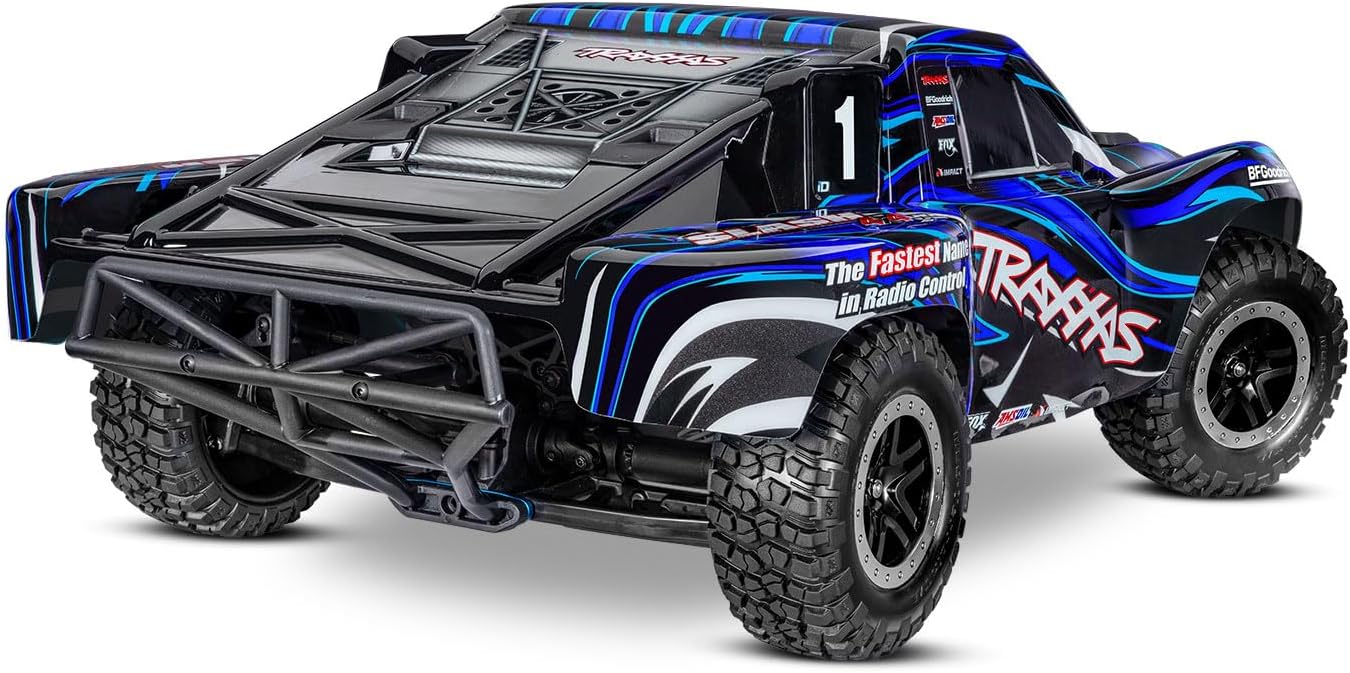
olusin 4.1: Ẹyìn view of the Traxxas Slash 4X4 VXL HD, showing the rear bumper and tire tread, important areas for post-run inspection.
5. Laasigbotitusita
This section provides solutions to common issues you might encounter with your Traxxas Slash 4X4 VXL HD.
Awọn oran ti o wọpọ ati Awọn ojutu:
- Ko si Agbara:
- Rii daju pe batiri ti gba agbara ni kikun ati pe o ti sopọ daradara.
- Check that both the truck and remote control are switched ON.
- Verify battery connections for corrosion or damage.
- Pípàdánù Ìṣàkóso/Ìwà àìtọ́:
- Check for interference from other radio frequencies.
- Ensure the remote control batteries are fresh.
- Re-bind the remote control to the receiver if necessary (refer to TQi radio system manual).
- Iṣe Dinku/Igbona gbigbona:
- Check for debris in the motor or around moving parts.
- Ensure the motor and ESC have adequate ventilation.
- Verify that the correct gearing is used for the terrain and battery type.
- Awọn Iṣoro Itọsọna:
- Ṣe àyẹ̀wò ìṣiṣẹ́ ìdarí fún ìbàjẹ́ tàbí àwọn ìsopọ̀ tí ó bàjẹ́.
- Check steering linkages for obstructions or damage.
If you encounter an issue not listed here, or if the suggested solutions do not resolve the problem, please refer to the official Traxxas support resources.
6. Awọn pato
Detailed technical specifications for the Traxxas Slash 4X4 VXL HD:
| Sipesifikesonu | Iye |
|---|---|
| Orukọ Brand | Traxxas |
| Orukọ awoṣe | SLASH 4X4 VXL HD |
| Nọmba awoṣe | 68386-4-BLUE |
| UPC | 020334026958 |
| Ohun elo Iru | Ṣiṣu |
| Orisun agbara | Agbara Batiri |
| Batiri Apejuwe | Lithium-Ion Polymer (Awọn batiri ko si) |
| Ipo Isẹ | Isakoṣo latọna jijin |
| inu ile / ita gbangba Lilo | Ita gbangba |
| Iwọn Nkan | 8.07 iwon |
| Awọn iwọn Nkan (LxWxH) | 22.4 x 11.7 x 7.6 inches |
| Ọjọ ori Range Apejuwe | Adult (Manufacturer Minimum Age: 168 months) |
| Ti a beere Apejọ | Rara |
7. Atilẹyin ọja ati Support
Traxxas products are known for their quality and durability. For specific warranty information, please refer to the documentation included with your product or visit the official Traxxas webojula.
Atilẹyin Onibara:
For technical assistance, replacement parts, or any questions regarding your Traxxas Slash 4X4 VXL HD, please contact Traxxas customer support directly. Their official website often provides extensive FAQs, troubleshooting guides, and contact information.
You can typically find support resources and contact details on the manufacturer's webojula: Traxxas Support