
Ọrọ Iṣaaju
The ACASIS Thunderbolt 4 Dock is a versatile 11-in-1 docking station designed to expand the connectivity of your laptop or compatible device. It offers high-speed data transfer, multiple display outputs, and power delivery, enhancing your productivity and connectivity options.

Aworan: Iwaju ati ẹhin views of the ACASIS Thunderbolt 4 Dock, highlighting its various ports.
Key Awọn ẹya ara ẹrọ
- 11-ni-1 Asopọmọra: Includes Thunderbolt 4, DisplayPort, USB-C, and USB-A ports.
- Gbigbe Data Iyara Giga: Up to 40Gbps via Thunderbolt 4 ports.
- Ifijiṣẹ Agbara: Up to 100W PD for laptop charging.
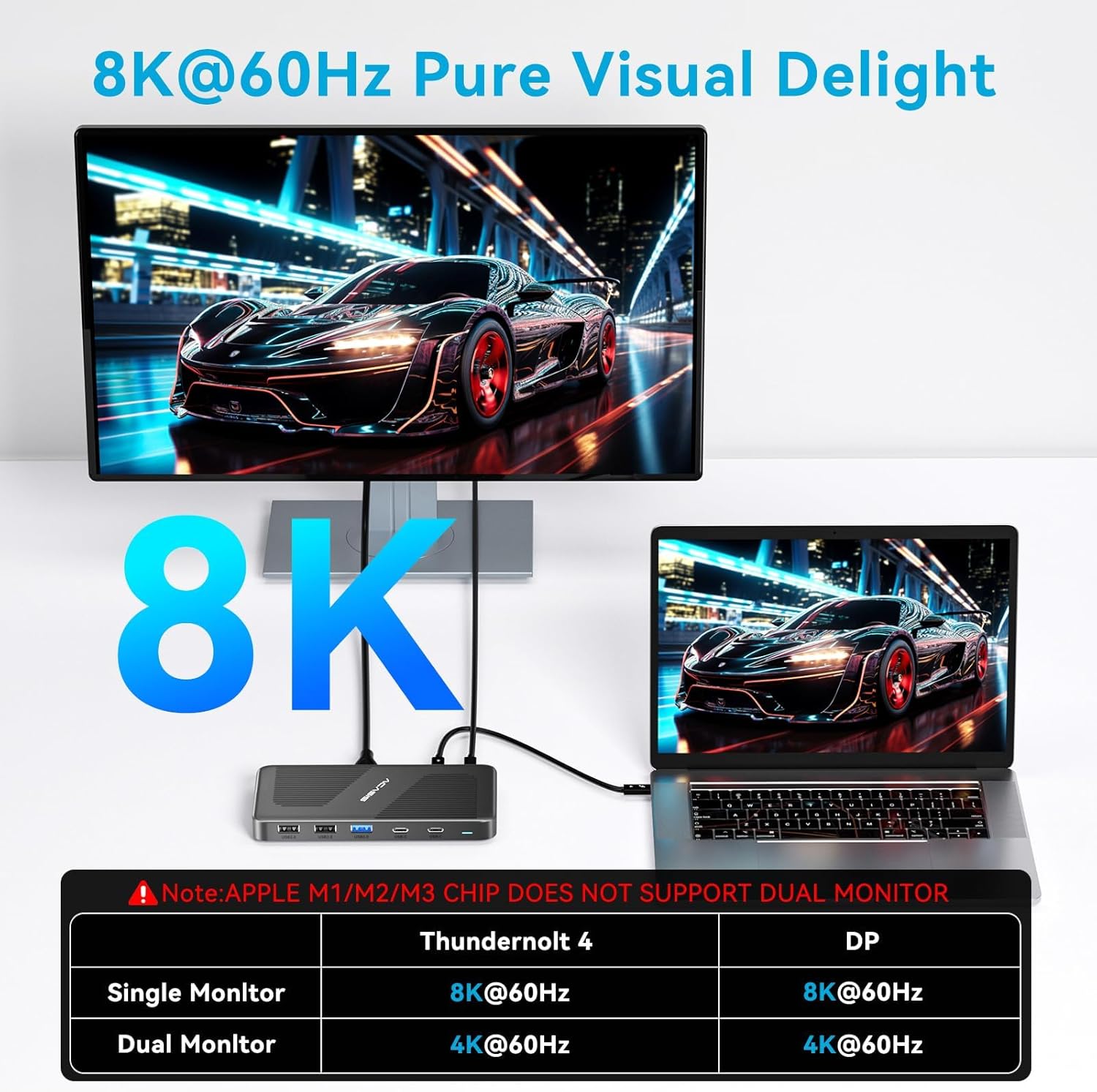
- Iṣafihan Afihan: Supports single 8K@60Hz or dual 4K@60Hz displays.
- Ibamu gbooro: Works with Thunderbolt 4, Thunderbolt 3, USB4, and USB-C computers (Windows, macOS, Chrome OS).

Image: Detailed diagram illustrating the 11-in-1 features and port layout of the ACASIS USB4 Dock.
Package Awọn akoonu
Daju pe gbogbo awọn nkan wa ninu apo rẹ:
- ACASIS Thunderbolt 4 Dock
- Power Adapter (65W standard)
- Thunderbolt 4 Cable (1.7ft)
- Itọsọna olumulo
Video: Unboxing and initial setup of the ACASIS Thunderbolt 4 Dock, showing included accessories.
Eto Itọsọna
Follow these steps to set up your ACASIS Thunderbolt 4 Dock:
- So agbara: Plug the included power adapter into the "PD IN" port on the dock and then into a wall outlet.
- Sopọ si Ẹrọ Gbalejo: Use the provided Thunderbolt 4 cable to connect your laptop's Thunderbolt 4/USB4/USB-C port to one of the 40Gbps input ports on the dock.
- Sopọ Awọn ifihan:
- For DisplayPort (DP) connection: Connect your monitor using a DP cable to the DP port on the dock.
- For Thunderbolt 4 display: Connect a compatible monitor to one of the 40Gbps output ports using a Thunderbolt 4 cable.
- Awọn Agbeegbe Sopọ: Plug your USB devices (keyboard, mouse, external drives) into the available USB-A and USB-C ports.
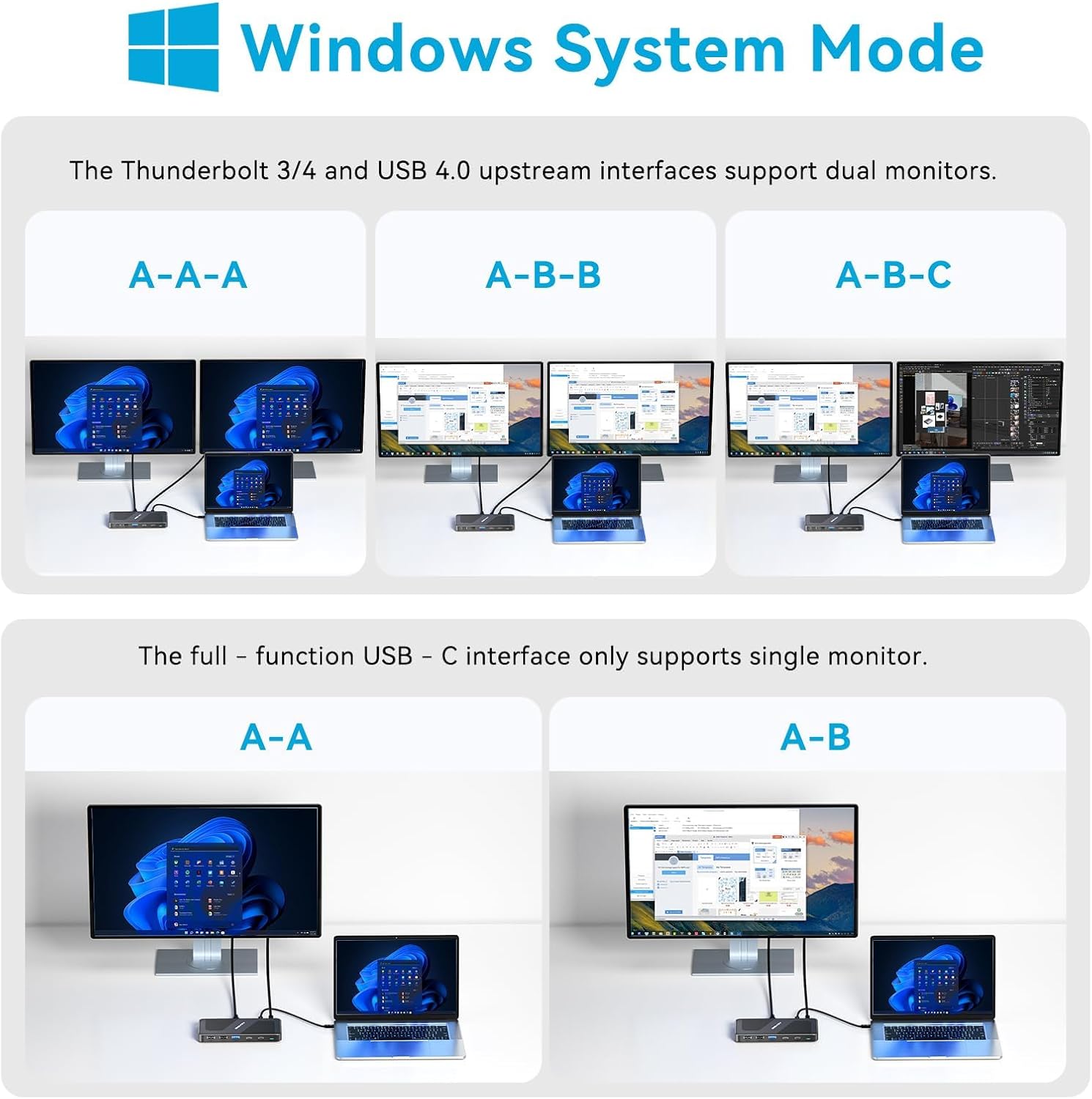
Image: A setup showing the ACASIS Thunderbolt 4 Dock connected to a laptop and two external monitors, demonstrating a typical multi-display configuration.
Awọn ilana Iṣiṣẹ
Iṣeto ni ifihan
The dock supports various display configurations depending on your operating system and host device capabilities.
Windows System Mode
For Windows systems, the Thunderbolt 3/4 and USB 4.0 upstream interfaces support dual monitors. A full-function USB-C interface only supports a single monitor.

Image: Visual guide for Windows users showing single, mirror, and extended display modes with the dock.
macOS System Mode
Intel Mac OS/Mac OS M1/M2/M3 Pro, Max, and above support dual monitors. Please note that Mac OS with M1/M2/M3 processors only supports a single monitor.

Image: Visual guide for macOS users showing single, mirror, and extended display modes with the dock, including M1/M2/M3 chip limitations.
Data Gbigbe
Awọn ebute oko oju omi Thunderbolt 4 pese to awọn iyara gbigbe data 40Gbps, apẹrẹ fun nla file transfers and high-bandwidth peripherals.
Aworan: Isunmọ view of the dock's ports, emphasizing the 40Gbps data transfer capability.
Ifijiṣẹ Agbara
The dock supports up to 100W Power Delivery (PD) to charge your connected laptop. It can also provide 15W output to power a portable monitor or charge a phone simultaneously.

Image: Diagram illustrating the power delivery capabilities, showing 100W input, 65W output to a laptop, and 15W output to a phone or portable monitor.
Itọju ati Itọju
To ensure the longevity and optimal performance of your ACASIS Thunderbolt 4 Dock, please follow these care guidelines:
- Keep the dock in a dry, well-ventilated area away from direct sunlight.
- Yago fun ṣiṣafihan ẹrọ naa si awọn iwọn otutu to gaju, ọriniinitutu, tabi awọn nkan ti o bajẹ.
- Clean the exterior with a soft, dry, lint-free cloth. Do not use liquid cleaners, aerosols, or abrasive materials.
- Ensure all cables are connected securely and without excessive strain to prevent damage to ports.
- Disconnect the dock from power and your devices when not in use for extended periods.
Laasigbotitusita
If you encounter issues with your ACASIS Thunderbolt 4 Dock, refer to the following common problems and solutions:
| Isoro | Owun to le Solusan |
|---|---|
| Ko si igbejade ifihan | Ensure all display cables are securely connected. Verify your laptop's display settings. Check compatibility for dual monitors, especially with Apple M1/M2/M3 chips (only single monitor supported). Try updating your graphics drivers. |
| Laptop not charging or charging fluctuates | Confirm the power adapter is correctly connected to the dock and a working power outlet. Ensure your laptop supports PD via its USB-C/Thunderbolt port. Note that the standard 65W power supply may not be sufficient for laptops requiring higher wattage (e.g., 95W). Use a higher wattage power adapter if your laptop requires more than 65W. |
| Awọn ẹrọ USB ko mọ | Try connecting the device to a different USB port on the dock. Ensure the device drivers are up to date on your computer. Restart your computer and the dock. Check if the device requires external power. |
| Dock gets hot | It is normal for the dock to generate some heat during operation, especially under heavy load. Ensure adequate ventilation around the device. If it becomes excessively hot or malfunctions, disconnect it and contact support. |
Awọn pato
- Awoṣe: DS-9003-NEW
- Brand: ACASIS
- Asopọmọra: 11-in-1 (2x 40Gbps Thunderbolt 4, 1x DP 8K 60HZ, 1x PD 100W, 2x USB C 3.0 (5Gbps), 1x USB A 3.0, 4x USB A 2.0)
- Ifijiṣẹ Agbara: Up to 100W (input), 65W (output to laptop), 15W (output to device)
- Ifihan Atilẹyin: Single 8K@60Hz or Dual 4K@60Hz (Windows); Dual 4K@60Hz (Intel Mac); Single 4K@60Hz (Apple M1/M2/M3)
- Iyara Gbigbe Data: Up to 40Gbps (Thunderbolt 4 ports)
- Awọn iwọn: 5.71 x 3.98 x 1.46 inches
- Ìwúwo: 8.8 iwon
- Ibamu: Thunderbolt 4, Thunderbolt 3, USB4, USB-C computers (Windows, macOS, Chrome OS)
Atilẹyin ọja ati Support
ACASIS products come with a standard warranty. For detailed warranty information, please refer to the warranty card included in your package or visit the official ACASIS webojula.
For technical support, troubleshooting assistance, or any inquiries regarding your ACASIS Thunderbolt 4 Dock, please contact ACASIS customer service:
- Imeeli: support@acasis.com
- Atilẹyin Ayelujara: 7x24 hours online service

Image: ACASIS company logo.


