
1. Ifihan
Thank you for choosing the MESTEK TH11 Digital Temperature and Humidity Meter. This device is designed for precise measurement of ambient temperature, relative humidity, wet bulb temperature, and dew point temperature. Its portable and user-friendly design makes it suitable for a wide range of applications, from home environments to industrial and agricultural settings. Please read this manual thoroughly before use to ensure proper operation and to maximize the lifespan of your instrument.

Image 1.1: The MESTEK TH11 meter highlighting its multi-functional capabilities including ambient temperature, humidity, wet bulb, and dew point measurements.
2. Alaye Aabo
- Ma ṣe gbiyanju lati ṣajọpọ tabi yi ohun elo naa pada.
- Pa ẹrọ naa mọ kuro ninu omi ati ọriniinitutu giga lati yago fun ibajẹ.
- Yago fun ṣiṣafihan ẹrọ naa si awọn iwọn otutu to gaju tabi oorun taara fun awọn akoko gigun.
- Rọpo awọn batiri ni kiakia nigbati ifihan batiri kekere ba han lati rii daju pe o peye awọn kika.
- Sọ awọn batiri ti a lo ni ibamu si awọn ilana agbegbe.
- Nu ẹrọ naa pẹlu asọ ti o tutu, ti o gbẹ. Ma ṣe lo abrasive ose tabi epo.
3. Ọja Ipariview
3.1. Package Awọn akoonu
Ni ṣiṣi package, jọwọ rii daju pe gbogbo awọn nkan wa ati ni ipo to dara:
- 1 x MESTEK TH11 Digital Temperature and Humidity Meter
- 3 x AAA batiri
- 1 x Apo Aṣọ
- 1 x Screwdriver
- 1 x Itọsọna olumulo

Image 3.1: The complete packing list for the MESTEK TH11, showing all included accessories.
3.2. Device irinše
Familiarize yourself with the main parts of your MESTEK TH11 meter:
- Sensọ iwadii: Located at the top, this high-precision Swiss SHT30 sensor measures temperature and humidity.
- Iboju ifihan: A backlit LCD for clear reading of measurement values.
- Awọn bọtini iṣẹ: Buttons for power, mode selection, unit switching, and data hold.
- Abala Batiri: Located at the rear for AAA battery installation.

Image 3.2: Labeled diagram of the MESTEK TH11, indicating the probe sensor, display screen, and function keys, along with its dimensions.
3.3. Ifihan Awọn ẹya ara ẹrọ
The backlit LCD provides clear readings and important indicators:
- Ifihan Meji: Shows both temperature and humidity simultaneously.
- Imọlẹ ẹhin: Ṣe ilọsiwaju hihan ni awọn ipo ina kekere.
- Itọkasi Batiri Kekere: An icon will appear when batteries need replacement.
- Idaduro data (HOLD): Didi wiwọn lọwọlọwọ lori ifihan.
- O pọju/MIN: Displays maximum or minimum recorded values.
- WB/DP: Indicates Wet Bulb or Dew Point temperature mode.
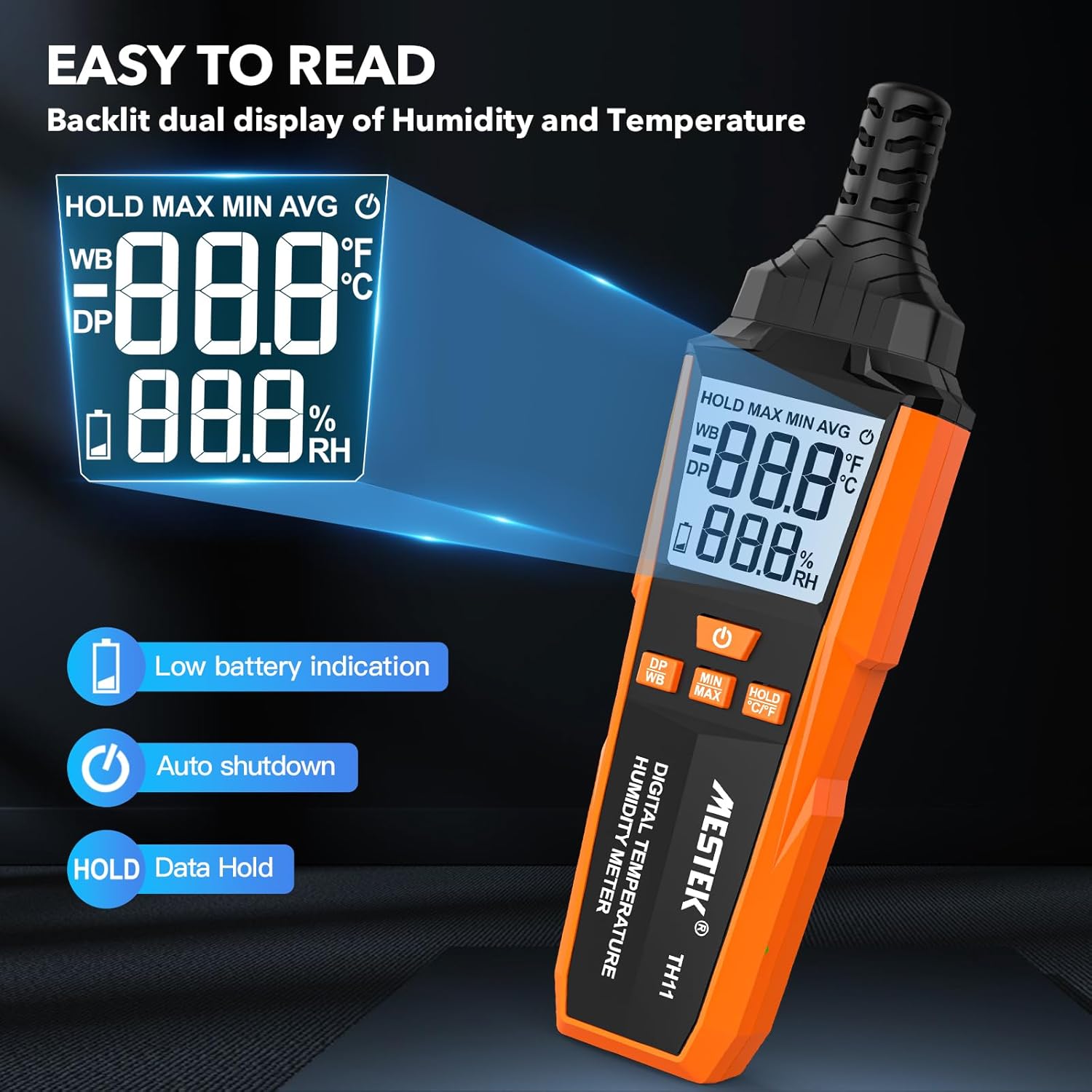
Image 3.3: The MESTEK TH11's backlit display, illustrating its clarity and indicators for low battery and data hold.
4. Eto
4.1. Fifi sori batiri
The MESTEK TH11 requires 3 AAA batteries for operation. Follow these steps to install them:
- Wa ideri iyẹwu batiri ni ẹhin ẹrọ naa.
- Use the provided screwdriver to loosen the screw on the battery compartment cover.
- Yọ ideri kuro.
- Fi awọn batiri AAA mẹta sii, ki o rii daju pe polarity ti o tọ (+/-) gẹgẹ bi a ti fihan ninu yara naa.
- Ropo ideri kompaktimenti batiri ki o si Mu dabaru.
5. Awọn ilana Iṣiṣẹ
5.1. Agbara Tan / Paa
- Lati fi agbara sori ẹrọ, tẹ bọtini naa Bọtini agbara ().
- Lati fi agbara si pipa ẹrọ naa, tẹ mọlẹ Bọtini agbara for approximately 2 seconds. The device also features an automatic shutdown function after 30 minutes of inactivity to conserve battery life.

Image 5.1: The automatic shutdown feature of the MESTEK TH11, activating after 30 minutes of inactivity.
5.2. Ìyípadà Ẹ̀yà (°C/°F)
- To switch between Celsius (°C) and Fahrenheit (°F), press and hold the HOLD °C/°F button fun isunmọ 2 aaya.
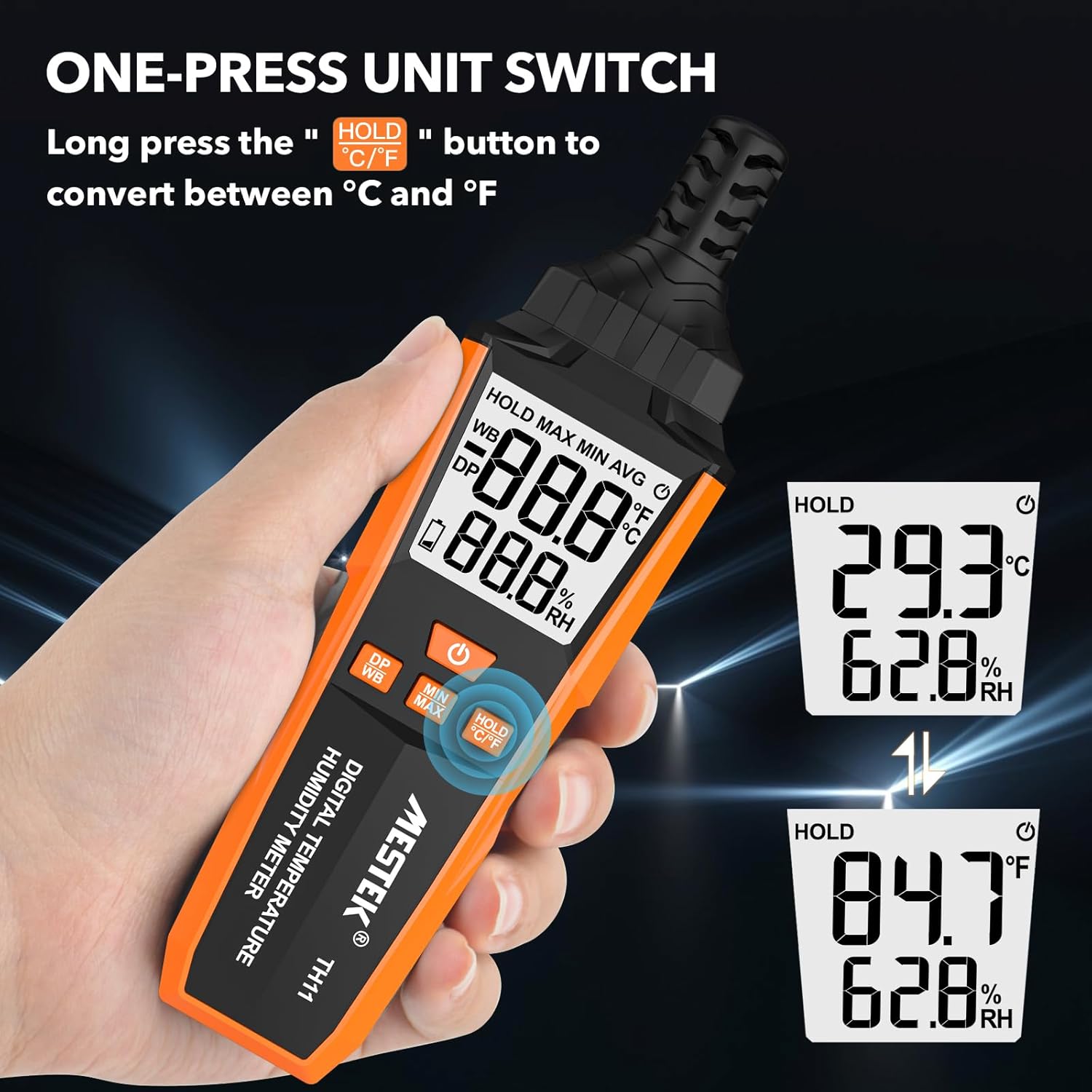
Image 5.2: The MESTEK TH11 showing how to switch between Celsius and Fahrenheit temperature units.
5.3. Iṣẹ́ Ìdádúró Dátà
- To freeze the current measurement on the display, short press the HOLD °C/°F button. The "HOLD" icon will appear on the screen.
- Press the button again to exit the data hold mode.

Image 5.3: The MESTEK TH11 display indicating the active HOLD function.
5.4. Minimum/Maximum Value Measurement
- Si view the maximum recorded temperature and humidity, short press the MIN / Max bọtini. The "MAX" icon will appear.
- Tẹ awọn MIN / Max bọtini lẹẹkansi lati view the minimum recorded values. The "MIN" icon will appear.
- Press the button a third time to return to real-time measurement.

Image 5.4: The MESTEK TH11 displaying the maximum and minimum recorded temperature and humidity values.
5.5. Wet Bulb / Dew Point Mode
- To switch between Wet Bulb (WB) and Dew Point (DP) temperature display, short press the DP/WB button. The corresponding icon will be shown on the display.
6. Awọn ohun elo
The MESTEK TH11 Digital Temperature and Humidity Meter is versatile and can be used in various environments:
- Ile: Monitor indoor climate in bedrooms, children's rooms, and living areas for comfort and health.
- Ọfiisi: Ensure optimal working conditions by monitoring office temperature and humidity.
- Iṣẹ-ogbin: Ideal for gardens, greenhouses, and agricultural crops to maintain suitable growing conditions.
- Ile-iṣẹ: Useful in warehouses, cellars, and facilities with air conditioning systems for environmental control.
- Specialized Environments: Suitable for maternity wards and areas requiring precise climate control.

Aworan 6.1: Examples of the MESTEK TH11's diverse applications in home, plant, storage, and warehouse settings.
6.1. Ambient Temperature and Relative Humidity Reference Values
For optimal conditions in various environments, consider the following reference values:
| Ayika | Iwọn otutu | Ọriniinitutu ibatan (RH) |
|---|---|---|
| Human Body Comfort | 15-25°C | 45% -75% RH |
| Room Environment | 40% -70% RH | |
| Library/Art Gallery/Museum | 40% -60% RH | |
| Electronic Equipment/Communication Room | 45% -60% RH | |
| Agricultural/Cotton/Wool Textiles Storage | 40% -60% RH | |
| Dairy Products Storage | 50% -60% RH | |
| Fruit Storage | 60% -70% RH | |
| Best Convalescent Environment | 30% -50% RH |
Table 6.1: Reference values for ambient temperature and relative humidity in various settings.
7. Awọn pato
| Paramita | Iye |
|---|---|
| Nọmba awoṣe | TH11 |
| Brand | MESTEK |
| Iwọn | 210 g |
| Awọn iwọn (L x W x H) | 18.8 x 5.4 x 3.4 cm |
| Àwọ̀ | ọsan |
| Ara | Igbalode |
| Orisun agbara | Agbara Batiri |
| Batiri Iru | 3 x Awọn batiri Alkaline AAA |
| Measurement Accuracy (Temperature) | ±0.1°C |
| Ifihan ara | Oni-nọmba |
| Iṣagbesori Iru | Handheld / Freestanding |
| Pataki Awọn ẹya ara ẹrọ | High Accuracy, Backlit Display, Data Hold, Min/Max, Auto Shutdown, Low Battery Indicator |
| Ibiti ọriniinitutu | 0-99% RH |
| Iwọn otutu | -20°C ~ 60°C (-4°F ~ 140°F) |
| Ìri Point otutu Range | -50°C ~ 60°C (-58°F ~ 140°F) |
| Awọn iwọn otutu Boolubu tutu | -20°C ~ 60°C (-4°F ~ 140°F) |
| Sensọ Iru | Swiss SHT30 High-Precision Sensor |
| SampOṣuwọn ling | O fẹrẹ to iṣẹju -aaya 1 |
8. Itọju
- Ninu: Wipe the device with a soft, dry cloth. Do not use liquid cleaners or immerse the device in water.
- Ibi ipamọ: Tí o kò bá lò ó fún ìgbà pípẹ́, yọ àwọn bátìrì náà kúrò kí ó má baà jò. Tọ́jú ẹ̀rọ náà sí ibi tí ó tutù, tí ó gbẹ, tí kò sí ìmọ́lẹ̀ oòrùn tààrà àti ooru tó le koko.
- Itọju Sensọ: The probe sensor is delicate. Avoid touching it directly or exposing it to dust and debris.
9. Laasigbotitusita
- Ẹrọ ko ni agbara lori:
Check if the batteries are installed correctly with the right polarity. Ensure the batteries are not depleted; replace them if necessary. - Awọn kika ti ko pe:
Ensure the device has been in the environment for at least 15 minutes to stabilize. Check for any obstructions around the sensor. Replace old batteries. - Ifihan ti wa ni baibai tabi yiyi:
Eyi nigbagbogbo tọkasi agbara batiri kekere. Rọpo awọn batiri. - Awọn bọtini ko dahun:
Try powering off and on the device. If the issue persists, replace the batteries.
10. Atilẹyin ọja ati Support
The MESTEK TH11 Digital Temperature and Humidity Meter comes with a 24-osu atilẹyin ọja from the date of purchase, covering manufacturing defects. Additionally, MESTEK provides s'aiye imọ support fun ọja yi.
If you encounter any issues, have questions, or require assistance, please do not hesitate to contact our customer support team. We are committed to providing satisfactory solutions.
For support, please refer to the contact information provided on the MESTEK official webojula tabi rẹ ra Syeed.