
1. Ifihan
The DALY 40A 8S-24S Smart BMS is an advanced Battery Management System designed for Lithium battery packs, including LiFePO4, Li-ion, and LTO chemistries. This BMS features a 1A active balancer to optimize cell performance and prolong battery life. It integrates Bluetooth, RS485, and CAN communication protocols for comprehensive monitoring and control. This manual provides essential information for the safe and efficient installation, operation, and maintenance of your DALY Smart BMS.
Awọn ẹya pataki:
- Ibamu Wapọ: Supports battery strings from 4S-24S (12V-84V) and various lithium battery types (LiFePO4, Li-ion, LTO).
- Active Balancing: Equipped with a 1A active balancer to equalize cell charge/discharge states, enhancing battery longevity.
- Abojuto Smart: Integrated Bluetooth for wireless monitoring of cell voltages, temperatures, and other critical parameters via the 'BalanceBMS' app. Optional WiFi for cloud monitoring and data logging.
- Aabo ti o ni kikun: Protects batteries against overcharge, overdischarge, overcurrent, short circuits, and high-temperature shutdown.
- Multiple Communication Interfaces: Includes UART, RS485, and CAN for flexible integration and control.
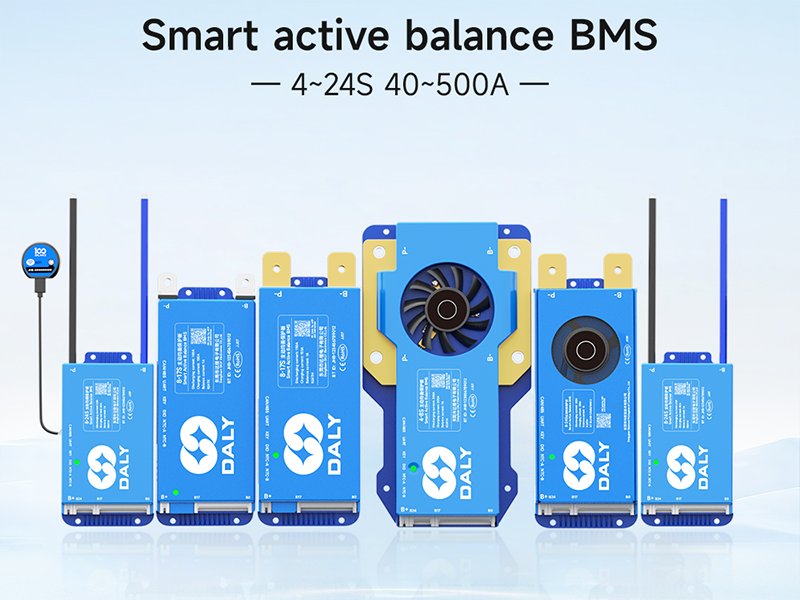
Image: DALY Smart Active Balance BMS highlighting key specifications like battery strings (8-24S), charge/discharge current (40A), balance current (1A), built-in Bluetooth, battery types (Li-ion/LiFePO4/LTO), and communication protocols (UART+RS485+CAN).
2. Alaye Aabo
Please read and understand all safety instructions before installing or operating the DALY Smart BMS. Failure to follow these instructions may result in electric shock, fire, serious injury, or property damage.
- Always wear appropriate personal protective equipment (PPE), including safety glasses and insulated gloves, when working with batteries and electrical components.
- Ensure the battery pack is disconnected from any power source before beginning installation or maintenance.
- Verify all wiring connections are correct and secure to prevent short circuits. Incorrect wiring can damage the BMS and battery.
- Do not short-circuit any wires, especially during testing. Use insulation tape to secure any unused or excess wires.
- Keep the BMS and battery components away from water, moisture, and flammable materials.
- Do not attempt to disassemble or repair the BMS yourself. Contact qualified personnel for service.
- Ensure proper ventilation around the battery pack and BMS during operation.


Images: Visual representations of the BMS's protection features, including overall protection, pre-charge protection, and misconnection protection.
3. Package Awọn akoonu
Daju pe gbogbo awọn ohun ti a ṣe akojọ rẹ si isalẹ wa ninu package rẹ. Ti awọn ohun kan ba nsọnu tabi bajẹ, jọwọ kan si atilẹyin alabara.

Image: A visual representation of the DALY BMS package contents, including the Smart Active Balance BMS unit, P-&-B- cable, screws, sampling cable, B+ cable, NTC (temperature sensor), user manual, packaging box, and RS485/CAN port cable.
- Smart Active Balance BMS Unit
- P-&-B- Cable
- Àwọn skru (Ẹ̀rọ 2)
- Sampling Cable
- B+ Cable
- NTC (Temperature Sensor) - One standard, two optional
- Itọsọna olumulo
- Apoti apoti
- RS485/CAN Port Cable
4. Itọsọna fifi sori ẹrọ
This section provides step-by-step instructions for installing your DALY Smart BMS. Ensure the battery pack is completely disconnected before proceeding.
4.1. fifi sori Video
Video: An official installation guide for the DALY Smart Active Balancing BMS, demonstrating the wiring process for an 8S battery pack. This video covers connecting the sampling cables, B- wire, NTC sensor, and B+ wire, along with verification steps.
4.2. Step-by-Step Wiring Instructions (Example: 8S Battery Pack)
- Ṣe idanimọ awọn ebute batiri: Locate the total positive terminal and the total negative terminal of your battery pack.
- Connect B- Wire: Connect the first black cable of the sampling wire harness and the blue B- wire to the total negative terminal of the battery pack. Ensure a secure connection.
- Sopọ Sampling Cables: Connect the remaining sampling cables in sequential order to the positive terminals of each cell, starting from B1, B2, B3, and so on, up to the last cell's positive terminal (e.g., B8 for an 8S pack).
Iṣọra: If using fewer series than the maximum supported by the BMS, do not short-circuit the excess wires. Securely tape them up with insulation tape to prevent accidental contact. - Connect B+ Wire: Connect the red B+ wire from the sampling harness to the total positive terminal of the battery pack.
- Ṣe idaniloju Sampling Cable Connections: Before plugging the sampling cable into the BMS, use a multimeter to check the voltage readings. Place the black probe on B0 (the first black wire) and the red probe on B1, then B2, B3, etc. The multimeter should display positive voltage readings that increase step by step. If the readings are correct, the wiring is accurate.
Pataki: During this testing, do not let the two multimeter probes touch each other, as this may cause a cable short circuit. - Connect BMS B- Terminal: Connect the main blue B- wire from the battery pack to the B- terminal on the BMS unit.
- Insert Temperature Sensor (NTC): Insert the NTC (temperature sensor) into the designated NTC port on the BMS.
- Plug in Sampling Cable: Carefully plug the sampling cable harness into the corresponding port on the BMS.
- Connect BMS B+ Wire: Connect the red B+ wire from the sampling harness to the B+ terminal on the BMS.
- Verify BMS Power: If the green light on the BMS illuminates, the BMS is working properly and has been successfully installed.

Image: A DALY BMS unit connected to a battery pack, illustrating the main B- and B+ connections along with the multi-pin sampling cable connected to individual cell terminals.
5. Awọn ilana Iṣiṣẹ
The DALY Smart BMS offers advanced monitoring and control capabilities through its integrated communication interfaces.
5.1. Bluetooth App Monitoring
Download the 'BalanceBMS' app from your device's app store (available on iOS and Android). Once installed, connect to your BMS via Bluetooth to monitor real-time battery parameters such as:
- Olukuluku sẹẹli voltages
- Lapapọ batiri voltage
- Gbigba agbara / idasile lọwọlọwọ
- Batiri otutu
- Ipinle ti idiyele (SOC)
- Protection status and alerts
The app also allows for configuration of certain BMS parameters and provides data logging capabilities.
5.2. RS485 and CAN Communication
For advanced integration with other systems (e.g., inverters, motor controllers), the BMS supports RS485 and CAN communication. Refer to the detailed communication protocol documentation (usually provided separately or available from DALY support) for specific implementation guidelines.
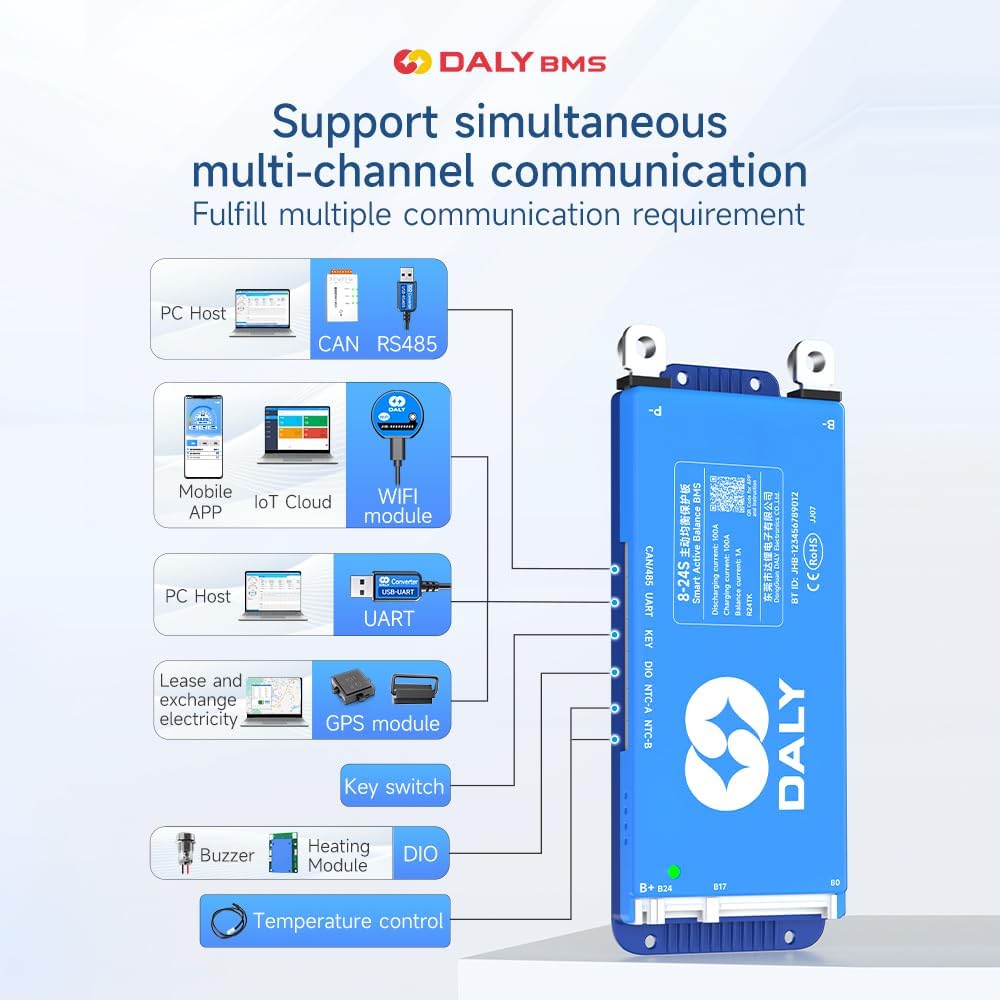
Image: Diagram illustrating the DALY BMS's support for simultaneous multi-channel communication, including PC Host (CAN, RS485, UART), Mobile APP (Bluetooth, IoT Cloud, WiFi module), GPS module, Key switch, Buzzer, Heating Module, and Temperature control.
6. Itọju
Proper maintenance ensures the longevity and optimal performance of your DALY Smart BMS and battery pack.
- Ayẹwo igbagbogbo: Periodically inspect all wiring connections for tightness and signs of corrosion or damage.
- Mimọ: Keep the BMS unit clean and free from dust and debris. Use a dry, soft cloth for cleaning.
- Abojuto iwọn otutu: Monitor battery and BMS temperatures, especially during charging and discharging, to ensure they remain within safe operating limits.
- Awọn imudojuiwọn famuwia: Check the DALY website or app for any available firmware updates for your BMS model to ensure you have the latest features and bug fixes.
- Ibi ipamọ: If storing the battery pack for an extended period, ensure it is charged to a recommended storage voltage (typically 50-60% SOC) and stored in a cool, dry place.
7. Laasigbotitusita
If you encounter issues with your DALY Smart BMS, refer to the following common troubleshooting steps:
| Isoro | Owun to le Fa | Ojutu |
|---|---|---|
| BMS not powering on (no green light) | Incorrect B- or B+ wiring; sampling cable not fully inserted; battery voltage kere ju. | Check all main power and sampling cable connections. Ensure battery voltage is within the BMS's operating range. Re-insert sampling cable firmly. |
| Voltage readings in app | Sampling cables connected in wrong order or loose. | Re-verify sampling cable connections using a multimeter as described in the installation section. Ensure correct sequence. |
| Overcharge/Overdischarge protection triggered | Battery cells reached voltage ifilelẹ. | Stop charging/discharging. Allow cells to balance. Check charger/load settings. |
| Overcurrent/Short circuit protection triggered | Excessive current draw; external short circuit. | Reduce load. Inspect external wiring for short circuits. |
| Awọn oran asopọ Bluetooth | BMS not powered; app issues; distance too far. | Ensure BMS is powered. Restart app and phone's Bluetooth. Move closer to the BMS. |
If the problem persists after attempting these solutions, please contact DALY customer support for further assistance.
8. Awọn pato
The following are the technical specifications for the DALY 40A 8S-24S Smart BMS (Model: R24TH-40A):
| Ẹya ara ẹrọ | Ẹ̀kúnrẹ́rẹ́ |
|---|---|
| Nọmba awoṣe | R24TH-40A |
| Supported Battery Strings | 8S-24S |
| Iṣagbewọle Voltage Ibiti | 24V-84V (depending on cell configuration) |
| Gbigba agbara / Sisọ lọwọlọwọ | 40A |
| Iṣuwọn Iṣuwọn Ti Nṣiṣẹ Lọwọlọwọ | 1A |
| Awọn oriṣi Batiri atilẹyin | NCM (Li-ion), LFP (LiFePO4), LTO |
| Awọn ibaraẹnisọrọ ibaraẹnisọrọ | Bluetooth, RS485, CAN, UART |
| Awọn iwọn Ọja (L x W x H) | 4.92 x 2.6 x 0.62 inches (125 x 66 x 15.7 mm) |
| Iwọn Nkan | 6.2 iwon (177 Giramu) |
| Olupese | Dongguan Daly Electronics Co., Ltd |

Image: Table showing applicable current ratings and physical dimensions for various DALY BMS models, including 100A, 150A/200A, and 250-500A versions. Note: The current model is 40A, but this image provides a general overview of the product line's physical characteristics.
9. Atilẹyin ọja ati Support
DALY provides an 18-month warranty for this Smart BMS. This warranty covers defects in materials and workmanship under normal use.
9.1. Atilẹyin ọja
The warranty period begins from the date of purchase. Please retain your proof of purchase for warranty claims. The warranty does not cover damage caused by:
- Improper installation or wiring
- Misuse, abuse, or neglect
- Awọn atunṣe tabi awọn atunṣe laigba aṣẹ
- Operating outside specified environmental conditions
- Accidental damage or natural disasters
9.2. Onibara Support
For technical assistance, warranty claims, or any questions regarding your DALY Smart BMS, please contact our friendly customer service. Refer to the contact information provided with your product packaging or visit the official DALY webojula.