
1. Ifihan
This instruction manual provides essential information for the safe and efficient assembly, operation, and maintenance of your new Lafulaifu Computer Desk, Model ct140. Please read this manual thoroughly before beginning assembly or use to ensure proper setup and to maximize the product's lifespan. Keep this manual for future reference.
2. Awọn ẹya Ọja
The Lafulaifu Computer Desk is designed with several features to enhance your workspace:
- Apẹrẹ Olopọ: This desk is versatile, suitable for use as a computer desk, office desk, work desk, gaming desk, or study table.
- Ilẹ̀ tí ó tọ́jú: The tabletop is constructed from medium-density fiberboard (MDF) with a glossy finish, offering resistance to scratches and water.
- Iduro Atẹle Ergonomic: A large, movable monitor shelf accommodates two monitors, elevating screens to improve visibility and promote better posture, reducing neck strain.
- Sturdy Construction & Storage: Features 0.6 mm thick metal legs and a robust tabletop for stability and high load capacity. An additional fixed shelf provides extra storage space.
- Apejọ Rọrun: All necessary mounting accessories and detailed instructions are included for straightforward setup.
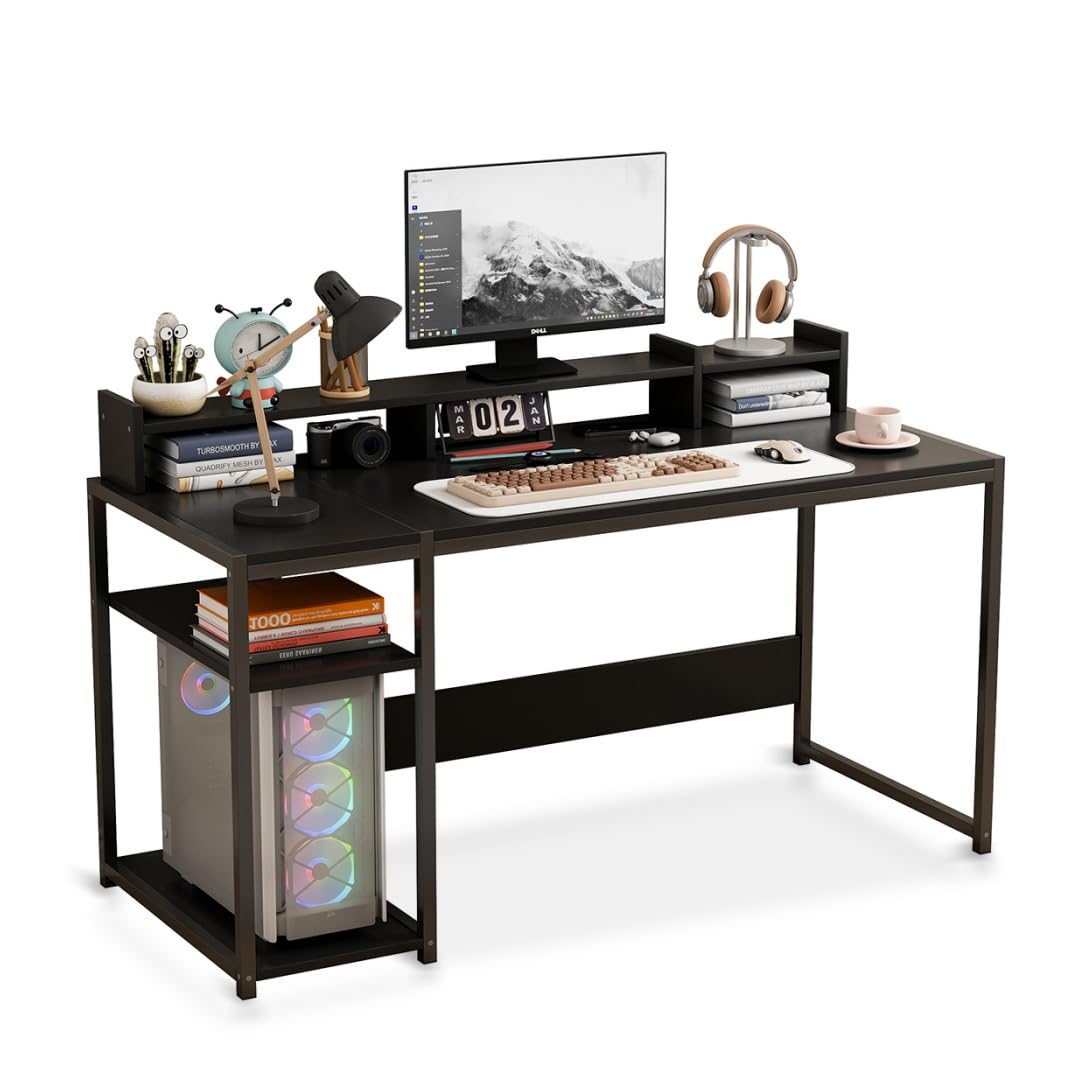
Image: The Lafulaifu Computer Desk, showcasing its spacious desktop and integrated shelving for various uses.
3. Apejọ Awọn ilana
Assembly of the Lafulaifu Computer Desk is required. Please follow the step-by-step instructions provided in the separate assembly manual included in your package. Ensure all components are present before starting.
- Yọọ gbogbo awọn paati ati rii daju lodi si atokọ awọn ẹya ninu iwe afọwọkọ apejọ.
- Identify all hardware (screws, bolts, etc.) which are typically organized and labeled.
- Assemble the metal frame structure according to the diagrams. Ensure all connections are secure but do not overtighten until the desk is fully assembled.
- Attach the main desktop panel to the assembled frame.
- Install the fixed storage shelf as indicated in the instructions.
- Place the movable monitor stand on the desktop. Note that this stand is not permanently affixed to the main desk surface, allowing for flexible positioning.
- Once all parts are in place, tighten all screws and bolts securely.
Note: All necessary tools for assembly are included in the package.

Image: Dimensional diagram of the desk, illustrating key measurements for setup and placement.
4. Awọn ilana Iṣiṣẹ
The Lafulaifu Computer Desk is designed for immediate use upon assembly. Consider the following for optimal operation:
- Iṣeto aaye iṣẹ: Arrange your computer, keyboard, mouse, and other peripherals on the main desktop.
- Atẹle Ibi: Utilize the monitor stand to elevate your screen(s) to eye level. This ergonomic positioning helps maintain a straight posture and reduces strain on your neck and eyes. The stand can be moved along the desktop to suit your preference.
- Lilo Ibi ipamọ: Use the integrated fixed shelf for storing books, documents, or your computer tower, keeping your workspace organized and clutter-free.
- Agbara fifuye: Distribute weight evenly across the desktop and shelves. Avoid placing excessively heavy items on any single point.

Image: Visual guide demonstrating the ergonomic benefits of using the monitor stand to maintain proper sitting posture.
5. Itọju ati Itọju
Proper care and maintenance will ensure the longevity and appearance of your Lafulaifu Computer Desk:
- Ninu: Nu tabili ati fireemu irin pẹlu asọ, damp cloth. For stubborn marks, use a mild soap solution and dry immediately. Avoid abrasive cleaners or harsh chemicals, as these can damage the finish.
- Idasonu: The desktop is water-resistant, but spills should be wiped immediately to prevent potential damage or staining.
- Ṣayẹwo iduroṣinṣin: Máa ṣàyẹ̀wò gbogbo àwọn skru àti bọ́ọ̀lù láti rí i dájú pé wọ́n wà ní ìdúróṣinṣin. Mú kí ó le dáadáa tí ó bá pọndandan láti jẹ́ kí tábìlì dúró ṣinṣin.
- Yago fun Imọlẹ Oorun Taara: Prolonged exposure to direct sunlight may cause fading or material degradation over time.
- Idaabobo Ooru: Use coasters or protective pads under hot items to prevent heat damage to the desktop surface.

Aworan: Alaye view of the desktop material, highlighting its smooth, durable, and easy-to-maintain characteristics.
6. Laasigbotitusita
Tí o bá ní ìṣòro pẹ̀lú tábìlì rẹ, ronú nípa àwọn ìdáhùn tó wọ́pọ̀ wọ̀nyí:
- Iduro Iduro: Ensure all assembly screws and bolts are fully tightened. Check that the desk is placed on a level surface. If the floor is uneven, consider using furniture pads or shims under the legs.
- Awọn ẹya ti o padanu: If any parts are missing upon unpacking, refer to the parts list in your assembly manual and contact customer support for assistance.
- Monitor Stand Movement: The monitor stand is designed to be movable and is not fixed to the main desktop. This is intentional for flexibility in positioning.
7. Awọn pato
Detailed specifications for the Lafulaifu Computer Desk, Model ct140:
| Ẹya ara ẹrọ | Ẹ̀kúnrẹ́rẹ́ |
|---|---|
| Brand | Lafulaifu |
| Awoṣe | ct140 |
| Àwọ̀ | Dudu |
| Awọn iwọn Ọja (D x W x H) | 50 x 140 x 88 cm (19.7 x 55.1 x 34.6 inches) |
| Iwọn Nkan | 12 kilogram (26.4 lbs) |
| Top elo Iru | Igi Ẹ̀rọ (MDF) |
| Fireemu elo Iru | Irin (Irin) |
| Pari Iru | Didan, didan |
| Nọmba ti selifu | 1 (fixed) + Monitor Stand |
| Sisanra tabili | 1.5 centimita |
| Apejọ ti a beere | Bẹẹni |
| Awọn irinṣẹ To wa | Bẹẹni |
| GTIN / UPC | 763523295734 |

Image: Detail of the desk's robust metal frame, emphasizing its stable and load-bearing design.
8. atilẹyin ọja Information
The Lafulaifu Computer Desk, Model ct140, comes with a Atilẹyin ọja to lopin. Please refer to the warranty card included with your purchase for specific terms, conditions, and duration of coverage. This warranty typically covers manufacturing defects and material flaws under normal use.
9. Onibara Support
For any questions regarding assembly, missing parts, product functionality, or warranty claims, please contact Lafulaifu customer support. Refer to your purchase documentation or the manufacturer's webaaye fun awọn alaye olubasọrọ.