
Ọrọ Iṣaaju
Thank you for choosing the Casio G-Shock GA-110 watch. This manual provides essential information regarding the setup, operation, and maintenance of your new timepiece. Designed for durability and precision, the GA-110 offers a range of features including world time, stopwatch, countdown timer, and multiple alarms, all housed in a robust, water-resistant casing.
Please read this manual carefully to ensure proper use and to maximize the lifespan of your watch. Keep this manual for future reference.
Ṣọraview

Figure 1: The Casio G-Shock GA-110 watch worn on a wrist. This image provides a real-world perspective of the watch's size and appearance, featuring its black resin construction and white dial.
The Casio G-Shock GA-110 features a combination analog and digital display. It is equipped with four buttons for various operations:
- ṢAtunṣe (Loke Osi): Ti a lo lati tẹ ati jade awọn ipo eto, ati lati jẹrisi eto.
- MODE (Isalẹ Osi): Cycles through different modes (Timekeeping, World Time, Stopwatch, Countdown Timer, Alarm).
- ÌDÍDÍ (Òkè Ọ̀tún): Used to scroll backward through settings or increase values.
- Siwaju (Isalẹ Apa Ọtun): Used to scroll forward through settings or decrease values.

olusin 2: Alaye iwaju view of the Casio G-Shock GA-110 watch. This image displays the watch's overall design, highlighting the black resin band and case, and the distinctive white analog-digital dial with multiple sub-dials and digital displays.

olusin 3: Apa view of the Casio G-Shock GA-110 watch. This image illustrates the robust casing and the placement of the ADJUST and MODE buttons on the left side of the watch.
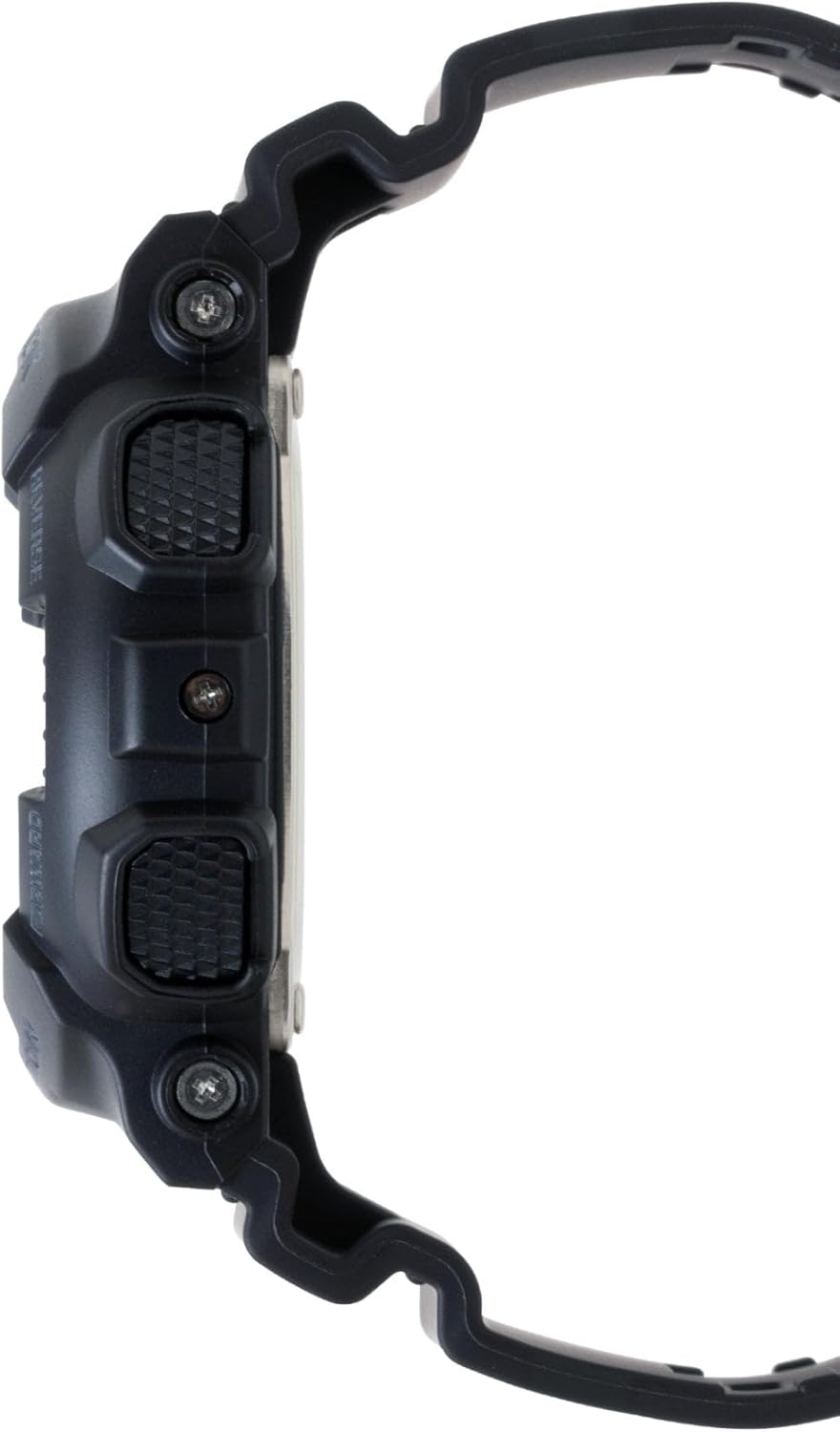
olusin 4: Idakeji ẹgbẹ view of the Casio G-Shock GA-110 watch. This image shows the placement of the REVERSE and FORWARD buttons on the right side of the watch, along with the textured grip.
Ṣeto
1. Eto Aago Ibẹrẹ
- Ni Ipo Ṣiṣe Aago, di mọlẹ ṢAtunṣe bọ́tìnì títí tí kódì ìlú yóò fi bẹ̀rẹ̀ sí í tàn. Èyí fi hàn pé ipò ìṣètò náà ni a ó lò.
- Lo awọn Yipada ati Siwaju awọn bọtini lati yan koodu Ilu Ile ti o fẹ.
- Tẹ awọn MODE button to cycle through the settings: City Code → DST (Daylight Saving Time) → 12/24-hour format → Seconds → Hour → Minute → Year → Month → Day → Illumination Duration.
- Lo awọn Yipada ati Siwaju awọn bọtini lati yi ìmọlẹ iye.
- Lẹhin ti ṣeto gbogbo awọn iye, tẹ bọtini naa ṢAtunṣe bọtini lati jade ni ipo eto.
2. Ṣíṣe àtúnṣe ọwọ́ afọwọ́ṣe
If the analog hands do not match the digital time, you may need to adjust them manually.
- Ni Ipo Itọju akoko, di mọlẹ ṢAtunṣe button until the city code flashes.
- Tẹ awọn MODE button repeatedly until "H.SET" appears on the digital display.
- Lo awọn Yipada ati Siwaju buttons to move the analog hands to the 12 o'clock position.
- Tẹ awọn ṢAtunṣe button to confirm and exit. The hands will automatically move to match the digital time.
3. batiri Alaye
The watch is powered by one LR44 battery, which is included and pre-installed. The battery life varies depending on usage of features like the backlight and alarms. When the display becomes dim or functions become erratic, it may be time for a battery replacement. Refer to the Maintenance section for more details.
Ṣiṣẹ awọn Watch
1. Ipo Lilọ kiri
Tẹ awọn MODE button to cycle through the different modes in the following order:
Timekeeping Mode → World Time Mode → Stopwatch Mode → Countdown Timer Mode → Alarm Mode
2. Ipo akoko
This is the default mode, displaying the current time and date. You can switch between 12-hour and 24-hour formats by pressing the Siwaju button in Timekeeping Mode (when not in setting mode).
3. World Time Ipo
Ni World Time Ipo, lo awọn Yipada ati Siwaju awọn bọtini lati view the current time in 48 cities (29 time zones) around the world. Press the ṢAtunṣe button to toggle Daylight Saving Time (DST) on or off for the currently displayed city.
4. Ipo aago iṣẹju-aaya
The stopwatch measures elapsed time, split times, and two finishes. The measuring capacity is 1/1000 second for the first hour, then 1/10 second for up to 100 hours.
- Tẹ Siwaju lati bẹrẹ/da aago iṣẹju-aaya duro.
- Tẹ Yipada to reset the stopwatch to zero while it is stopped.
- During measurement, press Yipada lati ṣe igbasilẹ akoko pipin. Tẹ Yipada again to release the split and continue measurement.
5. Kika Aago Ipo
The countdown timer can be set from 1 minute to 24 hours. An alarm sounds when the countdown reaches zero.
- In Countdown Timer Mode, hold down the ṢAtunṣe button until the current countdown start time flashes.
- Lo awọn MODE button to move the flashing between hours and minutes.
- Lo awọn Yipada ati Siwaju awọn bọtini lati yi ìmọlẹ iye.
- Tẹ ṢAtunṣe lati jade kuro ni ipo eto.
- Tẹ Siwaju lati bẹrẹ tabi da kika.
- Tẹ Yipada to reset the countdown to its start time while it is stopped.
6. Ipo Itaniji
The watch has 5 daily alarms (AL1 to AL4, and SNZ for snooze alarm) and an hourly akoko ifihan agbara (SIG).
- In Alarm Mode, use the Yipada ati Siwaju buttons to scroll through the alarms (AL1, AL2, AL3, AL4, SNZ, SIG).
- To set an alarm, hold down the ṢAtunṣe button when the desired alarm (e.g., AL1) is displayed. The hour setting will flash.
- Lo awọn MODE button to move the flashing between hours and minutes.
- Lo awọn Yipada ati Siwaju awọn bọtini lati yi ìmọlẹ iye.
- Tẹ ṢAtunṣe lati jade kuro ni ipo eto.
- Tẹ Siwaju to toggle the alarm (and SIG) on or off. An indicator will appear on the display when an alarm or the hourlifihan agbara akoko y n ṣiṣẹ.
7. Illumination (LED Light)
Tẹ awọn Yipada button in any mode (except when setting) to illuminate the display. The illumination duration can be set in Timekeeping Mode settings (refer to Initial Time Setting, step 3).
Itoju
1. Mímú Aago naa
- Pa aago naa nigbagbogbo pẹlu asọ ti o gbẹ, asọ ti o gbẹ lati yọ idoti ati ọrinrin kuro.
- For resin bands and cases, a mild soap solution and a soft brush can be used, followed by rinsing with clean water and thorough drying.
- Yẹra fún lílo àwọn kẹ́míkà líle, àwọn ohun èlò ìfọ́, tàbí àwọn ohun èlò ìfọmọ́ra, nítorí pé wọ́n lè ba àwọn ohun èlò aago jẹ́.
2. Omi Resistance
The GA-110 is water-resistant to 200 meters (20 BAR). This means it is suitable for showering, swimming, and diving. However, please observe the following precautions:
- Do not operate the buttons while the watch is wet or submerged.
- Avoid exposing the watch to hot water or steam (e.g., hot showers, saunas), as this can compromise the water resistance seals.
- Tí a bá fi omi iyọ̀ sí aago náà, fi omi tuntun fọ̀ ọ́ dáadáa kí o sì gbẹ ẹ́ pátápátá.
- Have the water resistance seals checked periodically (e.g., every 2-3 years) by an authorized service center, especially after battery replacement.
3. Batiri Rirọpo
The watch uses one LR44 battery. When the battery runs low, the display may dim or functions may become unreliable. Battery replacement should ideally be performed by an authorized Casio service center or a qualified watch technician to ensure proper sealing and maintain water resistance. Attempting to replace the battery yourself may void the warranty and compromise the watch's water resistance.
Laasigbotitusita
| Isoro | Owun to le Fa | Ojutu |
|---|---|---|
| Awọn ọwọ Analog ko baramu akoko oni-nọmba. | Ọwọ ti wa ni aṣiṣe. | Perform analog hand adjustment (refer to Setup section). |
| Ifihan oni nọmba jẹ baibai tabi ofo. | Batiri kekere. | Replace the battery (refer to Maintenance section). |
| Awọn bọtini ko dahun. | Watch may be in a frozen state or battery is very low. | Try pressing all four buttons simultaneously for a few seconds to reset. If unresponsive, replace battery. |
| Akoko ko tọ. | Incorrect city code, DST setting, or manual adjustment error. | Re-set the Home City, DST, and time settings (refer to Setup section). |
| Water inside the watch or fogging. | Compromised water resistance due to impact, aging seals, or button operation underwater. | Immediately take the watch to an authorized Casio service center for inspection and repair. Do not attempt to dry it yourself. |
Awọn pato
- Nọmba awoṣe: GA-110
- Ohun elo Ọran/Ọmọ: Resini
- Crystal: Erupe Gilasi
- Ifihan: Analog-Digital
- Gbigbe: Kuotisi
- Omi Resistance: 200 Mita (20 BAR)
- Batiri: 1 x LR44 (pẹlu)
- Igbesi aye batiri: Approximately 2 years (varies with usage of power-intensive functions)
- Yiye: ±15 seconds per month (without time signal calibration)
- Watch Dimensions (H×W×D): Isunmọ 55 × 51.2 × 16.9 mm
- Wo iwuwo: O fẹrẹ to giramu 72
- Awọn iṣẹ: World Time (48 cities + UTC), 1/1000-second Stopwatch, Countdown Timer, 5 Daily Alarms (1 Snooze Alarm), Hourly Time Signal, Full Auto-calendar, 12/24-hour format, LED light with Afterglow.
Note: Product package dimensions and weight (e.g., 5 x 4.5 x 3.25 inches; 5.6 ounces) refer to the shipping package, not the watch itself.
Alaye atilẹyin ọja
Your Casio G-Shock GA-110 watch comes with a Atilẹyin ọja to lopin. The terms and duration of the warranty may vary by region and retailer. Please refer to the warranty card included with your purchase or visit the official Casio webaaye fun alaye alaye nipa iṣeduro iṣeduro, awọn ofin, ati awọn ipo.
Tọju ẹri rira rẹ (iwe-ẹri) bi yoo ṣe nilo fun eyikeyi awọn ibeere atilẹyin ọja.
Onibara Support
For further assistance, technical support, or service inquiries, please contact Casio customer support through their official website or the contact information provided in your warranty documentation. You can typically find support resources, FAQs, and service center locations on the official Casio webojula: