
1. Ifihan
This manual provides essential instructions for the safe and efficient operation, setup, and maintenance of your Displays2go Pedestal Display with Digital Sign (Model DF037NLB). Please read this manual thoroughly before using the product and retain it for future reference.
The DF037NLB is a versatile pedestal display featuring a 37-inch stretch LCD advertising screen, designed for indoor use. It includes a rear locking storage compartment for added functionality.
2. Alaye Aabo
- Ọja yi jẹ ipinnu fun inu ile nikan. Do not expose to moisture, rain, or extreme temperatures.
- Rí i dájú pé a gbé ohun èlò náà sí orí ilẹ̀ tí ó dúró ṣinṣin, tí ó tẹ́jú láti dènà kí ó rì.
- Maṣe ṣe idiwọ awọn ṣiṣi eefin.
- Lo oluyipada agbara ti a pese nikan.
- Ge asopọ agbara ṣaaju ṣiṣe mimọ tabi ṣiṣe itọju eyikeyi.
- Ọjà yìí lè ní àwọn kẹ́míkà tí Ìpínlẹ̀ California mọ̀ pé ó lè fa àrùn jẹjẹrẹ àti àbùkù ìbímọ tàbí àwọn ìpalára mìíràn nínú ìbímọ (ìkìlọ̀ Proposition 65).
3. Package Awọn akoonu
Rii daju pe gbogbo awọn paati wa ninu apoti:
- Pedestal Display Unit (DF037NLB)
- Okun agbara
- Isakoṣo latọna jijin
- Set of Keys (for storage compartment)
- Afowoyi Olumulo (iwe-ipamọ yii)
4. Eto
4.1 Ṣiṣii ati Gbe
- Carefully remove the pedestal display from its packaging.
- Place the unit on a flat, stable surface in your desired indoor location. Ensure adequate space around the unit for ventilation.
4.2 Asopọ agbara
- Locate the power input port on the rear of the unit.
- Connect the provided power cable to the unit and then to a standard electrical outlet.
- The unit is now ready for initial power-on.
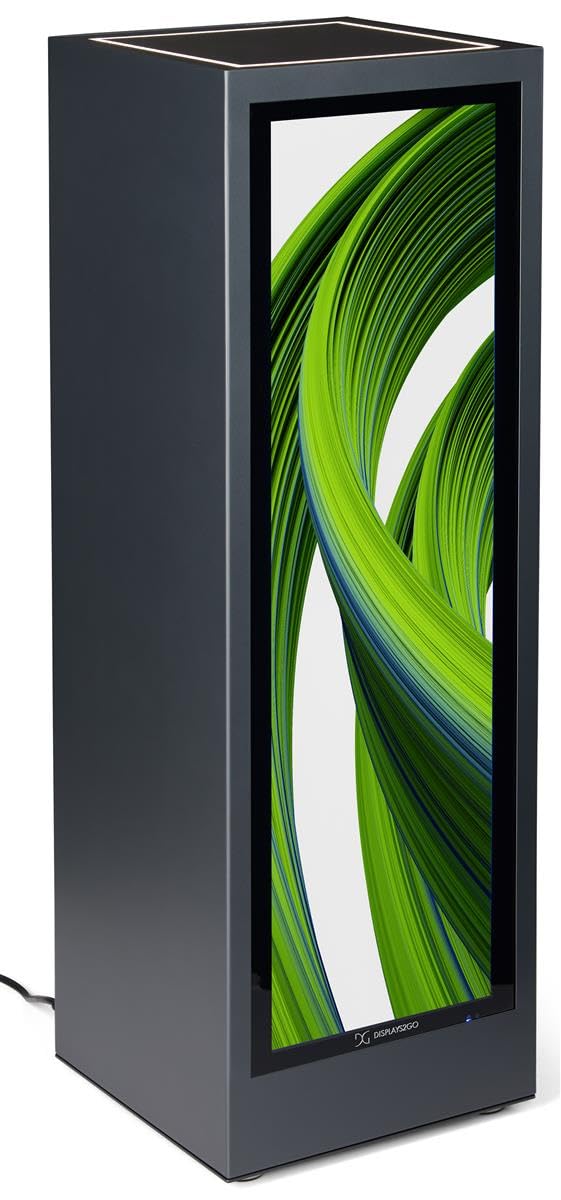
Aworan 4.1: Iwaju view of the Displays2go Pedestal Display with Digital Sign.
5. Awọn ilana Iṣiṣẹ
5.1 Digital Signage Operation
The pedestal display features a 37-inch stretch LCD screen for displaying various media content.
- Content Formatting: For optimal display, format your marketing materials to a resolution of 720 awọn piksẹli fife x 2520 awọn piksẹli giga.
- USB Content Transfer: Use the USB ports located on the rear of the unit to transfer images, videos, and other content to the display's internal storage.
- Asopọmọra: The unit supports WiFi and Bluetooth connectivity. This allows for network access, content updates, and connection to external Bluetooth speakers or peripherals like a mouse and keyboard.
- Google Play Access: Access the Google Play app store to download and install business applications directly onto the display.
- Ohun: The display includes two built-in speakers for audio playback.

Image 5.1: The digital display showcasing product advertisements for watches.

Image 5.2: The digital display showcasing product advertisements for headphones.

Image 5.3: The 37-inch diagonal measurement of the stretch LCD screen.
5.2 Rear Locking Storage Compartment
The unit features a rear-accessible storage compartment for securing personal items or product backstock.
- To open the compartment, insert one of the provided keys into the lock and turn.
- To lock, close the door, insert the key, and turn to secure. Remove the key to prevent unauthorized access.
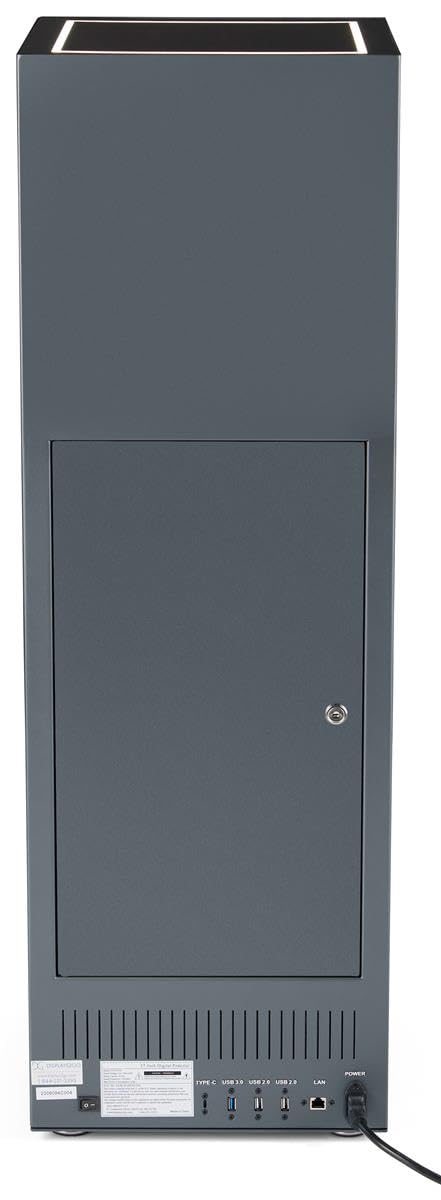
Aworan 5.4: Ẹyin view of the pedestal display showing the closed locking storage compartment and connectivity ports.

Aworan 5.5: Ẹyin view of the pedestal display with the locking storage compartment open, revealing interior space.
5.3 LED itanna
The mirrored top surface of the pedestal features LED illumination to highlight products placed on top. This feature is integrated with the main power supply and activates when the unit is powered on.
6. Itọju
6.1 Ninu
- Nigbagbogbo ge asopọ okun agbara ṣaaju ṣiṣe mimọ.
- Use a soft, dry, lint-free cloth to clean the exterior surfaces of the pedestal.
- For the screen, use a screen-specific cleaning solution and a microfiber cloth. Do not spray liquid directly onto the screen.
- Avoid abrasive cleaners or solvents, as they may damage the finish.
6.2 Software imudojuiwọn
Periodically check for software updates through the unit's operating system settings to ensure optimal performance and access to the latest features. Refer to the on-screen instructions for update procedures.
7. Laasigbotitusita
If you encounter issues with your pedestal display, refer to the following common problems and solutions:
| Isoro | Owun to le Fa | Ojutu |
|---|---|---|
| Ifihan ko si titan | Ko si agbara asopọ | Rí i dájú pé okùn agbára náà so mọ́ ẹ̀rọ náà àti ibi tí ó ń ṣiṣẹ́ dáadáa. |
| Ko si aworan loju iboju | Incorrect input source or no content loaded | Check display settings for input source. Ensure content is properly loaded via USB or network. |
| Ko si ohun lati ọdọ awọn agbohunsoke | Iwọn didun ju kekere tabi dakẹ | Adjust volume using the remote control or on-screen settings. Check if external Bluetooth speakers are connected and overriding internal speakers. |
| Kò le sopọ̀ mọ́ Wi-Fi/Bluetooth | Network issues or incorrect settings | Verify Wi-Fi network is active and password is correct. Ensure Bluetooth device is in pairing mode and within range. |
8. Awọn pato
| Ẹya ara ẹrọ | Ẹ̀kúnrẹ́rẹ́ |
|---|---|
| Nọmba awoṣe | DF037NLB |
| Awọn iwọn Ọja (W x D x H) | 14 x 14 x 43 inches |
| Iwon iboju | 37 inches (oni-rọsẹ) |
| Recommended Content Resolution | 720px (width) x 2520px (height) |
| Asopọmọra | WiFi, Bluetooth, USB ports (Type-C, USB 3.0, USB 2.0), LAN |
| Ohun | Awọn agbohunsoke ti a ṣe sinu |
| Ibi ipamọ | Rear locking compartment |
| Eto isesise | Access to Google Play App Store |
| Ayika Lilo | Lilo inu ile Nikan |
9. Atilẹyin ọja ati Support
For warranty information, technical support, or service inquiries, please contact Displays2go customer service. Refer to your purchase documentation or the Displays2go official webaaye fun awọn alaye olubasọrọ.