
Ọrọ Iṣaaju
This manual provides detailed instructions for the assembly, operation, maintenance, and troubleshooting of your GTRACING Gaming Recliner Chair (Model GT208M). Please read this manual thoroughly before use to ensure proper function and safety.
Alaye Aabo
Always follow assembly instructions carefully. This chair has a maximum weight recommendation of 300 iwon. Exceeding this limit may cause damage or injury. Keep children and pets away from moving parts during operation. Ensure all connections are secure before use.
Package Awọn akoonu
Rii daju pe gbogbo awọn paati wa ṣaaju ki o to bẹrẹ apejọ. Ti eyikeyi awọn ẹya ba sonu tabi bajẹ, jọwọ kan si atilẹyin alabara.
- Alaga Mimọ
- Atẹhin sẹhin
- Awọn ihamọra (Osi ati ọtun)
- Apejọ ẹlẹsẹ
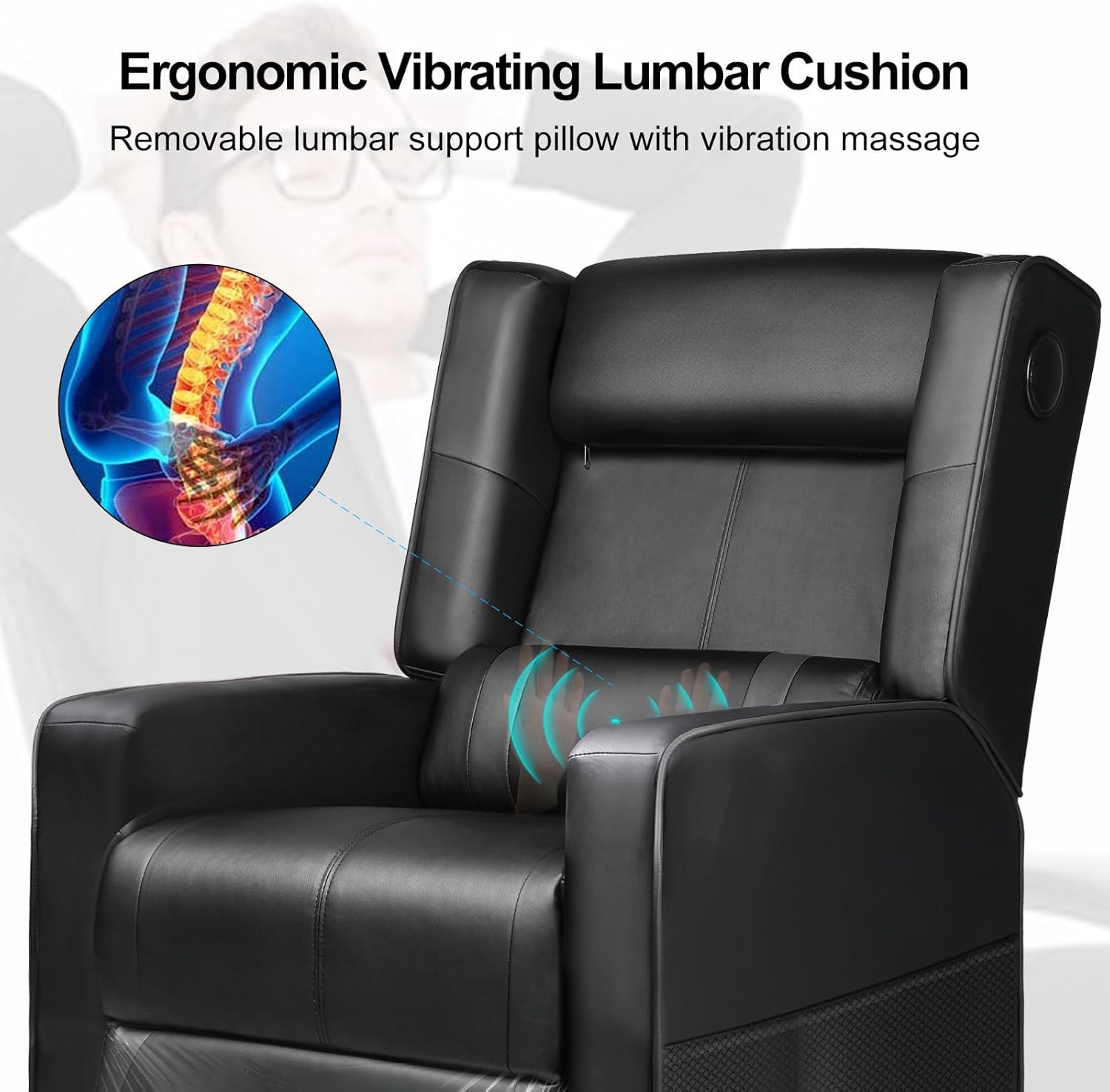
- Lumbar Cushion (with USB cable)
- Ohun elo Hardware (skru, washers, Allen wrench)
- Adapter Agbara (fun iṣẹ ifọwọra)
- Ilana itọnisọna
Awọn ilana Apejọ
Assembly typically takes 1-2 hours. It is recommended to have a second person assist with certain steps.
- Yọ awọn ohun elo kuro: Fi iṣọra yọ gbogbo awọn ẹya kuro ninu apoti ki o si gbe wọn si ori mimọ, dada rirọ lati ṣe idiwọ awọn itọ.
- So Armrests: Secure the left and right armrests to the chair base using the provided screws. Ensure they are firmly attached.
- Sopọ Backrest: Slide the backrest onto the chair base, aligning the metal brackets. Secure with screws.
- Fi sori ẹrọ Footrest: Attach the footrest assembly to the designated points on the chair base.
- Position Lumbar Cushion: Place the lumbar cushion on the backrest. The USB cable for the massage function should be accessible.
- Awọn ayẹwo Ipari: Rii daju pe gbogbo awọn skru ti wa ni wiwọ ati pe alaga jẹ iduroṣinṣin ṣaaju lilo.

Awọn ilana Iṣiṣẹ
Isẹ Isunmọ
The chair features a push-back reclining mechanism, allowing you to adjust the backrest and footrest to your desired position. Simply lean back to recline and push forward to return to an upright position. The reclining angle can reach up to 155 degrees.

Awọn Agbọrọsọ Bluetooth
Your GTRACING recliner is equipped with built-in Bluetooth speakers for an immersive audio experience.
- Agbara Tan: Locate the power button on the side of the chair (usually near the speaker). Press and hold to power on the speakers.
- Ipo sisopọ: The speakers will automatically enter pairing mode, indicated by a flashing LED light.
- So ẹrọ pọ: On your mobile device or computer, enable Bluetooth and search for "GTRACING Speaker" (or similar name). Select it to pair.
- Sisisẹsẹhin ohun: Once paired, audio from your device will play through the chair's speakers. Adjust volume via your device.

Lumbar Massage Function
The integrated lumbar cushion provides a vibrating massage function for added comfort. It is powered via a USB connection.
- So agbara: Plug the USB cable from the lumbar cushion into a compatible USB power source (e.g., computer USB port, power bank, USB wall adapter).
- Mu ifọwọra ṣiṣẹ: The massage function will typically activate upon connection. Some models may have an inline switch on the USB cable.
- Deactivate Massage: To turn off the massage, disconnect the USB power source.
Itọju ati Itọju
- Ninu: Pa nu pẹlu ipolowoamp cloth. Avoid harsh chemicals or abrasive cleaners, as these can damage the faux leather material.
- Ayẹwo igbagbogbo: Lokọọkan ṣayẹwo gbogbo awọn skru ati awọn asopọ lati rii daju pe wọn wa ni wiwọ. Retighten ti o ba wulo.
- Yago fun Imọlẹ Oorun Taara: Ifarahan gigun si imọlẹ oorun taara le fa faux alawọ lati rọ tabi kiraki.
- Opin iwuwo: Maṣe kọja iṣeduro iwuwo ti o pọju ti 300 poun.
Laasigbotitusita
| Isoro | Owun to le Fa | Ojutu |
|---|---|---|
| Àga kì í rọ̀gbọ̀kú. | Obstruction in mechanism; insufficient space behind chair. | Check for obstructions. Ensure chair is 18-20 inches from a wall. |
| Bluetooth speakers not pairing. | Speakers not in pairing mode; device Bluetooth off; too far from device. | Ensure speakers are powered on and in pairing mode. Turn on device Bluetooth. Move device closer to chair. |
| Iṣẹ ifọwọra ko ṣiṣẹ. | USB cable not connected; power source issue. | Verify USB cable is securely connected to a working power source. Try a different USB port or power bank. |
| Alaga kan lara riru tabi riru. | Loose ijọ skru. | Ṣàyẹ̀wò kí o sì mú gbogbo àwọn skru ìṣọ̀kan náà. |
Awọn pato ọja
- Awoṣe: GT208M
- Brand: JIJI
- Àwọ̀: Dudu
- Ohun elo: Faux Alawọ, Foomu Kun
- Awọn iwọn Ọja (D x W x H): 35.03"D x 26.77"W x 38.97"H (Upright)
- Ìwọ̀n Nkan: 52.9 iwon
- Iṣeduro iwuwo ti o pọju: 300 iwon
- Igun ti o rọgbọ: Titi di iwọn 155
- Awọn ẹya pataki: Bluetooth Speakers, Lumbar Massage, Push-back Reclining, Side Pockets
- UPC: 810170303272
Atilẹyin ọja ati Support
For warranty information, technical support, or assistance with missing/damaged parts, please contact GTRACING customer service. Refer to your purchase documentation for specific warranty terms and contact details.
You can often find support contact information on the official GTRACING webaaye tabi nipasẹ alagbata ti o ti ra ọja naa.