
Ọrọ Iṣaaju
Welcome to the GOBOULT Mirage Smart Watch user manual. This guide provides detailed instructions on how to set up, operate, and maintain your new smartwatch. Please read this manual thoroughly to ensure optimal performance and longevity of your device.
Ọja Pariview
The GOBOULT Mirage Smart Watch is a feature-rich device designed to enhance your daily life with advanced health monitoring, communication, and fitness tracking capabilities. It features a vibrant 1.39-inch HD display, Bluetooth calling, and a durable zinc alloy frame.
Awọn ẹya pataki:
- 1.39-inch HD Ifihan: Bright and clear screen with 500 nits brightness and 360x360 pixel resolution.
- Ipe Bluetooth: Make and receive calls directly from your wrist with a built-in speaker and microphone.
- Abojuto Ilera pipe: Includes SpO2, heart rate, blood pressure, sleep tracking, breath training, and menstrual cycle tracking.
- Awọn ọna Idaraya 120+: Track a wide range of physical activities with detailed metrics.
- Oluranlọwọ ohun AI: Hands-free control and access to features.
- IP67 Idaabobo Omi: Designed to withstand splashes and dust.
- Awọn oju Wiwo ti o le ṣatunṣe: Over 300 cloud-based watch faces to personalize your device.
- Awọn iwifunni Smart: Receive alerts for calls, messages, and app notifications.
- Igbesi aye batiri gigun: Titi di ọjọ 7 ti lilo aṣoju.
Kini o wa ninu apoti:
- GOBOULT Mirage Smart Watch (Coal Black)
- Ngba agbara USB
- Itọsọna olumulo
- Kaadi atilẹyin ọja

Aworan: Pariview of the GOBOULT Mirage Smart Watch highlighting its main features.
Eto Itọsọna
1. Ngba agbara si Smart Watch
- Connect the magnetic charging cable to the charging pins on the back of your smartwatch.
- Pulọọgi okun USB opin okun sinu ohun ti nmu badọgba agbara USB boṣewa (5V/1A niyanju) tabi ibudo USB ti kọnputa kan.
- The watch display will show a charging indicator. A full charge takes approximately 120 minutes.
- Ensure the charging pins are clean and dry before charging to prevent corrosion.
2. Agbara lori / Paa
- Agbara Tan: Press and hold the side button (digital crown) for a few seconds until the GOBOULT logo appears.
- Agbara Pa: From the watch face, swipe down to access quick settings, or navigate to the settings menu. Select "Power Off" and confirm. Alternatively, press and hold the side button until the power off option appears.
3. Sopọ pẹlu Foonuiyara Foonuiyara Rẹ
- Download the official GOBOULT companion app from your smartphone's app store (available for iOS and Android).
- Rii daju pe Bluetooth ti ṣiṣẹ lori foonuiyara rẹ.
- Open the GOBOULT app and follow the on-screen instructions to create an account or log in.
- In the app, select "Add Device" or a similar option to search for your smartwatch.
- Select "GOBOULT Mirage" from the list of available devices.
- Jẹrisi ibeere sisopọ lori mejeeji foonuiyara rẹ ati smartwatch naa.
- Nígbà tí a bá so aago náà pọ̀, aago náà yóò mú kí dátà pọ̀ mọ́ fóònù rẹ, o sì lè ṣe àtúnṣe àwọn ètò nípasẹ̀ àpù náà.
Awọn ilana Iṣiṣẹ
Lilọ kiri ipilẹ:
- Afi ika te: Rọ apa osi/ọtun, soke/isalẹ lati lọ kiri nipasẹ awọn akojọ aṣayan ati awọn iwifunni. Tẹ lati yan awọn ohun kan.
- Digital Crown (Side Button):
- Tẹ lẹẹkan: Return to the watch face from any screen, or wake the screen.
- Tẹ mọlẹ: Power on/off, or access the AI Voice Assistant (configurable).
- Yiyi: Scroll through menus, lists, or adjust settings.
- Bọtini Ọna abuja: The second physical button on the side can be customized for quick access to specific functions, such as launching sports modes.

Image: Digital crown and button functionalities for navigation and quick access.
Abojuto Ilera
The GOBOULT Mirage Smart Watch offers a comprehensive suite of health tracking features. For accurate readings, ensure the watch is worn snugly on your wrist, about one finger's width from your wrist bone.
- Abojuto Oṣuwọn Ọkàn: The watch continuously tracks your heart rate. View data akoko gidi lori aago tabi awọn aṣa alaye ninu app naa.
- SpO2 (Atẹgun ẹjẹ) Abojuto: Measure your blood oxygen levels on demand. Navigate to the SpO2 function on your watch and remain still for accurate results.
- Abojuto Ipa Ẹjẹ: Access the blood pressure feature on your watch for readings.
- Abojuto oorun: Wear your watch to bed to track your sleep patterns, including deep sleep, light sleep, and awake times. Data is available in the app.
- Breath Training Mode: Follow guided breathing exercises to help reduce stress and improve relaxation.
- Àtòjọ iṣẹ́: Ṣe abojuto awọn igbesẹ, ijinna, ati awọn kalori ti o jo jakejado ọjọ naa.
- Olurannileti Omi mimu: Set reminders in the app to ensure you stay hydrated.
- Olurannileti Iduroṣinṣin: Receive alerts when you've been inactive for too long, encouraging you to move.
- Àtòjọ Ìyípo Osu: For female users, track and predict menstrual cycles through the companion app.

Image: The watch's health sensors and a summary of its health monitoring capabilities.
Awọn ipo ere idaraya
The GOBOULT Mirage Smart Watch supports over 120 sports modes to accurately track your workouts. From running to yoga, you can monitor your performance and progress.
Using Sports Modes:
- Access the sports mode menu from the watch's main interface or by using the dedicated shortcut button.
- Scroll through the list and select your desired activity (e.g., Running, Cycling, Yoga, Cricket, Badminton, Basketball).
- Tap to start the activity. The watch will begin recording data such as duration, heart rate, calories burned, and distance (where applicable).
- To pause or end an activity, swipe right or press the side button and follow the on-screen prompts.
- Review your workout summaries on the watch or in detail within the companion app.

Image: The watch interface showing various sports modes and quick access options.
Bluetooth Calling & Smart Notifications
With Bluetooth 5.3 connectivity, your GOBOULT Mirage Smart Watch allows you to manage calls and receive notifications directly on your wrist.
Ipe Bluetooth:
- Rii daju pe aago rẹ ti so pọ pẹlu foonu rẹ nipasẹ Bluetooth.
- Ṣiṣe awọn ipe: Wọle si paadi ipe tabi atokọ olubasọrọ lori aago rẹ lati pilẹṣẹ ipe kan.
- Gbigba Awọn ipe: When a call comes in, the watch will display the caller ID. You can answer or reject the call directly from your wrist using the built-in speaker and microphone.
- Contact Sync: Synchronize your phone contacts with the watch through the companion app for easy access.
Awọn iwifunni Smart:
- Enable app notifications in the GOBOULT companion app on your smartphone.
- Your watch will display incoming messages, social media alerts, and other app notifications.
- Fì sí òkè tàbí ìsàlẹ̀ lórí aago náà ní ojú sí view your notification history.

Image: Bluetooth calling features and interface on the smartwatch.

Image: Smart notifications and other quick access features like calculator and voice assistant.
Isọdi
Awọn oju iṣọ:
Personalize your GOBOULT Mirage Smart Watch with over 300 cloud-based watch faces. You can change the watch face directly from the device or through the companion app.
- Lori Iṣọ: From the watch face, press and hold the screen. Swipe left or right to browse available watch faces and tap to select.
- Nipasẹ App: Open the GOBOULT app, navigate to the watch face section, and explore a wider selection of designs. Download and apply your preferred watch face.

Aworan: Examples of customizable watch faces available for the smartwatch.
Afikun Awọn ẹya ara ẹrọ
Oluranlọwọ ohun AI:
Activate the AI Voice Assistant (compatible with Hey Siri and Ok Google) by long-pressing the digital crown or through a dedicated menu option. Use voice commands to perform various tasks hands-free.
Wa Foonu Mi:
If your paired smartphone is misplaced, use the "Find My Phone" feature on your watch to make it ring or vibrate, helping you locate it quickly.
- Go to the watch menu.
- Select the "Find Phone" option.
- The connected phone will ring or vibrate.
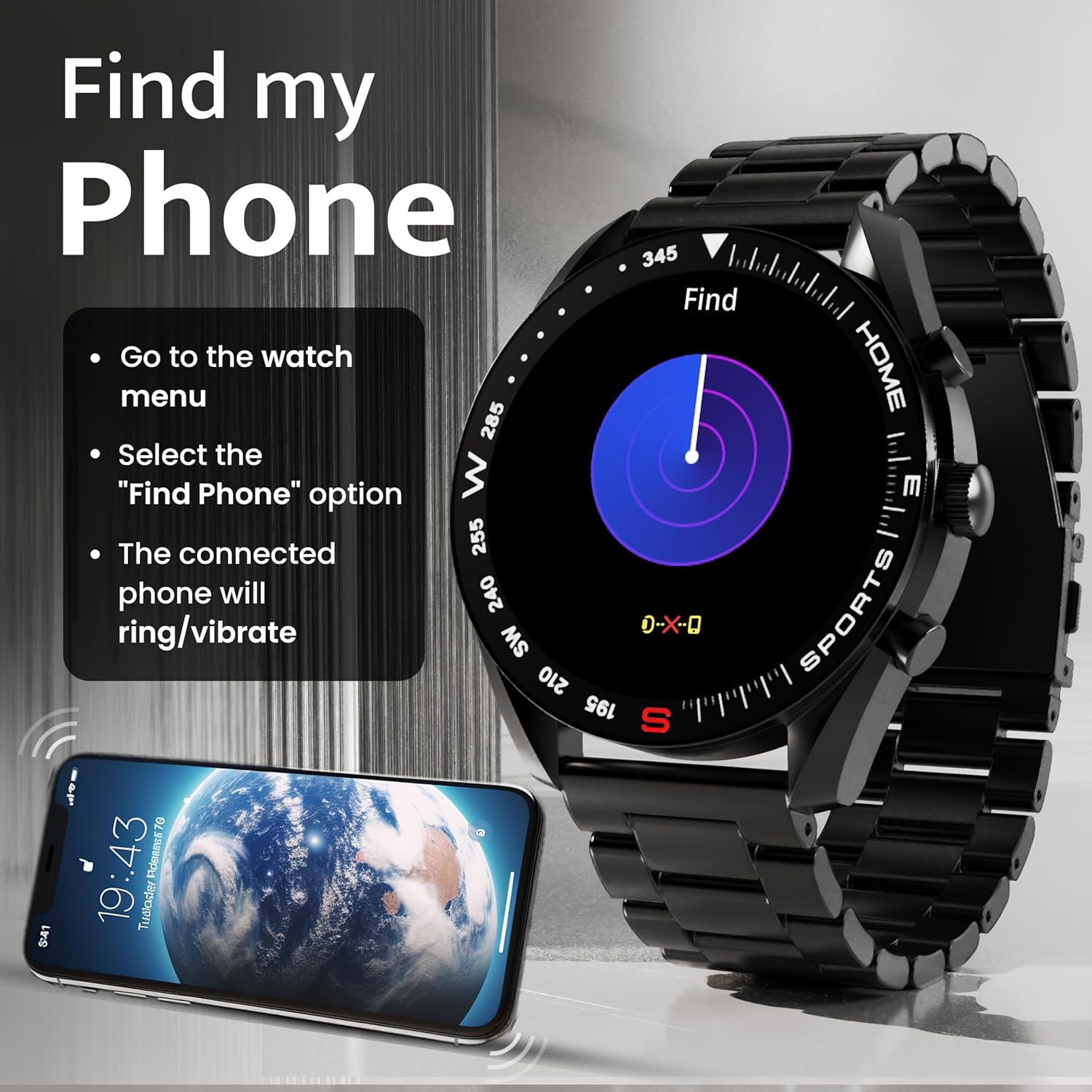
Image: How to use the 'Find My Phone' feature on the smartwatch.
Awọn ere kekere:
The watch includes several mini-games for entertainment, such as 2048, Battleship, Hamster, and Young Bird.

Aworan: Examples of mini-games available on the smartwatch.
Itoju
Cleaning Your Smart Watch:
- Pa iboju aago ati ara rẹ nu pẹlu asọ ti ko ni lint.
- Fun idoti alagidi, die-die dampen aṣọ pẹlu omi. Yago fun lilo awọn kẹmika lile tabi awọn ohun elo abrasive.
- Clean the charging pins regularly with a dry cloth or cotton swab to ensure proper charging.
Omi Resistance (IP67):
The GOBOULT Mirage Smart Watch is IP67 water-resistant, meaning it is protected against dust ingress and can withstand immersion in water up to 1 meter for up to 30 minutes. However, it is not suitable for swimming, showering with hot water, or diving. Avoid exposure to high-pressure water or corrosive liquids.

Image: Information regarding the IP67 water and dust resistance of the smartwatch.
Atunse okun:
The watch comes with a metallic strap adjustment tool. Refer to the included instructions or a professional for adjusting the strap length to ensure a comfortable and secure fit.

Image: The watch's zinc alloy frame and the metallic strap adjustment tool.
Laasigbotitusita
- Wo ti ko tan: Ensure the watch is fully charged. Connect it to the charging cable and allow it to charge for at least 30 minutes before attempting to power it on again.
- Ko le so pọ pẹlu foonu:
- Rii daju pe Bluetooth ti ṣiṣẹ lori foonu rẹ ati aago.
- Ensure the watch is within the Bluetooth range (up to 10 meters).
- Tun foonu rẹ bẹrẹ mejeeji ati smartwatch.
- Clear the Bluetooth cache on your phone or forget the device and try pairing again.
- Ensure the GOBOULT companion app is updated to the latest version.
- Awọn alaye ilera ti ko pe: Rí i dájú pé aago náà wà ní ọwọ́ rẹ dáadáa, kò ní le jù tàbí kí ó rọ̀ jù. Nu àwọn sensọ̀ tó wà lẹ́yìn aago náà. Yẹra fún ṣíṣí kiri jù nígbà tí a bá ń wọn nǹkan.
- Awọn iwifunni ko han:
- Check if notifications are enabled for the specific apps in the GOBOULT companion app.
- Ensure your phone's notification settings allow the GOBOULT app to display alerts.
- Verify that the watch is properly connected to your phone via Bluetooth.
- Igbesi aye batiri kukuru: Reduce screen brightness, disable unnecessary features like continuous heart rate monitoring if not needed, and limit the number of active notifications. Ensure the watch is fully charged.
- Iboju ifọwọkan ko dahun: Tun aago bẹrẹ. Ti ọrọ naa ba wa, rii daju pe iboju jẹ mimọ ati gbẹ.
Awọn pato
| Ẹya ara ẹrọ | Ẹ̀kúnrẹ́rẹ́ |
|---|---|
| Orukọ awoṣe | Mirage |
| Iwọn Ifihan | 1.39 inches HD |
| Ipinnu Ifihan | 360 x 360 awọn piksẹli |
| Imọlẹ | 500 Nits Peak Brightness |
| Asopọmọra | Bluetooth 5.3 |
| Omi Resistance | IP67 |
| Ohun elo fireemu | Sinkii Alloy |
| Batiri Iru | Litiumu polima |
| Apapọ batiri Life | Titi di ọjọ 7 |
| Akoko gbigba agbara | O fẹrẹ to iṣẹju 120 |
| Ibamu System isẹ | iOS, Android |
| Iwọn Nkan | 106 g |
| Awọn irinše to wa | Smart Watch, Charging Cable, User Manual, Warranty Card |
Atilẹyin ọja ati Support
Alaye Atilẹyin ọja:
Your GOBOULT Mirage Smart Watch comes with a manufacturer's warranty. Please refer to the included Warranty Card for specific terms, conditions, and duration of the warranty. Keep your purchase receipt as proof of purchase.
Atilẹyin Onibara:
If you encounter any issues or have questions not covered in this manual, please contact GOBOULT customer support. Contact details can typically be found on the Warranty Card or the official GOBOULT webojula.