
1. Ifihan
Thank you for choosing the MOUNTUP Dual Monitor Arm MU8012-W-07. This instruction manual provides essential information for the safe and correct installation, operation, and maintenance of your new monitor arm. Please read this manual thoroughly before installation and keep it for future reference.
Awọn iṣọra Aabo
- Rí i dájú pé gbogbo àwọn ẹ̀yà ara wà níbẹ̀ tí wọn kò sì bàjẹ́ kí wọ́n tó kó wọn jọ. Má ṣe lò ó tí àwọn ẹ̀yà ara kan bá sọnù tàbí tí wọ́n ní àbùkù.
- Rí i dájú pé ojú tábìlì rẹ lágbára tó láti gbé gbogbo ìwọ̀n apá àtẹ̀gùn àti àwọn àtẹ̀gùn rẹ ró.
- Do not exceed the maximum weight capacity of 10kg (22 lbs) per arm.
- Always follow the installation steps carefully. Improper installation may result in product damage or personal injury.
- Keep children away from the product during assembly. Small parts may be a choking hazard.
2. Package Awọn akoonu
Jọwọ ṣayẹwo pe gbogbo awọn paati wọnyi wa ninu package rẹ:
- Monitor Arm Assembly (x1)
- Awo VESA (x2)
- Iduro Clamp Mimọ (x1)
- Grommet Base (x1)
- Ohun elo Ohun elo Iṣagbesori (skru, washers, spacers)
- Awọn Wrenches Hex (oriṣiriṣi awọn iwọn)
- Ilana itọnisọna (x1)
3. Awọn pato
| Ẹya ara ẹrọ | Sipesifikesonu |
|---|---|
| Awoṣe | MU8012-W-07 |
| Ohun elo | Alloy Irin |
| Àwọ̀ | Funfun |
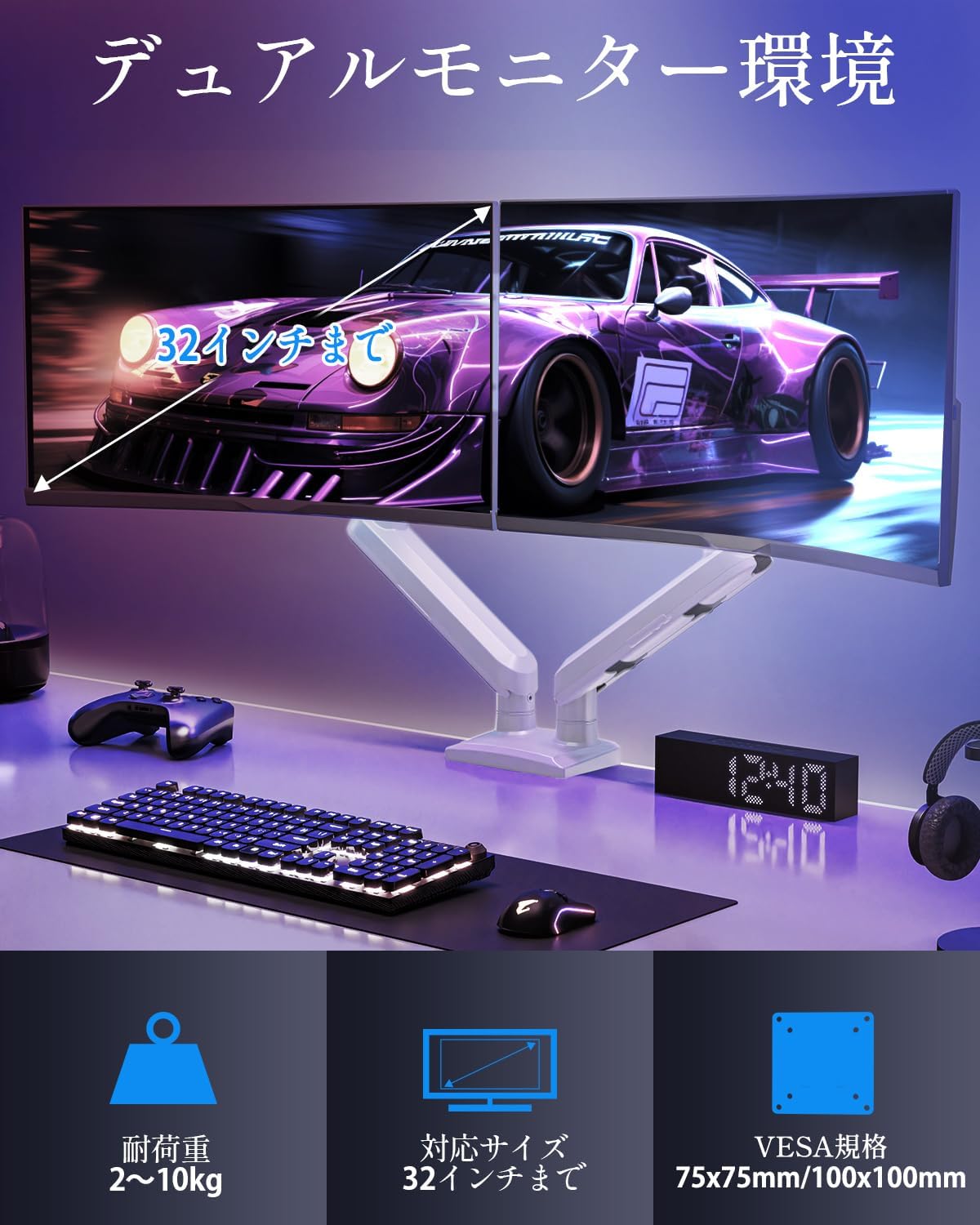
| Ibamu Iwon Iboju | 13 - 32 inches |
| Agbara iwuwo (fun apa) | 2 - 10 kg (4.4 - 22 lbs) |
| VESA ibamu | 75x75mm, 100x100mm |
| Iṣagbesori Aw | Clamp, Grommet |
| Titẹ Range | +85° si -45° |
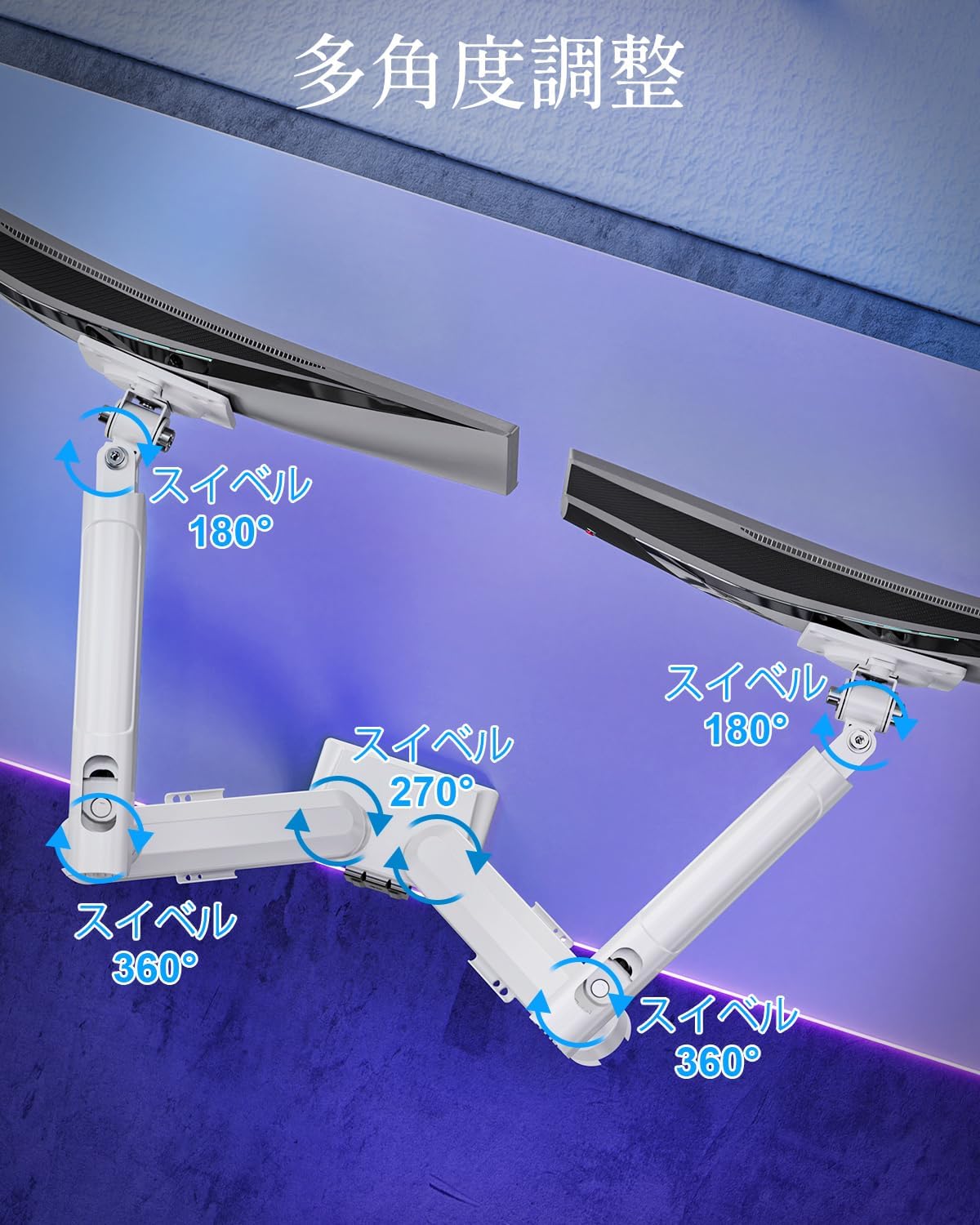
| Swivel Ibiti | 180° (monitor plate), 270° (middle joint), 360° (base) |
| Rotation (Pivot) | 360° |
| Max Iga tolesese | 44 cm (17.3 inches) |
| Max Arm Extension | 50 cm (19.7 inches) |
| Iwọn Ọja | 3.1 kg (6.8 lbs) |

4. Eto ati fifi sori
Igbesẹ 1: Yan Ọna Iṣagbesori Rẹ
The MOUNTUP Dual Monitor Arm supports two installation methods: Clamp Mount and Grommet Mount. Choose the method that best suits your desk.

Clamp Oke fifi sori
- So clamp base to the main pole of the monitor arm.
- Gbe awọn clamp onto the edge of your desk. Ensure the desk thickness is between 10-70mm (0.4-2.7 inches).
- Mu clamp Rí i dájú pé apá náà dúró ṣinṣin, kò sì mì tìtì.

Grommet Mount fifi sori
- If your desk has a grommet hole, ensure its diameter is between 10-60mm (0.4-2.4 inches) and the desk thickness is between 10-70mm (0.4-2.7 inches).
- Attach the grommet base to the main pole.
- Insert the grommet bolt through the desk hole and secure it from underneath with the provided plate and nut.
- Tighten the nut until the arm is firmly attached to the desk.
Igbesẹ 2: So awọn awopọ VESA pọ si Awọn diigi
- Carefully lay your monitor face down on a soft, clean surface.
- Ṣe deede awo VESA pẹlu awọn ihò iṣagbesori lori ẹhin atẹle rẹ.
- Use the appropriate screws (M4 or M5) and washers from the hardware kit to secure the VESA plate to the monitor. Do not overtighten.
Igbesẹ 3: Oke Awọn diigi si Arms
- Slide the monitor (with the attached VESA plate) onto the VESA head of the monitor arm.
- Ensure the monitor clicks into place or is securely fastened by the quick-release mechanism.
- Tun ṣe fun atẹle keji.

Igbesẹ 4: Isakoso okun
Route your monitor cables through the integrated cable management clips on the underside of the arms. This helps maintain a tidy workspace.

5. Ṣiṣẹ ati Awọn atunṣe
The MOUNTUP Dual Monitor Arm offers flexible adjustments to optimize your viewiriri iriri.

Adjusting Arm Tension (Gas Spring)
The gas spring mechanism allows for smooth height adjustments. If your monitor sags or is difficult to move, you may need to adjust the tension.

- To increase tension (if monitor sags): Use the provided hex wrench to turn the adjustment screw clockwise.
- To decrease tension (if arm is too stiff): Turn the adjustment screw counter-clockwise.
- Always adjust tension with the arm held horizontally. Test the movement after each small adjustment until the monitor holds its position freely.
Atẹle Awọn atunṣe
- Atunse Giga: Gently push or pull the monitor up or down to your desired height. The gas spring will assist in holding the position. Max height is 44cm (17.3 inches).
- Atunṣe tẹlọrun: Tilt the monitor screen up to +85° or down to -45° to reduce glare and optimize viewing angles. Loosen the tilt bolt, adjust, then re-tighten.
- Atunṣe Swivel: The arm allows for 180° swivel at the monitor plate, 270° at the middle joint, and 360° at the base, providing wide range of motion.
- Rotation (Pivot): Yi iboju rẹ pada ni iwọn 360° lati yipada laarin awọn oju-ọna ala-ilẹ ati awọn aworan.

6. Itọju
- Ninu: Mu apa atẹle nu pẹlu asọ, damp asọ. Yago fun abrasive ose tabi olomi ti o le ba awọn ipari.
- Awọn ayẹwo igbakọọkan: Lokọọkan ṣayẹwo gbogbo awọn skru ati awọn asopọ lati rii daju pe wọn wa ni wiwọ ati aabo. Tun-mu ti o ba wulo.
- Gas Spring Longevity: The high-quality gas spring is tested for over 20,000 cycles. Proper tension adjustment will help maintain its performance over time.

7. Laasigbotitusita
- Má ṣe àkíyèsí ìdíwọ́ tàbí kí o má dúró ní òru: The gas spring tension is too low. Refer to the "Adjusting Arm Tension" section and turn the adjustment screw clockwise to increase tension.
- Arm is Too Stiff or Difficult to Move: The gas spring tension is too high. Refer to the "Adjusting Arm Tension" section and turn the adjustment screw counter-clockwise to decrease tension.
- Monitor Wobbles: Ensure all mounting screws (VESA plate to monitor, arm to desk) are securely tightened. Check that the desk clamp or grommet mount is firm.
- Monitor Tilt Angle Won't Hold: The tilt bolt may be loose. Tighten the tilt bolt on the VESA head.
8. Atilẹyin ọja ati Support
MOUNTUP provides a 2-odun didara lopolopo from the date of purchase for this product. This warranty covers manufacturing defects and issues arising from normal use.
If you encounter any problems with your MOUNTUP Dual Monitor Arm, or if you have questions regarding installation or operation, please contact our customer support. You can typically find seller contact information through your purchase history on the platform where you bought the product (e.g., Amazon order details).
Please have your model number (MU8012-W-07) and purchase date ready when contacting support to ensure a swift resolution.