
1. Ifihan
The Fenton Pulse65 is a versatile portable party speaker designed for various events and environments. It delivers powerful sound, offers wireless connectivity, and features dynamic lighting. This manual provides essential information for the safe and optimal use of your Pulse65 speaker.
Awọn ẹya pataki:
- 60W RMS (140W max) output for clear, powerful sound with deep bass.
- Bluetooth 5.3 for wireless streaming and stereo pairing (TWS).
- Dynamic multicolour light show synchronized with music.
- IPX4 splashproof design for outdoor use.
- Integrated 12-hour rechargeable battery.
- Includes a wireless UHF microphone and remote control.
- USB playback and FM radio functionality.
2. Alaye Aabo
Jọwọ ka ati loye gbogbo awọn ilana aabo ṣaaju lilo ọja yii. Daduro iwe afọwọkọ yii fun itọkasi ọjọ iwaju.
- Omi Resistance: The Pulse65 is IPX4 splashproof. Do not immerse the speaker in water or expose it to heavy rain. Ensure all port covers are securely closed when used near water.
- Orisun Agbara: Use only the specified charging cable and power adapter. Do not attempt to open or modify the battery compartment.
- Afẹfẹ: Do not block any ventilation openings. Ensure adequate airflow around the speaker.
- Ninu: Ge asopọ agbara ṣaaju ṣiṣe mimọ. Lo asọ asọ ti o gbẹ. Maṣe lo awọn olutọpa olomi tabi awọn aerosols.
- Iwọn otutu: Avoid extreme temperatures. Do not expose to direct sunlight for extended periods or place near heat sources.
- Awọn ọmọde: Pa kuro ni arọwọto awọn ọmọde. Ọja yii kii ṣe nkan isere.
3. Package Awọn akoonu
Jẹrisi pe gbogbo awọn ohun kan wa ninu package:
- Fenton Pulse65 Portable Party Speaker
- Alailowaya UHF Gbohungbo
- Isakoṣo latọna jijin
- Okun Ngba agbara USB
- Itọsọna olumulo
4. Eto
4.1. Gbigba agbara akọkọ
Before first use, fully charge the speaker. Connect the provided USB charging cable to the speaker's charging port and a suitable USB power adapter (not included). The charging indicator will show the charging status. A full charge provides approximately 12 hours of playback, depending on usage volume and light effects.
4.2. Agbara lori / Paa
Tẹ mọlẹ Agbara button on the control panel to turn the speaker on or off.
4.3. Ailokun Gbohungbo Oṣo
The included wireless UHF microphone is pre-paired with the speaker. Ensure the microphone has fresh batteries (not included) and is powered on. The microphone's display will indicate its status.

Image: The Fenton Pulse65 speaker shown with its wireless microphone and remote control, illustrating the complete package.
5. Awọn ilana Iṣiṣẹ
5.1. Iṣakoso igbimo Loriview
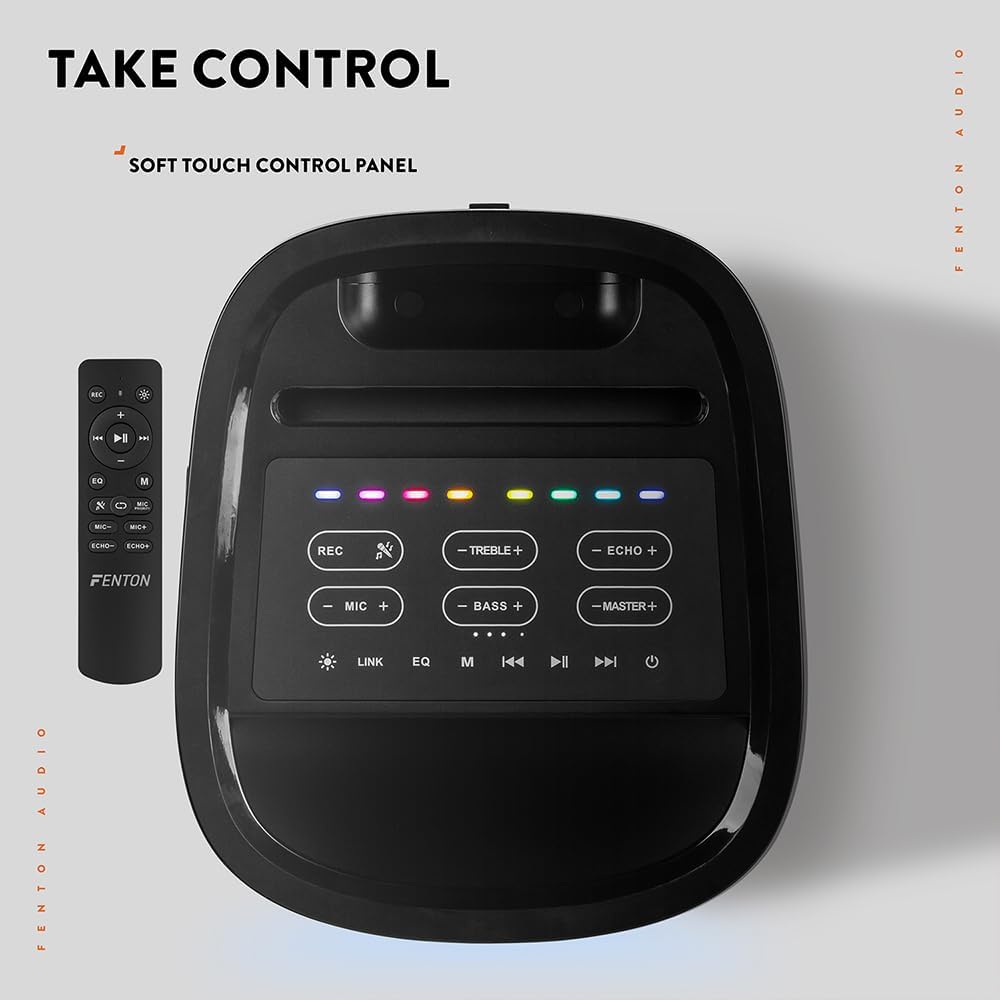
Aworan: A oke-isalẹ view of the Fenton Pulse65 speaker's soft-touch control panel, alongside the remote control, highlighting various buttons for audio and light adjustments.
The top panel features soft-touch controls for various functions:
- Gba: Gba ohun silẹ.
- TÍBÉLÌ +/-: Ṣe àtúnṣe àwọn ipele treble.
- ECHO +/-: Adjust microphone echo effect.
- MIC +/-: Satunṣe iwọn didun gbohungbohun.
- BASS +/-: Ṣe àtúnṣe àwọn ipele bass.
- MASTER +/-: Adjust overall master volume.
- Asopọmọra: Activate TWS (True Wireless Stereo) pairing.
- EQ: Yiyipo nipasẹ tito tẹlẹ oluṣeto.
- M (Ipo): Switch between input modes (Bluetooth, USB, FM Radio, AUX).
- Ṣiṣẹ/Daduro: Mu ṣiṣẹ tabi da idaduro ṣiṣiṣẹsẹhin ohun.
- Ti tẹlẹ/Itele: Skip tracks or tune FM radio stations.
- Agbara: Tan/pa agbohunsoke.
5.2. Asopọ Bluetooth
- Turn on the Pulse65 speaker.
- Tẹ awọn M (Ipo) button until the Bluetooth indicator lights up or you hear a Bluetooth pairing prompt.
- Lori ẹrọ alagbeka rẹ, mu Bluetooth ṣiṣẹ ki o wa awọn ẹrọ to wa.
- Select "Fenton Pulse65" from the list.
- Once connected, the speaker will confirm with an audible prompt.

Image: The Fenton Pulse65 speaker with a smartphone placed in its integrated dock, illustrating the Bluetooth streaming and charging capabilities.
5.3. Sitẹrio Alailowaya otitọ (TWS) Sisopọ
To link two Pulse65 speakers for stereo sound:
- Ensure both Pulse65 speakers are powered on and in Bluetooth mode, but not connected to any device.
- Lórí agbọ́hùnsọ̀kan (èyí ni yóò jẹ́ agbọ́hùnsọ̀kan àkọ́kọ́), tẹ Asopọmọra button. It will search for another Pulse65.
- The primary speaker will automatically connect to the secondary speaker. Once connected, you will hear a confirmation tone.
- Now, connect your mobile device to the primary Pulse65 speaker via Bluetooth as described in section 5.2.
- Ohun yoo mu ṣiṣẹ ni sitẹrio kọja awọn agbohunsoke mejeeji.
5.4. USB Sisisẹsẹhin
Fi kọnputa USB ti o ni ohun MP3 sii files into the USB port on the back of the speaker. The speaker will automatically switch to USB mode and begin playback. Use the Play/Pause and Previous/Next buttons to control playback.
5.5. Redio FM
- Tẹ awọn M (Ipo) bọtini lati yipada si FM redio mode.
- Tẹ mọlẹ Ṣiṣẹ / Sinmi bọtini lati ṣe ọlọjẹ laifọwọyi ati fipamọ awọn ibudo FM ti o wa.
- Lo awọn Ti tẹlẹ/Itele awọn bọtini lati lọ kiri nipasẹ awọn ibudo ti a fipamọ.
5.6. Gbohungbo ati gita awọn igbewọle
The speaker features dedicated inputs for a wired microphone and a guitar on the rear panel. Connect your devices to these ports. Use the MIC +/- ati ECHO +/- controls on the top panel to adjust the microphone's volume and echo effect.

Image: A composite image showing the rear panel of the Fenton Pulse65 speaker with its various input ports, and a front view of the speaker with a microphone, illustrating connectivity options.
5.7. Awọn ọna Imọlẹ
The multicolour LED lights on the speaker can be controlled via the remote control or specific buttons on the control panel (if available, refer to the remote for full control). Cycle through different light patterns or turn them off as desired.

Aworan: A sunmọ-soke view of the Fenton Pulse65 speaker, highlighting its multicolour LED light ring on the front grille, indicating its splashproof design.
6. Itọju
6.1. Ninu
Wipe the speaker's exterior with a soft, dry, or slightly damp cloth. Do not use abrasive cleaners, waxes, or solvents. Ensure all port covers are closed before cleaning if using a damp asọ.
6.2. Ibi ipamọ
Tọ́jú agbọ́hùnsọ̀ náà sí ibi gbígbẹ tí ó tutù, tí kò sí ìmọ́lẹ̀ oòrùn tààrà àti ooru tó le koko. Tí o bá ń tọ́jú rẹ̀ fún ìgbà pípẹ́, gba agbára bátírì náà sí nǹkan bí 50% ní gbogbo oṣù díẹ̀ láti mú kí bátírì náà ní ìlera tó dára.
6.3. Itọju batiri
To prolong battery life, avoid fully discharging the battery frequently. Recharge the speaker when the low battery indicator appears. Do not expose the battery to excessive heat.
7. Laasigbotitusita
If you encounter issues with your Fenton Pulse65, refer to the following common problems and solutions:
| Isoro | Owun to le Fa | Ojutu |
|---|---|---|
| Agbọrọsọ ko ni agbara lori. | Batiri kekere; Bọtini agbara ko tẹ ni deede. | Gba agbara si agbọrọsọ ni kikun. Tẹ mọlẹ bọtini Agbara fun iṣẹju diẹ. |
| Ko si ohun lati agbọrọsọ. | Iwọn ti o kere ju; Ipo titẹ sii ti ko tọ; Ẹrọ ko ni asopọ. | Increase master volume. Press 'M' to select correct input mode. Ensure Bluetooth device is connected or USB is inserted correctly. |
| Asopọ Bluetooth kuna. | Agbọrọsọ kii ṣe ni ipo sisopọ; Ẹrọ ti o jinna pupọ; kikọlu. | Ensure speaker is in Bluetooth mode and not connected to another device. Move device closer to speaker. Turn off other Bluetooth devices. |
| Gbohungbohun ko ṣiṣẹ. | Microphone off; Low battery in mic; Mic volume too low. | Ensure wireless mic is powered on. Replace mic batteries. Increase MIC volume on speaker. |
| TWS sisopọ kuna. | Speakers already connected to a device; Speakers too far apart. | Disconnect both speakers from any Bluetooth devices. Ensure both are in Bluetooth mode. Place speakers close together during pairing. |
8. Awọn pato
- Brand: Fenton
- Awoṣe: Pulse65
- Agbara Ijade ti o pọju Agbọrọsọ: 140 Wattis (Ti o ga julọ)
- Idahun Igbohunsafẹfẹ: 12000 Hz
- Imọ-ẹrọ Asopọmọra: Bluetooth 5.3
- Ipo Ijade Ohun: Sitẹrio
- Iru fifi sori: Tabili
- Irú Agbọrọsọ: Ita gbangba
- Awọn iwọn ọja: 49 x 34.5 x 39.5 cm
- Ìwúwo: 7.6 kg
- Batiri: 1 Nonstandard Battery (included), 12-hour playback
- Iwọn IP: IPX4 (Asọtẹlẹ)
- Olupese: Tronios BV
- Ilu isenbale: China

Image: The Fenton Pulse65 speaker displayed with its approximate dimensions (40cm height, 32cm width, 27cm depth) and an icon indicating 12 hours of battery life.
9. Atilẹyin ọja ati Support
For warranty information and customer support, please refer to the documentation provided with your purchase or visit the official Fenton brand store. You can find more information and contact details at the Fenton Brand Store.


