
1. Ifihan
The FSP VITA GM 850W Power Supply is designed to provide stable and efficient power for your computer system. Featuring 80 PLUS Gold certification, a fully modular design, and advanced protection features, it is suitable for a wide range of applications, including gaming and professional workstations. This manual provides essential information for the proper installation, operation, and maintenance of your power supply unit.

Aworan 1.1: Oke-isalẹ view of the FSP VITA GM 850W Power Supply, showcasing its compact design and fan grill.
2. Alaye Aabo
Please read and understand all safety instructions before installing or operating the power supply. Failure to do so may result in personal injury or damage to your equipment.
- Maṣe ṣii ipese agbara casing. Iwọn gigatages are present inside, even when the unit is unplugged. There are no user-serviceable parts inside. Opening the casing yoo sọ atilẹyin ọja di ofo.
- Fi sori ẹrọ ipese agbara ni agbegbe ti o ni afẹfẹ daradara, kuro lati awọn orisun ooru, oorun taara, ati ọrinrin.
- Rii daju pe ipese agbara ti wa ni asopọ si itanna ti ilẹ.
- Lo awọn kebulu modulu nikan ti a pese pẹlu ipese agbara yii. Lilo awọn kebulu ti ko ni ibamu le fa ibajẹ si PSU ati awọn paati ti a ti sopọ.
- Before installation or maintenance, always disconnect the AC power cord from the wall outlet.
- Avoid placing objects on top of the power supply or blocking its ventilation openings.
3. Package Awọn akoonu
Daju pe gbogbo awọn nkan wa ninu apo rẹ:
- FSP VITA GM 850W Power Supply Unit
- Modular Cable Set (including 12V-2x6 PCIe cable)
- AC Agbara okun
- Iṣagbesori skru
- Afowoyi Olumulo (iwe-ipamọ yii)
4. Ọja Ipariview
The FSP VITA GM 850W features a fully modular design, allowing for clean cable management and improved airflow within your PC case. Key components include the main power unit, a 120mm hydraulic bearing fan for cooling, and various modular connectors for system components.
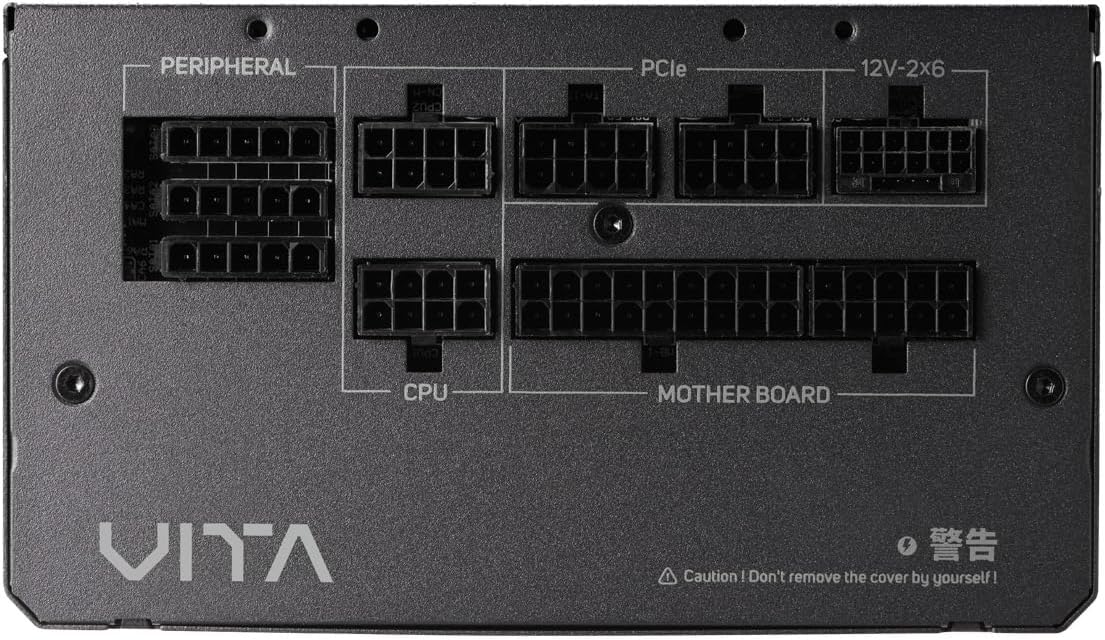
Aworan 4.1: Isunmọ view of the modular connector panel on the FSP VITA GM 850W Power Supply, showing labeled ports for Motherboard, CPU, PCIe, Peripheral, and 12V-2x6.
4.1. Modular Connectors
The power supply features clearly labeled ports for connecting various components:
- Modaboudu: Main 24-pin ATX connector.
- Sipiyu: 8-pin (4+4 pin) EPS connectors for CPU power.
- PCIe: 8-pin (6+2 pin) connectors for graphics cards.
- 12V-2x6: Dedicated 12V-2x6 connector for high-power PCIe 5.1 graphics cards.
- Agbeegbe: Connectors for SATA and Molex devices.
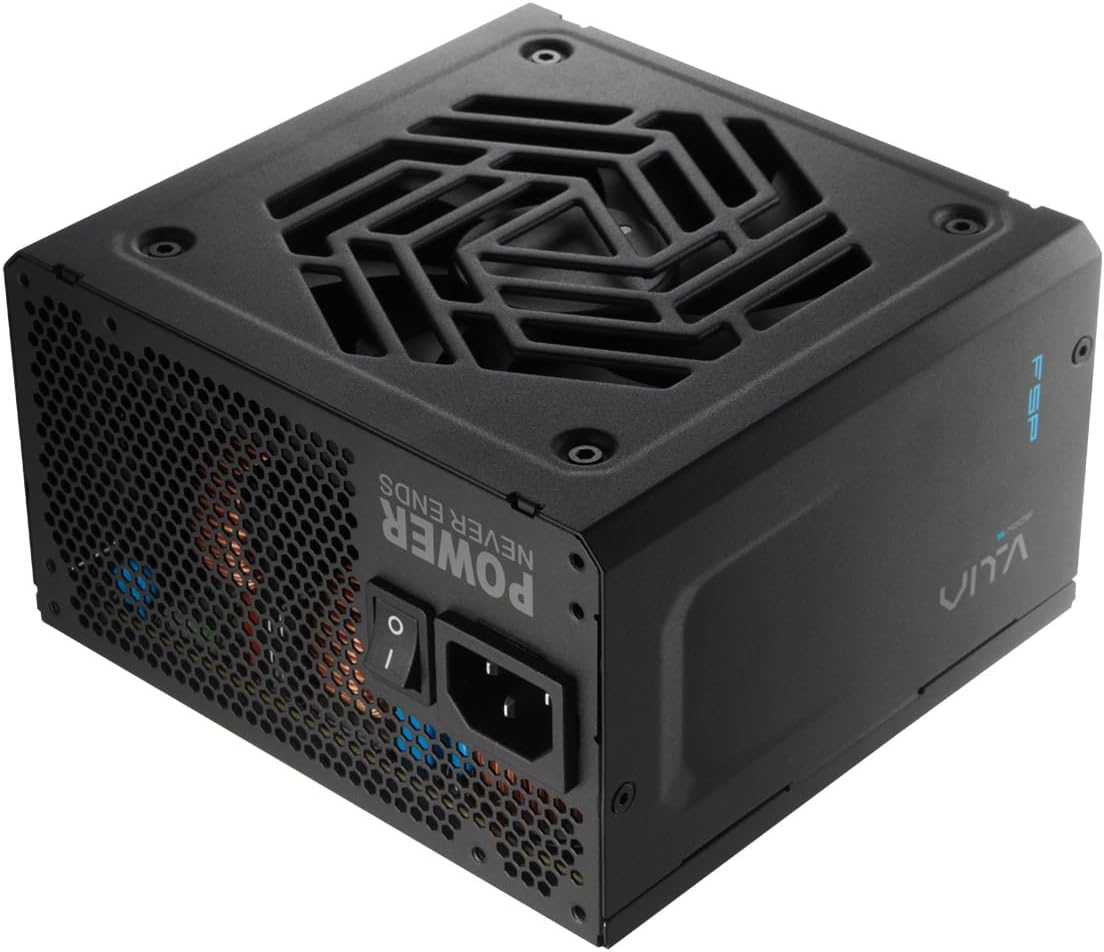
Aworan 4.2: Ẹyin view of the FSP VITA GM 850W Power Supply, showing the AC power inlet, power switch, and ventilation grille.
5. Eto ati fifi sori
Follow these steps to properly install your FSP VITA GM 850W Power Supply into your computer system.
5.1. Fifi sori ti ara
- Rii daju pe kọmputa rẹ ti wa ni pipa ati yọọ kuro lati inu iṣan ogiri.
- Ṣii apoti kọnputa rẹ lati wọle si agbegbe iṣagbesori ipese agbara.
- Carefully place the FSP VITA GM 850W Power Supply into the designated bay, ensuring the fan faces the correct direction for optimal airflow (typically facing downwards if there's a bottom vent, or inwards if mounted at the top).
- Ṣe aabo ipese agbara si ọran naa nipa lilo awọn skru iṣagbesori ti a pese.
5.2. USB Awọn isopọ
Connect the necessary modular cables to your power supply and system components. Only connect the cables you need to minimize clutter and improve airflow.

Image 5.1: Diagram illustrating the various modular cables included with the FSP VITA GM 850W Power Supply, including Motherboard, CPU, PCIe 6+2 Pin, PCIe 12V-2x6, SATA, and SATA/Molex cables, along with their approximate lengths in millimeters.
- Connect the 24-pin ATX cable from the power supply to the motherboard.
- Connect the 8-pin (4+4 pin) EPS cable(s) from the power supply to the CPU power connector(s) on the motherboard.
- For graphics cards, connect the appropriate 8-pin (6+2 pin) PCIe cables or the 12V-2x6 cable (for compatible PCIe 5.1 GPUs) from the power supply to the graphics card(s).
- So awọn kebulu agbara SATA pọ si awọn awakọ ibi ipamọ rẹ (HDDs, SSDs) ati awọn ẹrọ SATA miiran ti o ni agbara.
- Connect Molex cables to any peripheral devices that require them.
- Ensure all cable connections are secure and properly seated.
- Pa ọran kọmputa rẹ.
- So okun agbara AC pọ si ipese agbara ati lẹhinna si iṣan ogiri ti o wa lori ilẹ.
6. Awọn ilana Iṣiṣẹ
Once installed, operating your FSP VITA GM 850W Power Supply is straightforward.
6.1. Agbara lori / Paa
- Rí i dájú pé ìyípadà agbára tí ó wà ní ẹ̀yìn agbára náà wà ní ipò 'ON' (I).
- Tẹ bọtini agbara lori ọran kọmputa rẹ lati bẹrẹ eto naa.
- To power off, shut down your operating system normally. For complete power disconnection, switch the power supply to the 'OFF' (O) position and unplug the AC cord.
6.2. Efficiency and Fan Operation
The VITA GM 850W is 80 PLUS Gold certified, meaning it operates with over 90% efficiency at typical loads. This reduces wasted energy, heat generation, and noise. The integrated 120mm HYB fan is designed for quiet and efficient cooling, adjusting its speed based on the power supply's temperature and load to maintain optimal performance and acoustics.

Image 6.1: Graph illustrating the fan speed (RPM) and acoustic noise (dBA) of the 120mm HYB fan in the FSP VITA GM 850W Power Supply across different load percentages, demonstrating quiet operation at lower loads.
7. Itọju
Itọju to dara ṣe idaniloju gigun ati iṣẹ ti o dara julọ ti ipese agbara rẹ.
- Ninu: Periodically clean the exterior of the power supply and its fan grille to prevent dust buildup. Use a soft, dry cloth or compressed air. Ensure the power supply is unplugged before cleaning.
- Fife ategun: Rí i dájú pé àwọn ihò agbára tí a fi ń gba agbára àti àwọn ihò tí a fi ń tú èéfín sí kò dí lọ́wọ́. Afẹ́fẹ́ tó dára ṣe pàtàkì fún ìtútù tó dára.
- Iṣakoso USB: Maintain tidy cable management within your PC case to promote better airflow and prevent cables from interfering with the power supply fan.
8. Laasigbotitusita
If you encounter issues with your FSP VITA GM 850W Power Supply, refer to the following common problems and solutions.
8.1. Awọn ọrọ ti o wọpọ
- Ko si Agbara:
- Ṣàyẹ̀wò bóyá okùn agbára AC náà so mọ́ ibi tí agbára náà wà àti ibi tí agbára náà ti wà ní ògiri.
- Ensure the power switch on the PSU is in the 'ON' (I) position.
- Daju pe iṣan ogiri n ṣiṣẹ nipa pilogi sinu ẹrọ miiran.
- Check all modular cable connections to the motherboard and components.
- Àìdúróṣinṣin sí ètò/Ìpadé àìròtẹ́lẹ̀:
- This could indicate an overloaded system or a component issue. Ensure your system's power requirements do not exceed 850W.
- Check for proper ventilation and ensure the power supply fan is spinning. Overheating can trigger protection mechanisms.
- Daju pe gbogbo awọn asopọ okun wa ni aabo.
- Ariwo Afẹfẹ Npariwo:
- Ensure the power supply's fan intake/exhaust is not obstructed.
- Clean any dust buildup on the fan blades or grille.
- High system load will naturally increase fan speed. If noise is excessive at low loads, contact support.
8.2. Idaabobo Awọn ẹya ara ẹrọ
The FSP VITA GM 850W Power Supply includes several protection features to safeguard your system:
- OVP (Overvoltage Idaabobo): Shuts down the PSU if output voltages exceed a safe level.
- OCP (Idaabobo lọwọlọwọ): Shuts down the PSU if current on a single rail exceeds a safe level.
- OPP (Overpower Protection): Shuts down the PSU if the total power draw exceeds its maximum wattage.
- UVP (Labẹ Voltage Idaabobo): Shuts down the PSU if output voltages drop below a safe level.
- SCP (Aabo Kukuru Circuit): Shuts down the PSU in case of a short circuit on any output rail.
- OTP (Overtemperature Protection): A máa pa PSU tí ìwọ̀n otútù inú bá ga jù.

Image 8.1: Diagram illustrating the comprehensive protection features of the FSP VITA GM 850W Power Supply, including OVP, OCP, OPP, NLO, OTP, SCP, UVP, and SIP.
If any of these protections are triggered, the power supply will shut down. Disconnect the AC power, check your system for faults, and then reconnect power to attempt a restart.
9. Awọn pato
Detailed technical specifications for the FSP VITA GM 850W Power Supply:
| Ẹya ara ẹrọ | Sipesifikesonu |
|---|---|
| Orukọ awoṣe | VITA-850GM |
| Brand | FSP |
| Ijade Wattage | 850 Wattis |
| 80 PLUS Ijẹrisi | Wura |
| Fọọmù ifosiwewe | ATX |
| Awọn iwọn (L x W x H) | 140 x 150 x 86 mm (5.5 x 5.9 x 3.4 inches) |
| Iwọn Nkan | kilo 3.1 (6.82 poun) |
| Ọna Itutu | Afẹfẹ (120mm HYB Fan) |
| Awọn agbara agbara | 105°C Japanese Bulk Capacitors |
| Asopọmọra Iru | ATX, PCI Express (Full Modular) |
| Awọn ẹrọ ibaramu | Computer, Gaming Console |
| Idaabobo Awọn ẹya ara ẹrọ | OVP, OCP, SCP, OPP, UVP, OTP, NLO, SIP |
10. Atilẹyin ọja
The FSP VITA GM 850W Power Supply comes with a 10-odun atilẹyin ọja from the date of purchase. This warranty covers defects in materials and workmanship under normal use. Please retain your proof of purchase for warranty claims. The warranty does not cover damage caused by improper installation, accident, abuse, misuse, natural disaster, insufficient or excessive electrical supply, abnormal mechanical or environmental conditions, or any unauthorized disassembly, repair, or modification.
11. Atilẹyin
For technical assistance, troubleshooting beyond this manual, or warranty inquiries, please visit the official FSP website or contact FSP customer support. You can often find FAQs, driver downloads, and contact information on the manufacturer's support pages.
Fun alaye diẹ sii, ṣabẹwo: FSP Official Store on Amazon