
1. Ifihan
The DATOUBOSS PSW-E-12V 2000W Pure Sine Wave Inverter is designed to convert 12V DC battery power into stable 220V-230V 50Hz AC power. This inverter provides a clean and reliable power source for various electronic devices, making it ideal for use in RVs, boats, solar power systems, and during emergency power outages.
Its pure sine wave output ensures compatibility with sensitive electronics, reducing noise and electrical interference. The robust aluminum casing offers durability and protection for both domestic and outdoor applications.
Kini To wa:
- 1 x DATOUBOSS 12V 220V Pure Sine Wave 2000W Inverter
- 2 x Battery Cables (Red and Black)
- 1 x Itọsọna olumulo
2. Awọn ilana aabo
Please read all safety instructions carefully before installing and operating the inverter. Failure to follow these instructions may result in electric shock, fire, or serious injury.
- Afẹfẹ: Rí i dájú pé afẹ́fẹ́ tó péye wà ní àyíká inverter. Má ṣe dí àwọn ihò afẹ́fẹ́.
- Ayika: Install the inverter in a dry, cool, and well-ventilated area, away from direct sunlight, heat sources, and flammable materials.
- Ifihan omi: Do not expose the inverter to water, rain, or moisture.
- Awọn isopọ: Ensure all connections are tight and secure to prevent loose connections, which can cause overheating and fire.
- Ilẹ: Oluyipada gbọdọ wa ni ilẹ daradara.
- Awọn ọmọde: Pa inverter kuro ni arọwọto awọn ọmọde.
- Oṣiṣẹ ti o peye: Fifi sori ẹrọ ati itọju yẹ ki o ṣe nipasẹ oṣiṣẹ ti o peye nikan.
- Agbara fifuye: Do not exceed the inverter's rated power capacity.
- Batiri Voltage: Rii daju pe batiri voltage ibaamu awọn ẹrọ oluyipada ká input voltage (12V DC).
Ikilo: High voltage inside. Do not open the inverter casing.
3. Ọja Ipariview
The DATOUBOSS PSW-E-12V 2000W inverter features a compact design with multiple output ports and an intelligent cooling system.
Awọn ẹya pataki:
- Pure Sine Wave Output: Provides stable and clean power for sensitive electronics.
- High Efficiency: Conversion efficiency greater than 92%.
- Multiple Output Ports: 2 EU AC sockets, 1 USB 2.1A port, and 1 Type-C port.
- LCD Display: Real-time monitoring of input/output voltage, power, frequency, and fault indications.
- Comprehensive Protection: Overload, overheating, high/low voltage, short circuit, reverse polarity protection.
- Intelligent Cooling Fan: Automatically activates based on internal temperature to prevent overheating and ensure quiet operation.
Idanimọ eroja:
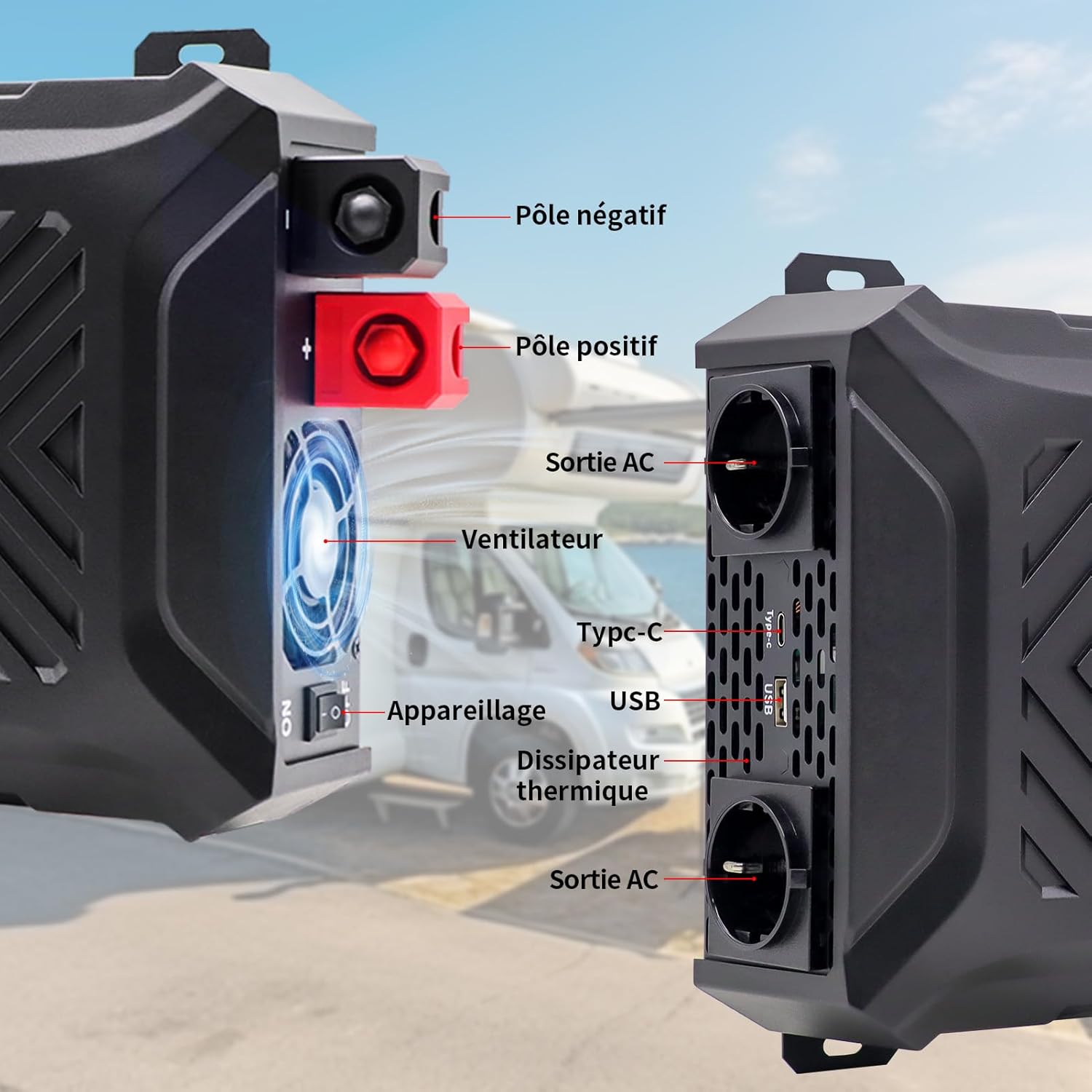
Aworan: Iwaju ati ẹgbẹ view of the inverter with labels for the negative pole, positive pole, AC output sockets, fan, Type-C port, USB port, and heat sink.

Aworan: Alaye view of the inverter's LCD screen, AC output sockets, USB port, and Type-C port, with labels for input voltage, iwọn didun ti o wujadetage, real-time power, output frequency, and battery level.

Image: The DATOUBOSS inverter connected to various devices, illustrating its multiple output options including two EU AC outlets, a USB port, and a Type-C port, along with its 12V DC input.
4. Awọn ilana iṣeto
Tẹle awọn igbesẹ wọnyi fun fifi sori ẹrọ to dara ati asopọ ti inverter rẹ.
4.1 Iṣagbesori ẹrọ oluyipada
- Choose a secure, flat, and well-ventilated location.
- Ensure there is sufficient space around the inverter for airflow, especially around the fan and heat sink.
- Mount the inverter using appropriate screws and brackets (not included unless specified).
4.2 batiri Asopọ
The inverter requires a 12V DC battery system. Ensure the battery type is compatible (GEL, SLA, LI, FLD, AGM, CLA, LifePO4).

Image: Icons representing various compatible battery types including GEL, SLA, LI, FLD, AGM, CLA, and LifePO4, indicating the inverter's versatility.
- Turn off the inverter: Rí i dájú pé ẹ̀rọ ìyípadà agbára ẹ̀rọ ìyípadà náà wà ní ipò 'PA'.
- Connect the negative cable: Connect the black battery cable to the negative (-) terminal of the battery and then to the negative (-) terminal of the inverter.
- Connect the positive cable: Connect the red battery cable to the positive (+) terminal of the battery and then to the positive (+) terminal of the inverter.
- Secure connections: Tighten all connections firmly to prevent sparks or overheating.
- Ilẹ: Connect the inverter's grounding terminal to a proper earth ground.
Pataki: Always connect the battery cables in the correct polarity. Reverse polarity can damage the inverter and void the warranty. Use the provided battery cables or cables of appropriate gauge for the power rating.
4.3 Optional Solar Panel Connection
The inverter can be integrated into a solar power system. A solar charge controller is required for this setup.

Image: A diagram illustrating the connection of solar panels to a solar charge controller, which then connects to a battery bank, and finally to the DATOUBOSS inverter to power various household appliances.
5. Awọn ilana Iṣiṣẹ
Once the inverter is properly installed and connected, follow these steps to operate it.
5.1 Titan / Pa a
- Lati Fi agbara: After ensuring all connections are secure, switch the inverter's power button to the 'ON' position. The LCD screen will illuminate, displaying current status.
- Lati Paarẹ: Disconnect all AC loads from the inverter, then switch the inverter's power button to the 'OFF' position.
5.2 Lilo LCD Ifihan
The LCD screen provides real-time information about the inverter's operation and status.
- Iṣagbewọle Voltage (DC): Han voltage lati batiri.
- O wujade Voltage (AC): Shows the inverter's AC output voltage.
- Agbara Ijade (W): Ó tọ́ka sí lílo agbára gidi ti àwọn ẹ̀rọ tí a so pọ̀.
- Igbohunsafẹfẹ ti o njade (Hz): Ṣe àfihàn ìgbóhùnsáfẹ́fẹ́ AC (50Hz).
- Atọka Ipele Batiri: Shows the approximate charge level of the connected battery.
- Awọn itọkasi aṣiṣe: Displays error codes or symbols if a protection mechanism is triggered.

Image: The inverter's LCD screen displaying operational data, alongside icons representing various safety protections such as overvoltage, overheating, overload, and undervoltage.
5.3 Awọn ẹrọ Nsopọ
- Plug your AC appliances into the EU sockets.
- Connect USB-powered devices to the USB 2.1A port.
- Connect Type-C powered devices to the Type-C port.
Akiyesi: The total power consumption of all connected devices must not exceed the inverter's rated continuous power (2000W). For inductive loads (e.g., motors, refrigerators), the starting surge power can be significantly higher than the running power. Ensure the inverter's peak power (4000W) can handle these surges.
6. Itọju
Itọju deede ṣe idaniloju igbesi aye gigun ati iṣẹ ti o dara julọ ti oluyipada rẹ.
6.1 Ninu
- Ensure the inverter is turned off and disconnected from all power sources before cleaning.
- Use a soft, dry cloth to wipe the exterior of the inverter.
- Periodically check and clean the ventilation openings to ensure proper airflow. Do not use liquid cleaners or solvents.
6.2 Ibi ipamọ
- Ti o ba tọju ẹrọ oluyipada fun akoko ti o gbooro sii, ge asopọ kuro ninu batiri ki o tọju rẹ si ibi ti o tutu, ti o gbẹ.
- Ensure the battery connected to the inverter is properly maintained according to its manufacturer's instructions, especially if it's a lead-acid battery requiring periodic charging.
7. Laasigbotitusita
Apá yìí ń yanjú àwọn ìṣòro tó wọ́pọ̀ tó o lè bá pàdé pẹ̀lú ẹ̀rọ ìyípadà rẹ.
| Isoro | Owun to le Fa | Ojutu |
|---|---|---|
| Ko si voltage / Inverter not turning on | Loose batiri awọn isopọ, kekere batiri voltage, inverter switch off, internal fuse blown. | Check battery connections. Charge or replace battery. Ensure inverter switch is ON. Contact support if fuse is suspected. |
| Inverter shuts down / Overload alarm | Connected load exceeds inverter's rated power. | Reduce the total load by disconnecting some appliances. Check appliance wattage. |
| Itaniji igbona pupọ | Poor ventilation, excessive ambient temperature, prolonged high load. | Ensure proper ventilation. Move inverter to a cooler location. Reduce load. |
| Vol kekeretage itaniji | Batiri voltage kere ju. | Charge the battery immediately. Disconnect loads to prevent deep discharge. |
| Iwọn gigatage itaniji | Batiri voltage ga ju. | Check battery charging system. Disconnect inverter from battery if voltage remains high. |
| Abnormal noise from inverter | Fan operating, or inductive load causing slight hum. | Normal operation for fan. If noise is excessive or unusual, contact support. |
Ti iṣoro naa ba wa lẹhin igbiyanju awọn iṣeduro wọnyi, jọwọ kan si atilẹyin alabara.
8. Awọn pato
Technical details for the DATOUBOSS PSW-E-12V 2000W Pure Sine Wave Inverter.

Image: The DATOUBOSS inverter with its dimensions labeled: 37 cm (14.57 in) length, 28.5 cm (11.22 in) width, and 18 cm (7.09 in) height, along with the included red and black battery cables.
| Ẹya ara ẹrọ | Ẹ̀kúnrẹ́rẹ́ |
|---|---|
| Brand | DATOUBOSS |
| Orukọ awoṣe | PSW-E |
| Nọmba awoṣe | PSW-E-12V 2000W |
| Iṣagbewọle Voltage | 12 Volts DC |
| O wujade Voltage | 220V-230V AC |
| Igbohunsafẹfẹ Ijade | 50Hz |
| Agbara Tesiwaju | 2000 Wattis |
| Agbara ti o ga julọ | 4000 Wattis |
| Imudara Iyipada | > 92% |
| Iwajade Waveform | Wave Sine Sure |
| Awọn ibudo ti njade | 2 x EU AC Sockets, 1 x USB 2.1A, 1 x Type-C |
| Orisun agbara | Agbara oorun ati batiri |
| Ọja Mefa | 37L x 28.5W x 18H sẹntimita |
| Niyanju Lilo | Home and Outdoor Use |
9. Atilẹyin ọja ati Support
DATOUBOSS provides a comprehensive warranty and customer support for your product.
Alaye Atilẹyin ọja:
- Ọja yi wa pẹlu kan Atilẹyin ọja olupilẹṣẹ oṣu mejila lati ọjọ ti o ra.
- Atilẹyin ọja ni wiwa awọn abawọn ninu awọn ohun elo ati iṣẹ-ṣiṣe labẹ lilo deede.
- Damage caused by improper installation, misuse, unauthorized modifications, or natural disasters is not covered.
Atilẹyin Onibara:
If you have any questions regarding the use, performance, or troubleshooting of your DATOUBOSS inverter, please do not hesitate to contact our customer service team. We offer friendly and patient customer support.
Please refer to the contact information provided with your purchase or visit the official DATOUBOSS webojula fun support awọn alaye.