
Ọrọ Iṣaaju
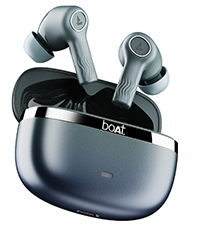
Welcome to the user manual for your boAt Nirvana Ion ANC Pro True Wireless Stereo (TWS) Earbuds. These earbuds are designed to provide a high-quality audio experience with advanced features such as Hi-Res Audio with LDAC, Active Noise Cancellation, and extended battery life. Please read this manual carefully to ensure proper use and optimal performance of your device.

Image: boAt Nirvana Ion ANC Pro TWS Earbuds and charging case.
Ohun ti o wa ninu Apoti
- 1 x TWS Agbekọti
- 1 x Ọran gbigba agbara
- 1 x Kaadi atilẹyin ọja
- 1 x Itọsọna olumulo
- 1 x Okun Gbigba agbara (Iru-C)
Ṣeto
1. Gbigba agbara akọkọ
Before first use, fully charge the earbuds and the charging case. Connect the provided Type-C charging cable to the charging port on the case and a power source. The indicator light on the case will show charging status.
2. Sisopọ pẹlu Ẹrọ Rẹ
- Ṣii ideri ti apoti gbigba agbara. Awọn agbekọri yoo tẹ ipo isọpọ sii laifọwọyi.
- Lori foonuiyara rẹ tabi ẹrọ Bluetooth miiran ti o ṣiṣẹ, lọ si awọn eto Bluetooth.
- Wa fun "Nirvana Ion ANC Pro" in the list of available devices.
- Select it to connect. Once connected, you will hear an audio prompt.
The earbuds support Bluetooth v5.3 for stable and efficient wireless connectivity.
3. boAt Hearables App Installation
Enhance your experience by installing the boAt Hearables App. This app allows for customization of EQ settings, firmware updates, and other advanced controls.
Scan this QR code to download the boAt Hearables App. Alternatively, visit l.ead.me/bdAX6k.

Image: boAt Hearables App interface for sound customization and ANC control.
Awọn ilana Iṣiṣẹ
1. Awọn iṣakoso ifọwọkan
The earbuds feature intuitive touch controls for various functions. Specific gestures may vary; refer to the app for customization options.
- Ṣiṣẹ/Daduro: Fọwọ ba ẹyọkan lori boya agbekọri.
- Orin t’okan: Fọwọ ba lẹẹmeji lori agbekọri ọtun.
- Tẹlẹ Orin: Fọwọ ba lẹẹmeji lori agbekọri osi.
- Idahun/Ipe Ipari: Fọwọ ba ẹyọkan lori boya agbekọri.
- Kọ Ipe: Tẹ gun lori boya agbekọri.
- Mu Oluranlọwọ Ohun ṣiṣẹ: Fọwọ ba meteta lori boya agbekọri.
- Yipada Awọn ọna ANC: Long press on either earbud (customizable via app).
2. Àwọn Ìgbésẹ̀ Ìfagilé Ariwo (ANC)
The Nirvana Ion ANC Pro offers up to 32dB Active Noise Cancellation to reduce ambient noise. You can switch between different modes:
- Ipo ANC: Dinku ariwo ita fun iriri gbigbọ immersive kan.
- Ipo akoyawo: Allows you to hear your surroundings while listening to audio, enhancing situational awareness.
- Ipo deede: Sisisẹsẹhin ohun boṣewa laisi ifagile ariwo tabi akoyawo.

Image: Demonstrating 32dB Active Noise Cancellation.
3. Dual EQ Modes with Crystal Bionic Sound
Experience high-fidelity audio with 10mm drivers and choose between two distinct sound profiles:
- Crystal Bionic Sound: Powered by HiFi, this mode delivers enhanced clarity and detail.
- boAt Signature Sound: Provides a balanced and dynamic audio experience, characteristic of boAt products.

Image: Visual representation of Dual EQ Modes.
4. BEAST™ Mode (Low Latency for Gaming)
Activate BEAST™ Mode for an ultra-low latency experience, ideal for gaming. This mode reduces audio delay to approximately 60ms, ensuring synchronized sound with on-screen action.

Image: BEAST™ Mode for low latency gaming.
5. Multipoint Asopọmọra
Connect your earbuds to two devices simultaneously and seamlessly switch between them. For example, you can listen to music on your laptop and instantly answer a call on your phone without re-pairing.

Image: Multipoint Connectivity feature.
6. Crystal Clear Calling with ENx™ Technology
The earbuds are equipped with 4 microphones and ENx™ Technology to ensure your voice is transmitted clearly during calls, even in noisy environments.

Image: Crystal Clear Calling with ENx™ Technology.
7. Gbigba agbara ati batiri Life
The earbuds offer an impressive total playback time of up to 120 hours with the charging case. The ASAP™ Charge feature provides 4 hours of playback from just 10 minutes of charging.

Image: 120 Hours Playback and ASAP™ Charge.
Itoju
- Ninu: Lo asọ gbigbẹ, asọ ti o gbẹ lati nu awọn agbekọri ati apoti gbigba agbara. Maṣe lo awọn kẹmika lile tabi awọn ohun elo abrasive.
- Ibi ipamọ: Tọju awọn agbekọri naa sinu apoti gbigba agbara wọn nigbati ko si ni lilo lati daabobo wọn ati jẹ ki wọn gba agbara.
- Omi Resistance: The earbuds are not water resistant. Avoid exposure to water, sweat, or moisture.
- Ibudo gbigba agbara: Jẹ́ kí ibudo gbigba agbara Iru-C wà láìsí eruku àti ìdọ̀tí.
Laasigbotitusita
| Isoro | Ojutu |
|---|---|
| Earbuds ko so pọ | Rii daju pe awọn agbekọri ti gba agbara. Paa ati tan Bluetooth lori ẹrọ rẹ. Gbe awọn agbekọri pada si ọran, sunmọ, lẹhinna tun ṣii lati tun-tẹ ipo isọpọ sii. |
| Agbekọri agbekọri kan ṣoṣo ti n ṣiṣẹ | Place both earbuds back in the case, close the lid, then open again. Check battery levels for both earbuds. Try resetting the earbuds (refer to app or support for specific reset instructions). |
| Iwọn kekere tabi didara ohun ko dara | Adjust volume on your device and through touch controls. Ensure earbuds are clean and properly seated in your ears. Check EQ settings in the boAt Hearables App. |
| Awọn ọran gbigba agbara | Ensure the charging cable is securely connected. Try a different charging cable or power adapter. Clean the charging port on the case. |
| ANC ko munadoko | Ensure earbuds are properly sealed in your ear canal. Switch between ANC modes using touch controls or the app. |
Awọn pato
| Ẹya ara ẹrọ | Ẹ̀kúnrẹ́rẹ́ |
|---|---|
| Orukọ awoṣe | Nirvana Ion ANC Pro |
| Brand | boAt |
| Gbigbe Eti | Ninu Eti |
| Ẹya Bluetooth | 5.3 |
| Bluetooth Ibiti | 15 Mita |
| Ariwo Iṣakoso | Ìfagilé Ariwo Tí Ń Ṣiṣẹ́ (tó 32dB) |
| Audio Driver Iwon | 10 Milimita |
| Kodẹki ohun | LDAC (Hi-Res Audio) |
| Igbesi aye batiri (Lapapọ) | Titi di awọn wakati 120 |
| Gbigba agbara Yara | ASAP™ Charge (10 mins = 4 Hrs playback) |
| Ọna Iṣakoso | Fọwọkan, Iṣakoso ohun |
| Awọn gbohungbohun | 4 (with ENx™ Technology) |
| Omi Resistance Ipele | Ko Omi Resistant |
| Awọn ẹrọ ibaramu | Foonuiyara, Awọn tabulẹti, Kọǹpútà alágbèéká, Kọǹpútà alágbèéká |
| Iwọn | Giramu 45 (tó fẹ́rẹ̀ tó) |
Atilẹyin ọja & Atilẹyin
Your boAt Nirvana Ion ANC Pro TWS Earbuds come with a 1 Odun atilẹyin ọja lati ọjọ ti o ra.
For product-related queries, technical support, or warranty claims, please contact boAt customer support:
- Olubasọrọ Support: +91 (022) 69181920
- Imeeli: info@imaginemarketingindia.com
- Olupese: Imagine Marketing Ltd.
- Adirẹsi olupese: Unit no. 204 & 205, 2nd floor, D-wing & E-wing, Corporate Avenue, Andheri Ghatkopar Link Road, Mumbai, Maharashtra-400093, India.
Jọwọ pa ìwé ẹ̀rí ìrajà rẹ mọ́ fún ìfọwọ́sowọ́pọ̀ àtìlẹ́yìn.