
1. Ifihan
This manual provides detailed instructions for the proper use, setup, and maintenance of your Caliber Scientific Calculator, Model 297208. Designed for students, engineers, and professionals, this calculator offers 240 functions for a wide range of mathematical and scientific calculations.
Please read this manual thoroughly before using the calculator to ensure optimal performance and longevity.
2. Alaye Aabo
- Keep the calculator away from extreme temperatures, direct sunlight, and high humidity.
- Yago fun sisọ ẹrọ iṣiro silẹ tabi fifisilẹ si awọn ipa to lagbara.
- Do not attempt to disassemble or modify the calculator. This will void the warranty.
- Use only the specified battery type. Incorrect battery usage may cause leakage or explosion.
- Ikilọ Batiri: Jeki awọn batiri kuro lati awọn ọmọde ati ohun ọsin. Awọn batiri le jẹ ipalara ti wọn ba gbe wọn mì. Ti ọmọ tabi ohun ọsin ba gbe batiri kan, wa iranlọwọ iṣoogun lẹsẹkẹsẹ.
3. Package Awọn akoonu
Upon opening your Caliber Scientific Calculator package, please verify that all items are present and in good condition:
- Caliber Scientific Calculator (Model 297208)
- Protective Hard Sliding Cover
- One AG10 Button Cell Battery (pre-installed or included separately)
- Afowoyi Olumulo (iwe-ipamọ yii)

Image 1: Caliber Scientific Calculator in retail packaging, showing key features.
4. Eto
4.1. Agbara Orisun
The Caliber Scientific Calculator operates on dual power sources: solar power and battery power. The solar panel provides power in well-lit environments, while the battery ensures operation in low-light conditions.
4.2. Batiri sori / Rirọpo
Your calculator includes one AG10 button cell battery. If battery replacement is needed:
- Rii daju pe ẹrọ iṣiro ti wa ni pipa.
- Wa ibi ipamọ batiri naa ni ẹhin ẹrọ iṣiro naa.
- Using a small screwdriver, carefully open the battery compartment cover.
- Remove the old battery and insert a new AG10 button cell battery, ensuring the correct polarity (+/-).
- Rọpo ideri kompaktimenti batiri ki o ni aabo pẹlu dabaru.
Note: Some models may require a AAA battery. Refer to the specific markings on your calculator's battery compartment if different from AG10.
5. Key Functions Overview
The calculator features a 10-digit LCD display and 240 functions. Familiarize yourself with the key layout:
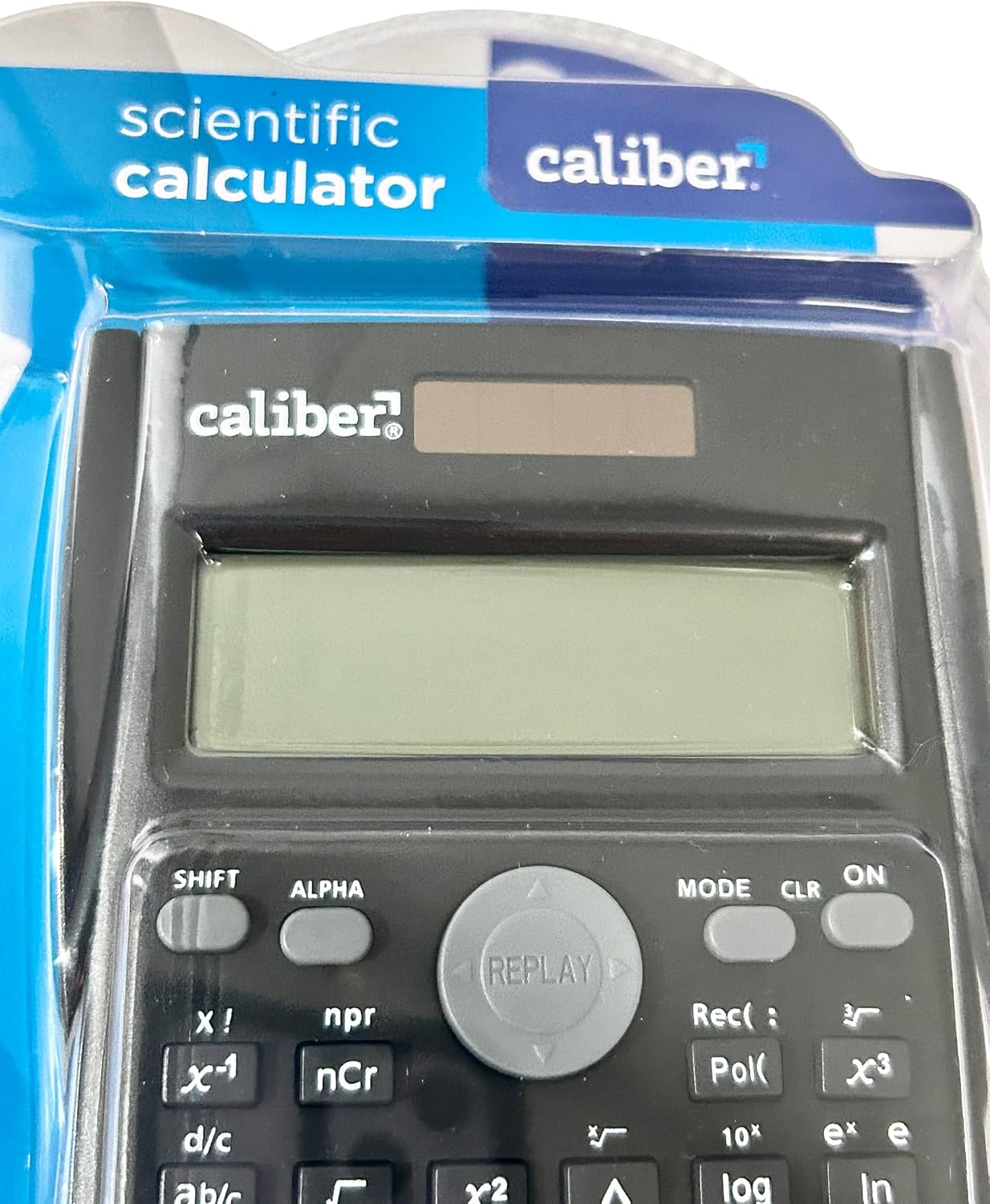
Image 2: Close-up of the calculator's display and key layout.
- Ifihan: 10-digit LCD for clear viewing of inputs and results.
- TAN/PA: Power on/off the calculator.
- Iyipada: Accesses secondary functions printed above the keys (typically in yellow or orange).
- ALFA: Accesses alpha characters and variables (typically in red or green).
- Ipo: Changes calculation modes (e.g., COMP, STAT, EQN).
- CLR: Clears memory or settings.
- DEL: Deletes the last entered digit.
- AC: Clears all entries and resets the calculation.
- Awọn bọtini itọka: Navigate through entries and results.
- = (O dọgba): Executes the calculation.
6. Awọn ilana Iṣiṣẹ
6.1. Awọn Iṣiro Ipilẹ
Lati ṣe awọn iṣẹ iṣiro ipilẹ:
- Tẹ awọn ON key to turn on the calculator.
- Tẹ nọmba akọkọ sii.
- Press the desired operation key (+, -, ×, ÷).
- Tẹ nọmba keji sii.
- Tẹ awọn = bọtini lati ṣafihan abajade naa.
6.2. Awọn iṣẹ ilọsiwaju
The calculator supports 240 functions, including trigonometric, logarithmic, statistical, and more. To access secondary functions (printed above keys), press the Yipada key before the desired function key.
- Awọn iṣẹ Trigonometric: ese, kos, tan ati awọn iṣẹ onidakeji wọn (Yipada + sin⁻¹, ati bẹbẹ lọ).
- Awọn iṣẹ Logarithmic: wọle (base 10), ln (logarithm adayeba).
- Agbara ati Awọn iṣẹ gbongbo: x², √, xʸ.
- Awọn iṣẹ iranti: Lo STO (Ile itaja) ati RCL (Recall) to save and retrieve values.
- Awọn Iṣiro Iṣiro: Wọle MODE and select STAT mode for statistical computations.
For detailed instructions on specific functions, refer to the comprehensive instructions enclosed with your product (if applicable) or consult online resources for scientific calculator usage.
7. Itọju
7.1. Ninu
To clean your calculator:
- Mu ese ita pẹlu asọ ti o gbẹ.
- Fun idoti alagidi, die-die dampen awọn asọ pẹlu omi ati ìwọnba ọṣẹ, ki o si mu ese gbẹ lẹsẹkẹsẹ.
- Do not use abrasive cleaners, solvents, or alcohol, as these can damage the casing tabi ifihan.
7.2. Ibi ipamọ
When not in use, store the calculator in a cool, dry place, away from direct sunlight and extreme temperatures. Always use the protective hard sliding cover to prevent damage to the keys and display.

Image 3: Packaging detail showing features including the hard sliding cover and dual power.
8. Laasigbotitusita
| Isoro | Owun to le Fa | Ojutu |
|---|---|---|
| Ẹrọ iṣiro ko tan. | Insufficient light for solar power, or dead battery. | Move to a brighter area or replace the AG10 button cell battery. |
| Display shows "ERROR". | Mathematical error (e.g., division by zero, invalid input). | Tẹ AC to clear the error and re-enter the calculation correctly. |
| Awọn abajade iṣiro ti ko tọ. | Incorrect mode selected, or input error. | Check the current mode (MODE key) and ensure correct data entry. Clear all memory (Yipada + CLR) ti o ba wulo. |
9. Awọn pato
| Nọmba awoṣe | 297208 |
| Brand | Caliber |
| Ifihan Iru | 10-nọmba LCD |
| Nọmba ti Awọn iṣẹ | 240 |
| Oniṣiro Iru | Imọ-ẹrọ / Imọ |
| Orisun agbara | Dual Power (Solar & Battery) |
| Batiri Iru | 1 x AG10 Button Cell (included) or 1 x AAA (may vary by model) |
| Iwon iboju | 3 inches |
| Awọn iwọn (L x W) | 6" x 3" |
| Ohun elo apade | Ṣiṣu |
| UPC | 050428205495 |
10. Atilẹyin ọja ati Support
10.1. atilẹyin ọja Information
This product is subject to a return policy. For details regarding returns, exchanges, or warranty claims, please refer to the retailer's return policy where the product was purchased.
10.2. Onibara Support
For further assistance, technical support, or inquiries not covered in this manual, please contact Caliber customer service through their official webaaye tabi alagbata lati ọdọ ẹniti o ti ra ọja naa.