
Ọrọ Iṣaaju
Thank you for choosing the Irfora Multifunction Bamboo 12-Digit Calculator. This eco-friendly calculator combines classic design with modern functionality, featuring a durable bamboo casing and dual power source. This manual provides essential information for setting up, operating, and maintaining your calculator to ensure optimal performance.

olusin 1: Iwaju view of the Irfora Bamboo Calculator, showcasing its natural bamboo finish and large LCD display.
1. Eto
1.1 Ṣiṣii silẹ
Carefully remove the calculator from its packaging. Inspect the device for any signs of damage. Retain the packaging for future storage or transport.
1.2 Agbara Lori
The calculator features a dual power system: solar and button battery. It automatically switches between power sources for efficient operation.
- Agbara oorun: Place the calculator in a well-lit area. The solar panel will convert light into energy, powering the device.
- Agbara Batiri: In low-light conditions, the calculator will automatically switch to button battery power.
- Lati tan ẹrọ iṣiro, tẹ awọn ON/C/CE or AC bọtini.

olusin 2: Angled view of the Irfora Bamboo Calculator, showing the solar panel and LCD display.
2. Awọn ilana Iṣiṣẹ
The calculator features 29 large, comfortable keys with carved numbers that are designed not to fade over time.
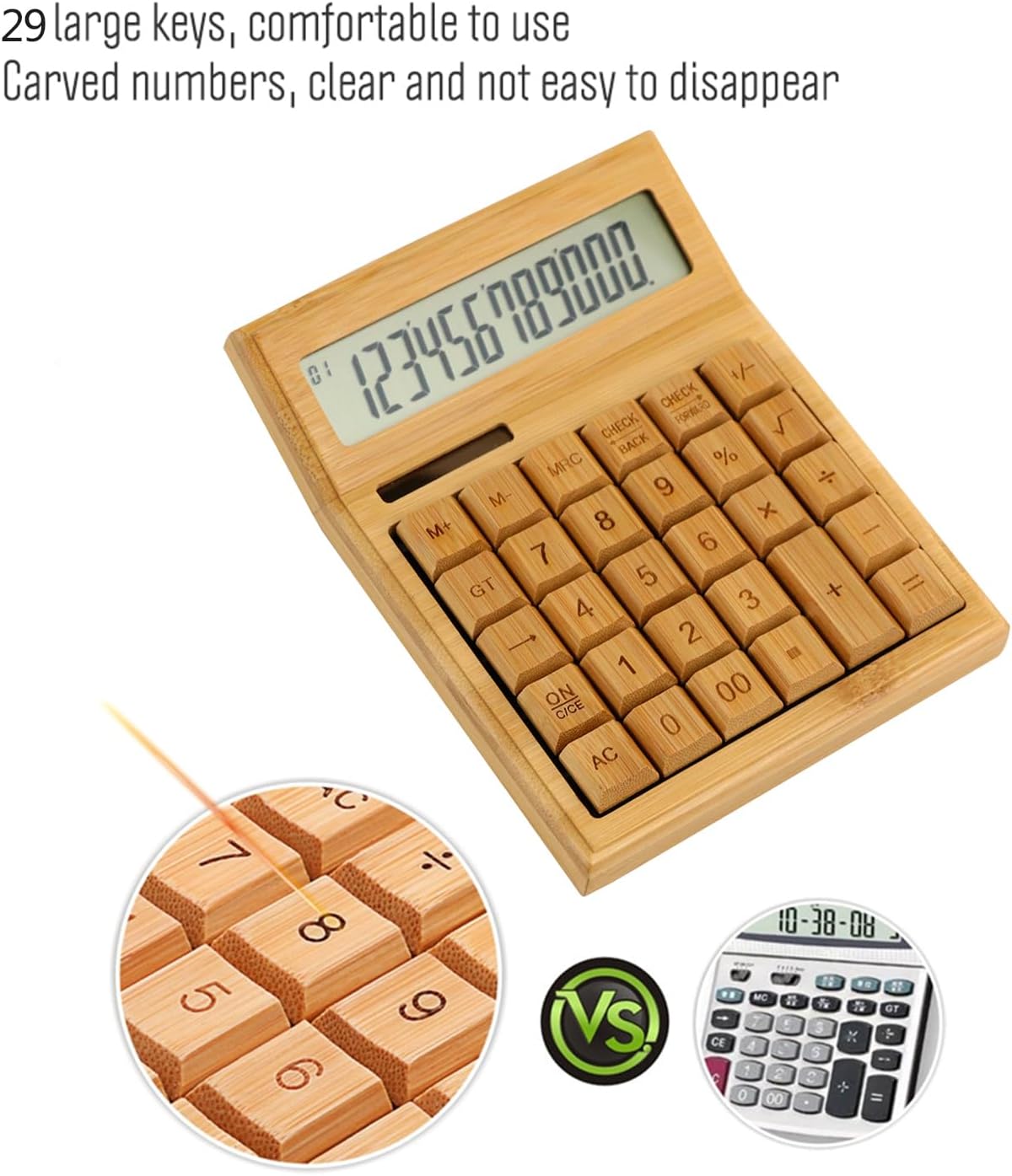
olusin 3: Isunmọ view highlighting the large, carved bamboo keys for comfortable and durable use.
2.1 Àwọn Iṣẹ́ Ìṣirò Pàtàkì
Perform standard calculations using the following keys:
- + (Afikun)
- - (Iyọkuro)
- × (Ilọpo)
- ÷ (Pipin)
- = (O dọgba)
2.2 Memory Awọn iṣẹ
The calculator includes memory functions for complex calculations:
- M+: Ṣe afikun iye ti o han si iranti.
- M-: Yọkuro iye ti o han lati iranti.
- MRC: Recalls the memory value. Pressing twice clears the memory.
2.3 Awọn iṣẹ pataki
- % ( Ogoruntage): Calculates percentages.
- √ (Square Root): Calculates the square root of the displayed number.
- +/- (Sign Change): Changes the sign of the displayed number (positive to negative, or vice versa).
- AC (All Clear): Clears all entries and memory.
- ON/C/CE (On/Clear Entry): Turns on the calculator. When on, clears the last entry. Pressing twice clears all entries.

Figure 4: A hand demonstrating the use of the calculator for daily tasks.
2.4 Laifọwọyi Power Pa
To conserve energy, the calculator will automatically power off after approximately 12 minutes of inactivity. Press ON/C/CE or AC lati tan-an pada.
3. Itọju
3.1 Ninu
To clean the calculator, gently wipe the surface with a soft, dry cloth. For stubborn dirt, a slightly damp asọ le ṣee lo, ṣugbọn rii daju pe ko si ọrinrin ti o wọ inu ẹrọ naa. Yẹra fun lilo awọn kẹmika lile tabi awọn afọmọ abrasive.
3.2 Ibi ipamọ
Store the calculator in a cool, dry place away from direct sunlight and extreme temperatures. Prolonged exposure to direct sunlight can affect the bamboo finish.
3.3 Batiri Rirọpo
The calculator uses a button battery (type not specified, typically AG10 or LR1130). If the display becomes dim or unresponsive in low light, the battery may need replacement. Consult a qualified technician or refer to the product packaging for specific battery type and replacement instructions. Improper battery replacement can damage the device.
4. Laasigbotitusita
| Isoro | Owun to le Fa | Ojutu |
|---|---|---|
| Ifihan ti ṣofo tabi baibai. | Ina ti ko to fun agbara oorun, tabi batiri kekere. | Move the calculator to a brighter area. If the problem persists, the button battery may need replacement. |
| Ẹrọ iṣiro ko tan. | No power, or device is in auto-off mode. | Ensure adequate light for solar power. Press ON/C/CE or AC. If still unresponsive, replace the button battery. |
| Awọn abajade iṣiro ti ko tọ. | Incorrect key input, or temporary internal error. | Tẹ AC to clear all entries and restart the calculation. Double-check your input. |
5. Awọn pato
- Brand: Irfora
- Awoṣe: LAKJPOS0867
- Ifihan: LCD Ńlá Nọ́mbà 12
- Orisun Agbara: Dual Power (Solar & Button Battery)
- Awọn bọtini: 29 Bamboo Keys with Carved Numbers
- Awọn iṣẹ: Basic Arithmetic, Square Root, Percentage, Memory (M+, M-, MRC), Sign Change
- Agbara Aifọwọyi Paa: Approximately 12 minutes of inactivity
- Awọn iwọn ọja: 19 x 14 x 4 cm (isunmọ. 7.5 x 5.5 x 1.6 inches)
- Iwọn Ọja: 295 g (isunmọ 0.65 lbs)
6. Atilẹyin ọja ati Support
For warranty information and customer support, please refer to the documentation included with your purchase or contact your retailer. Keep your proof of purchase for any warranty claims.
Fun iranlọwọ siwaju sii, jọwọ ṣabẹwo si Irfora brand page on Amazon.co.jp.