
Ọrọ Iṣaaju
Welcome to your new RadioShack BT Headphones. This manual provides essential information for the proper setup, operation, and maintenance of your headphones. Please read these instructions carefully before use to ensure optimal performance and longevity of your device.
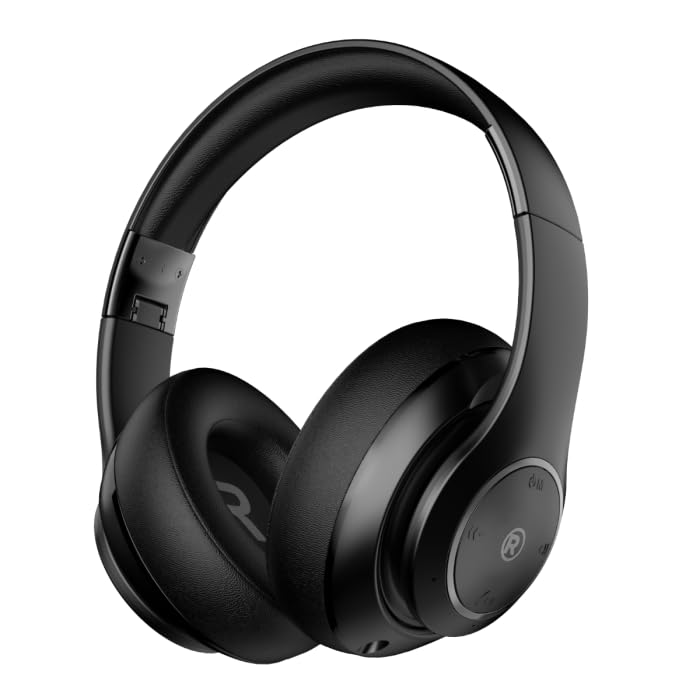
A iwaju-igun view of the black RadioShack BT Headphones, showcasing their over-ear design and cushioned earcups.
Ohun ti o wa ninu Apoti
Daju pe gbogbo awọn nkan wa ninu apo rẹ:
- RadioShack BT Headphones
- Ngba agbara USB
- Okun Audio Iranlọwọ
- Itọsọna olumulo
This video demonstrates the unboxing process of the RadioShack BT Headphones, showing the contents included in the package.
Ọja Awọn ẹya ara ẹrọ
The RadioShack BT Headphones are designed for an enhanced audio experience with convenience and durability.
- Akoko Idaraya: Enjoy up to 30 hours of uninterrupted music.
- Gbohungbohun ti a ṣe sinu: Features a built-in microphone for clear and convenient calling functions.
- Bluetooth 5.4 ti ilọsiwaju: Equipped with Bluetooth version 5.4 for seamless and stable wireless connectivity.
- Ohun Didara Ga: 40mm drivers deliver rich, immersive sound with excellent sensitivity and impedance.
- Apẹrẹ folda: Compact and foldable design for easy portability and storage.

An informational graphic highlighting the built-in microphone, 400mAh battery capacity, and Bluetooth 5.4 compatibility of the headphones.
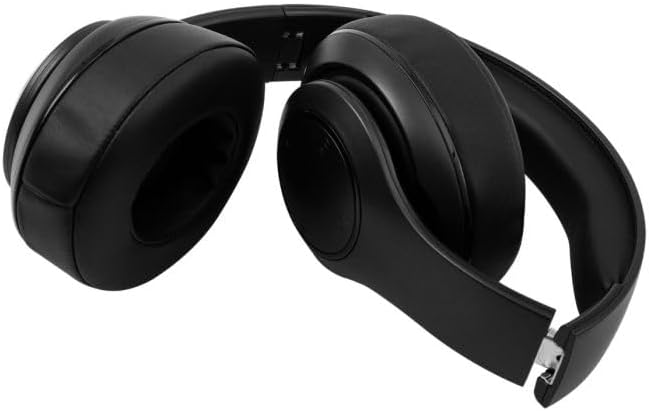
The RadioShack BT Headphones folded for compact storage and portability.
Yi fidio pese kan finifini loriview of the RadioShack Over-the-Head Earphones, showcasing their design and use.
Ṣeto
Ngba agbara si Awọn Agbekọri
- Connect the provided USB charging cable to the charging port on the headphones.
- So opin keji okun USB pọ mọ orisun agbara USB ti o baamu (fun apẹẹrẹ, kọnputa, adapter ogiri).
- Àmì LED náà yóò tànmọ́lẹ̀ nígbà tí a bá ń gba agbára, yóò sì pa tàbí yí àwọ̀ padà nígbà tí a bá ti gba agbára tán.
- Gbigba agbara ni kikun pese to awọn wakati 30 ti akoko ere.
Sisopọ nipasẹ Bluetooth
- Rii daju pe awọn agbekọri ti gba agbara ni kikun.
- Tẹ mọlẹ bọtini Agbara lori awọn agbekọri titi ti afihan LED yoo tan bulu ati pupa, nfihan ipo sisopọ.
- Lori ẹrọ rẹ (foonuiyara, tabulẹti, kọmputa), mu Bluetooth ṣiṣẹ ki o wa awọn ẹrọ to wa.
- Select "RadioShack BT Headphones" from the list of found devices.
- Once connected, the LED indicator will show a solid blue light or flash blue slowly.
Awọn ilana Iṣiṣẹ
Titan / Paa
- Agbara Tan: Tẹ mọlẹ bọtini agbara fun isunmọ awọn aaya 3 titi ti Atọka LED yoo tan imọlẹ.
- Agbara Pa: Tẹ mọlẹ bọtini agbara fun isunmọ awọn aaya 3 titi ti itọkasi LED yoo wa ni pipa.
Sisisẹsẹhin Orin
- Ṣiṣẹ/Daduro: Tẹ bọtini Olona-iṣẹ lẹẹkan.
- Orin t’okan: Tẹ mọlẹ bọtini Iwọn didun Up.
- Tẹlẹ Orin: Tẹ mọlẹ bọtini Iwọn didun isalẹ.
Isakoso Ipe
- Idahun/Ipe Ipari: Tẹ bọtini Olona-iṣẹ lẹẹkan.
- Kọ Ipe: Tẹ mọlẹ bọtini iṣẹ-ọpọlọpọ fun iṣẹju-aaya 2.
- Nọmba Ikẹhin Tun Tun: Tẹ bọtini Olona-iṣẹ lẹẹmeji.
Iṣakoso iwọn didun
- Iwọn didun Up: Tẹ bọtini Iwọn didun Up.
- Iwọn didun isalẹ: Tẹ bọtini Iwọn didun isalẹ.
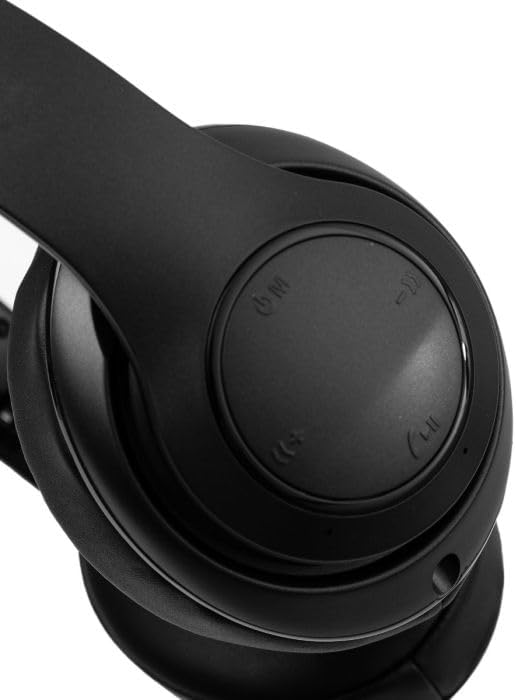
A sunmọ-soke view of the right earcup, showing the integrated control buttons for power, volume, and playback.
Itoju
Ninu
- Mu awọn agbekọri nu pẹlu asọ ti o gbẹ.
- Ma ṣe lo abrasive ose tabi epo.
- Jeki ibudo gbigba agbara laisi eruku ati idoti.
Ibi ipamọ
- Tọju awọn agbekọri naa ni itura, aye gbigbẹ kuro lati orun taara ati awọn iwọn otutu to gaju.
- When not in use for extended periods, charge the headphones at least once every three months to preserve battery life.
Laasigbotitusita
| Oro | Owun to le Solusan |
|---|---|
| Awọn agbekọri ko ṣiṣẹ | Rii daju pe awọn agbekọri ti gba agbara. Sopọ si orisun agbara ati gbiyanju lẹẹkansi. |
| Ko le so pọ pẹlu ẹrọ | Rí i dájú pé àwọn agbekọri wa ní ipò ìsopọ̀ (ìmọ́lẹ̀ bulu/pupa LED). Pa Bluetooth lórí ẹ̀rọ rẹ kí o sì tan án. Sún mọ́ ẹ̀rọ náà. |
| Ko si ohun tabi iwọn didun kekere | Check volume levels on both headphones and connected device. Ensure headphones are properly paired. Try reconnecting. |
| Asopọmọra igba diẹ | Reduce distance between headphones and device. Avoid obstacles. Ensure no other devices are interfering with the Bluetooth signal. |
Awọn pato
| Ẹya ara ẹrọ | Ẹ̀kúnrẹ́rẹ́ |
|---|---|
| Brand | RadioShack |
| Nọmba awoṣe | 3304403-PRNT |
| Àwọ̀ | Dudu |
| Gbigbe Eti | Lori Eti |
| Fọọmù ifosiwewe | Lori Eti |
| Ariwo Iṣakoso | Ti nṣiṣe lọwọ Noise Ifagile |
| Ẹya Bluetooth | 5.4 |
| Batiri Apapọ Life | Awọn wakati 30 |
| Iwọn Igbohunsafẹfẹ | 20Hz - 20,000Hz |
| Audio Driver Type | Yiyi Awakọ |
| -Itumọ ti Media | USB |
| Ohun elo apade | Ṣiṣu |
| Iwọn Nkan | 0.34 kilo |
| Omi Resistance Ipele | Mabomire |
| Awọn ẹrọ ibaramu | Smartphones, Laptops, Desktops, Tablets, Televisions, Smart Speakers |
Atilẹyin ọja ati Support
Alaye atilẹyin ọja
These RadioShack BT Headphones come with a 6-osu atilẹyin ọja Láti ọjọ́ tí a rà á. Àtìlẹ́yìn yìí bo àwọn àbùkù iṣẹ́-ọnà lábẹ́ lílo déédéé. Kò bo ìbàjẹ́ tí ó wáyé nípasẹ̀ ìlòkulò, jàǹbá, àtúnṣe tí a kò gbà láyè, tàbí ìbàjẹ́ déédé.
Onibara Support
For technical assistance, warranty claims, or further inquiries, please contact RadioShack customer support through their official website or the retailer where the product was purchased. Please have your model number (3304403-PRNT) and proof of purchase ready.
You can visit the official RadioShack store for more information: RadioShack Store on Amazon