
RadioShack Home Projector
RadioShack Home Projector User Manual
Model: Home Projector (ASIN: B0DP1GFG9L)
1. Ifihan
This manual provides essential instructions for the safe and efficient operation of your RadioShack Home Projector. Please read this manual thoroughly before using the device and retain it for future reference.
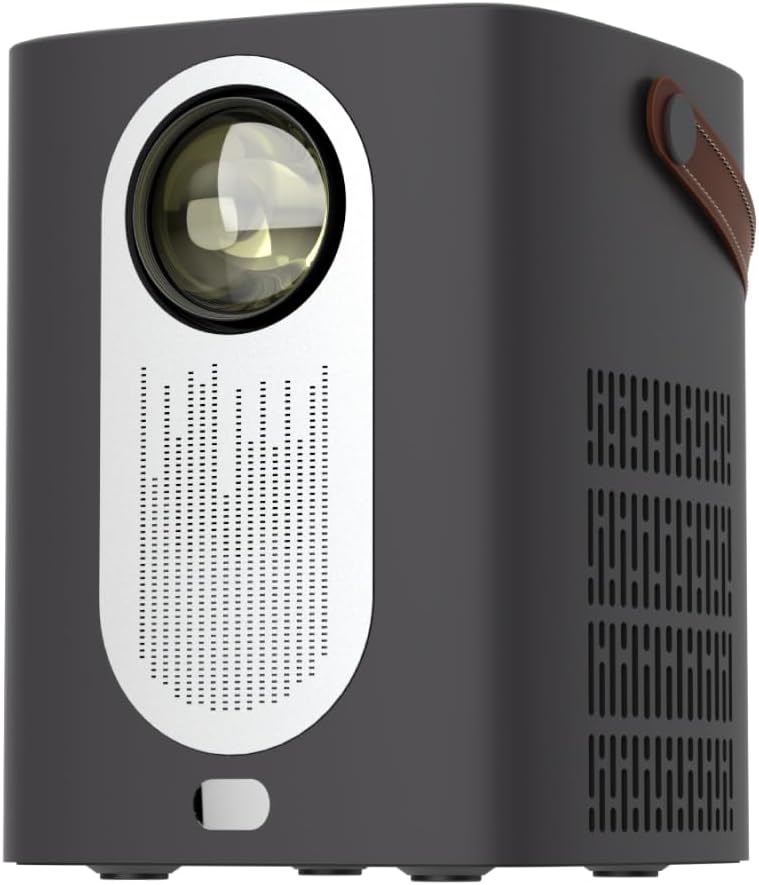
Aworan 1.1: Iwaju view of the RadioShack Home Projector, showcasing its lens and speaker grille.
2. Package Awọn akoonu
Jẹrisi pe gbogbo awọn ohun kan wa ninu package:
- 1 x RadioShack Home Projector
- 1 x Isakoṣo latọna jijin
- 1 x Okun Agbara
- 1 x Itọsọna olumulo (iwe yii)

Image 2.1: Illustration of the package contents, including the projector, remote control, power cable, and user manual.
3. Ọja Ipariview
3.1. Key Awọn ẹya ara ẹrọ
- Ifihan Ipinnu giga: Supports full HD resolution for clear and detailed images.
- Bright and Long-Lasting: Features impressive brightness and a durable light source.
- Asopọmọra Wapọ: Includes Bluetooth, WiFi, Android Miracast, and iOS Cast for streaming.
- Imudara Viewing: Digital focus and keystone correction for optimal image alignment.
- Iwapọ ati Gbigbe: Lightweight design with a handle for easy transport.
3.2. Àwọn Èbúté àti Àwọn Ìṣàkóso
Familiarize yourself with the projector's input/output ports and controls.

Aworan 3.1: Ẹyin view of the projector showing USB input for media playback, AV input for DVD players, and HDMI input for various devices like video game consoles, streaming sticks, cell phones, tablets, and laptops.

Aworan 3.2: Apa view illustrating the compact dimensions (approximately 7 inches tall, 5.3 inches wide) and the integrated leather handle for portability.
4. Eto Itọsọna
4.1. Agbara akọkọ Lori
- So okùn agbara pọ mọ ero isise ati ibudo agbara ti o yẹ.
- Press the power button located on the top of the projector or on the remote control to turn on the device. The indicator light will illuminate.
- The RadioShack logo will appear on the projection surface, indicating successful power-on.
Video 4.1: A short demonstration showing the unboxing, connecting the power cable, powering on the projector, and the initial display of the RadioShack logo.
4.2. Placement and Focus
- Place the projector on a stable, flat surface, ensuring the lens is unobstructed.
- Adjust the distance from the projection surface (wall or screen) to achieve the desired image size.
- Use the digital focus adjustment (refer to the remote control or on-screen menu) to sharpen the image.
- Utilize keystone correction if the image appears trapezoidal, to achieve a rectangular projection.
5. Awọn ilana Iṣiṣẹ
5.1. Nsopọ Awọn ẹrọ
Pirojekito ṣe atilẹyin awọn orisun titẹ sii lọpọlọpọ:
- HDMI: Connect devices such as laptops, gaming consoles, streaming boxes, or Blu-ray players using an HDMI cable. Select HDMI as the input source from the projector's menu.
- USB: Insert a USB drive to play compatible video or audio files. Select USB as the input source.
- TI: Connect older devices like DVD players using an AV cable. Select AV as the input source.
- Bluetooth: Pair with Bluetooth audio devices for wireless sound output.
- WiFi / Casting: Connect to a Wi-Fi network to enable Android Miracast or iOS Cast for screen mirroring from compatible smartphones and tablets.

Image 5.1: A couple enjoying content projected by the RadioShack Home Projector, demonstrating its use in a home cinema setting.
5.2. Awọn iṣẹ Iṣakoso latọna jijin
The included remote control allows for convenient operation:
- Agbara: Tan pirojekito / pa.
- Orisun: Yan awọn orisun titẹ sii (HDMI, USB, AV, ati bẹẹ bẹẹ lọ).
- Lilọ kiri: Arrow keys to navigate menus, OK button to confirm.
- Iwọn didun: Ṣe àtúnṣe ipele ìjáde ohùn.
- Idojukọ/Ohun-ọrọ: Access digital focus and keystone correction settings.

Image 5.2: The RadioShack Home Projector placed on a table next to its remote control, ready for use.
6. Itọju
- Fifọ lẹnsi naa: Lo aṣọ rirọ, tí kò ní àwọ̀ tí a ṣe pàtó fún àwọn lẹ́nsì ojú láti fi fọ lẹ́nsì àwòjìji náà pẹ̀lú ìrọ̀rùn. Yẹra fún àwọn ohun èlò ìfọ́ tàbí àwọn kẹ́míkà líle.
- Ninu Ode: Mu ese pirojekito nu pẹlu asọ ti o gbẹ. Ma ṣe lo awọn olutọpa omi taara lori ẹrọ naa.
- Afẹfẹ: Ensure the projector's ventilation openings are clear of dust and obstructions to prevent overheating.
- Ibi ipamọ: Nigbati o ko ba wa ni lilo fun awọn akoko ti o gbooro sii, tọju ẹrọ pirojekito ni itura, aye gbigbẹ, kuro lati orun taara ati awọn iwọn otutu to gaju.
7. Laasigbotitusita
| Isoro | Owun to le Fa | Ojutu |
|---|---|---|
| Ko si aworan han | Power cable disconnected; incorrect input source selected; lens cap on. | Check power connection; select correct input source (HDMI, USB, AV); remove lens cap. |
| Aworan jẹ blurry | A kò ṣe àtúnṣe ìfojúsùn; ẹ̀rọ ìfihàn náà sún mọ́/jìnnà sí ìbòjú. | Adjust digital focus; reposition projector for optimal distance. |
| Ko si ohun | Volume too low; external audio device not connected/paired; incorrect audio output selected. | Increase volume; ensure Bluetooth device is paired or wired audio is connected; check audio output settings. |
| Isakoṣo latọna jijin ko ṣiṣẹ | Awọn batiri ti dinku; idiwo laarin latọna jijin ati pirojekito. | Replace remote control batteries; ensure clear line of sight to the projector's IR receiver. |
8. Awọn pato
- Brand: RadioShack
- Awoṣe: Home Projector (ASIN: B0DP1GFG9L)
- Ipinnu Ifihan: 1280 x 720 (Supports Full HD)
- Imọ-ẹrọ Asopọmọra: AV, HDMI, USB, Bluetooth, WiFi (Android Miracast, iOS Cast)
- Awọn ẹya pataki: Portable, Digital Focus, Keystone Correction
- Iṣeduro Lilo: Ile sinima ile
- Awọn iwọn ọja: 5.31 x 5.31 x 7.09 inches
- Ìwọ̀n Nkan: 3.91 iwon

Image 8.1: The projector displaying content, highlighting its support for full HD resolution and high-quality sound.
9. Atilẹyin ọja ati Support
For warranty information and technical support, please refer to the official RadioShack webojula tabi kan si wọn onibara iṣẹ. Tọju iwe-ẹri rira rẹ bi ẹri rira.
Atilẹyin Ayelujara: www.radioshack.com
Ask a question about this manual
Ask about setup, troubleshooting, compatibility, parts, safety, or missing instructions. Manuals+ will review the question and use this page’s manual context to help answer it.