
THINKYA Y11
THINKYA Y11 Portable CD Player Instruction Manual
Model: Y11 | Brand: THINKYA
1. Ọja Ipariview
The THINKYA Y11 Portable CD Player is a versatile audio device designed for home use, blending retro aesthetics with modern functionality. It supports multiple playback modes including CD, Bluetooth, USB, AUX, and Optical. Equipped with dual HiFi speakers and a remote control, it offers a rich audio experience. Its built-in 2600mAh rechargeable battery ensures portability, allowing for extended listening sessions. The player also features an RGB colorful light show for enhanced ambiance and a 3-point silicone shockproof design for stable playback.

Image 1.1: The THINKYA Y11 Portable CD Player in white, shown with its remote control. This image highlights the device's compact design and the included remote for convenient operation.
2. Package Awọn akoonu
Jọwọ ṣayẹwo package ni pẹkipẹki lati rii daju pe gbogbo awọn nkan wa:
- Portable CD Player x 1
- CD Player Remote Control x 1
- CD Player USB-C Cable x 1
- CD Player 3.5mm AUX Cable x 1
- CD Player Manual x 1
3. Eto
3.1 Gbigba agbara akọkọ
Before first use, it is recommended to fully charge the CD player. Connect the provided USB-C cable to the DC IN 5V port on the back of the player and the other end to a compatible USB power adapter (not included). The battery indicator on the display will show charging status.
3.2 Latọna jijin Iṣakoso batiri sori
The remote control requires two AAA batteries (not included). Open the battery compartment on the back of the remote and insert the batteries, ensuring correct polarity.
3.3 Removing CD Protection Card
Before playing a CD for the first time, locate and remove the protective card from the CD tray. This card prevents damage during transit.

Image 3.1: A person holding the remote control, demonstrating its use with the CD player in the background. The remote allows for convenient control from a distance.
4. Awọn ilana Iṣiṣẹ
4.1 Agbara Tan / Pa
Locate the ON/OFF switch on the back of the unit. Slide it to the 'ON' position to power on the device. Slide it to 'OFF' to power off.
4.2 CD Sisisẹsẹhin
- Open the top cover of the CD player.
- Carefully place a CD onto the spindle, ensuring it is seated correctly.
- Pa oke ideri.
- Press the 'MODE' button on the player or remote until 'CD' mode is selected.
- The CD player will automatically begin playing. Use the Play/Pause, Next/Previous, and Volume buttons on the player or remote to control playback.
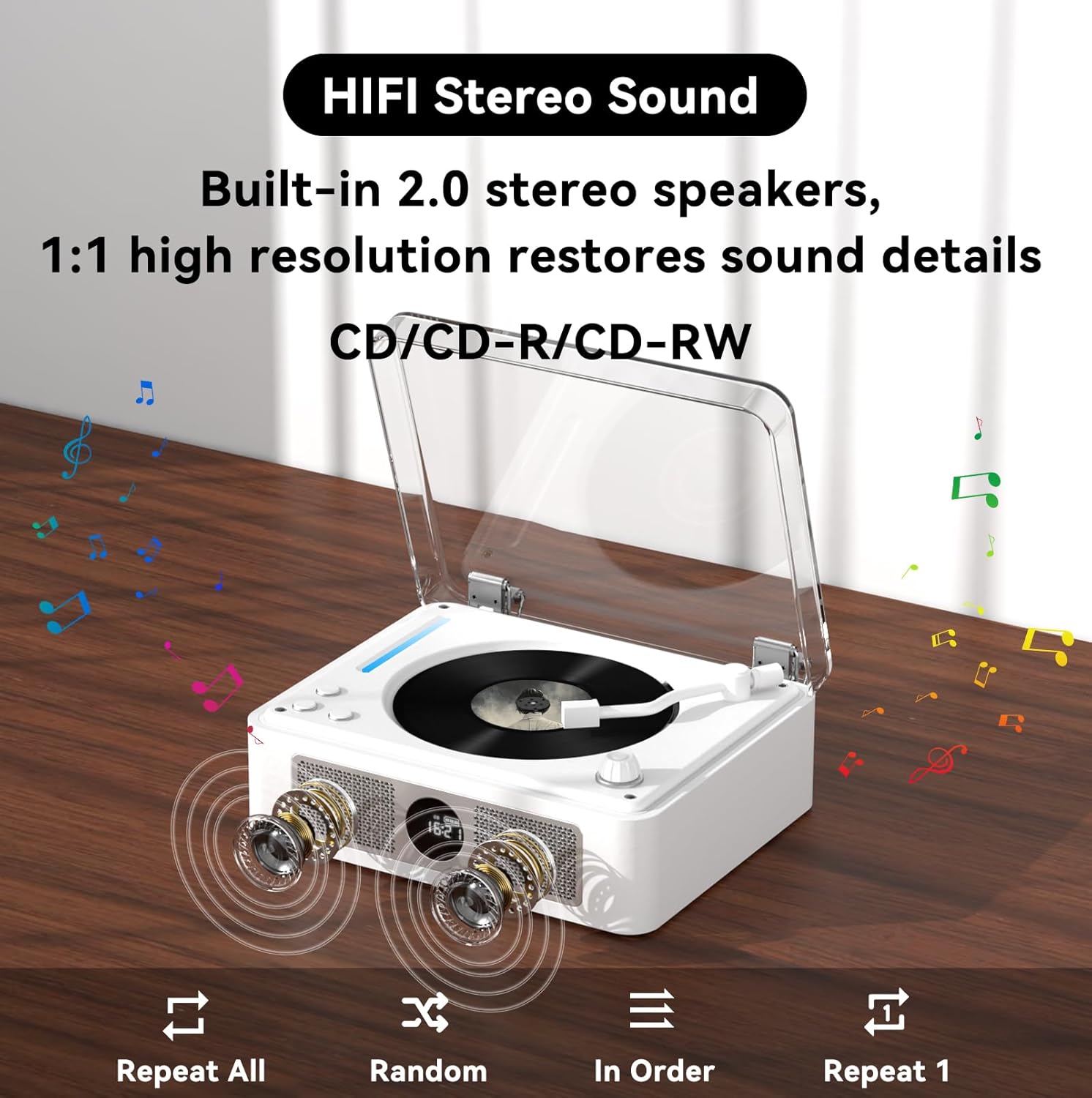
Image 4.1: The CD player showcasing its built-in 2.0 stereo speakers and the CD playback area. It emphasizes high-resolution sound restoration and playback options like Repeat All, Random, In Order, and Repeat 1.
4.3 Bluetooth Connection (Two-Way)
The THINKYA Y11 supports both Bluetooth input (as a receiver) and Bluetooth output (as a transmitter).
4.3.1 Bluetooth Receiver Mode (Connect your phone/tablet to the CD player)
- Press the 'MODE' button on the player or remote until 'BT' mode is selected. The display will show 'bt' and the Bluetooth indicator will flash, indicating it's in pairing mode.
- Lórí ẹ̀rọ alágbèéká rẹ (fóònù, tábìlẹ́ẹ̀tì, kọ̀ǹpútà), mu Bluetooth ṣiṣẹ́ kí o sì wá àwọn ẹ̀rọ tó wà.
- Select 'THINKYA Y11' from the list. Once connected, the Bluetooth indicator on the player will stop flashing.
- You can now play audio from your device through the CD player's speakers.
4.3.2 Bluetooth Transmitter Mode (Connect the CD player to Bluetooth headphones/speakers)
- Rí i dájú pé àwọn agbekọri Bluetooth tàbí agbọrọsọ rẹ wà ní ipò ìsopọ̀.
- While in CD, USB, AUX, or Optical mode, press and hold the 'BT' button on the remote control (or the corresponding button on the unit if available) to initiate Bluetooth transmission pairing. The Bluetooth indicator will flash rapidly.
- The CD player will automatically search for and connect to nearby Bluetooth audio devices. Once connected, audio will be streamed to your external Bluetooth device.

Image 4.2: A visual representation of the two-way Bluetooth connection capability. On the left, the CD player acts as a transmitter to headphones/speakers. On the right, it acts as a receiver for a smartphone.
4.4 USB Sisisẹsẹhin
- Insert a USB flash drive containing MP3/WMA/WAV/APE/FLAC audio files into the USB port on the back of the player.
- Press the 'MODE' button until 'USB' mode is selected.
- The player will automatically detect and begin playing audio files lati USB drive.

Aworan 4.3: A sunmọ-soke view of the rear panel showing a USB flash drive inserted into the USB port, indicating its use for playing audio files.
4.5 AUX Ipo
Connect an external audio device (e.g., smartphone, MP3 player) to the AUX port on the back of the CD player using the provided 3.5mm AUX cable. Press the 'MODE' button until 'AUX' mode is selected. Audio from your external device will now play through the CD player's speakers.
4.6 Optical Mode
For high-quality digital audio output, connect the CD player to a compatible audio receiver, soundbar, or TV using an optical audio cable (not included) via the SPDIF port on the back. This mode is for outputting audio from the CD player to an external system.
4.7 Lilo isakoṣo latọna jijin
The remote control provides full functionality for the CD player:
- Bọtini agbara: Tan ẹyọ kuro / PA.
- Iwọn didun +/-: Ṣatunṣe iwọn didun titunto si.
- Ṣiṣẹ/Daduro: Bẹrẹ tabi da ṣiṣiṣẹsẹhin duro.
- Itele/Tiwaju: Skip to the next or previous track/chapter.
- Duro: Duro ṣiṣiṣẹsẹhin.
- Ipo: Switch between CD, Bluetooth, USB, AUX, and Optical modes.
- Tun: Cycle through repeat options (e.g., Repeat One, Repeat All).
- EQ: Change equalizer presets.
- BASS +/-: Ṣe àtúnṣe àwọn ipele bass.
- TÍBÉLÌ +/-: Ṣe àtúnṣe àwọn ipele treble.
- BT: Directly switch to Bluetooth mode or initiate Bluetooth pairing (long press for transmitter mode).
5. Key Awọn ẹya ara ẹrọ
- Multi-Functional Playback: Supports CD Play, Bluetooth, USB, AUX, and Optical modes. Compatible with CD, CD-R, CD-DA, MP3, WMA, WAV, APE, FLAC formats.
- Dual HiFi Stereo Speakers: Built-in 2.0 stereo speakers provide high-resolution sound, filling the room with clear audio.
- Two-Way Bluetooth: Functions as both a Bluetooth transmitter (output to headphones/speakers) and a Bluetooth receiver (input from phone/tablet).
- Gbigba agbara & Gbigbe: Features a built-in 2600mAh USB-C fast rechargeable battery, offering approximately 4-8 hours of playback time. Its compact size (8.27x6.69x3.03 inches) and light weight (2.2 lbs) make it easy to carry.
- Ifihan Imọlẹ Awọ RGB: Offers 10 different color-changing themes, including colorful lights, automatic change, white light, blue light, and yellow light, controllable via remote.
- Ijade Olohun Digital Optical: Allows for high-fidelity digital audio output to external devices like TVs, power amplifiers, or speakers with optical input interfaces.
- 3-Point Silicone Shockproof Design: Effectively reduces external vibrations, enhancing stability and preventing disc skipping during playback.

Image 5.1: The portable CD player shown outdoors with a group of friends, highlighting its portability and rechargeable battery for on-the-go use.
6. Itọju
- Ninu: Use a soft, dry cloth to clean the exterior of the player. For the CD lens, use a specialized CD lens cleaner. Do not use abrasive cleaners or solvents.
- Ibi ipamọ: Store the player in a cool, dry place away from direct sunlight, high temperatures, and humidity.
- Itọju Batiri: Lati pẹ aye batiri, yago fun gbigba agbara si batiri ni kikun nigbagbogbo. Gba agbara si ẹrọ nigbagbogbo, paapaa ti ko ba wa ni lilo fun awọn akoko ti o gbooro sii.
- Disiki mimu: Always handle CDs by their edges to avoid fingerprints and scratches. Store discs in their cases when not in use.
7. Laasigbotitusita
| Isoro | Owun to le Fa | Ojutu |
|---|---|---|
| Ẹrọ orin ko ni agbara lori. | Battery is low or depleted. Power switch is OFF. | Charge the player using the USB-C cable. Ensure the power switch on the back is set to 'ON'. |
| CD ko ṣiṣẹ tabi fo. | CD is dirty, scratched, or inserted incorrectly. Protection card not removed. | Clean the CD with a soft cloth. Ensure the CD is placed correctly on the spindle. Remove the CD protection card if it's the first use. |
| Ko si ohun lati awọn agbohunsoke. | Volume is too low or muted. Incorrect mode selected. External device not connected properly (AUX/Optical). | Increase volume. Check if muted. Ensure correct mode (CD, BT, USB, AUX, Optical) is selected. Verify cable connections for AUX/Optical. |
| Asopọ Bluetooth kuna. | Device is too far. Bluetooth not enabled on external device. Player not in pairing mode. | Ensure devices are within 10 meters. Enable Bluetooth on your external device. Put the CD player into Bluetooth pairing mode (BT mode for receiver, long press BT for transmitter). |
| Isakoṣo latọna jijin ko ṣiṣẹ. | Awọn batiri ti ku tabi fi sii lọna ti ko tọ. Idilọwọ laarin latọna jijin ati ẹrọ orin. | Replace AAA batteries, ensuring correct polarity. Remove any obstructions. Ensure direct line of sight. |
8. Awọn pato
| Ẹya ara ẹrọ | Ẹ̀kúnrẹ́rẹ́ |
|---|---|
| Awoṣe | Y11 |
| Iṣagbewọle Voltage | 5V-2A |
| Agbara Batiri | 2600 mAh |
| Akoko gbigba agbara | Isunmọ. wakati meji 3 |
| Akoko Sisisẹsẹhin | Isunmọ. 4-8 wakati |
| Portable Size (L x W x H) | 8.27 x 6.69 x 3.03 inches (21 x 17 x 7.7 cm) |
| Iwọn | 2.2 lbs (1 kg) |
| Agbọrọsọ | 4Ω-2*2W (Independent Sound Cavity) |
| Supported CD Formats | CD-DA, CD-R, MP3 |
| Awọn ọna kika USB atilẹyin | MP3 / WMA / WAV / APE / FLAC |
| Awọn atọkun | 3.5mm Audio (AUX), USB, Optical (SPDIF), Headphone, USB-C Charge |
| Player Modes | CD Play, Bluetooth, USB, AUX, Optical |
9. Atilẹyin ọja ati Support
For warranty information and customer support, please refer to the contact details provided on the product packaging or visit the official THINKYA webojula. Tọju iwe-ẹri rira rẹ fun awọn ẹtọ atilẹyin ọja.
Ask a question about this manual
Ask about setup, troubleshooting, compatibility, parts, safety, or missing instructions. Manuals+ will review the question and use this page’s manual context to help answer it.