
BONSEN S3105
BONSEN S3105 Eru Ojuse Paper Shredder olumulo Afowoyi
Model: S3105 | Brand: BONSEN
Ọja Pariview
The BONSEN S3105 is a heavy-duty cross-cut paper shredder designed for office and home use. It offers high security shredding, a large capacity waste bin, and quiet operation, making it suitable for continuous shredding tasks.

Figure 1: BONSEN S3105 Heavy Duty Paper Shredder.
Ohun ti o wa ninu Apoti
- 1 x BONSEN Paper Shredder S3105
- 1 x Itọsọna olumulo
Ṣeto
Unpacking ati Placement
Carefully remove the shredder from its packaging. Place the shredder on a flat, stable surface. Ensure there is adequate space around the unit for ventilation and easy access to the waste bin. The shredder is equipped with wheels for convenient relocation.
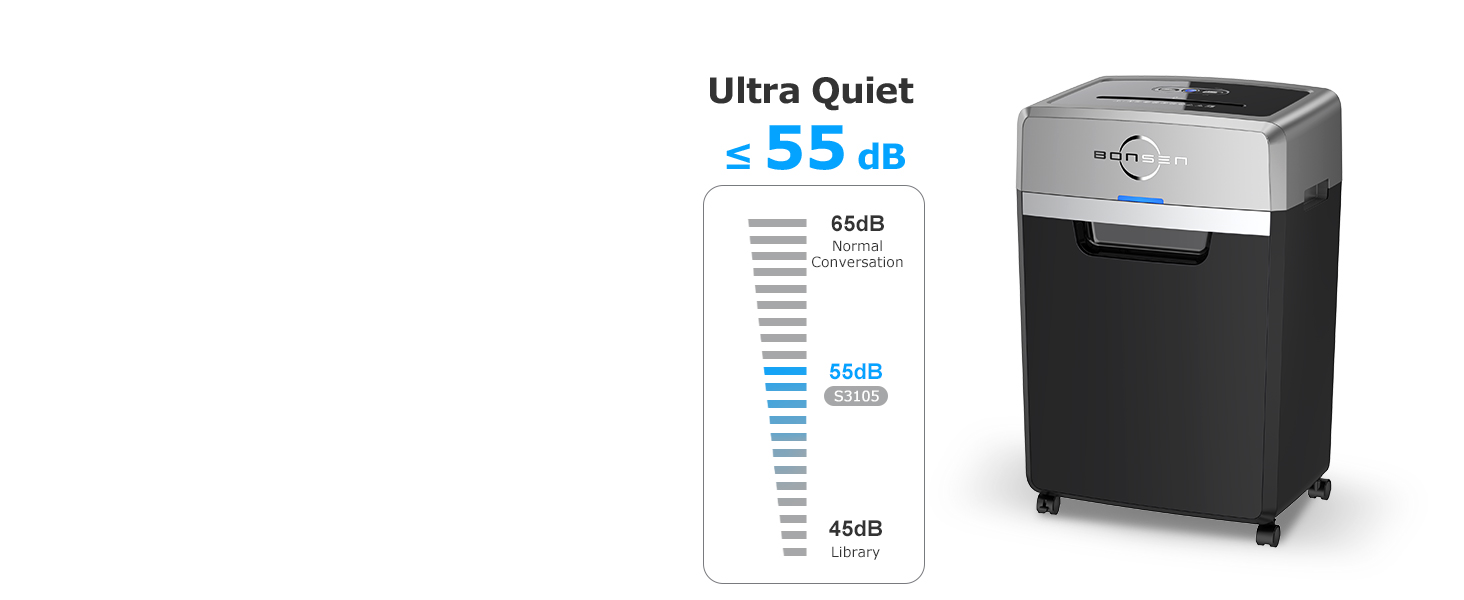
Figure 2: Illustration of shredder assembly and proper placement.
Asopọ agbara
Connect the power cord to a standard electrical outlet. Ensure the power switch on the shredder is in the "OFF" position before plugging it in.
Awọn ilana Iṣiṣẹ
Ibi iwaju alabujuto
The shredder features a simple 3-button control panel: Power On, Forward, and Reverse. LED indicators provide status updates for Power On, Overheat, Overload, Bin Open, and Bin Full conditions.

Nọmba 3: Alaye view of the control panel with LED indicators.
Awọn iwe aṣẹ Shredding
The BONSEN S3105 can shred up to 24 sheets of letter-size (20 lb) paper simultaneously. It also handles CDs, staples, paper clips, credit cards, and junk mail. Insert items into the designated shredding slot. The shredder will automatically start when material is detected and stop when shredding is complete.

Figure 4: The shredder's capability to shred paper, junk mail, staples/clips, CDs, and credit cards.
Isẹ ti o tẹsiwaju
This heavy-duty shredder is designed for continuous operation for up to 40 minutes. After this period, a 60-minute cool-down period is recommended to prevent overheating and ensure longevity. During a 40-minute cycle, it can shred approximately 5230 sheets of A4 paper.

Figure 5: Visual representation of the 40-minute continuous shredding capability.
Aabo Ipele
The BONSEN S3105 provides P-4 security level cross-cut shredding, reducing paper into small pieces of 5/32 x 1-12/32 inches (4 x 35 mm). This ensures your confidential information is securely destroyed.

Figure 6: Comparison of P-4 security shred size to a dime.
Isẹ idakẹjẹ
Operating at an ultra-low noise level of 55 dB, the shredder minimizes disruption in office or home environments, allowing for quiet and smooth shredding.

Figure 7: Noise level comparison, highlighting the 55dB quiet operation.
Waste Bin Management
The shredder features a large 9-gallon pull-out waste bin, capable of holding up to 650 sheets of shredded paper, reducing the frequency of emptying. The "Bin Full" LED indicator will flash when the bin needs to be emptied.

Nọmba 8: View of the 9-gallon pull-out waste bin.
Itoju
Lubrication
To maintain optimal performance and extend the lifespan of your shredder, it is recommended to lubricate the shredder blades regularly. Use Bonsen shredder lubricant sheets (Model: LS50) or a suitable shredder oil. Simply insert a lubricant sheet into the shredder as you would a regular piece of paper every few shredding cycles. This helps reduce static dust and improves shredding efficiency.
Ninu
Periodically clean the exterior of the shredder with a soft, dry cloth. Do not use abrasive cleaners or solvents. Ensure the power is disconnected before cleaning.
Laasigbotitusita
| Isoro | Owun to le Fa | Ojutu |
|---|---|---|
| Shredder ko tan. | No power, power switch off, bin not properly closed. | Check power connection. Ensure power switch is ON. Push waste bin firmly into place. |
| Overheat (Red Light On). | Continuous operation exceeded duty cycle. | Allow the shredder to cool down for at least 60 minutes. The light will turn off when ready. |
| Overload (Red Light Flashing). | Pupọ iwe ti a fi sii. | Press the "Reverse" button to clear the jam. Reduce the amount of paper for next shredding. |
| Bin Open (Red Light On). | Waste bin is not fully inserted or is open. | Ensure the waste bin is fully and correctly inserted into the shredder housing. |
| Bin Full (Red Light Flashing). | Ibi idọti ti kun. | Ṣofo ọpọn idọti naa. |
Awọn pato
- Awoṣe: S3105
- Ge Iru: Agbelebu Ge
- Iwon ti a ge: 5/32 x 1-12/32 inches (4 x 35 mm)
- Ipele Aabo: P-4
- Agbara Idinku: 24 sheets (20 lb paper)
- Akoko Ilọsiwaju: 40 iṣẹju
- Akoko Itura: 60 iṣẹju
- Agbara Bin Egbin: 9 Gallons (approx. 650 sheets)
- Ipele Ariwo: 55 dB
- Awọn iwọn ọja: 11.61 x 16.69 x 25.39 inches
- Ìwọ̀n Nkan: 43.2 iwon
- Àwọ̀: Dudu
- Olupese: BONSEN
Atilẹyin ọja ati Support
BONSEN provides professional customer service for its products. For any inquiries, technical assistance, or warranty claims, please refer to the contact information provided in your product packaging or visit the official BONSEN website. It is recommended to consult the user manual and troubleshooting guide before seeking support.