OnePlus CPH2655

Ìwé ìtọ́nisọ́nà fún àwọn olùlò OnePlus 13

Comprehensive guide for your OnePlus 13 smartphone, featuring Snapdragon 8 Elite, Hasselblad Camera, and advanced charging capabilities.

1. Ifihan

The OnePlus 13 is a cutting-edge unlocked Android smartphone designed for exceptional performance and user experience. Powered by the latest Qualcomm Snapdragon 8 Elite chipset and equipped with up to 16GB of RAM and 512GB of storage, it delivers lightning-fast speeds and seamless multitasking. Its 120Hz Super Fluid AMOLED display with Dynamic Refresh Rate offers vibrant colors and ultra-smooth visuals. The device features an advanced 5th Generation Hasselblad Camera System for stunning photography and supports 80W SUPERVOOC fast charging and 50W AIRVOOC wireless charging for rapid power-ups. Running on OxygenOS 15, the OnePlus 13 provides a smarter, more intuitive smartphone experience.

OnePlus 13 Midnight Ocean smartphone, front and back view

The OnePlus 13 in Midnight Ocean color, showcasing apẹrẹ didara ati modulu kamẹra olokiki rẹ.

An official video highlighting the overall features and design of the One Plus 13.

2. Ohun ti o wa ninu Apoti

Upon unboxing your OnePlus 13, please ensure all components are present:

  • Aimudani
  • Charger (80W SUPERVOOC power adapter)
  • USB data cable (Type-C)
  • SIM ejector ọpa
  • Awọn ọna Itọsọna
  • Itọsọna Abo
  • Kaadi ẹgbẹ
  • Brand sitika
  • Kaabo Iwe
Contents of the OnePlus 13 retail box including phone, charger, cable, and documentation

All items included in the OnePlus 13 retail packaging.

3. Eto

  1. Agbara Tan: Press and hold the Power button (located on the right side) until the OnePlus logo appears.
  2. Iṣeto akọkọ: Tẹle awọn itọnisọna loju iboju lati yan ede rẹ, sopọ si Wi-Fi, ati ṣeto akọọlẹ Google rẹ.
  3. Fi kaadi SIM sii: Use the provided SIM ejector tool to open the SIM tray. Insert your Nano-SIM card(s) into the tray and reinsert it into the phone. The OnePlus 13 supports Dual SIM functionality.
  4. Eto Ika ika: Configure the built-in ultrasonic fingerprint sensor for secure and effortless unlocking. Navigate to Settings > Security & lock screen > Fingerprint to add your fingerprints.
  5. Batiri Gba agbara: For optimal performance, fully charge your device using the included 80W SUPERVOOC charger and USB data cable.
Apa view of OnePlus 13 showing power and volume buttons

Apa view of the OnePlus 13, highlighting the power and volume buttons.

OnePlus 13 being used with wet hands, demonstrating Aqua Touch feature

The OnePlus 13 features Aqua Touch technology, allowing for seamless interaction even with wet hands.

4. Ṣiṣẹ ẹrọ rẹ

Ifihan ati Lilọ kiri

The OnePlus 13 features a stunning 120Hz ProXDR display, offering a smooth and responsive touch experience. Navigate through OxygenOS 15 using intuitive gestures or traditional navigation buttons. The display's Dynamic Refresh Rate optimizes power consumption while providing fluid visuals.

Close-up of OnePlus 13's ProXDR display

The vibrant 120Hz ProXDR display of the OnePlus 13.

Eto kamẹra

Capture professional-grade photos and videos with the 5th Generation Hasselblad Camera System. The advanced triple-camera setup, including a 50MP main lens, ensures breathtaking detail in any lighting condition. Explore various shooting modes like Portrait, Night, and Pro mode for enhanced creativity.
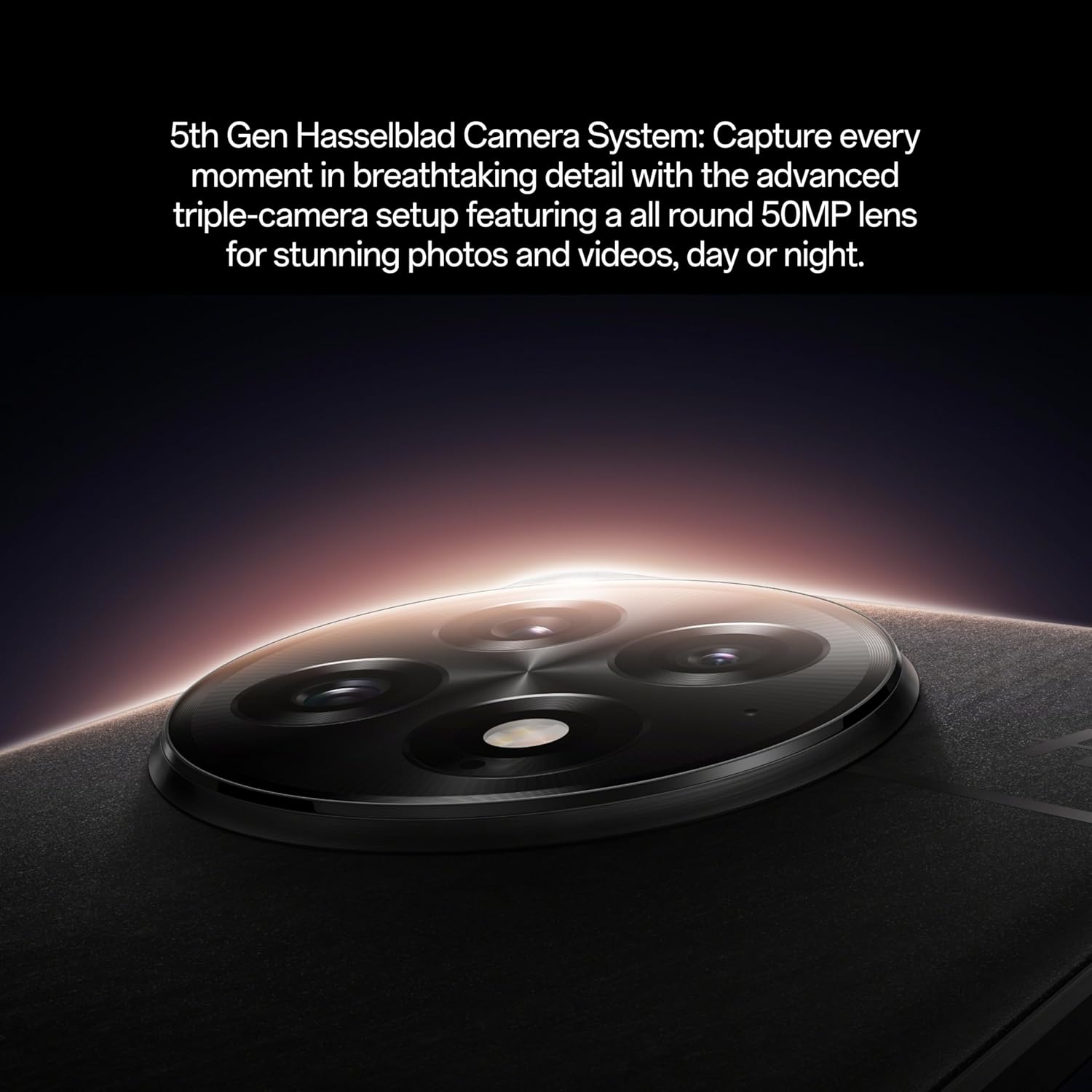
Àkójọpọ̀ ẹ̀rọ kámẹ́rà Hasselblad ti OnePlus 13

The sophisticated 5th Generation Hasselblad Camera System on the OnePlus 13.

Woman taking a photo with OnePlus 13

Utilizing the OnePlus 13's camera for capturing moments.

Ìfihàn fídíò ìjọbaasing the camera capabilities of the OnePlus 13.

Learn how to shoot like a pro with the OnePlus 13's intuitive camera features.

Demonstration of the OnePlus 13's camera performance in various scenarios.

Iṣẹ ṣiṣe

The Snapdragon 8 Elite processor ensures exceptional speed and efficiency for all your tasks, from gaming to productivity. With 16GB RAM, the OnePlus 13 handles demanding applications and multitasking with ease.

Ti abẹnu view of OnePlus 13 highlighting Snapdragon 8 Elite processor and RAM

The powerful Snapdragon 8 Elite processor and 16GB RAM inside the OnePlus 13.

Gbigba agbara

The massive 6000mAh battery provides all-day power. Utilize 80W SUPERVOOC fast charging for incredibly quick wired charging, or enjoy the convenience of 50W AIRVOOC wireless charging.

5. Itọju

To ensure the longevity and optimal performance of your OnePlus 13, follow these maintenance guidelines:

  • Ninu: Lo asọ ti ko ni lint lati nu iboju ati ara. Yago fun awọn ohun elo abrasive tabi awọn kemikali lile.
  • Awọn imudojuiwọn sọfitiwia: Máa ṣàyẹ̀wò kí o sì fi àwọn àtúnṣe sí ẹ̀rọ rẹ déédéé láti rí i dájú pé ẹ̀rọ rẹ ní àwọn ẹ̀yà tuntun, àwọn àtúnṣe ààbò àti àwọn àtúnṣe iṣẹ́.
  • Itọju Batiri: Avoid extreme temperatures. While the device supports fast charging, occasional slower charging can help prolong battery life.
  • Omi ati Eruku Resistance: The OnePlus 13 boasts an IP69 rating, providing superior protection against dust, dirt, and water. While highly resistant, avoid intentional submersion or exposure to high-pressure water jets.
OnePlus 13 phones in water, demonstrating IP69 water resistance

The OnePlus 13 is built with IP69 water and dust resistance for enhanced durability.

Man in pool with OnePlus 13, showcasing water resistance

The OnePlus 13 is designed to withstand splashes and dust, making it suitable for various environments.

6. Laasigbotitusita

If you encounter issues with your OnePlus 13, try the following common troubleshooting steps:

  • Tun ẹrọ bẹrẹ: Tun bẹrẹ irọrun le nigbagbogbo yanju awọn abawọn sọfitiwia kekere.
  • Ṣayẹwo Awọn isopọ: Ensure Wi-Fi, Bluetooth, and mobile data connections are active and stable if experiencing connectivity issues.
  • Ko kaṣe kuro: Fun awọn ọran ti ohun elo kan pato, gbiyanju lati nu kaṣe app kuro (Eto> Awọn ohun elo> [Orukọ Ohun elo]> Ibi ipamọ> Ko kaṣe kuro).
  • Imudojuiwọn Software: Daju pe ẹrọ rẹ n ṣiṣẹ ẹya sọfitiwia tuntun.
  • Idapada si Bose wa tele: As a last resort, you may perform a factory reset (Settings > System > Reset options > Erase all data). Ikilọ: Eyi yoo nu gbogbo data rẹ lori ẹrọ rẹ. Ṣe afẹyinti data pataki ṣaaju ki o to tẹsiwaju.

7. Awọn pato

Ẹya ara ẹrọẸ̀kúnrẹ́rẹ́
Orukọ awoṣeOnePlus 13 (CPH2655)
Eto isesiseAndroid 15 (OxygenOS 15)
isiseSnapdragon 8 Elite (4.32 GHz CPU Speed)
Àgbo16 GB
Ibi ipamọ512 GB
Iwọn Ifihan6.82 inches
Ipinnu Ifihan2K DCI 1080p
Oṣuwọn sọtun120 Hz
Eto kamẹra5th Gen Hasselblad Camera (Rear, Front)
Agbara Batiri6000 mAh
Gbigba agbaraGbigba agbara iyara SUPERVOOC 80W, gbigba agbara alailowaya AIRVOOC 50W
Awọn iwọn6.41 x 3.01 x 0.35 inches
Iwọn7.4 iwon (210 Giramu)
AsopọmọraBluetooth, Dual band GPS, WLAN positioning, cellular network positioning
Pataki Awọn ẹya ara ẹrọDual SIM, Wireless Charging, Built-In Ultrasonic Fingerprint Sensor
Omi ResistanceIP69 won won

8. Atilẹyin ọja ati Support

Your OnePlus 13 comes with a standard manufacturer's warranty. For detailed warranty information, technical support, or service inquiries, please visit the official OnePlus support webojula tabi kan si wọn onibara iṣẹ. Jeki ẹri rira rẹ fun awọn iṣeduro atilẹyin ọja.

Fun alaye diẹ sii ati atilẹyin, ṣabẹwo si Official OnePlus Store.

Ask a question about this manual

Ask about setup, troubleshooting, compatibility, parts, safety, or missing instructions. Manuals+ will review the question and use this page’s manual context to help answer it.