
1. Ifihan
Thank you for choosing the OUMIFAND H100 Series Variable Frequency Drive (VFD). This manual provides essential information for the safe and efficient operation, installation, and maintenance of your VFD. The H100 series is designed for precise motor speed control and phase conversion in various industrial applications. Please read this manual thoroughly before installation and operation to ensure proper usage and to prevent damage to the equipment or injury to personnel.
2. Alaye Aabo
IKILO: Improper installation or operation may result in electric shock, fire, or serious injury. Always adhere to local electrical codes and safety regulations.
- Oṣiṣẹ oṣiṣẹ nikan yẹ ki o fi sori ẹrọ, ṣiṣẹ, ati ṣetọju ohun elo yii.
- Ensure the power supply is disconnected before performing any wiring, inspection, or maintenance. Wait at least 5 minutes after power-off for capacitors to discharge.
- Do not touch the VFD terminals when power is applied or immediately after power-off.
- Rii daju didasilẹ to dara ti VFD ati mọto naa.
- Do not operate the VFD with damaged cables or if the enclosure is open.
- Protect the VFD from moisture, dust, corrosive gases, and direct sunlight.
3. Ọja Ipariview
3.1 Awọn ohun elo
The OUMIFAND H100 Series VFD is suitable for a wide range of industrial applications requiring precise motor speed control and efficient power conversion.

The OUMIFAND H100 Series Variable Frequency Drive is versatile, suitable for various industrial applications such as pharmaceutical equipment, woodworking machinery, and textile machinery, enabling precise motor speed control.
3.2 Key Awọn ẹya ara ẹrọ
The H100 VFD offers advanced functionalities for optimal performance and control.

This image illustrates the powerful functions of the OUMIFAND H100 VFD, including high accuracy, high moment of force, multiple speed modes (up to 8/16), support for both synchronization and non-synchronization, and a wide speed regulating range for diverse operational needs.
- High Accuracy: Provides precise control over motor speed.
- High Moment of Force: Delivers strong torque output.
- Up to 8/16 Speed Modes Selection: Offers flexibility in speed control.
- Both Synchronization & Non-Synchronization: Adaptable to various motor types.
- Wide Speed Regulating Range Driving: Allows for broad operational adjustments.
3.3 Multiple Safeguards
The H100 VFD is built with robust safety features to protect both the device and the connected equipment.
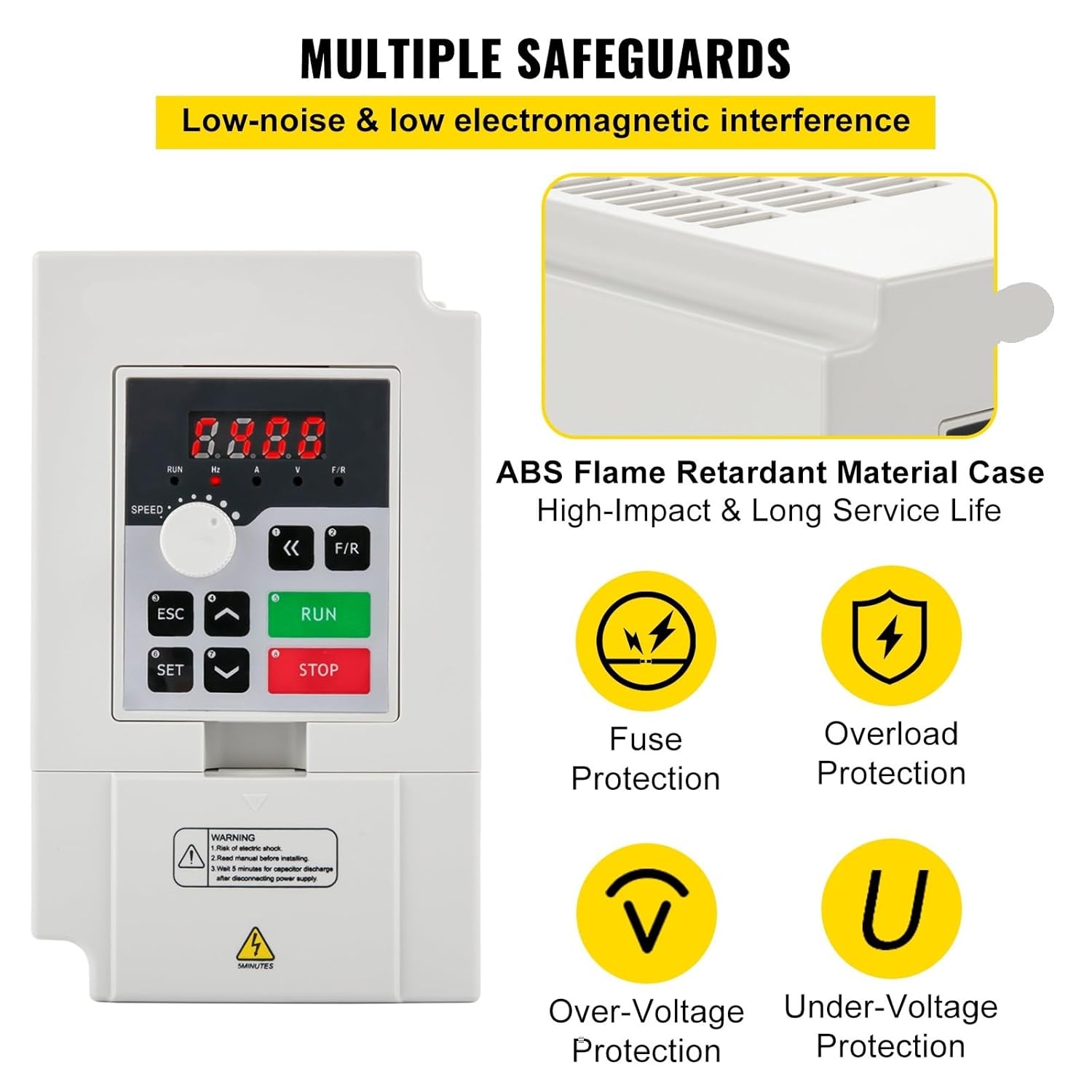
The OUMIFAND H100 VFD is equipped with multiple safeguards for reliable operation, featuring an ABS flame-retardant material case, fuse protection, overload protection, over-voltage Idaabobo, ati labẹ-voltage protection to ensure user and equipment safety.
- ABS Flame Retardant Material Case: Provides enhanced fire safety and durability.
- Fuse Protection: Safeguards against overcurrents.
- Overload Protection: Prevents damage from excessive loads.
- Lori-Voltage Protection: Protects against high voltage spikes.
- Labẹ-Voltage Protection: Ensures stable operation during low voltage awọn ipo.
4. Eto ati fifi sori
4.1 Iṣagbesori
- Mount the VFD vertically on a stable, non-flammable surface.
- Ensure adequate ventilation space around the unit (at least 10 cm on all sides) to prevent overheating.
- Avoid locations with direct sunlight, high temperatures, excessive dust, moisture, or corrosive gases.
4.2 Onirin
IKIRA: All wiring must be performed by a qualified electrician. Ensure power is disconnected before wiring.
- Power Input (R, S, T or L1, L2): Connect the main power supply to the input terminals. Refer to the specific model specifications for 1-phase or 3-phase input requirements.
- Ìjáde Mọ́tò (U, V, W): Connect the three-phase motor to these output terminals. Ensure correct phase sequence.
- Ilẹ̀ (PE): Connect the ground terminal of the VFD to a reliable earth ground.
- Awọn ibudo Iṣakoso: For external control (e.g., start/stop, speed reference, fault indication), refer to the detailed wiring diagram in the full product manual.
- Use appropriate wire gauges for all connections to handle the rated current.
5. Awọn ilana Iṣiṣẹ
5.1 Iṣakoso igbimo Loriview
The VFD features a user-friendly control panel for direct operation and parameter setting.
- Bọtini RUN: Bẹrẹ motor.
- Bọtini Duro: Duro motor.
- Bọtini ESC: Ó jáde kúrò nínú àkójọ oúnjẹ tó wà lọ́wọ́lọ́wọ́ tàbí ó fagilé iṣẹ́ kan.
- Ṣeto Bọtini: Enters parameter setting mode or confirms a selection.
- Awọn itọka oke/isalẹ: Navigate through menus or adjust parameter values.
- Bọtini F/R: Changes the motor's rotation direction (Forward/Reverse).
- Kokoro Iyara: Adjusts the output frequency/motor speed directly.
- Ifihan Digital: Shows current operating status, frequency, or parameter values.
5.2 Ipilẹ isẹ
- Agbara Tan: Connect the VFD to the appropriate power supply. The digital display will light up.
- Ibẹrẹ Motor: Tẹ awọn RUN button. The motor will start accelerating to the set frequency.
- Ṣatunṣe Iyara: Yiyi awọn Iyara Knob to increase or decrease the motor speed.
- Yi Itọsọna pada: Tẹ awọn F/R button to reverse the motor's rotation.
- Mọto Duro: Tẹ awọn DURO bọtini. Awọn motor yoo decelerate ati ki o da.
5.3 Eto Eto
The VFD has numerous parameters that can be adjusted to customize its operation for specific applications. Refer to the comprehensive parameter list in the full product manual for detailed descriptions and adjustment procedures. Common parameters include acceleration/deceleration times, maximum/minimum output frequency, motor parameters, and control modes.
- Tẹ SET to enter the parameter menu.
- Lo Awọn itọka oke/isalẹ to navigate through parameter groups and individual parameters.
- Tẹ SET again to select a parameter for editing.
- Lo Awọn itọka oke/isalẹ lati yi paramita iye.
- Tẹ SET lati fi awọn titun iye.
- Tẹ ESC láti jáde kúrò nínú àkójọ paramita.
6. Itọju
Itọju deedee n ṣe idaniloju gigun ati iṣẹ igbẹkẹle ti VFD rẹ.
- Ayẹwo Ojoojumọ: Check for unusual noises, vibrations, or odors. Monitor the display for any error codes.
- Isọmọ ọsẹ: Keep the VFD clean and free from dust and debris. Use a soft, dry cloth. For internal cleaning, disconnect power and use compressed air to clear heat sinks and fans.
- Ṣayẹwo oṣooṣu: Inspect all wiring connections for tightness. Ensure cooling fans are operating correctly and are not obstructed.
- Ṣayẹwo Ọdọọdun: Have a qualified technician inspect the VFD's internal components, including capacitors and power modules, for signs of wear or damage.
- Always ensure power is disconnected and capacitors are discharged before any maintenance.
7. Laasigbotitusita
Apá yìí pèsè àwọn ìdáhùn sí àwọn ọ̀ràn tó wọ́pọ̀. Fún àwọn ìṣòro tó díjú, kan sí ìrànlọ́wọ́ ìmọ̀-ẹ̀rọ.
| Isoro | Owun to le Fa | Ojutu |
|---|---|---|
| Ko si agbara/Ifihan ti a ti pa | No input power; Blown fuse; Loose wiring. | Check power supply; Replace fuse; Inspect and tighten wiring. |
| Motor ko nṣiṣẹ | VFD in stop mode; Incorrect parameter settings; Motor fault. | Press RUN; Verify frequency and control parameters; Check motor connections and integrity. |
| Overcurrent fault (OC) | Motor overload; Short circuit in motor wiring; Rapid acceleration. | Reduce load; Check motor and wiring; Increase acceleration time parameter. |
| Apọjutagaṣiṣe (OV) | Iwọn titẹ sii gigatage; Rapid deceleration; Regenerative load. | Ṣayẹwo igbewọle voltage; Increase deceleration time parameter; Consider braking resistor if applicable. |
| Overheat fault (OH) | Insufficient ventilation; Ambient temperature too high; Fan failure. | Ensure proper ventilation; Reduce ambient temperature; Check cooling fan operation. |
8. Awọn pato
The OUMIFAND H100 Series Variable Frequency Drives are available in various power ratings and input voltages. Below are the detailed specifications for common models.
8.1 Model: 2.2KW 3HP 110V (Current Product Variant)
| Paramita | Iye |
|---|---|
| Agbara | 2.2 kW |
| Agbara ẹṣin | 3 HP |
| Iṣagbewọle Voltage | 110 V |
| O wujade Voltage | 0-110 V |
| Igbese Input | 1 tabi 3 awọn ipele |
| Ipele Ijade | 3 awọn ipele |
| Igbohunsafẹfẹ Input | 50/60 Hz |
| Igbohunsafẹfẹ Ijade | 0-1000 Hz |
| Awọn iwọn otutu ti nṣiṣẹ | 23 ~ 104°F (-5 ~ 40°C) |
| Ọriniinitutu | 0-90% RH (ti kii ṣe itọlẹ) |
| Gbigbọn | O kere ju 0.5G |
8.2 Model: H100-3S2-1B (3KW 4HP 220V)
| Paramita | Iye |
|---|---|
| Agbara | 3 kW |
| Agbara ẹṣin | 4 HP |
| Iṣagbewọle Voltage | 220 V |
| O wujade Voltage | 0-220 V |
| Ti nwọle lọwọlọwọ | 0-14A |
| Ijade lọwọlọwọ | 0-14A |
| Igbese Input | 1 tabi 3 awọn ipele |
| Ipele Ijade | 3 awọn ipele |
| Igbohunsafẹfẹ Input | 50/60 Hz |
| Igbohunsafẹfẹ Ijade | 0-1000 Hz |
| Awọn iwọn otutu ti nṣiṣẹ | 23 ~ 104°F (-5 ~ 40°C) |
| Ọriniinitutu | 0-90% RH (ti kii ṣe itọlẹ) |
| Gbigbọn | O kere ju 0.5G |
| Apapọ iwuwo | 2.43 lb / 1.1 kg |
| Iwọn ọja | 5.9 x 3.54 x 4.6 inches / 150 x 90 x 118 mm |
8.3 Model: H100-4S2-1B (4KW 5.5HP 220V)
| Paramita | Iye |
|---|---|
| Agbara | 4 kW |
| Agbara ẹṣin | 5.5 HP |
| Iṣagbewọle Voltage | 220 V |
| O wujade Voltage | 0-220 V |
| Ti nwọle lọwọlọwọ | 0-17A |
| Ijade lọwọlọwọ | 0-17A |
| Igbese Input | 1 tabi 3 awọn ipele |
| Ipele Ijade | 3 awọn ipele |
| Igbohunsafẹfẹ Input | 50/60 Hz |
| Igbohunsafẹfẹ Ijade | 0-1000 Hz |
| Awọn iwọn otutu ti nṣiṣẹ | 23 ~ 104°F (-5 ~ 40°C) |
| Ọriniinitutu | 0-90% RH (ti kii ṣe itọlẹ) |
| Gbigbọn | O kere ju 0.5G |
| Apapọ iwuwo | 5.73 lb / 2.6 kg |
| Iwọn ọja | 8.7 x 4.6 x 5.8 inches / 220 x 118 x 148 mm |
8.4 Model: H100-7.5S2-1B (7.5KW 10HP 220V)
| Paramita | Iye |
|---|---|
| Agbara | 7.5 kW |
| Agbara ẹṣin | 10 HP |
| Iṣagbewọle Voltage | 220 V |
| O wujade Voltage | 0-220 V |
| Ti nwọle lọwọlọwọ | 0-33A |
| Ijade lọwọlọwọ | 0-33A |
| Igbese Input | 1 tabi 3 awọn ipele |
| Ipele Ijade | 3 awọn ipele |
| Igbohunsafẹfẹ Input | 50/60 Hz |
| Igbohunsafẹfẹ Ijade | 0-1000 Hz |
| Awọn iwọn otutu ti nṣiṣẹ | 23 ~ 104°F (-5 ~ 40°C) |
| Ọriniinitutu | 0-90% RH (ti kii ṣe itọlẹ) |
| Gbigbọn | O kere ju 0.5G |
| Apapọ iwuwo | 5.73 lb / 2.6 kg |
| Iwọn ọja | 8.7 x 4.6 x 5.8 inches / 220 x 118 x 148 mm |
9. Atilẹyin ọja ati Support
OUMIFAND products are manufactured to high-quality standards. For warranty information, technical support, or service inquiries, please refer to the warranty card included with your product or contact your authorized dealer. Please have your model number and purchase date available when contacting support.