
Alaye Aabo pataki
Read all instructions before using this appliance to prevent injury or damage. Keep this manual for future reference.
- Aabo Itanna: Ensure the unit is connected to a properly grounded 115V, 60Hz electrical outlet. Do not use extension cords or adapters.
- Ibi: Position the refrigerator on a level, stable surface capable of supporting its weight (approximately 411 lbs when empty, more when loaded). Allow adequate ventilation space around the unit.
- Mimu: Due to its weight and size, always use appropriate lifting equipment and personnel when moving the unit. Use the integrated casters for repositioning.
- Firiji ti o le sun: This appliance uses R290 (Propane) as a refrigerant. Handle with care and ensure proper ventilation during installation and servicing. Do not damage the refrigerant circuit.
- Ninu: Ge asopọ agbara ṣaaju ṣiṣe mimọ. Lo awọn afọmọ ti kii ṣe abrasive.
- Awọn ọmọde: Keep children away from the appliance. Do not allow them to play with or inside the unit.
Ọja Pariview
The KoolMore KM-MDR-3FGD is a 71-inch commercial three-door glass merchandiser refrigerator designed for displaying and cooling various products. It features a spacious 46.1 cubic feet capacity, adjustable shelving, and precise digital temperature control.
Key Awọn ẹya ara ẹrọ
- Agbara: 46.1 cubic feet of storage.
- Ibi ipamọ: Eight adjustable PVC shelves, each supporting up to 99 lbs.
- Iṣakoso iwọn otutu: Digital system maintains 36°F to 50°F (2°C to 10°C).
- Hihan: Three double-tempered glass swing doors with integrated locks.
- Imọlẹ: Bright 1520-lumen LED lights recessed in the walls.
- Fọ: Aifọwọyi defrost iṣẹ.
- Ikole: Durable painted iron exterior (black) and interior (white).
- Gbigbe: A fi awọn casters mẹrin ṣe iṣipopada fun irọrun gbigbe.
Awọn eroja
Apo ọja naa pẹlu:
- KoolMore KM-MDR-3FGD Commercial Merchandiser Refrigerator Unit
- 8 PVC Shelves
- Keys for door locks
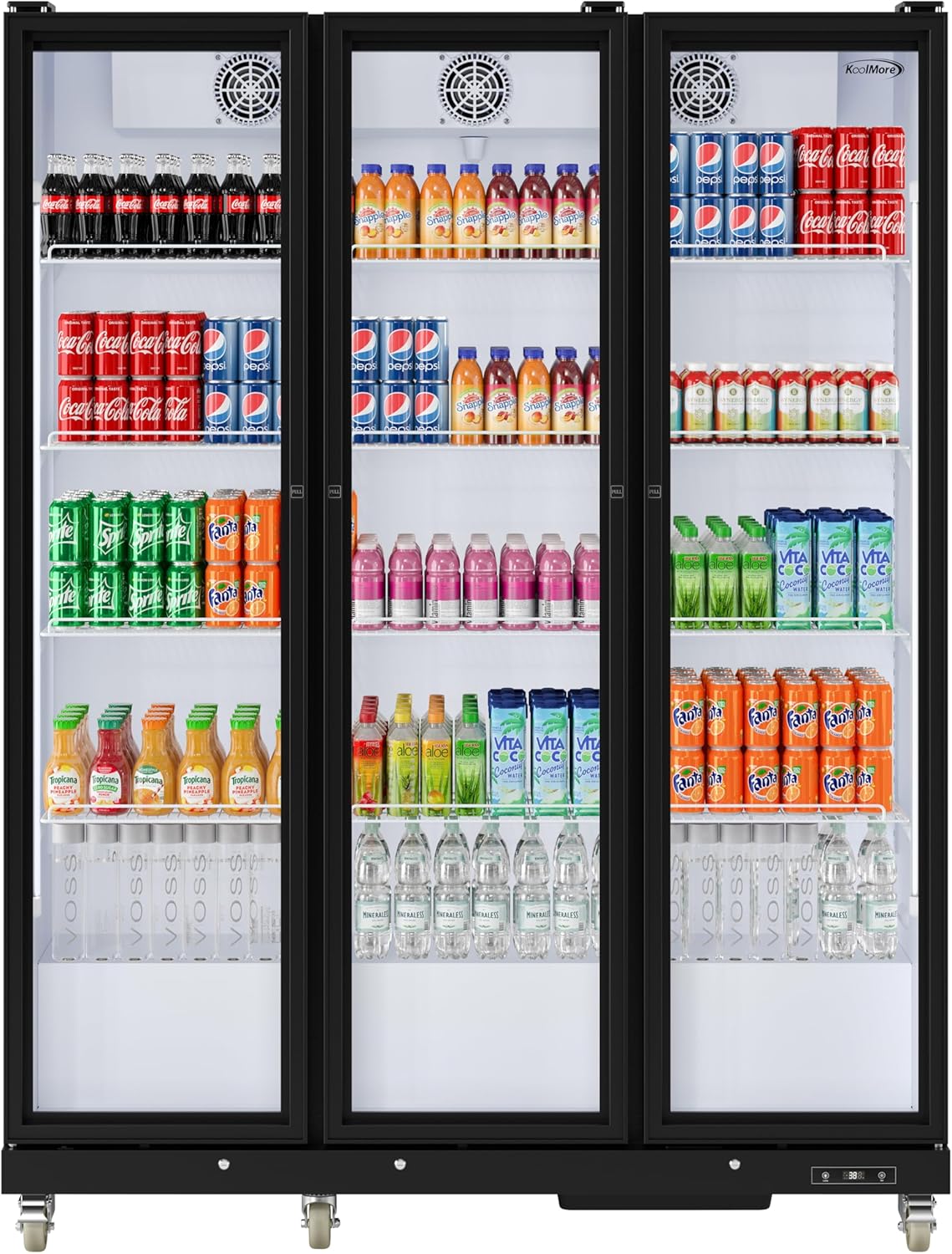
olusin 1: Iwaju view of the KoolMore KM-MDR-3FGD refrigerator, showcasing its three glass doors and interior contents.

olusin 2: Apa view of the refrigerator with indicated dimensions (71"W x 22.63"D x 78.34"H).

olusin 3: inu ilohunsoke view of one section, showing adjustable shelves and LED lighting.

Figure 4: Close-up of the digital temperature control panel.

Figure 5: Close-up of the integrated door lock mechanism.
Awọn ilana iṣeto
1. Unpacking
- Ni ifarabalẹ yọ gbogbo awọn ohun elo apoti kuro, pẹlu teepu ati awọn fiimu aabo.
- Ṣe àyẹ̀wò ẹ̀rọ náà fún ìbàjẹ́ èyíkéyìí nínú ọkọ̀ ojú omi náà. Fi ìròyìn fún ẹni tó ń gbé e lọ lẹ́sẹ̀kẹsẹ̀.
2. Ifiweranṣẹ
- Choose a location with a strong, level floor capable of supporting the refrigerator's weight.
- Ensure adequate clearance around the unit for proper ventilation (at least 4 inches from walls and other appliances).
- Avoid direct sunlight or heat sources, as this can affect cooling efficiency.
3. Ipele ipele
- The unit is equipped with casters for mobility. Once in its final position, engage the brakes on the two front casters to prevent movement.
- Use a level to ensure the refrigerator is perfectly level. Adjust the casters if necessary to achieve stability.
4. Asopọ Itanna
- Kí o tó so mọ́ ọn, jẹ́ kí ẹ̀rọ náà dúró ní gígùn fún o kere ju wákàtí méjì kí epo compressor lè dúró.
- Connect the power cord to a dedicated, grounded 115V, 60Hz electrical outlet. Do not use multi-outlet adapters or extension cords.
5. Selifu fifi sori
- Insert the shelf clips into the desired slots on the interior pilasters.
- Place the PVC shelves onto the clips, ensuring they are securely seated and level.
- Adjust shelf height as needed to accommodate different product sizes.
Awọn ilana Iṣiṣẹ
1. Agbara Tan / Paa
- Once plugged in, the unit will automatically power on and begin cooling.
- To turn off, disconnect the power cord from the outlet.
2. Iṣakoso iwọn otutu
- The digital control panel (Figure 4) displays the current internal temperature.
- Press the 'Set' button to view iwọn otutu ṣeto.
- While the set temperature is displayed, use the up/down arrows to adjust the desired temperature within the range of 36°F to 50°F (2°C to 10°C).
- Press 'Set' again or wait a few seconds for the display to return to the current temperature.
3. Ìmọ́lẹ̀ inú ilé
- The unit features internal LED lighting.
- Press the 'Lamp' button on the digital control panel (Figure 4) to turn the interior lights on or off.
4. Loading the Refrigerator
- Allow the unit to reach the desired temperature before loading products.
- Distribute products evenly on the shelves. Do not overload shelves beyond their 99 lb capacity.
- Avoid blocking the internal air vents to ensure proper air circulation and consistent cooling.
- Ensure doors are closed completely after each use to maintain temperature. Use the integrated locks for security when needed.
Itoju
1. Ninu
- Òde: Mu ese ita gbangba pẹlu asọ rirọ ati ọṣẹ ọjẹ tutu. Yago fun abrasive ose.
- Inu inu: Remove shelves and clean the interior with a solution of mild soap and water. Rinse thoroughly and dry before replacing shelves and products.
- Awọn ilẹkun gilasi: Use a glass cleaner for streak-free results.
- Okun Condenser: Periodically clean the condenser coil (located at the rear/bottom of the unit) with a brush or vacuum cleaner to ensure efficient operation. Disconnect power before cleaning.
2. Aifọwọyi Defrost
- This unit is equipped with an automatic defrost system, which minimizes ice buildup.
- During defrost cycles, the internal temperature may temporarily rise slightly. This is normal.
- Ensure the drain pan is clear and not overflowing.
3. Gasket Care
- Regularly inspect door gaskets for cracks or damage.
- Clean gaskets with mild soap and water to maintain their sealing effectiveness.
Laasigbotitusita
Ṣaaju ki o to kan si iṣẹ, tunview Awọn iṣoro ti o wọpọ ati awọn solusan wọnyi:
| Isoro | Owun to le Fa | Ojutu |
|---|---|---|
| Firiji ko itutu | No power; thermostat set too high; condenser coil dirty; door left open. | Check power connection; adjust thermostat; clean condenser coil; ensure doors are closed. |
| Ariwo ti o pọju | Ẹ̀yà náà kò ní ìpele; ìdíwọ́ afẹ́fẹ́; àwọn èròjà tí kò ní ìpele. | Level the unit; check for obstructions around fans; tighten any loose parts. |
| Omi lori pakà | Drain pan overflowing; clogged drain line. | Empty drain pan; clear drain line. |
| Iwọn otutu ga / kekere | Thermostat setting incorrect; door seals compromised; unit overloaded. | Adjust thermostat; check and clean door gaskets; reduce product load. |
Awọn pato
| Ẹya ara ẹrọ | Sipesifikesonu |
|---|---|
| Brand | KoolMore |
| Nọmba awoṣe | KM-MDR-3FGD |
| Agbara | 46.1 Onigun Ẹsẹ |
| Iwọn (D x W x H) | 22.63 x 71 x 78.34 inches |
| Iwọn Nkan | 411 iwon |
| Iwọn otutu | 36°F si 50°F (2°C si 10°C) |
| Voltage | 115 Volts |
| Defrost Eto | Laifọwọyi |
| Nọmba ti ilẹkun | 3 (Triple Doors) |
| Enu Ohun elo Iru | Glass (Double Tempered) |
| Selifu Iru | PVC |
| Nọmba ti selifu | 8 |
| Iru fifi sori ẹrọ | Sisun |
| Pataki Awọn ẹya ara ẹrọ | 6 Casters, Digital Temperature Control, Double Tempered Glass, Safety Lock |
| Àwọ̀ | Dudu |
| Ijẹrisi | Akojọ ETL |
| Lododun Lilo Lilo | 1379 kilowatt wakati fun odun |
Atilẹyin ọja ati Support
For warranty information or technical support, please contact KoolMore customer service directly. Refer to your purchase documentation for specific warranty terms and conditions.
KoolMore Customer Service: Please visit the official KoolMore website or refer to the contact information provided with your purchase for assistance.