1. Ifihan
The Aulumu M01 is a versatile 4-in-1 wireless charging station designed to power your iPhone, Apple Watch, AirPods, and an additional USB-C device simultaneously. Its collapsible design allows for use as both a charging stand and a flat charging pad, making it ideal for home, office, or travel. This manual provides essential information for proper setup, operation, and maintenance of your device.
2. Ohun ti o wa ninu Apoti
- M01 Wireless Charging Station (15W fast version)
- USB-C to USB-C Cable (2.62 ft)
- Apo ipamọ
- Ìwé Ìtọ́sọ́nà M01
3. Awọn ẹya Ọja
- Gbigba agbara iyara pupọ 15W: MagSafe-compatible design ensures efficient 15W charging for compatible iPhones.
- Bimorphic Folding: Easily transforms between a vertical charging stand and a flat charging pad.
- Agbara Ijade Lapapọ 35W: Supports simultaneous charging for iPhone (15W Max), Apple Watch (5W Max), AirPods (5W), and an additional USB-C device (10W).
- Apẹrẹ to gbe: Compact and lightweight (6.89 x 3.35 x 0.43 inches, 9.2 oz / 260g) for easy transport.
- Imọlẹ Alẹ Iṣọkan: Features an atmospheric light with adjustable settings.
4. Awọn ilana iṣeto
- Yọ Ẹrọ naa kuro: Ni ifarabalẹ yọ gbogbo awọn paati kuro ninu apoti.
- So agbara: Use the provided USB-C to USB-C cable to connect the charging station to a 35W or higher Power Delivery (PD) wall charger (not included). For optimal performance, a 35W+ PD charger is required.
- Choose Configuration: The M01 can be used in two primary configurations:
- Vertical Stand Mode: Unfold the charging station to create a stand for your iPhone.
- Flat Pad Mode: Keep the station folded flat for a compact charging surface.

Figure 1: The Aulumu M01 4-in-1 Wireless Charging Station demonstrating its bimorphic folding design, allowing it to function as both a flat charging pad and a vertical stand.
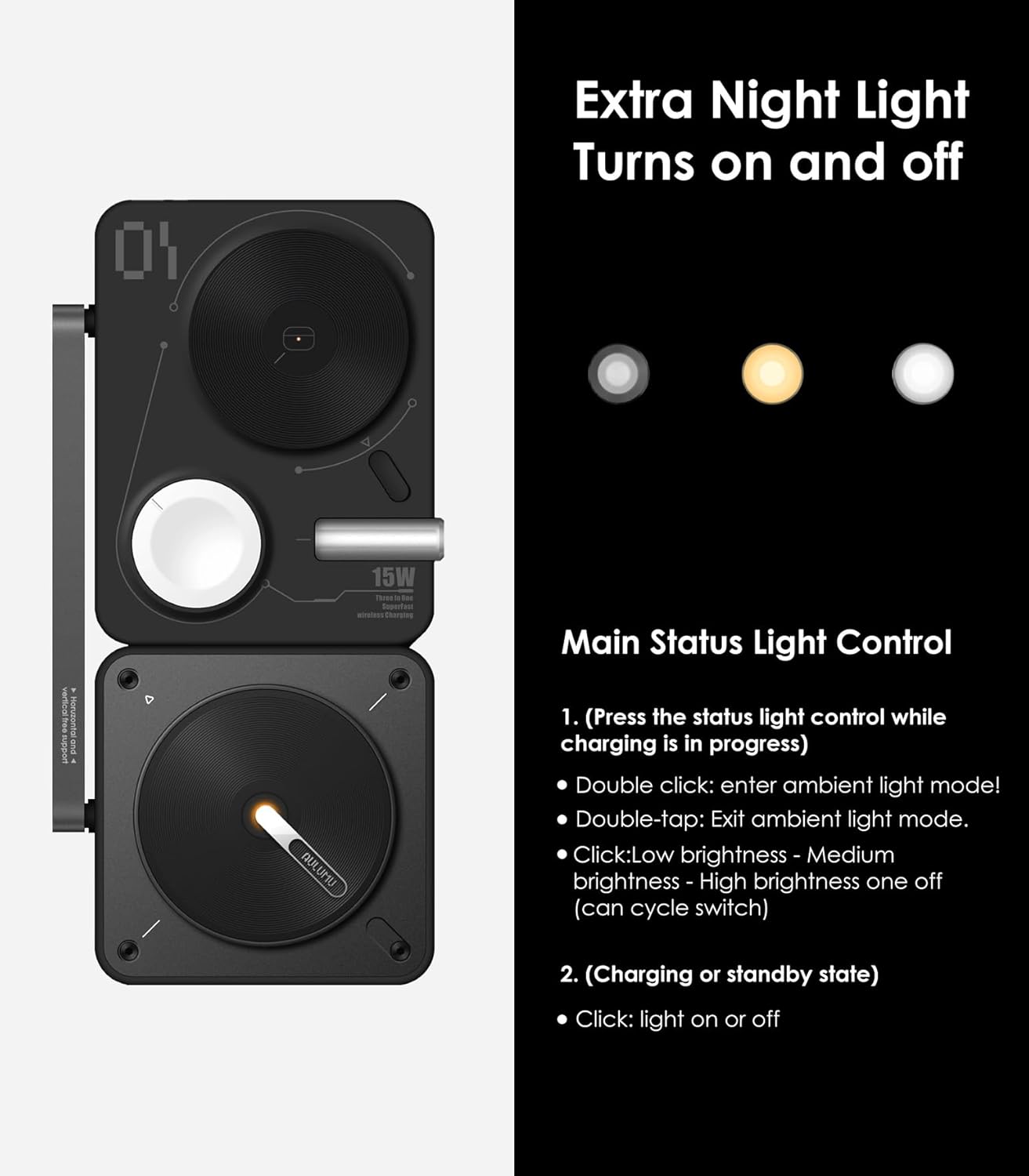
Figure 2: The Aulumu M01 4-in-1 Wireless Charging Station in its compact, folded configuration, ready for portability.
5. Awọn ilana Iṣiṣẹ
- Gbigba agbara iPhone kan: Place your MagSafe-compatible iPhone onto the magnetic charging pad. Ensure proper alignment for optimal 15W wireless charging. The device can be positioned vertically or horizontally.
- Ngba agbara si Apple Watch: Place your Apple Watch onto the dedicated charging puck. For wristwatches with loop straps, it may be necessary to unfasten the strap and lay the watch module flat to ensure proper contact.
- Gbigba agbara AirPods: Place your AirPods (with wireless charging case) onto the designated charging area.
- Charging an Additional USB-C Device: Connect a compatible USB-C device (e.g., iPad, tablet) to the 10W USB-C output port on the side of the charging station using a suitable cable.
- Iṣakoso Imọlẹ Alẹ: The integrated atmospheric light can be controlled via the light switch. Double-click to enter ambient light mode, double-tap to exit. Click once to cycle through low, medium, and high brightness. In charging or standby state, a single click turns the light on or off.

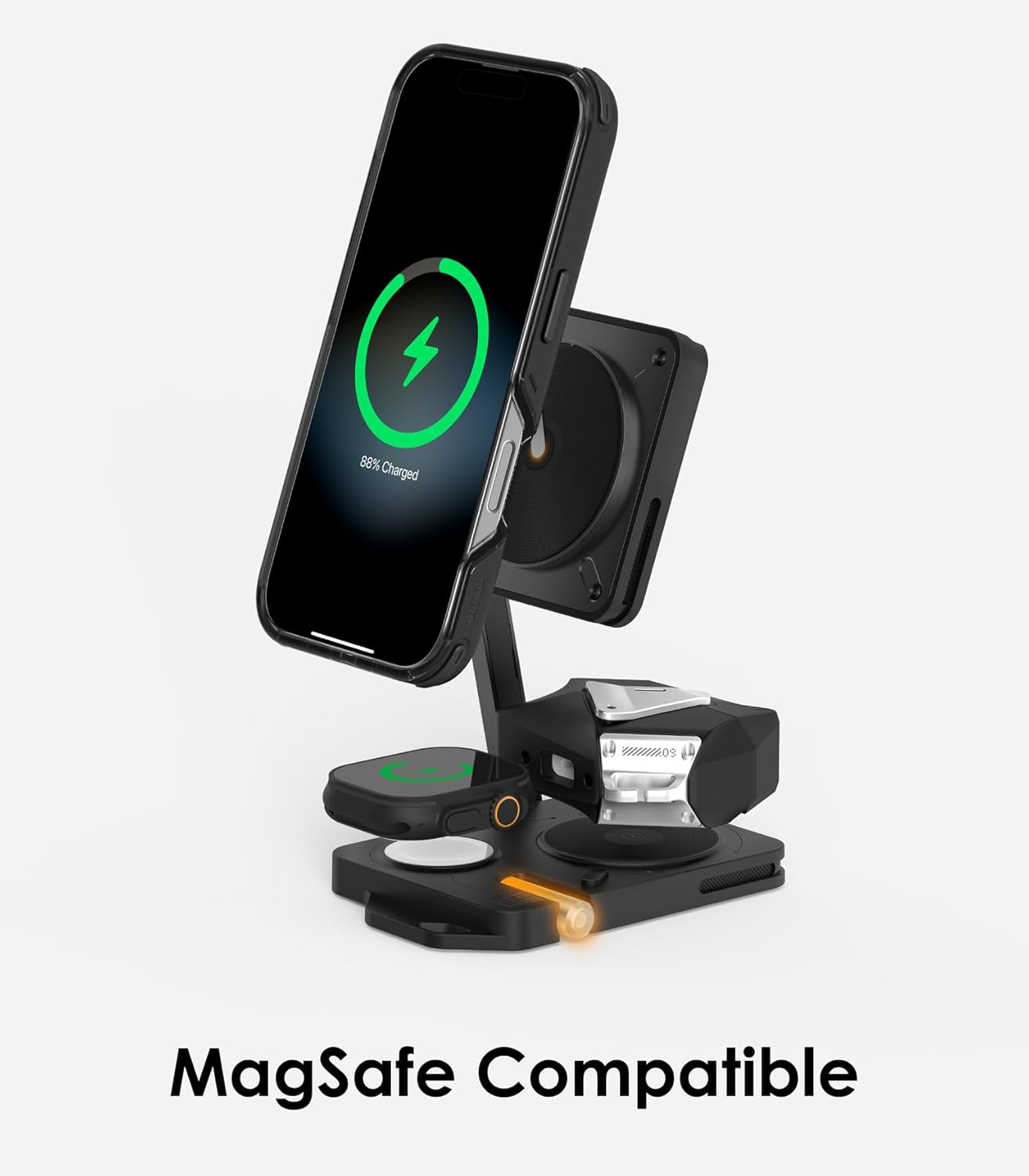
Figure 3: The Aulumu M01 in vertical stand mode, showcasing MagSafe compatibility for iPhone charging.
olusin 4: An loriview of the Aulumu M01's 4-in-1 fast charging capabilities for multiple devices simultaneously.

Figure 5: Detail of the Aulumu M01's night light and status light controls.
Video 1: Aulumu M01 Qi2 4-in-1 Wireless Charging Station Showcase. This video demonstrates the product's design, folding mechanism, and how various devices are placed for charging.
Video 2: Aulumu M01 Product Overview. This video highlights the key features and aesthetic of the Aulumu M01 charging station.
6. Itọju
- Keep the charging station clean and free from dust. Use a soft, dry cloth for cleaning.
- Yago fun ṣiṣafihan ẹrọ naa si awọn iwọn otutu to gaju tabi ọriniinitutu.
- Ma ṣe tuka ibudo gbigba agbara.
7. Laasigbotitusita
- Ẹrọ ko gba agbara: Ensure the charging station is connected to a 35W or higher Power Delivery (PD) wall charger. Check all cable connections. Verify that your device is properly aligned on the charging pad.
- Phone tipping or unstable: The phone stand arm may require careful adjustment for heavier phones. Ensure the arm is fully extended and positioned to support the phone's weight.
- Apple Watch not charging: Confirm the watch is correctly placed on the charging puck. If using a loop strap, try unfastening it and laying the watch module flat to ensure full contact.
- AirPods not fitting/charging: Ensure your AirPods case is compatible with wireless charging. Some protective covers may interfere with proper placement or charging.
- Flickering or resetting: Ensure a stable power supply. Some power stations or adapters may cause interruptions if they perform voltage sọwedowo.
- Imọlẹ itọkasi ko ṣiṣẹ: Check the power connection. If the issue persists, refer to the warranty information.
8. Awọn pato
- Awọn iwọn ọja: 6.89 x 3.46 x 0.59 inches
- Ìwọ̀n Nkan: 8.8 iwon
- Nọmba Awoṣe Nkan: M01
- Olupese: Aulumu
- Brand: Aulumu
- Orisi Asopọmọra: USB Iru C
- Awọn ẹrọ ibaramu: AirPods Pro 3/2/1, AirPods 3/2 (with Wireless Charging Case), Apple Watch Ultra 3/2/1, Apple Watch Series 11/1-10/SE/2, iPhone 17-12 Series (and other wireless charging-enabled mobile phones)
- Ẹya Pataki: 4-in-1, Fast Charging, MagSafe Compatible, Wireless Charging
- Àwọ̀: Dudu
- Iṣagbewọle Voltage: 9 Volts
- Lapapọ Awọn ibudo USB: 2 (1x Input, 1x 10W Output)
- Wattage: 15 watts (Max for iPhone)
9. Atilẹyin ọja ati Support
The Aulumu M01 Wireless Charging Station comes with a 12-month warranty from the date of purchase. This warranty covers manufacturing defects and ensures reliable performance under normal use. For warranty claims, technical assistance, or any product-related inquiries, please contact Aulumu customer service. Keep your purchase receipt as proof of purchase.
For further support, please visit the official Aulumu webojula tabi kan si wọn onibara iṣẹ egbe taara.