
Conambo K10C-CBOX
Conambo K10C Bluetooth Headset User Manual
Model: K10C-CBOX
Ọrọ Iṣaaju
Thank you for choosing the Conambo K10C Bluetooth Headset. This manual provides detailed instructions on how to set up, operate, and maintain your new headset, ensuring you get the best experience from its advanced features, including dual-mic noise canceling and extended battery life with the charging case.
Ohun ti o wa ninu Apoti
- Conambo K10C Bluetooth Headset
- Alailowaya Ngba agbara Case
- Okun Ngba agbara USB
- Eartips (oriṣiriṣi titobi)
- Itọsọna olumulo
Ọja Pariview
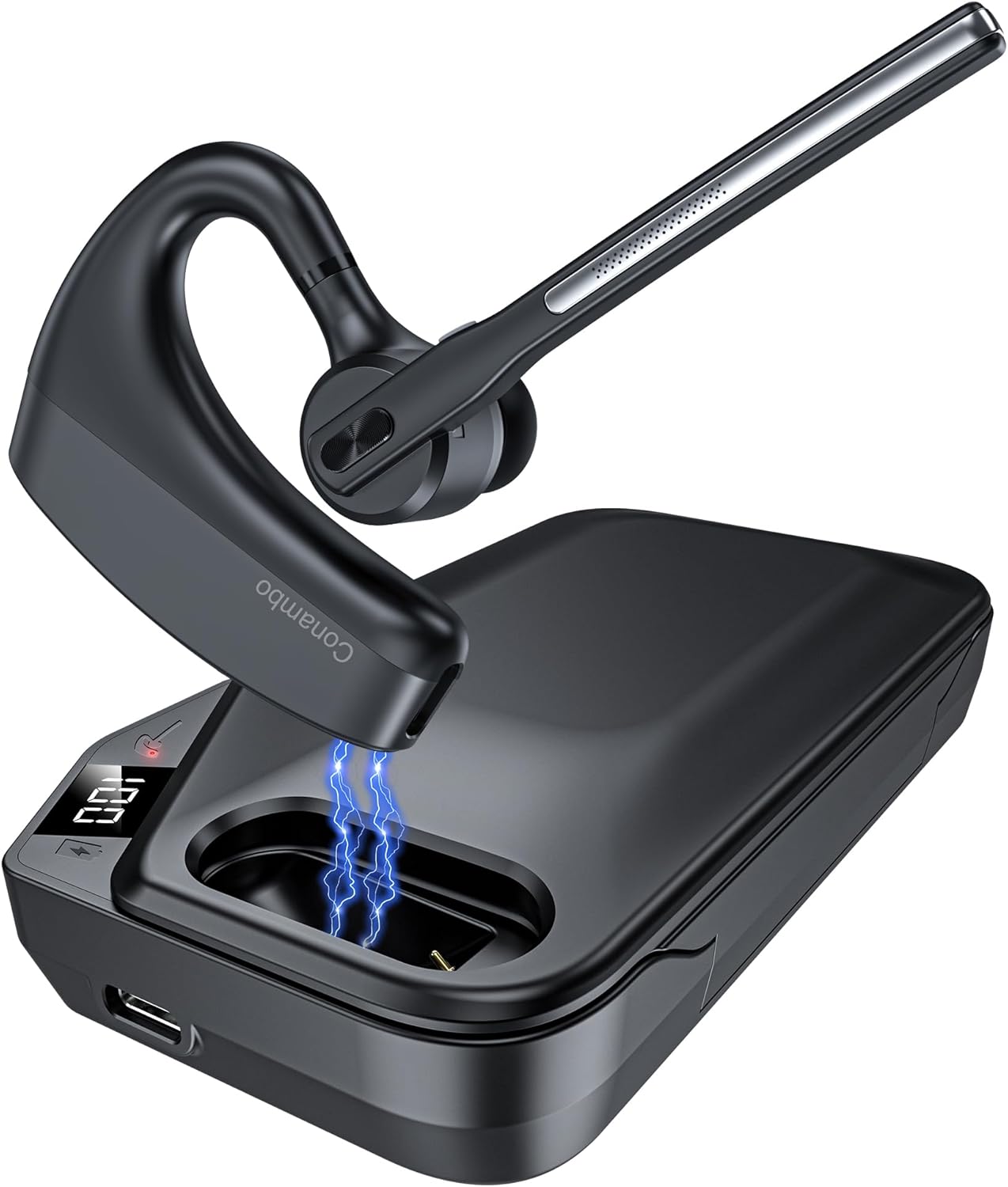
The Conambo K10C Bluetooth Headset with its dedicated charging case. The headset features an ergonomic design for comfortable wear, and the charging case provides extended battery life.
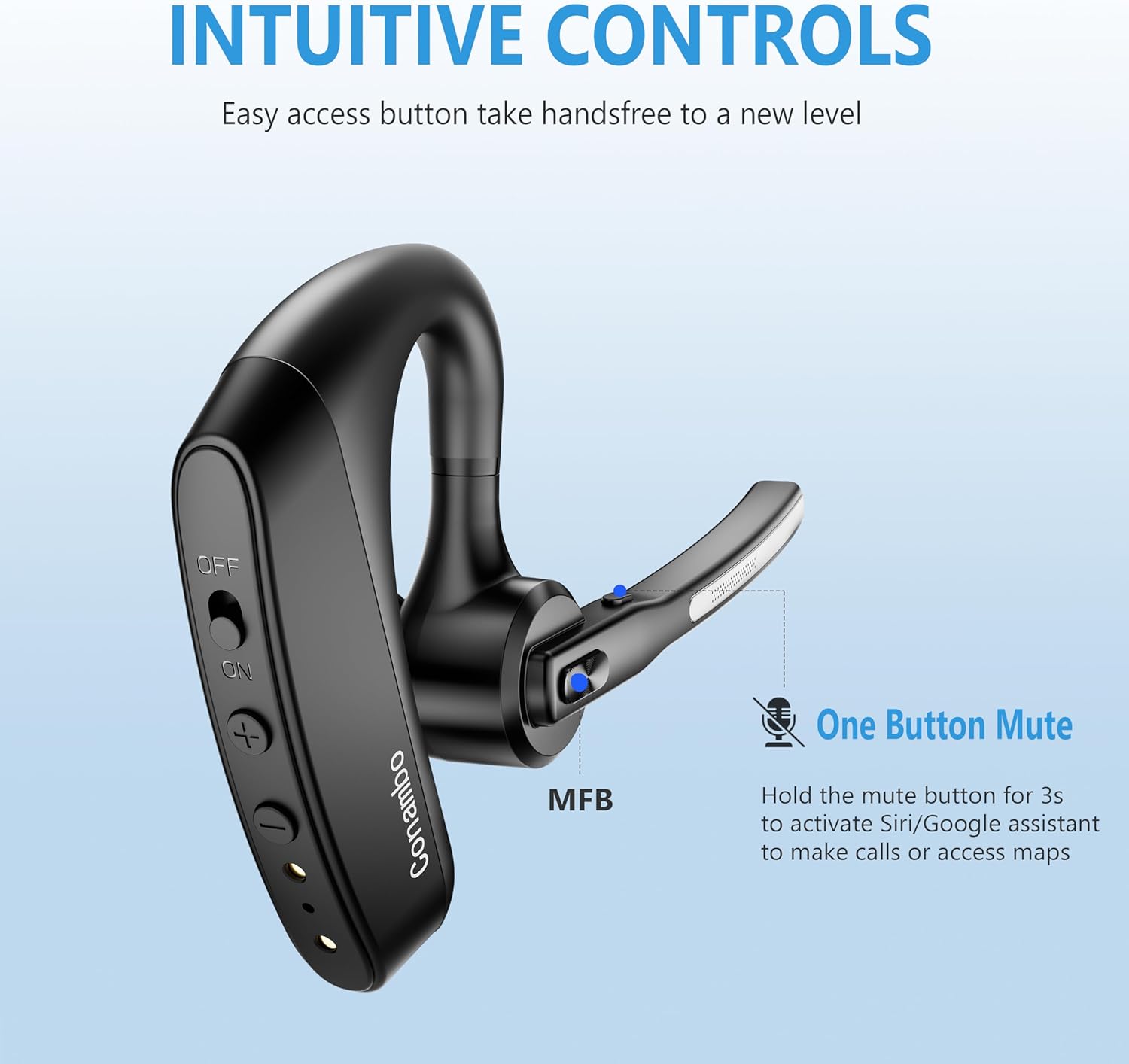
Alaye view of the headset's intuitive controls, including the power switch, volume buttons, and the Multi-Function Button (MFB). The microphone boom also features a dedicated mute button.
Awọn eroja pataki:
- Agbekọri: Earpiece, Microphone Boom, Power Switch, Volume Up/Down Buttons, Multi-Function Button (MFB), Mute Button.
- Ngba agbara: Headset charging slot, USB-C Charging Port, LED Digital Display for battery life.
Ṣeto
1. Charging the Headset and Charging Case
Before first use, fully charge both the headset and the charging case.
- Gbigba agbekari: Place the headset into the charging slot of the charging case. Ensure the charging contacts align. The headset's indicator light will show charging status.
- Gbigba agbara si ọran naa: Connect the USB charging cable to the USB-C port on the charging case and to a power source (e.g., computer USB port, wall adapter). The LED digital display on the case will show the battery percentage nigba gbigba agbara.

The 750mAh charging case provides up to 64 hours of talk time. The LED display indicates the remaining battery life of the case.
2. Agbara lori / Paa
- Agbara Tan: Slide the power switch on the headset to the "ON" position. You will hear a voice prompt indicating power on.
- Agbara Pa: Slide the power switch on the headset to the "OFF" position. You will hear a voice prompt indicating power off.
3. Sisopọ Bluetooth
The first time you power on the headset, it will automatically enter pairing mode.
- Ensure the headset is powered on and in pairing mode (indicator light will flash).
- Lori ẹrọ rẹ (foonuiyara, kọǹpútà alágbèéká, ati bẹbẹ lọ), mu Bluetooth ṣiṣẹ.
- Wa fun available Bluetooth devices and select "K10C-CBOX" from the list.
- Once connected, the headset's indicator light will stop flashing, and you will hear a voice prompt confirming the connection.

The K10C supports fast pairing and multi-point technology, allowing connection to two devices simultaneously within a 59-foot (18-meter) range.
4. Olona-Point Asopọ
The K10C headset supports connecting to two Bluetooth devices simultaneously.
- Connect the headset to the first device as described in the "Bluetooth Pairing" section.
- Disable Bluetooth on the first device. The headset will re-enter pairing mode.
- Connect the headset to the second device.
- Re-enable Bluetooth on the first device. The headset should automatically connect to both devices. You can then switch between audio sources as needed.
Awọn ilana Iṣiṣẹ
1. Iṣakoso ipe
- Idahun/Ipe Ipari: Tẹ Bọtini Iṣẹ-ọpọlọpọ (MFB) lẹẹkan.
- Kọ Ipe: Tẹ mọlẹ MFB fun iṣẹju-aaya 2.
- Pa ẹ / Mu Gbohungbohun dakẹ: Press the dedicated mute button on the microphone boom once during a call.

The Conambo K10C headset provides crystal clear audio quality for calls, supported by dual mic noise-canceling technology.

Equipped with CVC8.0 and ENC noise canceling technology, the K10C effectively blocks 96% of background noise, ensuring clear voice transmission.
2. Ìmúṣiṣẹ́ Olùrànlọ́wọ́ Ohùn
To activate your device's voice assistant (Siri, Google Assistant), press and hold the mute button on the microphone boom for 2 seconds.
3. Iṣakoso iwọn didun
Use the Volume Up (+) and Volume Down (-) buttons on the headset to adjust the audio volume.
Itoju
- Ninu: Use a soft, dry cloth to clean the headset and charging case. Do not use abrasive cleaners or solvents.
- Ibi ipamọ: When not in use, store the headset in its charging case to protect it and keep it charged. Store in a cool, dry place away from extreme temperatures.
- Itọju Batiri: Lati pẹ aye batiri, yago fun gbigba agbara si batiri ni kikun nigbagbogbo. Gba agbara si ẹrọ nigbagbogbo, paapaa ti kii ṣe ni lilo igbagbogbo.
Laasigbotitusita
| Isoro | Owun to le Fa | Ojutu |
|---|---|---|
| Headset won't turn on | Batiri kekere; Pa a agbara | Charge the headset; Slide power switch to ON. |
| Ko le so pọ pẹlu ẹrọ | Headset not in pairing mode; Bluetooth off on device; Device too far | Ensure headset is in pairing mode; Enable Bluetooth on device; Move device closer (within 18m). |
| Kò sí ohùn nígbà ìpè/orin | Volume too low; Not connected; Wrong audio output selected | Increase volume on headset/device; Reconnect headset; Select K10C as audio output on device. |
| Poor call quality/noise | Interference; Headset too far from device; Microphone blocked | Move away from interference sources; Move closer to device; Ensure microphone is clear. |
| Ngba agbara ko gba agbara | Cable issue; Power source issue | Try a different USB cable or power adapter; Ensure connection is secure. |
Awọn pato
| Ẹya ara ẹrọ | Ẹ̀kúnrẹ́rẹ́ |
|---|---|
| Orukọ awoṣe | K10C-CBOX |
| Asopọmọra Technology | Bluetooth V5.2 |
| Bluetooth Ibiti | Titi de 59 ẹsẹ (18 mita) |
| Igbesi aye Batiri Agbekọri | Up to 16 hours talk time (single charge) |
| Igbesi aye batiri gbigba agbara | Up to 64 hours total talk time (with 750mAh case) |
| Ariwo Iṣakoso | Dual Mic CVC8.0 & ENC Noise Canceling |
| Apẹrẹ Akọti | Lori-eti |
| Iwọn | Approx. 18g (headset only) |
| Awọn ẹrọ ibaramu | Cellphones, Laptops, Tablets (IOS, Android, PC) |
| Omi Resistance Ipele | Omi sooro |
Atilẹyin ọja ati Support
Conambo products are designed for reliability and performance. For warranty information or technical support, please refer to the contact details provided on the product packaging or visit the official Conambo webojula. Jọwọ ṣe idaduro ẹri rira rẹ fun awọn iṣeduro atilẹyin ọja.
Ask a question about this manual
Ask about setup, troubleshooting, compatibility, parts, safety, or missing instructions. Manuals+ will review the question and use this page’s manual context to help answer it.