
1. Ifihan
This manual provides essential instructions for the proper setup, operation, and maintenance of your OnePlus Nord N30 5G smartphone. Please read this guide thoroughly before using your device to ensure optimal performance and longevity.
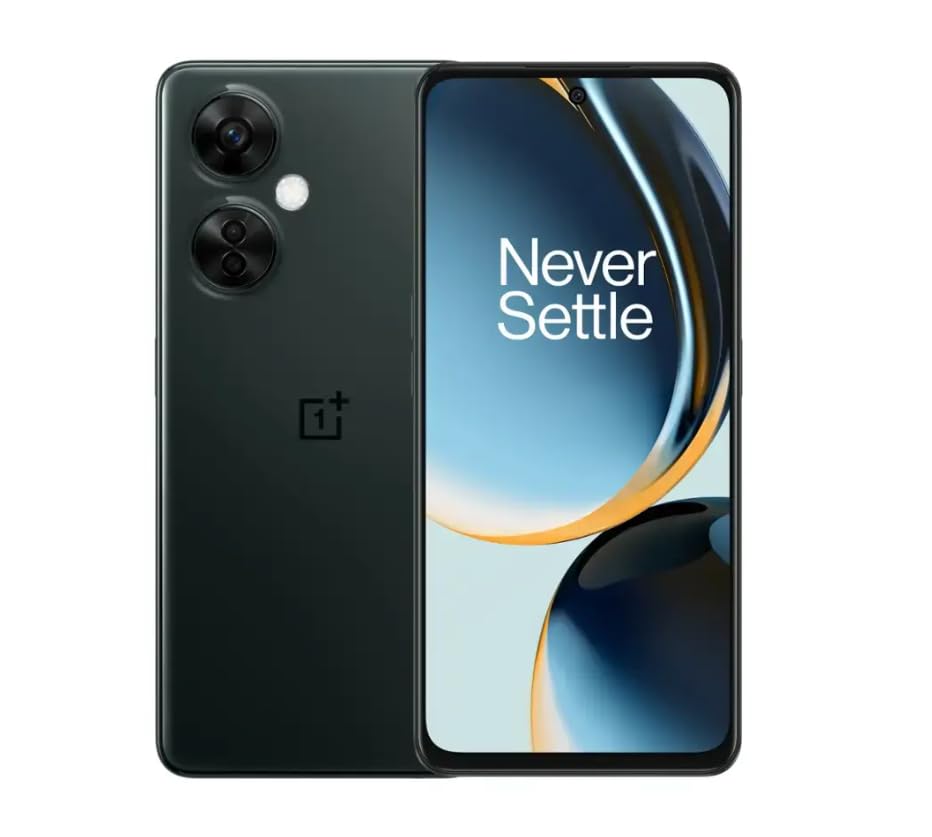
Image 1.1: OnePlus Nord N30 5G smartphone. This image displays the overall design of the device, highlighting its screen and camera module.
2. Ohun ti o wa ninu Apoti
Jẹrisi pe gbogbo awọn ohun kan wa ninu package:
- Foonu alagbeka OnePlus Nord N30 5G
- Adapter agbara
- Okun USB
Akiyesi: Awọn ẹya ẹrọ le yatọ nipasẹ agbegbe.
3. Eto
3.1. Fi kaadi SIM sii
- Wa atẹ kaadi SIM ni ẹgbẹ ti ẹrọ naa.
- Insert the SIM ejector tool (not included, use a paperclip if necessary) into the small hole next to the tray to open it.
- Place your Nano-SIM card(s) into the tray with the gold contacts facing down. The device supports a single SIM card and a microSDXC card for expandable storage.
- Fi iṣọra Titari atẹ naa pada sinu iho titi ti yoo fi fọ pẹlu ara foonu naa.
3.2. Gbigba agbara akọkọ ati Agbara Tan
Ṣaaju lilo akọkọ, o niyanju lati gba agbara si ẹrọ naa ni kikun.
- Connect the USB cable to the power adapter and then to the phone's USB-C port.
- Plug the power adapter into a wall outlet. The device supports 50W SUPERVOOC fast charging.
- Once sufficiently charged, press and hold the Power button (located on the side) until the OnePlus logo appears.
3.3. Iṣeto Ẹrọ Ibẹrẹ
Tẹle awọn itọnisọna loju iboju lati pari iṣeto akọkọ:
- Yan ede ti o fẹ.
- Sopọ si nẹtiwọki Wi-Fi kan.
- Review ati ki o gba awọn ofin ati ipo.
- Wọle pẹlu akọọlẹ Google rẹ tabi ṣẹda tuntun kan.
- Set up security features such as fingerprint unlock or face unlock.
4. Awọn ilana Iṣiṣẹ
4.1. Ifihan ati Lilọ kiri
The OnePlus Nord N30 5G features a 6.72-inch LCD display with a 120Hz refresh rate for smooth visuals. Navigate the OxygenOS interface using gestures or traditional navigation buttons.
- Ra soke: Wọle si apo-iwọle app naa.
- Ra si isalẹ: Access notifications and quick settings.
- Fọwọ ba: Yan awọn ohun kan.
- Fun pọ: Sun-un sinu tabi ita.
4.2. Lilo kamẹra
The device is equipped with a triple rear camera system and a front camera.
- Kamẹra akọkọ: 108 MP, f/1.7 (wide) for high-resolution photos.
- Kamẹra Makiro: 2 MP, f/2.4 for close-up shots.
- Kamẹra Ijinle: 2 MP, f/2.4 for portrait mode effects.
- Kamẹra iwaju: 16 MP, f/2.4 for selfies and video calls.
Open the Camera app and select your desired mode (Photo, Video, Portrait, Macro, etc.) from the interface. Tap the shutter button to capture images or start/stop video recording.
4.3. Ibi ipamọ Management
The phone comes with 128GB of internal storage. You can expand this up to 1TB using a microSDXC card inserted into the SIM tray.
- To check storage usage: Go to Eto > Ibi ipamọ.
- Lati gbe files to microSD: Use the File Ohun elo oluṣakoso.
4.4. Asopọmọra
The device supports 5G cellular technology, Wi-Fi, and Bluetooth 5.1.
- 5G: Ensure your SIM card and plan support 5G for faster mobile data speeds.
- Wi-Fi: Sopọ si awọn nẹtiwọki alailowaya nipasẹ Eto > Wi-Fi.
- Bluetooth: Pair with wireless headphones or other devices via Eto > Bluetooth.
4.5. Aabo Awọn ẹya ara ẹrọ
Secure your device using the side-mounted fingerprint sensor or face unlock.
- To set up fingerprint unlock: Go to Eto > Aabo & asiri > Ṣiṣii ika ọwọ.
- To set up face unlock: Go to Eto > Aabo & asiri > Ṣii silẹ oju.
4.6. Ohun
The device features dual stereo speakers for enhanced audio experience. It also includes a 3.5 mm audio jack for wired headphones.
5. Itọju
5.1. Itọju batiri
The 5000mAh battery provides extended usage. To prolong battery life:
- Yago fun awọn iwọn otutu to gaju.
- Use the provided 50W SUPERVOOC charger for optimal charging speed and battery health.
- Yago fun mimu batiri kuro patapata nigbagbogbo.
5.2. Software imudojuiwọn
Keep your OxygenOS (based on Android 13) updated to ensure optimal performance, security, and access to new features.
- Lati ṣayẹwo fun awọn imudojuiwọn: Lọ si Eto > Nipa ẹrọ > Ẹ̀yà OxygenOS.
5.3. Ninu ẹrọ
Lo asọ ti ko ni lint lati nu iboju ati ara ti foonu naa. Yago fun lilo awọn kẹmika lile tabi awọn ohun elo abrasive.
6. Laasigbotitusita
Abala yii n ṣalaye awọn ọran ti o wọpọ ti o le ba pade.
6.1. Ẹrọ Ko Nṣiṣẹ Tan-an
- Ensure the battery is charged. Connect the device to the charger for at least 15 minutes.
- Tẹ bọtini agbara ki o si mu fun awọn aaya 10-15 lati fi agbara mu lati tun bẹrẹ.
6.2. Awọn ọrọ Asopọmọra Nẹtiwọọki
- Check if the SIM card is correctly inserted.
- Verify that mobile data is enabled in Eto > Nẹtiwọọki alagbeka.
- Tun ẹrọ naa bẹrẹ.
- Contact your carrier (T-Mobile) to confirm service availability in your area.
6.3. Awọn ohun elo jija tabi Didi
- Pa ati tun app naa ṣii.
- Pa àkójọpọ̀ ohun èlò náà rẹ́: Eto > Awọn ohun elo > [Orukọ App] > Storage usage > Ko kaṣe kuro.
- Ensure the app and OxygenOS are updated to the latest versions.
6.4. Sisọ batiri ni kiakia
- Din imọlẹ iboju din.
- Disable unused features like Bluetooth, GPS, or Wi-Fi when not needed.
- Ṣayẹwo lilo batiri ni Eto > Batiri lati ṣe idanimọ awọn ohun elo ti ebi npa agbara.
- Ensure background app refresh is limited for non-essential apps.
7. Awọn pato
| Orukọ awoṣe | OnePlus Nord N30 5G |
| Eto isesise | OxygenOS (based on Android 13) |
| isise | Qualcomm Snapdragon 695 Octa-core |
| Àgbo | 8GB |
| Ibi ipamọ inu | 128GB (Expandable up to 1TB via microSDXC) |
| Ifihan | 6.72 inches LCD, 2400 x 1080 resolution, 120Hz Refresh Rate |
| Kamẹra ẹhin | 108 MP (fífẹ̀), 2 MP (macro), 2 MP (jinlẹ̀) |
| Kamẹra iwaju | 16 MP |
| Agbara Batiri | 5000 mAh |
| Gbigba agbara | 50W SUPERVOOC Gbigba agbara Yara (iwọn iṣẹju 47 fun idiyele ni kikun) |
| Asopọmọra | 5G, Wi-Fi, Bluetooth 5.1, USB-C |
| Jack ohun | 3.5 mm |
| Awọn iwọn | 6 x 4 x 4 inches |
| Iwọn | 10.8 iwon |
| Pataki Awọn ẹya ara ẹrọ | Dual SIM, Side-mounted Fingerprint Sensor, Face Unlock, Dual Stereo Speakers |
8. Renewed Product Information
This OnePlus Nord N30 5G is an Amazon Renewed product. Renewed products are pre-owned and professionally inspected, tested, and cleaned to work like new. They come with generic or original accessories and packaging.
8.1. Àwọn Ìpò Tí A Túnṣe sí Amazon
Amazon Renewed products are categorized based on their cosmetic condition and battery life. All renewed products are fully functional and have a battery life greater than 80% of a new equivalent.

Image 8.1: Amazon Renewed conditions overview. This image illustrates the criteria for Excellent, Good, and Acceptable cosmetic conditions for renewed products.

Àwòrán 8.2: Àwòrán àtijọ́amples of renewed product cosmetic conditions. This image provides visual examples of what 'Excellent', 'Good', and 'Acceptable' cosmetic conditions might look like on a phone's back.

Image 8.3: Customer feedback on Amazon Renewed. This image presents testimonials from customers regarding their positive experiences with Amazon Renewed products.
9. Atilẹyin ọja ati Support
9.1. atilẹyin ọja Information
As an Amazon Renewed product, this device is backed by the Amazon Renewed Guarantee. Please refer to the Amazon Renewed program terms and conditions for specific warranty details and coverage. This typically includes a limited warranty for a specified period from the date of purchase, covering defects in materials and workmanship.
9.2. Onibara Support
For technical assistance, troubleshooting, or warranty claims, please contact Amazon Customer Service or refer to the official OnePlus support webojula fun afikun oro ati FAQs.
- Iṣẹ Onibara Amazon: Ṣabẹwo amazon.com/contact-us
- OnePlus Support: Visit the official OnePlus support webaaye fun agbegbe rẹ.