
1. Ifihan
This manual provides detailed instructions for the installation, operation, and maintenance of your Montech AX 120 ARGB Fans. These 120mm fans are designed to provide efficient cooling and customizable lighting for your computer system. Please read this manual thoroughly before installation to ensure proper function and safety.
2. Alaye Aabo
- Always disconnect power from your computer before installing or handling internal components.
- Handle fans by their frames, avoiding contact with the blades.
- Ensure proper grounding to prevent electrostatic discharge (ESD) damage.
- Pa awọn ẹya kekere ati awọn ohun elo apoti kuro lọdọ awọn ọmọde.
- Má ṣe gbìyànjú láti yí afẹ́fẹ́ tàbí àwọn okùn rẹ̀ padà. Àwọn àtúnṣe tí a kò fún ní àṣẹ lè sọ àtìlẹ́yìn rẹ di òfo kí ó sì fa ewu ààbò.
3. Package Awọn akoonu
Daju pe gbogbo awọn nkan wa ninu apo rẹ:
- Montech AX 120 ARGB Fan (x4)
- Awọn skru gbigbe (x16)
- Fan Hub (if included in your specific pack)

Figure 3.1: Montech AX 120 ARGB Fan (Pack of 4)
4. Eto ati fifi sori
Follow these steps to install your Montech AX 120 ARGB Fans:
- Mura Eto Rẹ: Power off your computer and disconnect it from the power outlet. Open your computer case.
- Identify Fan Mounting Locations: Determine where you want to install the fans (e.g., front, top, rear, bottom of the case).
- So awọn Afẹfẹ pọ: Position each fan in the desired location. The AX series fans are designed to blow air from the RGB-lit side towards the non-RGB side. Consider this for optimal airflow (e.g., intake or exhaust). Secure each fan using four mounting screws. The integrated anti-vibration pads help reduce noise from resonance.

olusin 4.1: Iwaju view of the Montech AX 120 ARGB Fan

olusin 4.2: Pada view of the Montech AX 120 ARGB Fan, indicating airflow direction from front to back.
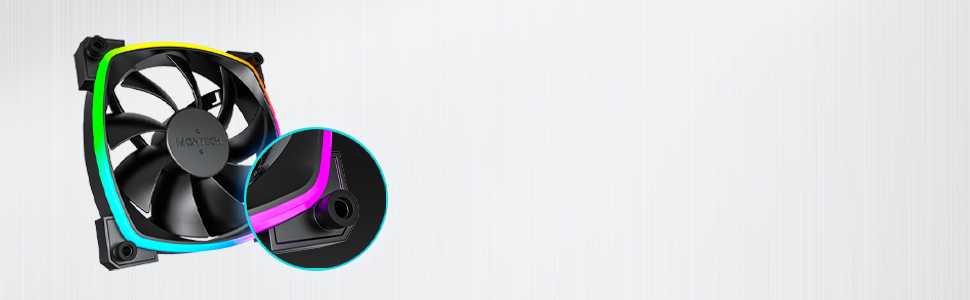
Figure 4.3: Integrated anti-vibration pads for reduced noise.
- Connect Power and ARGB Cables: Each fan has two cables: a 4-pin PWM cable for fan speed control and a 3-pin ARGB cable for lighting control.
- Connect the 4-pin PWM cable to an available 4-pin fan header on your motherboard or to a fan hub.
- Connect the 3-pin ARGB cable to an available 5V 3-pin ARGB header on your motherboard or to a compatible ARGB controller/hub. Akiyesi: Ma ṣe sopọ si akọsori 12V RGB, nitori eyi yoo ba awọn LED jẹ.
- Iṣakoso USB: Route cables neatly to avoid interference with other components and to improve airflow.
- Pa Apo ati Agbara Tan: Once all connections are secure, close your computer case, reconnect power, and power on your system.
5. Awọn ilana Iṣiṣẹ
The Montech AX 120 ARGB Fans offer both speed and lighting control:
5.1 Iṣakoso Iyara Fan (PWM)
The 4-pin PWM connection allows for precise fan speed control based on system temperature. The fan speed can be adjusted from 600 RPM to 1600 RPM.
- BIOS/UEFI: Access your motherboard's BIOS/UEFI settings to configure fan curves. This allows the fan speed to automatically adjust based on CPU or system temperatures.
- Software: Use your motherboard's fan control software (e.g., ASUS Fan Xpert, MSI Dragon Center, Gigabyte SIV) to create custom fan profiles within your operating system.

Figure 5.1: PWM fan speed adjustment from 600 RPM to 1600 RPM.
5.2 ARGB ina Iṣakoso
The Addressable RGB (ARGB) lighting can be synchronized and customized through your motherboard's software or a dedicated ARGB controller.
- Sọfitiwia modaboudu: If connected to a 5V 3-pin ARGB header, use your motherboard's RGB software (e.g., ASUS Aura Sync, MSI Mystic Light Sync, Gigabyte RGB Fusion, ASRock Polychrome Sync) to control lighting effects, colors, and synchronization with other ARGB components.
- Adarí ARGB: If using a standalone ARGB controller, refer to the controller's manual for specific instructions on changing lighting modes.
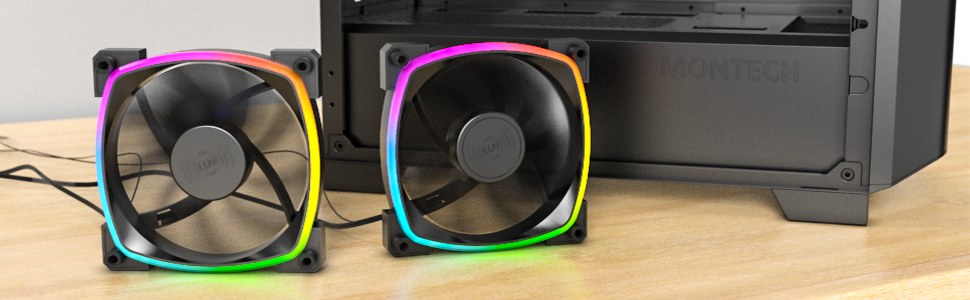
Figure 5.2: Customizable hexagonal ARGB lighting.
6. Itọju
Regular maintenance ensures optimal performance and longevity of your fans:
- Ninu: Periodically clean dust from the fan blades and frame using compressed air or a soft brush. Ensure the computer is powered off and unplugged before cleaning.
- Ayewo: Check cables for any signs of wear or damage. Ensure mounting screws are secure.
- Gbigbe Igba aye gigun: The fans feature an HDB (Hydro Dynamic Bearing) designed for high-end durability and a lifespan of 40,000 hours. No user maintenance is required for the bearing.

Figure 6.1: Hydro Dynamic Bearing (HDB) for extended lifespan.
7. Laasigbotitusita
If you encounter issues, refer to the following troubleshooting guide:
| Isoro | Owun to le Fa | Ojutu |
|---|---|---|
| Fan ko nyi | Loose 4-pin PWM cable connection Insufficient power from motherboard header Fan curve set too low in BIOS/software | Ensure 4-pin PWM cable is securely connected. Try connecting to a different fan header. Adjust fan curve settings in BIOS/software to ensure fans spin at low temperatures. |
| Ina ARGB ko ṣiṣẹ | Loose 3-pin ARGB cable connection Connected to incorrect 12V RGB header ARGB software not configured or running | Ensure 3-pin ARGB cable is securely connected to a 5V ARGB header. Verify connection is to a 5V 3-pin ARGB header, not a 12V 4-pin RGB header. Install and configure your motherboard's ARGB software or check your ARGB controller settings. |
| Ariwo ti o pọju | Ga iyara àìpẹ Awọn gbigbọn Idilọwọ | Adjust fan speed in BIOS/software to a lower RPM. Ensure all mounting screws are tight. The fans have anti-vibration pads to minimize this. Check for any cables or objects interfering with fan blades. |
8. Awọn pato
Key technical specifications for the Montech AX 120 ARGB Fan:
- Awoṣe: AX120 PWM BLACK
- Awọn iwọn Olufẹ: 120mm x 120mm x 25mm (4.72 x 4.72 x 0.98 inches)
- Iru nso: Hydro Dynamic Bearing (HDB)
- Iyara Yiyipo: 600 - 1600 RPM (Iṣakoso PWM)
- Ipele Ariwo: Lábẹ́ 27.9 dB(A)
- Asopọ Agbara: 4-PWM pin
- Asopọmọra ARGB: Pínì mẹ́ta 5V ARGB
- Oṣuwọn Voltage: 12V DC (Fan), 5V DC (LED)
- Wattage: 2 watt
- Ohun elo: Irin, Ṣiṣu, Roba
- Igbesi aye: wakati meji 40,000
9. Atilẹyin ọja ati Support
Montech products are manufactured to the highest quality standards. For warranty information, technical support, or customer service inquiries, please visit the official Montech webojú òpó wẹ́ẹ̀bù tàbí kí o kàn sí olùtajà agbègbè rẹ. Jọ̀wọ́ pa ẹ̀rí ìrajà rẹ mọ́ fún àwọn ẹ̀tọ́ ìdánilójú.


