
1. Ifihan
This manual provides essential instructions for the safe and efficient operation of your EPEVER Tracer4210ANG3 MPPT Solar Charge Controller. This device is designed to manage power flow from your solar panels to your battery bank, ensuring optimal charging and extending battery life. Please read this manual thoroughly before installation and use.
2. Alaye Aabo
Jọwọ ṣe akiyesi awọn iṣọra aabo wọnyi lakoko fifi sori ẹrọ ati iṣiṣẹ:
- Rí i dájú pé gbogbo wáyà ni a ti so pọ̀ dáadáa tí a sì so mọ́ ara wọn dáadáa láti dènà ìbàjẹ́ sí olùdarí tàbí àwọn ẹ̀yà ara mìíràn.
- Nigbagbogbo so batiri pọ ni akọkọ, lẹhinna nronu oorun, ati nikẹhin fifuye naa. Ge asopọ ni ọna yiyipada.
- Má ṣe gbìyànjú láti tú tàbí tún olùdarí náà ṣe fúnra rẹ. Pe àwọn òṣìṣẹ́ tó mọ̀ nípa iṣẹ́ náà fún iṣẹ́ náà.
- Fi sori ẹrọ oluṣakoso ni agbegbe ti o ni itunnu daradara, kuro lati awọn ohun elo ina ati imọlẹ orun taara.
- Lo awọn fifọ Circuit tabi awọn fuse ti o yẹ fun gbogbo awọn asopọ lati daabobo lodi si agbara ti o pọ ju.
- Wear eye protection when working with batteries.
3. Ọja Ipariview
The EPEVER Tracer4210ANG3 is an advanced Maximum Power Point Tracking (MPPT) solar charge controller designed for off-grid solar systems. It automatically identifies 12V or 24V system voltages and supports various battery types, including Lithium. Key features include high tracking and conversion efficiency, and comprehensive electronic protections.
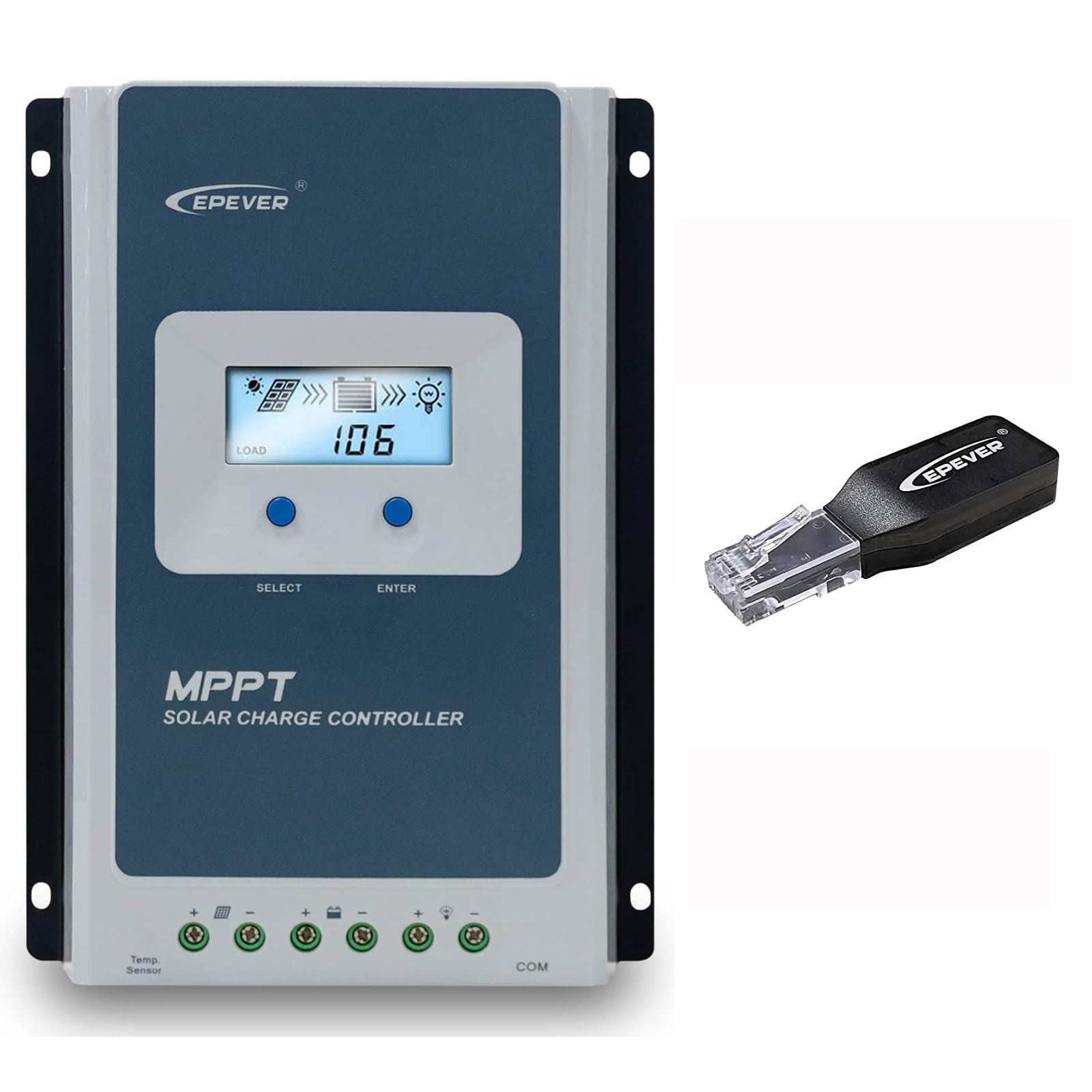
Figure 3.1: EPEVER Tracer4210ANG3 MPPT Solar Charge Controller with LCD display and connection terminals.
3.1 Key Awọn ẹya ara ẹrọ
- Automatic 12V/24V system voltage idanimọ.
- Advanced MPPT technology with tracking efficiency above 99.5% and conversion efficiency up to 98%.
- Mẹrin-stage charging (Bulk, Boost, Float, Equalization) to optimize battery health and lifespan.
- Supports various battery types including Sealed, Gel, Flooded, and Lithium.
- Comprehensive electronic protection functions: PV over current, short-circuit, reverse polarity, night reverse charging, battery reverse, over voltage, over-discharging, overheating, Lithium battery low temperature, load short circuit/overload, device overheating, and TVS high voltage transients protection.
- Remote control and monitoring capabilities via BLE (Bluetooth Low Energy) module (included with this model).

Figure 3.2: The Tracer4210ANG3 controller is compatible with multiple battery types, including Lithium (LI), Sealed (SLD), Flooded (FLD), Gel, and AGM, automatically identifying 12V/24V battery voltage.

Figure 3.3: System diagram illustrating the high tracking efficiency (above 99.5%) and conversion efficiency (98%) of the MPPT solar charge controller within a typical solar power setup for a home.

Figure 3.4: The controller offers real-time monitoring via a mobile application using BLE (Bluetooth Low Energy) or an optional MT50 remote meter. Note: BLE module is included with this model, while MT50 or WiFi modules are sold separately.
4. Eto ati fifi sori
4.1 Iṣagbesori Adarí
- Yan ibi ti o gbẹ, ti o ni afẹfẹ daradara, aabo lati orun taara, awọn iwọn otutu giga, ati ọrinrin.
- Ensure sufficient clearance around the controller for heat dissipation.
- Mount the controller vertically on a wall or suitable surface using appropriate fasteners.
4.2 Awọn isopọ onirin
Pataki: Always connect in the following order: Battery → Solar Panel → Load. Disconnect in the reverse order.
- So batiri pọ: Connect the positive and negative terminals of the battery to the corresponding battery terminals on the controller. Ensure correct polarity. The controller will automatically detect the system voltage (12V tabi 24V).
- Solar Panel: Connect the positive and negative terminals of the solar panel array to the corresponding PV terminals on the controller. Ensure correct polarity.
- So fifuye naa pọ: Connect the positive and negative terminals of the DC load to the corresponding load terminals on the controller.
After all connections are made, the controller's LCD display should illuminate, indicating proper power-up.
5. Awọn ilana Iṣiṣẹ
Ifihan ati Awọn bọtini LCD 5.1
The controller features an LCD display for real-time system status and parameters, along with buttons for navigation and settings adjustment.
- Bọtini Yan: Used to cycle through display screens and menu options.
- Tẹ Bọtini: Used to confirm selections or enter parameter editing mode.
Refer to the detailed user manual (available for download from the manufacturer's website) for a complete guide on LCD navigation and parameter settings.
5.2 Batiri Iru Yiyan
It is crucial to select the correct battery type in the controller's settings to ensure proper charging algorithms and prevent battery damage. The Tracer4210ANG3 supports various battery types, including:
- Sealed (SLD)
- Jeli
- Ikun omi (FLD)
- Litiọmu (LI)
- User-defined (for custom parameters)
Access the battery settings via the LCD menu and select the type that matches your connected battery bank. For Lithium batteries, ensure the correct voltage and charging parameters are set, especially if using user-defined settings.
5.3 Remote Monitoring (BLE)
This model includes a Bluetooth Low Energy (BLE) module, allowing you to monitor and configure the controller wirelessly via a smartphone application. Download the official EPEVER app from your device's app store, connect to the controller via Bluetooth, and follow the in-app instructions for monitoring system data and adjusting parameters.
6. Itọju
Regular maintenance ensures optimal performance and longevity of your solar charge controller:
- Ṣayẹwo Awọn isopọ: Máa ṣe àyẹ̀wò gbogbo àwọn ìsopọ̀ wáyà láti mọ̀ bóyá wọ́n ní ìsopọ̀ tó lágbára tàbí pé wọ́n ti di ìbàjẹ́.
- Nu Adarí: Keep the controller clean and free of dust and debris. Use a dry cloth for cleaning. Do not use liquids.
- Afẹfẹ: Rí i dájú pé àwọn ihò afẹ́fẹ́ kò dí láti jẹ́ kí ooru má baà tú jáde dáadáa.
- Ayewo Batiri: Regularly check your battery bank for signs of damage, corrosion, or electrolyte levels (for flooded batteries).
7. Laasigbotitusita
If you encounter issues with your Tracer4210ANG3 controller, refer to the following common problems and solutions:
| Isoro | Owun to le Fa | Ojutu |
|---|---|---|
| Ifihan oludari wa ni pipa. | No power from battery or solar panel; reversed battery polarity. | Ṣayẹwo awọn asopọ batiri ati voltage. Ensure solar panels are receiving sunlight. Verify battery polarity. |
| Batiri ko ngba agbara. | Solar panel not connected; low solar input; incorrect battery type setting; faulty wiring. | Check solar panel connections and ensure sufficient sunlight. Verify battery type setting. Inspect all wiring. |
| Fifuye ko ṣiṣẹ. | Load disconnected; battery voltage too low; load overcurrent protection activated. | Check load connections. Allow battery to charge. Reduce load or check for short circuits. |
| Ikilọ igbona pupọ. | Poor ventilation; excessive ambient temperature; overloaded system. | Ensure adequate airflow around the controller. Reduce load if possible. Relocate to a cooler environment. |
For more complex issues, please contact EPEVER customer support.
8. Awọn pato
| Paramita | Iye |
|---|---|
| Eto ipin Voltage | 12V / 24V Auto Identify |
| Ti won won idiyele Lọwọlọwọ | 40A |
| O pọju. PV Input Voltage | 100V |
| O pọju. PV Input Power | 520W (12V system) / 1040W (24V system) |
| MPPT Ipasẹ ṣiṣe | > 99.5% |
| Ṣiṣe Iyipada owo | Titi di 98% |
| Awọn oriṣi Batiri Ti ṣe atilẹyin | Sealed, Gel, Flooded, Lithium, User-defined |
| Gbigba agbara Stages | Bulk, Boost, Float, Equalization |
| Ibudo Ibaraẹnisọrọ | RS485 (for BLE module, MT50, or PC connection) |
| Awọn irinše to wa | MPPT Solar Controller, BLE Module |
9. Atilẹyin ọja ati Support
EPEVER products are designed for reliability and performance. For warranty information, please refer to the warranty card included with your product or visit the official EPEVER website. If you have any questions, require technical assistance, or need to report an issue, please contact EPEVER customer support directly. Contact details can typically be found on the manufacturer's webaaye tabi ni apoti ọja.
O tun le ṣàbẹwò awọn EPEVER Store on Amazon fun afikun alaye ọja ati awọn orisun atilẹyin.


