
1. Ifihan
This user manual provides comprehensive instructions for the Callsky 10-inch Wi-Fi Tablet, Model Ctab 10. Please read this manual carefully before using your device to ensure proper operation and to maximize its features. Keep this manual for future reference.
2. Ọja Ipariview
2.1 Package Awọn akoonu
Nígbà tí o bá ṣí àpótí náà, rí i dájú pé gbogbo àwọn ohun tí a kọ sí ìsàlẹ̀ yìí wà níbẹ̀:
- Callsky Ctab 10 Tablet
- USB Iru-C Ngba agbara USB
- Adapter agbara
- Ilana olumulo (Japanese)

Image: Package contents including the tablet, charging cable, power adapter, and user manual.
2.2 Device irinše
Familiarize yourself with the physical layout and ports of your tablet:
- Kamẹra iwaju: 5MP fun awọn ipe fidio ati awọn selfie.
- Kamẹra Tẹhin: 8MP with autofocus for high-resolution photos.
- Bọtini agbara: Located on the side for turning the device on/off and screen lock.
- Awọn bọtini iwọn didun: Ṣatunṣe awọn ipele ohun.
- Ibudo Iru-C USB: Fun gbigba agbara ati gbigbe data.
- Jack agbekọri 3.5mm: Fun igbejade ohun.
- Awọn Agbọrọsọ Meji: For enhanced audio experience.
- Iho kaadi MicroSD: For storage expansion up to 2TB.

Aworan: Pariview of tablet features including face recognition, wireless projection, and physical dimensions.
2.3 Key Awọn ẹya ara ẹrọ
- Apẹrẹ iwuwo fẹẹrẹ: Ultra-thin at 8.7mm and weighing 425g for easy portability.
- Android 14 OS: Enhanced privacy, personalized settings, and improved user experience.
- Iṣe to gaju: 1.8GHz Allwinner A523 Octa-core processor and Mali-G57 GPU for smooth multitasking, gaming, and HD video.
- Iranti & Ibi ipamọ: 3GB RAM + 9GB virtual memory, 128GB internal storage, expandable up to 2TB via MicroSD.
- Ifihan to han gbangba: 10.1-inch 1280x800 Incell IPS display with eye protection mode and Widevine L1 support for high-quality streaming.
- Asopọmọra: Wi-Fi 6 and Bluetooth 5.4 for stable and high-speed connections.
- Awọn ẹya to ti ni ilọsiwaju: Wireless projection, face recognition, and split-screen functionality.
- Batiri pipẹ: 6000mAh batiri fun o gbooro sii lilo.

Image: Visual summary of the tablet's core specifications and features.
3. Eto
3.1 Agbara Ibẹrẹ Lori ati Awọn Eto Ipilẹ
- Press and hold the Power button until the Callsky logo appears.
- Follow the on-screen prompts to select your language (e.g., English).
- Connect to a Wi-Fi network. Select your network from the list and enter the password if required.
- Review and accept the Google Services terms.
- Set up a screen lock (PIN, pattern, or password) for security. You can skip this step and set it up later.
- Complete the remaining setup steps as guided by the Android 14 interface.
3.2 Fi kaadi MicroSD sii
To expand your tablet's storage:
- Wa iho kaadi MicroSD ni ẹgbẹ tabulẹti naa.
- Gently insert the MicroSD card into the slot until it clicks into place. Ensure the card is oriented correctly.
- The tablet will detect the new storage. You may be prompted to format the card for optimal use with the device.
4. Awọn ilana Iṣiṣẹ
4.1 Ipilẹ Lilọ kiri
- Awọn Afarajuwe Fọwọkan: Fọwọ ba lati yan, ra lati yi lọ, fun pọ lati sun.
- Iboju ile: Wọle si awọn ohun elo, ẹrọ ailorukọ, ati awọn iwifunni.
- Awọn iwifunni: Ra isalẹ lati oke iboju si view awọn iwifunni ati awọn eto iyara.
4.2 Ìṣàkóso Ìrántí àti Ìpamọ́
The tablet comes with 3GB of physical RAM and 9GB of virtual memory, totaling 12GB, along with 128GB of internal storage. You can expand storage up to 2TB using a MicroSD card.
- Láti ṣàyẹ̀wò ibi ìpamọ́: Lọ sí Eto > Ibi ipamọ.
- To manage apps: Go to Eto> Awọn ohun elo.

Image: Details on memory and storage, including RAM, internal storage, and MicroSD expansion.
4.3 Ifihan ati Iriri wiwo
The 10.1-inch 1280x800 Incell IPS display provides clear and vibrant visuals. It supports Widevine L1 for high-definition streaming from platforms like Netflix and YouTube.
- Ipo Idaabobo Oju: Activate this mode in settings to reduce blue light and eye strain during prolonged use.
- Iboju Pipin: Use two applications simultaneously for enhanced productivity.

Image: Tablet demonstrating Widevine L1 support for streaming services.
4.4 Asopọmọra
The tablet supports Wi-Fi 6 and Bluetooth 5.4 for reliable and fast wireless connections.
- Wi-Fi: Connect to 2.4G or 5G networks. Go to Eto> Nẹtiwọọki & intanẹẹti> Wi-Fi lati ṣakoso awọn asopọ.
- Bluetooth: Pair with wireless devices like headphones or keyboards. Go to Eto > Awọn ẹrọ ti a ti sopọ > Bluetooth.
- Isọtẹlẹ Alailowaya: Share your screen with compatible displays. Access this feature from the quick settings panel.
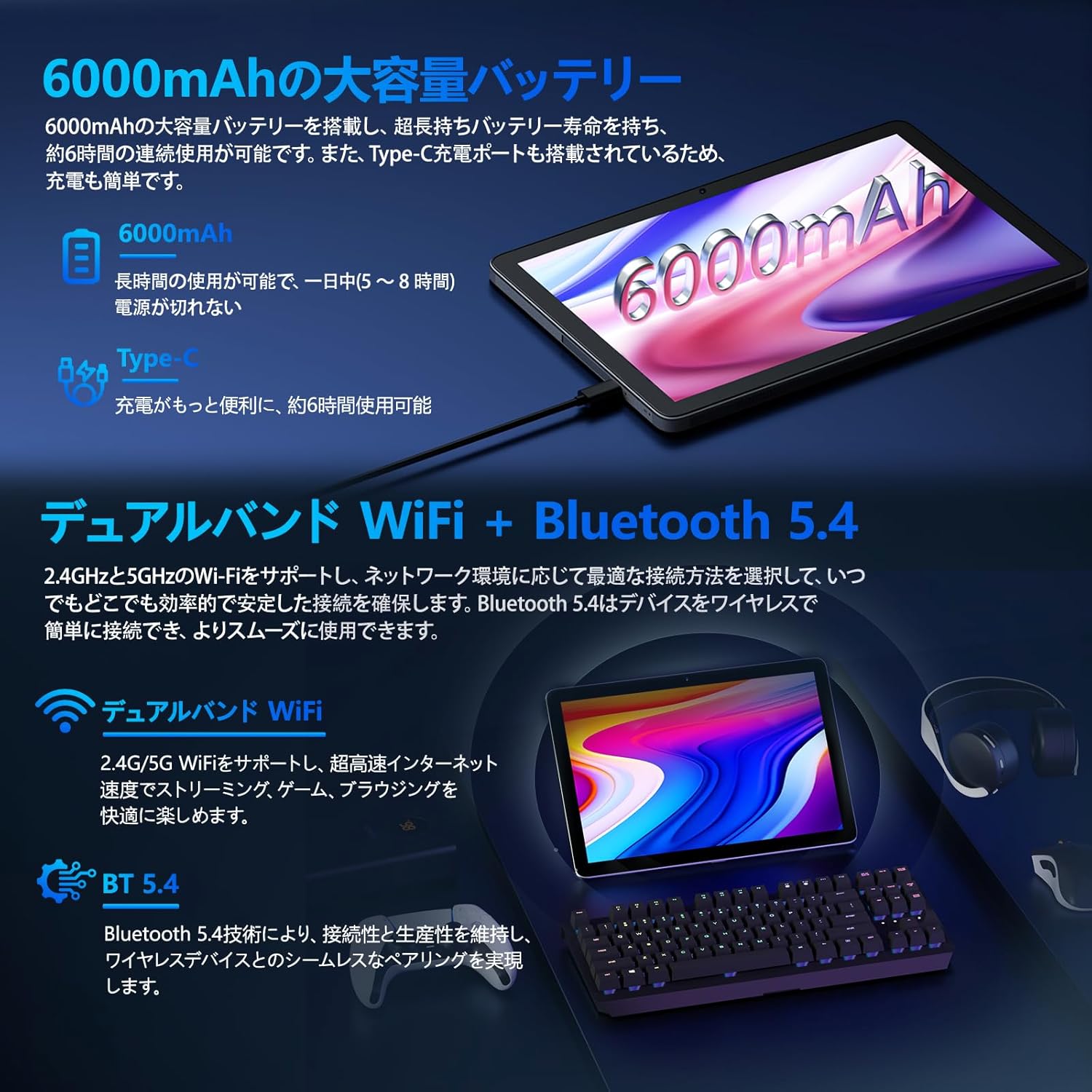
Image: Tablet highlighting battery capacity, Type-C charging, Wi-Fi, and Bluetooth features.
4.5 Awọn kamẹra
The tablet features a 5MP front camera and an 8MP rear camera with autofocus, suitable for video calls and capturing photos.
- Ṣii ohun elo kamẹra lati ya awọn fọto tabi ṣe igbasilẹ awọn fidio.
- Ti idanimọ oju: Use the front camera for quick and secure unlocking. Set this up in Settings > Security & privacy > Face unlock.

Image: Illustration of the tablet's front and rear cameras and their resolutions.
4.6 Kids Mode (Parental Controls)
The tablet includes a dedicated Kids Mode and parental control features to ensure a safe and controlled environment for children.
- Access Kids Mode to provide curated content and limit screen time.
- Parents can manage app usage and content access through parental control settings.
4.7 sensosi
The tablet is equipped with various sensors for enhanced functionality:
- GPS: Fun awọn iṣẹ ipo ati lilọ kiri.
- Geomagnetic Sensor: Functions as a compass.
- Sensọ isunmọtosi: Prevents unintended screen operations.
- Sensọ Imọlẹ Ibaramu: Automatically adjusts screen brightness.
- Gyroscope: For tilt operations and AR applications.
- Accelerometer: Detects tilt, shock, and movement.
5. Itọju
5.1 batiri Itọju
The 6000mAh battery provides long usage times. To prolong battery life:
- Yago fun awọn iwọn otutu to gaju.
- Ma ṣe jẹ ki batiri naa ṣan patapata nigbagbogbo.
- Lo ṣaja ti a pese ati okun.
- Mu lilo batiri pọ si Eto > Batiri.

Image: Tablet connected to a Type-C charger, highlighting the 6000mAh battery.
5.2 Ninu
Lo asọ ti ko ni lint lati nu iboju ati ara tabulẹti naa. Yago fun lilo awọn kẹmika lile tabi awọn ohun elo abrasive.
6. Laasigbotitusita
If you encounter issues with your tablet, refer to the following common problems and solutions:
| Isoro | Owun to le Fa / Solusan |
|---|---|
| Tabulẹti ko ni agbara lori | Rii daju pe batiri ti gba agbara. So ṣaja pọ ki o duro fun iṣẹju diẹ ṣaaju igbiyanju lati tan-an lẹẹkansi. |
| Iboju ko dahun | Restart the tablet by holding the power button. If unresponsive, force restart by holding the power button for a longer duration (e.g., 10-15 seconds). |
| Awọn oran asopọ Wi-Fi | Ṣàyẹ̀wò bóyá Wi-Fi ti ṣiṣẹ́ nínú àwọn ètò. Tún raítà rẹ bẹ̀rẹ̀. Gbàgbé nẹ́tíwọ́ọ̀kì náà kí o sì tún sopọ̀ mọ́. |
| Device overheating / unexpected shutdowns | Close background applications. Avoid using the tablet in direct sunlight or hot environments. If the issue persists, contact customer support. |
| Awọn ohun elo kọlu tabi didi | Clear the app's cache (Settings > Apps > [App Name] > Storage & cache > Clear cache). Update the app. Reinstall the app. |
| O lọra išẹ | Ti awọn ohun elo abẹlẹ ti ko wulo. Pa awọn kaṣe ati igba diẹ kuro. files. Ensure sufficient storage space. |
If the problem persists after trying these solutions, please contact Callsky customer support.
7. Awọn pato
| Ẹya ara ẹrọ | Ẹ̀kúnrẹ́rẹ́ |
|---|---|
| Brand | Callsky |
| Orukọ awoṣe | Ctab 10 |
| Eto isesise | Android 14 |
| Iwon iboju | 10.1 inches |
| Ipinnu Ifihan | 1280x800 pixels (Incell IPS) |
| Sipiyu | Allwinner A523 Octa-core (1.8 GHz) |
| GPU | Mali-G57 (Àpapọ̀) |
| Àgbo | 3GB Physical + 9GB Virtual (Total 12GB) |
| Ibi ipamọ inu | 128 GB |
| Expandable Ibi ipamọ | Titi di 2TB nipasẹ kaadi MicroSD |
| Kamẹra ẹhin | 8 MP |
| Kamẹra iwaju | 5 MP |
| Wi-Fi | Wi-Fi 6 (802.11ac, 802.11b, 802.11g, 802.11n) |
| Bluetooth | Bluetooth 5.4 |
| Agbara Batiri | 6000mAh (22.8 Watt-hours, 1 Lithium Polymer cell) |
| Gbigba agbara Port | Iru-C |
| Awọn iwọn | 32.4 x 20.3 x 3.4 cm |
| Iwọn | 425 g |
| Awọn iwe-ẹri | GMS Certified, PSE Certified |
8. Atilẹyin ọja ati Support
The Callsky Ctab 10 tablet comes with a 2-odun atilẹyin ọja. This warranty covers manufacturing defects and ensures long-term reliability.
8.1 Onibara Support
If you encounter any issues or have questions regarding your Callsky tablet, please contact our customer support team. We are committed to providing prompt assistance.
- Ọna olubasọrọ: Refer to your purchase platform (e.g., Amazon) for specific contact details. Typically, you can find seller contact information through your order history.
- Akoko Idahun: We aim to respond to inquiries within 24 hours on weekdays and within 48-72 hours on weekends or holidays.
Please have your product model (Ctab 10) and purchase details ready when contacting support.