
1. Ifihan
The Oilsky M1 MP3 Player is a portable digital music player designed for high-quality audio playback. It features Bluetooth 5.4 for stable wireless connections, a 2.4-inch touchscreen for easy navigation, and a built-in speaker. With 128GB of internal storage and support for an additional 128GB Micro SD card, it can store a vast library of music, audiobooks, and other media. This manual provides detailed instructions on how to set up, operate, and maintain your device.
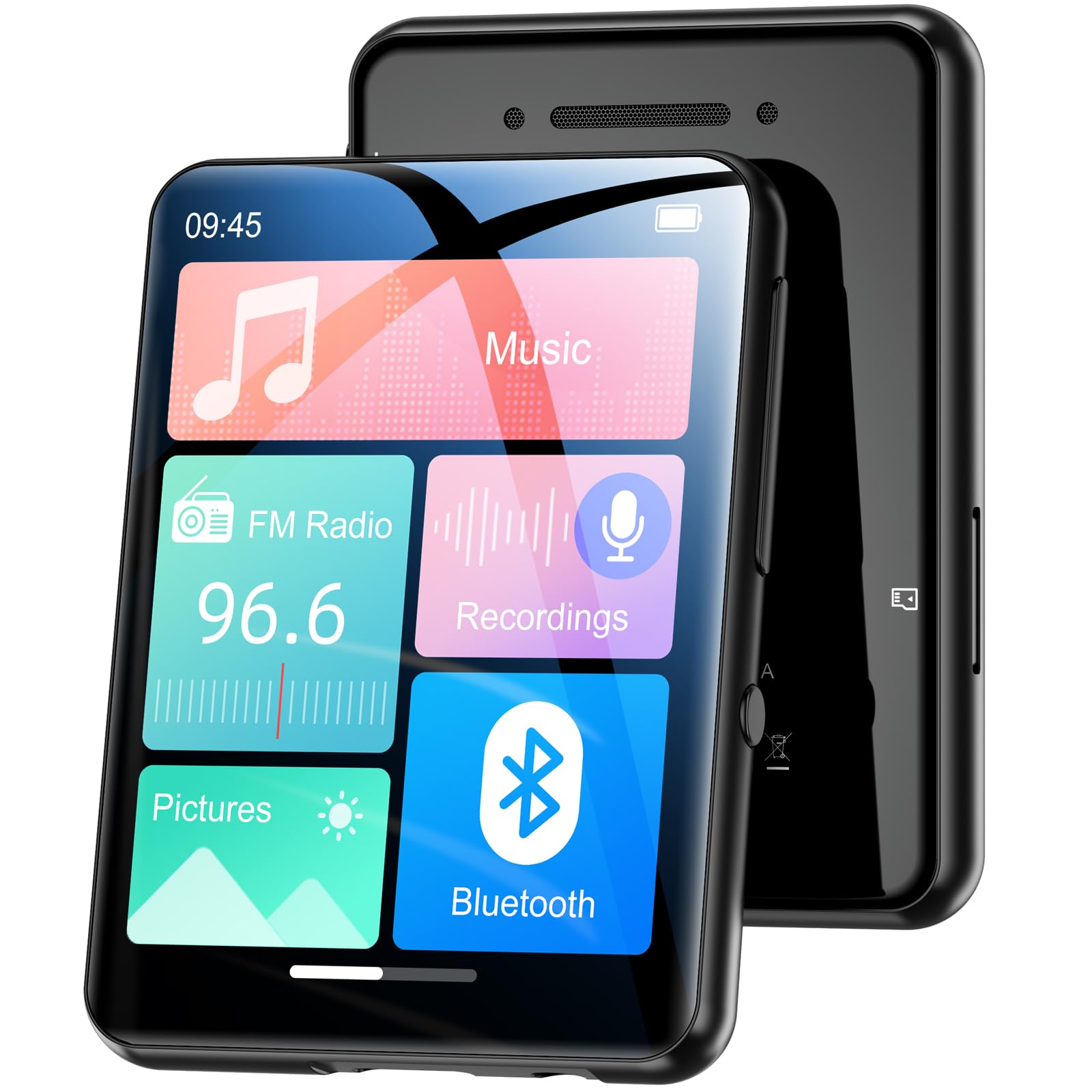
Aworan 1.1: Iwaju view ti Oilsky M1 MP3 Player, ifihanasing apẹrẹ iwapọ rẹ ati wiwo iboju ifọwọkan.
2. Ohun ti o wa ninu Apoti
Jọwọ ṣayẹwo awọn akoonu package lori ṣiṣi silẹ lati rii daju pe gbogbo awọn nkan wa:
- 1x Oilsky M1 MP3 Player
- 1x USB Ngba agbara USB
- 1x Wired Headphones
- 1x Itọsọna olumulo (iwe yii)
- 1x Aabo Idaabobo
- 1x Lanyard

Image 2.1: All included accessories and the MP3 player laid out, including the USB cable, headphones, protective case, and lanyard.
3. Eto
3.1 Ngba agbara si Ẹrọ
Before first use, fully charge the MP3 player. Connect the provided USB cable to the player's charging port and the other end to a USB power adapter (not included) or a computer's USB port. The device takes approximately 2 hours to fully charge, providing up to 50 hours of music playback.
3.2 Titan / Pa a
- Lati Fi agbara: Tẹ mọlẹ bọtini agbara titi iboju yoo fi tan.
- Lati Paarẹ: Tẹ bọtini agbara naa ki o si dimu titi aṣayan pipa agbara yoo fi han loju iboju, lẹhinna jẹrisi.
3.3 Fifi Micro SD Kaadi
The Oilsky M1 has 128GB of built-in memory and supports Micro SD cards up to an additional 128GB (not included). To expand storage:
- Wa awọn Micro SD kaadi Iho lori awọn ẹgbẹ ti awọn ẹrọ orin.
- Gently insert the Micro SD card into the slot with the gold contacts facing down until it clicks into place.
- To remove, push the card inward until it springs out.

Image 3.1: Visual representation of the 128GB internal memory and the option to expand storage with a Micro SD card.
3.4 Ede Eto
The device supports English, German, French, Italian, Spanish, and 29 other languages. To change the language:
- Go to the 'Settings' menu.
- Yan 'Èdè'.
- Yan ede ti o fẹ lati inu atokọ naa.
4. Awọn ilana Iṣiṣẹ
The Oilsky M1 features a 2.4-inch full touchscreen for intuitive control. Navigate through menus by swiping and tapping.

Image 4.1: A hand interacting with the full touchscreen interface of the MP3 player, demonstrating ease of use.
4.1 Sisisẹsẹhin Orin
The player supports various audio formats including MP3, WMA, APE, FLAC, WAV, and AAC, providing high-fidelity sound with digital noise reduction. You can organize music by title, folder, artist, or album.
- Gbigbe Orin: Connect the player to your computer using the USB cable. The player will appear as a removable disk. Drag and drop your music files into the 'Music' folder on the device or Micro SD card.
- Orin ti nṣire: From the main menu, tap 'Music'. You can browse by 'All Songs', 'Artists', 'Albums', 'Folders', etc. Tap a song to begin playback.
- Awọn iṣakoso: Use the on-screen controls for play/pause, next/previous track, and volume adjustment.

Image 4.2: A user enjoying music with headphones connected to the Oilsky M1 MP3 Player, highlighting the high-quality sound experience.

Image 4.3: Display illustrating the multiple audio formats supported by the MP3 player, including MP3, WMA, APE, FLAC, WAV, and AAC.
4.2 Bluetooth Asopọ
The player features Bluetooth 5.4 for connecting to Bluetooth headphones and speakers. It includes a memory function that automatically reconnects to previously paired devices. Note: The player cannot connect to mobile phones or car Bluetooth systems.
- From the main menu, tap 'Bluetooth'.
- Turn on Bluetooth. The player will scan for nearby devices.
- Yan agbekọri Bluetooth tabi agbọrọsọ ti o fẹ lati inu akojọ lati so pọ mọ.

Image 4.4: The MP3 player screen showing the Bluetooth connection icon, indicating stable and fast Bluetooth 5.4 connectivity to external audio devices.
4.3 Redio FM
Lati lo iṣẹ redio FM:
- Connect the wired headphones (they act as an antenna).
- From the main menu, tap 'FM Radio'.
- Use the on-screen controls to scan for stations or manually tune.
4.4 Agbohunsile
The player includes a built-in microphone for digital voice recording.
- From the main menu, tap 'Recordings'.
- Tap the record icon to start and stop recording.
- Recordings are saved and can be played back from this menu.

Image 4.5: The MP3 player displaying its voice recording interface, useful for capturing notes or conversations.
4.5 Olùkàwé ìwé-ẹ̀rọ itanna
The player supports TXT format e-books.
- Gbigbe TXT files to the 'E-book' folder on the device.
- From the main menu, tap 'E-book' to access your library.
4.6 Fọto Viewer
View JPEG/BMP image files on the 2.4-inch screen.
- Transfer image files to the 'Pictures' folder.
- From the main menu, tap 'Pictures' to browse your photos.
4.7 Iṣẹ itaniji
Set alarms using your favorite music as the ringtone.
- From the main menu, tap 'Alarm'.
- Configure alarm time, repeat settings, and select a music file for the alarm sound.

Image 4.6: The MP3 player displaying an alarm clock icon, indicating its alarm function capability.
5. Itọju
5.1 Ninu
- Mu ese ẹrọ rẹ jẹ pẹlu asọ, asọ gbigbẹ.
- Do not use liquid cleaners or aerosols, as they may damage the device.
5.2 batiri Itọju
- Yago fun ṣiṣafihan ẹrọ naa si awọn iwọn otutu to gaju.
- Gba agbara si ẹrọ nigbagbogbo, paapaa ti ko ba si ni lilo, lati ṣetọju ilera batiri.
5.3 Ibi ipamọ
When not in use for extended periods, store the player in a cool, dry place, away from direct sunlight and moisture.
6. Laasigbotitusita
| Isoro | Owun to le Solusan |
|---|---|
| Ẹrọ ko tan. | Ensure the device is fully charged. If the battery is depleted, it may take a few minutes of charging before it can power on. |
| Bluetooth headphones/speaker won't connect. | Ensure Bluetooth is enabled on both devices. Make sure the headphones/speaker are in pairing mode. Confirm the MP3 player is not attempting to connect to a mobile phone or car system, as this is not supported. |
| Ko le gbe lọ files si ẹrọ orin. | Check the USB cable connection. Ensure the player is properly recognized by your computer. Try a different USB port or cable. |
| Music playback is distorted or silent. | Check headphone connection or Bluetooth connection. Ensure volume is not muted and is set to an audible level. Verify the audio file kika ni atilẹyin. |
| Iboju ko dahun. | Perform a soft reset by pressing and holding the power button for 10-15 seconds. If the issue persists, ensure the device is charged. |
7. Awọn pato
| Ẹya ara ẹrọ | Ẹ̀kúnrẹ́rẹ́ |
|---|---|
| Brand | Oilsky |
| Nọmba awoṣe | M1 |
| Pataki Awọn ẹya ara ẹrọ | Touchscreen, Built-in Speaker, Digital Noise Reduction |
| Asopọmọra Technology | Bluetooth 5.4, USB |
| Ibi ipamọ inu | 128 GB |
| Expandable Ibi ipamọ | Micro SD kaadi soke 128 GB |
| Àwọ̀ | Dudu |
| Iwon iboju | 2.4 inches |
| Awọn ẹrọ ibaramu | Bluetooth Speakers, Bluetooth Headphones, Personal Computers |
| Awọn ọna kika Audio atilẹyin | MP3, WMA, APE, FLAC, WAV, AAC |
| Fọọmu E-iwe ti a ṣe atilẹyin | TXT |
| Awọn ọna kika Aworan ti a ṣe atilẹyin | JPEG, BMP |
| Igbesi aye batiri | Titi di awọn wakati 50 |
| Akoko gbigba agbara | O fẹrẹ to awọn wakati 2 |
| Iwọn Nkan | 65 giramu |
| Awọn iwọn Nkan (D x W x H) | 1 cm x 5 cm x 7 cm |
8. Atilẹyin ọja ati Support
8.1 atilẹyin ọja Afihan
Oilsky offers a one-year return policy for this product. This warranty covers manufacturing defects and issues arising from normal use.
8.2 Onibara Support
Our team is dedicated to providing prompt, attentive, and high-quality support. We guarantee a response within 24 hours for any inquiries or issues you may have.
For assistance, please contact us through the platform where you purchased the product or refer to the contact information provided on the official Oilsky webojula.
We are committed to ensuring your satisfaction with your Oilsky M1 MP3 Player.