
AMAZTIM M3
AMAZTIM M3 Smart Watch Instruction Manual
Awoṣe: M3
Ọrọ Iṣaaju
This manual provides detailed instructions for the setup, operation, and maintenance of your AMAZTIM M3 Smart Watch. Designed for durability and extensive functionality, the M3 features a 2-inch AMOLED display, military-grade construction, and comprehensive health and fitness tracking capabilities. Please read this manual thoroughly to ensure optimal performance and longevity of your device.
Ohun ti o wa ninu Apoti
Upon opening your AMAZTIM M3 Smart Watch package, you should find the following items:
- 1x AMAZTIM M3 Smart Watch
- 1x Watch Band
- 1x Okun gbigba agbara
- 1x Itọsọna olumulo

Image: Contents of the AMAZTIM M3 Smart Watch package, including the watch, band, charging cable, and user manual.
Awọn ilana iṣeto
1. Ngba agbara si Smart Watch
Before initial use, fully charge your AMAZTIM M3 Smart Watch. Connect the provided charging cable to the charging points on the back of the watch and to a USB power source. The watch display will indicate charging status.
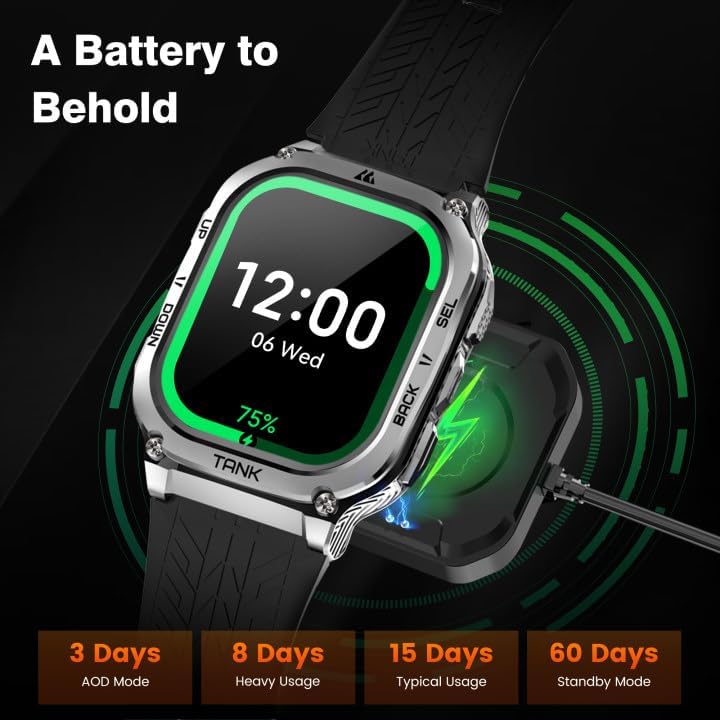
Image: The AMAZTIM M3 Smart Watch connected to its magnetic charging cable.
2. Installing the Watch Band
Attach the watch band by aligning the pins with the holes on the watch body and sliding them into place. Ensure both sides are securely fastened.
3. Sopọ pẹlu Foonuiyara Foonuiyara Rẹ
The AMAZTIM M3 Smart Watch is compatible with both Android and iOS devices. Follow these steps to pair your watch:
- Download the 'KOSPET FIT' app from the Google Play Store or Apple App Store.
- Rii daju pe Bluetooth ti ṣiṣẹ lori foonuiyara rẹ.
- Open the 'KOSPET FIT' app and navigate to the 'Device' section.
- Tap 'Add a new device' and select your AMAZTIM M3 from the list.
- Jẹrisi ibeere sisopọ lori foonu rẹ mejeeji ati aago naa.
- Grant necessary permissions for notifications and other features within the app settings.

Image: Visual guide demonstrating the pairing process of the smart watch with a smartphone via the KOSPET FIT app.
Fidio: How to set up the AMAZTIM Tank M3 Smartwatch.
Yi fidio pese kan gbogboogbo loriview of the AMAZTIM Tank M3 Smartwatch, including unboxing, band attachment, and initial pairing with a smartphone. It highlights the ease of setup and various customizable watch faces.
Awọn ilana Iṣiṣẹ
Lilọ kiri
The AMAZTIM M3 features a 2.0" Ultra Large AMOLED display with a responsive touchscreen. Swipe left, right, up, or down to navigate through menus and access different functions. Physical buttons on the side provide additional control for quick access to features and returning to the home screen.

Image: The 2.0-inch AMOLED display of the AMAZTIM M3 Smart Watch, showcasing its vibrant colors and clarity.
Ṣiṣe ati Gbigba Awọn ipe
Once paired with your smartphone, you can answer and make calls directly from your AMAZTIM M3 Smart Watch. Access the call function from the main menu. The watch also supports AI Voice Assistant for hands-free commands, including initiating calls.

Image: The smart watch showing options for Bluetooth calls and interacting with the powerful voice assistant.
Awọn iwifunni Ifiranṣẹ
Receive and read text messages and social media notifications directly on your watch. Ensure the 'KOSPET FIT' app is running in the background and notification permissions are granted for desired applications on your phone.

Image: Step-by-step instructions for enabling message and app notifications on iOS devices.

Image: Step-by-step instructions for enabling message and app notifications on Android devices.
Abojuto Ilera
The AMAZTIM M3 Smart Watch offers comprehensive health data real-time monitoring functions. Access these features through the watch interface or the 'KOSPET FIT' app.
- Atẹle Oṣuwọn ọkan: Ó ń tọ́pasẹ̀ ìlù ọkàn rẹ ní gbogbo ìgbà.
- Atẹgun Ẹjẹ: Measures your real-time blood oxygen levels.
- Titele orun: Monitors all-day sleep patterns, including sleep stages and daytime naps, providing in-depth sleep analysis.
- Pedometer: Keeps track of steps taken and calories burned throughout the day.

Image: The AMAZTIM M3 Smart Watch displaying multiple health monitoring metrics, including heart rate, blood oxygen, breath training, and smart sleep tracking.

Image: The smart watch tracking sleep stages, daytime naps, and providing in-depth sleep analysis.
Awọn ipo ere idaraya
The AMAZTIM M3 supports up to 170 sports modes and features 6 Intelligent Sports Recognition functions. It accurately collects data for every workout, ensuring precise tracking of your physical activity.
- Idanimọ oye: Automatically detects and tracks 6 common sports activities.
- Awọn ọna Idaraya 170+: Choose from a wide variety of sports for tailored tracking.
- Itọpa data: Monitors steps, calories, distance, heart rate zones, and more during workouts.

Image: The AMAZTIM M3 Smart Watch displaying various sports modes and intelligent recognition for activities like walking, running, cycling, and more.

Image: An illustration highlighting the 170+ sports modes and intelligent recognition for 6 sports, including still, walking, running, cycling, elliptical trainer, and rowing machine.
Igbesi aye batiri
The AMAZTIM M3 is equipped with a 480mAh pure cobalt-based battery, offering extended usage times. An industry-breaking super power-saving AI algorithm minimizes power consumption.
- Lilo deede: Up to 2 weeks of battery life.
- Ipo Fifipamọ Agbara: Up to 60+ days of continuous use for sports and health monitoring.
- Always On Display (AOD) Mode: O fẹrẹ to awọn ọjọ 3.

Image: The smart watch showing its battery life capabilities under different usage scenarios, including AOD mode, heavy usage, typical usage, and standby mode.
Fidio: Why THIS Smart Watch with a 60 Day Battery!
This video highlights the impressive 60-day battery life of the AMAZTIM M3 Smart Watch, showcasing its endurance for various activities.
Durability and Waterproofing
The AMAZTIM M3 is built to military standards, featuring a full-metal unibody and Corning Gorilla screen (Mohs hardness up to 9H). It has successfully passed 15 military toughness tests (MIL-STD-810H), including salt spray, rain, and impact.
- Military-Grade Quality: Indestructible and highly durable, designed to withstand harsh environments.
- 5ATM Mabomire: Can be immersed in up to 50 meters of water, suitable for swimming and diving.
- Damage Resistant: Tested against extreme conditions like high/low temperatures, sand, dust, and shock.
Image: The AMAZTIM M3 Smart Watch undergoing various military-grade tests, including low-temperature storage, sand and dust, high-temperature storage, and shock tests, demonstrating its robust quality.
Image: The AMAZTIM M3 Smart Watch being used underwater by a diver, illustrating its 5ATM and IP69K dive-proof waterproof capabilities.
Awọn pato
| Ẹya ara ẹrọ | Ẹ̀kúnrẹ́rẹ́ |
|---|---|
| Brand | AMAZTIM |
| Nọmba awoṣe | M3 |
| Iwon iboju | 2 inches |
| Ifihan Iru | AMOLED |
| Ipinnu iboju | 454 x 454 |
| Eto isesise | Compatible for Android and iOS |
| Asopọmọra Technology | Bluetooth |
| GPS | No GPS (Note: Product description mentions GPS, but specifications state 'No GPS'. Please refer to product packaging for definitive information.) |
| Omi Resistance | 5ATM (50 mita) |
| Agbara Batiri | 480mAh (Litiumu Polima) |
| Igbesi aye batiri (Aṣoju) | Titi di ọsẹ 2 |
| Ìgbésí Ayé Bátìrì (Ipò Ìfipamọ́ Agbára) | Titi di ọjọ 60+ |
| Pataki Awọn ẹya ara ẹrọ | Bluetooth Answer/Make Call, AI Voice Assistant, Compass, Health & Sport Monitor, Military Rugged Grade Designed |
| Iwọn Nkan | 0.025 iwon |
| Ohun elo | Full Metal Unibody, Corning Gorilla Screen |
Itoju
To ensure the longevity and optimal performance of your AMAZTIM M3 Smart Watch, follow these maintenance guidelines:
- Ninu: Regularly wipe the watch screen and body with a soft, dry cloth. For stubborn smudges, use a slightly damp aṣọ kí o sì gbẹ ẹ́ dáadáa. Yẹra fún àwọn kẹ́míkà líle.
- Gbigba agbara: Lo okùn gbigba agbara ti a pese nikan. Rii daju pe awọn olubasọrọ gbigba agbara lori aago ati okùn naa mọ ati gbẹ ṣaaju gbigba agbara.
- Ibi ipamọ: Tọju aago naa ni itura, aye gbigbẹ nigbati o ko ba lo. Yago fun awọn iwọn otutu to gaju.
- Ifihan omi: While the watch is 5ATM waterproof, prolonged exposure to hot water (e.g., hot showers, saunas) or high-pressure water jets should be avoided as it may compromise the seals over time. Rinse with fresh water after exposure to salt water.
Laasigbotitusita
If you encounter issues with your AMAZTIM M3 Smart Watch, refer to the following common troubleshooting steps:
- Wo ti ko tan: Rii daju pe aago naa ti gba agbara ni kikun. Sopọ mọ ṣaja fun o kere 30 iṣẹju.
- Ko le so pọ pẹlu foonu:
- Rii daju pe Bluetooth ti ṣiṣẹ lori foonu rẹ ati pe aago wa laarin iwọn.
- Tun foonu rẹ ati aago bẹrẹ mejeeji.
- Pa cache Bluetooth rẹ kuro lori foonu rẹ (ti o ba wulo).
- Try unpairing and re-pairing the device through the 'KOSPET FIT' app.
- Awọn iwifunni ko han:
- Check app permissions in your phone settings to ensure 'KOSPET FIT' has access to notifications.
- Verify that 'Do Not Disturb' or 'Low Power Mode' is not active on your phone, as these can block notifications.
- Ensure the 'KOSPET FIT' app is running in the background.
- Awọn alaye ilera ti ko pe: Rii daju pe aago naa ti wọ snugly lori ọwọ ọwọ rẹ, kii ṣe ju tabi alaimuṣinṣin pupọ. Mọ awọn sensọ lori ẹhin aago nigbagbogbo.
- Igbesi aye batiri kukuru:
- Din imọlẹ iboju din.
- Limit the use of 'Always On Display' mode.
- Disable unnecessary notifications or background app refreshes.
- Consider using Power Saving Mode for extended battery life.
If issues persist, please contact AMAZTIM customer support for further assistance.
Atilẹyin ọja ati Support
Your AMAZTIM M3 Smart Watch comes with a standard manufacturer's warranty. Please refer to the warranty card included in your package for specific terms and conditions. For technical support, product inquiries, or warranty claims, please visit the official AMAZTIM webojula tabi kan si wọn onibara iṣẹ taara.
AMAZTIM Store: Visit the AMAZTIM Store on Amazon