
1. Ifihan
The MESTEK EMF02R is a versatile 5-in-1 Electromagnetic Field (EMF) meter designed to detect and measure electric fields, magnetic fields, and radio frequency (RF) radiation. This rechargeable device provides accurate readings for various electromagnetic sources, including household appliances, WiFi signals, 5G signals, and base stations. It features a clear LCD display, audible and visual alarms, data hold, and maximum/average value measurement functions, making it an essential tool for assessing electromagnetic environments.

Figure 1: MESTEK EMF02R 5-in-1 EMF Meter with key features highlighted.
2. Alaye Aabo
- Ka gbogbo awọn ilana ni pẹkipẹki ṣaaju lilo ẹrọ naa.
- Má ṣe gbìyànjú láti tú tàbí ṣe àtúnṣe ẹ̀rọ náà. Èyí lè fa ìbàjẹ́ kí ó sì sọ àtìlẹ́yìn náà di òfo.
- Jeki ẹrọ naa kuro ni omi ati awọn agbegbe ọriniinitutu giga.
- Yago fun ṣiṣafihan ẹrọ naa si awọn iwọn otutu to gaju tabi oorun taara fun awọn akoko gigun.
- Use only the provided charging cable or a compatible USB-C cable for charging.
- Dispose of the device and its battery according to local regulations. Do not incinerate.
3. Package Awọn akoonu
Jẹrisi pe gbogbo awọn ohun kan wa ninu package:
- 1 x MESTEK EMF02R EMF Meter
- 1 x USB Iru-C Okun Ngba agbara
- 1 x Itọsọna olumulo (iwe yii)
- 1 x EMF Meter Carry Bag

Figure 2: Package contents of the MESTEK EMF02R.
4. Ọja Ipariview
Familiarize yourself with the components and controls of the MESTEK EMF02R meter.

Figure 3: Labeled diagram of the MESTEK EMF02R components.
- Induction Probe: Detects electromagnetic fields.
- Iboju ifihan: Shows measurement values, modes, and status indicators.
- Bọtini Agbara Tan/Paa: Tẹ lati tan ẹrọ naa tabi paa.
- SEL Button (Function Selection): Used to switch between Electric Field (E-field) and Magnetic Field (H-field) measurement modes.
- AVG/MAX Button: Toggles between average and maximum value display.
- Bọtini Dimu: Didi kika lọwọlọwọ lori ifihan.
- Bọtini Itaniji: Toggles the audible alarm on or off.
- RF Button (High-frequency Signal Selection): Activates Radio Frequency (RF) measurement mode.
- Imọlẹ Atọka gbigba agbara: Tọkasi ipo gbigba agbara.
- Ibudo Ngba agbara Iru-C: For connecting the USB-C charging cable.
5. Eto
5.1 Ngba agbara si Ẹrọ
The MESTEK EMF02R is equipped with a 2000mAh/3.7V Lithium battery and supports USB-C charging.
- Connect the provided USB Type-C charging cable to the charging port on the device.
- Pulọọgi opin okun miiran sinu ohun ti nmu badọgba agbara USB boṣewa (kii ṣe pẹlu) tabi ibudo USB ti kọnputa kan.
- Ìmọ́lẹ̀ àmì ìgbóná yóò máa tàn nígbà tí a bá ń gba agbára.
- A full charge typically takes several hours. The indicator light will change or turn off once charging is complete.
- The device features a low battery indication on the display to alert you when charging is needed.

Figure 4: USB-C charging port and charging indicator.
6. Awọn ilana Iṣiṣẹ
6.1 Agbara Tan / Pa
- Lati tan ẹrọ naa, tẹ mọlẹ Titan / Paa bọtini titi ti ifihan yoo fi tan imọlẹ.
- Lati paa ẹrọ naa, tẹ mọlẹ Titan / Paa bọtini titi ti ifihan yoo wa ni pipa.
- The device features an auto-shutdown function after 15 minutes of inactivity to conserve battery life.
6.2 Measurement Modes (RF, E-field, H-field)
The MESTEK EMF02R can measure three types of electromagnetic fields:
- RF (Radio Frequency) Radiation: Detects WiFi signals, 5G signals (30MHz ~ 8GHz), and microwave radiation.
- E-field (Electric Field) Radiation: Measures electric fields emitted by household appliances like TVs, laptops, and microwaves.
- H-field (Magnetic Field) Radiation: Measures magnetic fields from appliances such as refrigerators, washing machines, and air conditioners.

Figure 5: Switching between RF, E-field, H-field modes and using the HOLD function.
- High-frequency Signal Radiation Measurement (RF): Kukuru tẹ awọn RF button. The screen will display "RF" and show the high-frequency radiation measurement.
- E-field Radiation Measurement: Kukuru tẹ awọn SEL button. The screen will display "E-field" to enter electric field radiation measurement mode.
- Electromagnetic Field Radiation Measurement (H-field): Kukuru tẹ awọn SEL button again (after E-field mode). The screen will display "H-field" to enter electromagnetic field radiation measurement mode. Short press SEL button again to change the measurement unit (mG/µT).
6.3 Data idaduro Išė
Láti dì kíkà tó wà lórí ìbòjú náà:
- Kukuru tẹ awọn DIMU button to lock the displayed data. The "HOLD" indicator will appear on the screen.
- Tẹ awọn DIMU button again to unlock the data and resume real-time measurement.
6.4 MAX/AVG Measurement
The device can display either the instantaneous reading, the maximum value detected, or the average value detected.

Figure 6: Maximum (MAX) and Average (AVG) value display.
- Kukuru tẹ awọn AVG/MAX button to cycle through instantaneous, maximum (MAX), and average (AVG) readings during measurement.
6.5 Itaniji Eto
The MESTEK EMF02R provides visual and audible alarms when radiation levels exceed predefined thresholds.
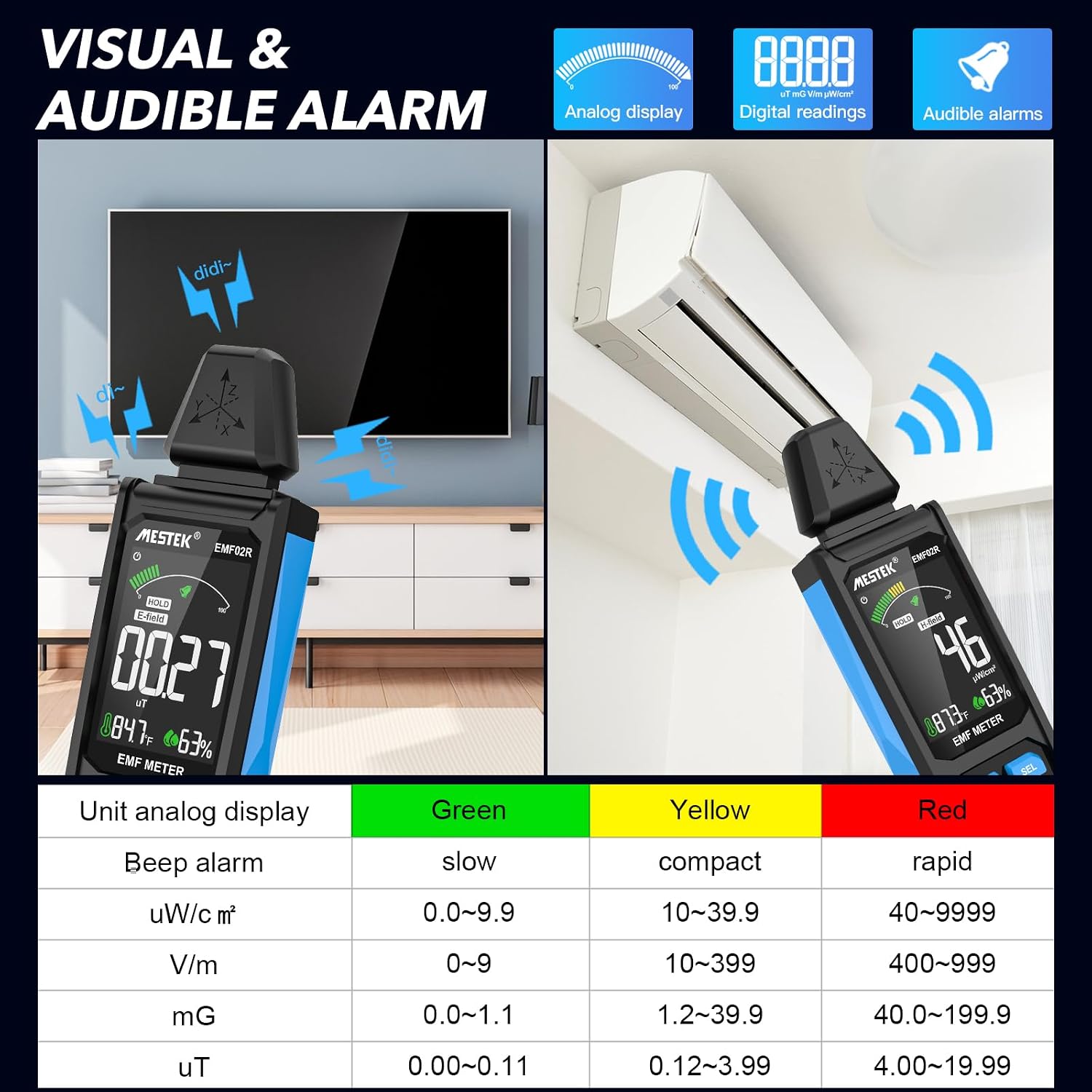
Figure 7: Visual and audible alarm thresholds.
- The display will show a color-coded bar (Green, Yellow, Red) indicating the radiation level.
- When the analog display reaches the yellow area, the device will emit an audible alarm, indicating that radiation levels are elevated.
- When the red area is reached, the alarm will become more rapid, indicating high radiation levels.
- To toggle the audible alarm on or off, short press the Itaniji bọtini.
6.6 Unit Switching and Temperature/Humidity Display
The device can display temperature and humidity, and allows switching between temperature units.

Figure 8: Temperature and humidity display with unit switching.
- The device displays ambient temperature in both Celsius (°C) and Fahrenheit (°F), and relative humidity (%).
- To switch between °C and °F, refer to the specific instructions in the device's on-screen menu or a dedicated button if available (not explicitly detailed in provided data, typically combined with another button press or a menu option).
7. Understanding Readings and Radiation Sources
The MESTEK EMF02R helps identify common sources of electromagnetic radiation in your environment.

Figure 9: Common sources of electromagnetic radiation.
- Radio Frequency (RF) Sources: Routers, cell phones, 5G towers, microwave ovens (when operating).
- Electric Field (E-field) Sources: TVs, laptops, power lines, ungrounded electrical appliances.
- Magnetic Field (H-field) Sources: Refrigerators, washing machines, induction cookers, motors, high-voltage kebulu.
When measuring, slowly move the meter closer to the suspected source. Observe the readings and the alarm indicators to determine the strength and type of radiation. If the radiation value reaches the yellow or red alarm zone, consider taking protective measures or increasing your distance from the source.
8. Itọju
- Ninu: Mu ẹrọ naa nu pẹlu asọ ti o gbẹ. Ma ṣe lo abrasive ose tabi epo.
- Ibi ipamọ: Store the device in its carry bag in a cool, dry place, away from direct sunlight and extreme temperatures.
- Itọju Batiri: Fun igbesi aye batiri to dara julọ, gba agbara si ẹrọ naa nigbagbogbo, paapaa ti kii ṣe ni lilo loorekoore. Yago fun gbigba agbara si batiri ni kikun fun awọn akoko ti o gbooro sii.
9. Laasigbotitusita
| Isoro | Owun to le Fa | Ojutu |
|---|---|---|
| Ẹrọ ko tan. | Batiri kekere tabi ko si idiyele. | Gba agbara si ẹrọ naa nipa lilo okun USB-C. |
| Awọn kika ti ko pe. | Interference from other electronic devices; device not held correctly. | Move away from other electronics; ensure the probe is directed towards the source. |
| Audible alarm not working. | Alarm function is turned off. | Tẹ awọn Itaniji bọtini lati mu ṣiṣẹ. |
| Display is frozen. | Data Hold function is active. | Tẹ awọn DIMU bọtini lati tu silẹ. |
10. Awọn pato
- Awọn ọna Wiwọn: Electric Field (E-field), Magnetic Field (H-field), Radio Frequency (RF)
- Ibiti igbohunsafẹfẹ RF: 30MHz ~ 8GHz
- Magnetic Field Units: mG / µT (switchable)
- Electric Field Units: V/m
- RF Field Units: uW/cm²
- Ifihan: Large Color LCD Screen
- Batiri: 2000mAh/3.7V Lithium Ion (rechargeable)
- Ibudo gbigba agbara: USB Iru-C
- Agbara Aifọwọyi Paa: Awọn iṣẹju 15 ti aiṣiṣẹ
- Awọn ẹya afikun: Data Hold, MAX/AVG measurement, Audible/Visual Alarm, Low Battery Indication, Temperature & Humidity Display
- Ìwọ̀n Nkan: 15.2 iwon
- Awọn iwọn idii: 7 x 2 x 1 inches
11. Atilẹyin ọja ati Support
MESTEK provides comprehensive customer support for your EMF02R meter.
- Atilẹyin ọja: 24 months after-sale service.
- Oluranlowo lati tun nkan se: 7/24 customer service available.
- Ilana Iyipada: If the meter is damaged within 24 months of purchase, please contact MESTEK customer service for a replacement.
For assistance, please refer to the contact information provided with your purchase or visit the official MESTEK webojula.


